1. Introducció
This manual provides essential information for the safe and efficient operation of your Prolink PRO1201SFCU 1200VA Uninterruptible Power Supply (UPS). The PRO1201SFCU is a line-interactive UPS system featuring Prolink's Super-Fast Charging technology, designed to provide stable backup power and protect your electronic devices from power fluctuations and outages. Please read this manual thoroughly before installation and use.
2. Informació de seguretat
Observe the following safety precautions to prevent injury and damage to the UPS or connected equipment:
- No obriu el SAI casing. No hi ha peces a l'interior que l'usuari pugui reparar. Demaneu totes les tasques de manteniment a personal de servei qualificat.
- Do not connect appliances that could overload the UPS, such as laser printers, vacuum cleaners, or hair dryers.
- Assegureu-vos que el SAI estigui connectat a una presa de corrent amb connexió a terra.
- Do not expose the UPS to rain, water, or excessive humidity.
- Place the UPS in a well-ventilated area, away from direct sunlight or heat sources.
- In case of fire, use a dry chemical fire extinguisher. Water can cause electrical shock.
- Battery replacement should only be performed by qualified personnel using the same type and number of batteries.
3. Producte acabatview
3.1 Tauler frontal
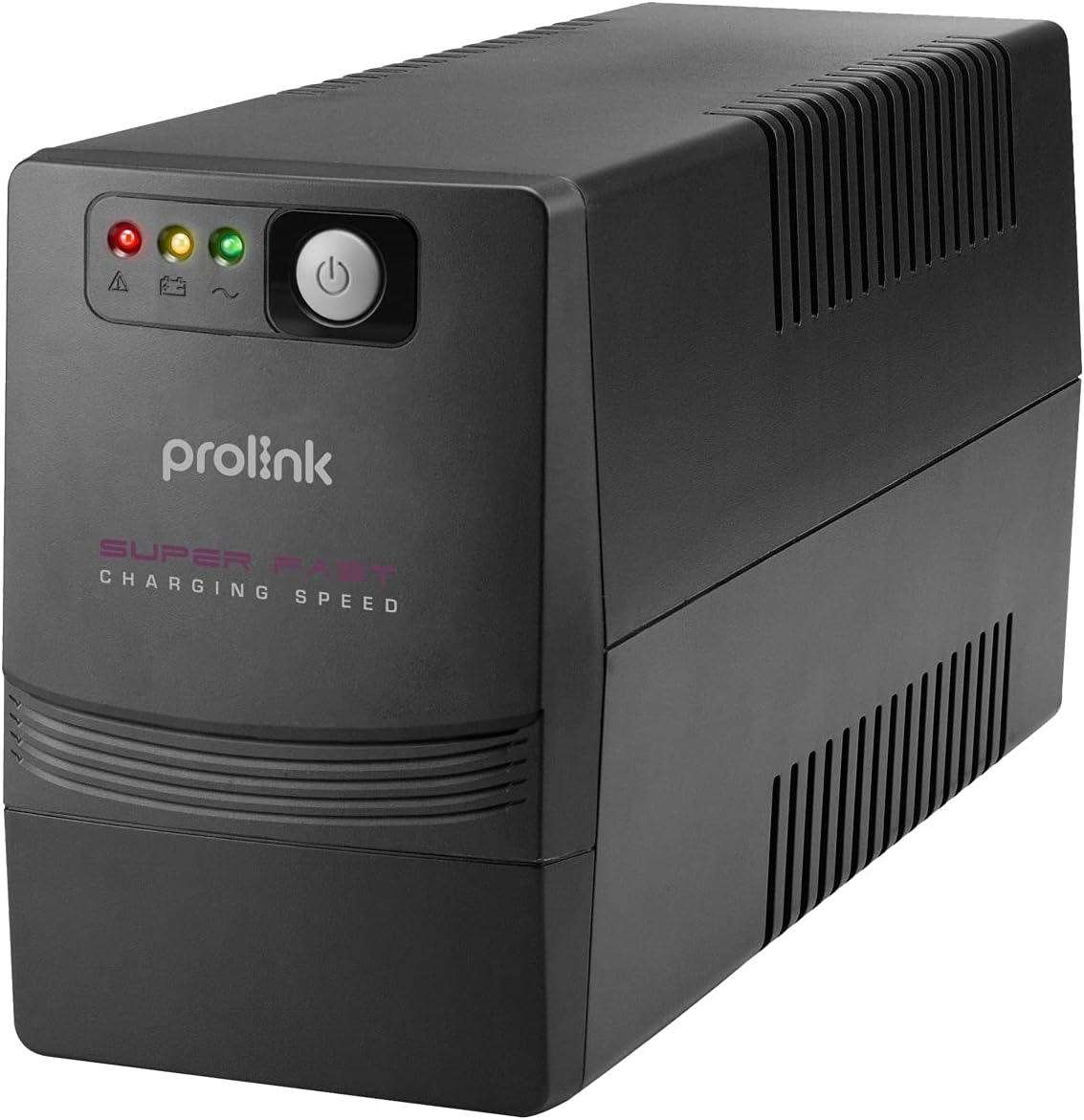
The front panel of the Prolink PRO1201SFCU features LED indicators for status monitoring and a power button for controlling the unit.
3.2 Panell posterior i connexions

The rear panel provides all necessary connection ports for your devices and the main power supply. It includes:
- Power AC Input: Connecta el SAI a la font d'alimentació principal.
- Backup Outlets: Provides battery backup and surge protection for connected devices.
- Port USB: For communication with a computer to enable monitoring and control software.
- Ports RJ45: For surge protection of network/phone lines.
3.3 Característiques clau
- Gestió intel·ligent de la bateria: Optimizes battery performance and extends lifespan.
- Càrrega súper ràpida: Recharges the battery to 90% capacity within 3 hours.
- TRUE 3-Step AVR: Volum automàtictage Regulation ensures stable output voltagi sense utilitzar la bateria.
- Vol d'entrada àmpliatage: Tolerates a broad range of input voltage fluctuacions.
- Protecció de sobrecàrrega: Protects against excessive power draw.
- Protecció contra sobretensions: Safeguards connected equipment from power surges.
- Early Shutdown Warning System: Alerts users to potential issues.
- Universal Sockets: Compatible with various plug types.
- Off-mode Charging: Charges batteries even when the UPS is off.
- Funció d'arrencada en fred: Allows the UPS to power on using battery power without AC input.
4. Configuració
4.1 Desembalatge i col·locació
- Desembaleu amb cura el SAI i inspeccioneu-lo per detectar possibles danys durant l'enviament. Si detecteu danys, no feu funcionar la unitat i poseu-vos en contacte amb el vostre distribuïdor.
- Place the UPS on a flat, stable surface in a clean, dry, and well-ventilated area. Avoid direct sunlight, heat sources, and excessive dust.
- Ensure there is adequate space around the UPS for proper airflow.
4.2 Connexió a l'alimentació i als dispositius
- Connecteu el cable d'alimentació del SAI a una presa de corrent amb connexió a terra.
- Connect your computer, monitor, and other critical devices to the backup outlets on the rear panel of the UPS.
- For network/phone line surge protection, connect your network cable or phone line through the RJ45 IN and OUT ports on the UPS.
- If desired, connect the USB cable from the UPS to your computer for monitoring and control software functionality.
4.3 Càrrega inicial
Before initial use, allow the UPS to charge for at least 4-6 hours with the power cord connected to a wall outlet, even if the UPS is turned off. This ensures the battery is fully charged and ready to provide optimal backup time.
4.4 Instal·lació del programari
For advanced monitoring and control features, install the ViewPower software on your computer. This software allows you to monitor UPS status, schedule shutdowns, and configure various settings. Ensure you use the correct version of ViewPower (e.g., ViewPower, not ViewPowerPro) compatible with your operating system.
5. Funcionament
5.1 Encesa/apagada
- Encendre: Premeu i manteniu premut el botó d'engegada del panell frontal durant aproximadament 3 segons fins que sentiu un bip i els indicadors s'encenguin.
- Apagar: Premeu i manteniu premut el botó d'engegada durant aproximadament 3 segons fins que els indicadors s'apaguin.
5.2 Indicadors LED
The front panel LEDs provide visual status of the UPS:
- Mode AC: Indicates the UPS is operating on utility power.
- Mode de bateria: Indica que el SAI funciona amb bateria durant una interrupció.tage.
- Fault/Warning: Indicates an error or warning condition. Refer to the troubleshooting section.
5.3 Volum automàtictagReglament (AVR)
The UPS automatically regulates incoming voltage fluctuations to provide a stable output to connected devices without switching to battery power, thus preserving battery life.
5.4 Battery Backup Mode
Durant una potènciatage, the UPS will automatically switch to battery power, providing continuous power to connected devices. An audible alarm will sound to indicate battery mode. The alarm will typically sound more frequently as the battery level depletes, signaling an impending shutdown.
6. Manteniment
6.1 Cura de la bateria
- To maintain optimal battery performance, keep the UPS connected to an AC outlet at all times to ensure the battery remains charged.
- If the UPS is stored for an extended period, recharge the battery every three months for at least 24 hours to prevent battery degradation.
- Battery lifespan is typically 3-5 years under normal operating conditions. Replace batteries when their capacity significantly diminishes.
6.2 Neteja
Use a soft, dry cloth to clean the exterior of the UPS. Do not use liquid or aerosol cleaners. Ensure the UPS is turned off and disconnected from the AC power source before cleaning.
7. Solució De Problemes
This section addresses common issues you may encounter with your UPS. If the problem persists after following these steps, contact technical support.
| Problema | Causa possible | Solució |
|---|---|---|
| El SAI no s'encén | No AC input; Low battery; UPS fault | Check AC power connection; Charge battery for several hours; Contact support if fault persists. |
| El SAI està sovint en mode bateria | Unstable AC power; Overload; Weak battery | Check AC power quality; Reduce connected load; Replace battery if old. |
| Temps de còpia de seguretat curt | Battery not fully charged; Battery end-of-life; Overload | Allow battery to fully charge; Replace battery; Reduce connected load. |
| Software not connecting | Incorrect software version; USB cable issue; Driver issue | Assegureu-vos que esteu utilitzant ViewPower (not ViewPowerPro); Check USB cable connection; Install correct USB drivers. |
| Alarma contínua | Overload; Battery fault; Internal fault | Reduce connected load; Contact support for battery or internal fault. |
8. Especificacions
The following table details the technical specifications of the Prolink PRO1201SFCU UPS:
| Característica | Especificació |
|---|---|
| Capacitat | 1200 VA |
| Potència de sortidatage | 960 watts |
| Entrada Voltage Rang | 140-300 VCA ± 5% |
| Vol. De sortidatage (mode CA) | 230VAC +12% -14% |
| Vol. De sortidatage (Mode de bateria) | 230VCA ± 10% |
| Freqüència | 50Hz / 60Hz (Auto-sensing) |
| Forma d'ona | Ona sinusoïdal simulada (mode de bateria), ona sinusoïdal (mode CA) |
| Temps de transferència | 2 ms típic |
| Tipus de bateria | 12V/8.2AH - 2pcs (Lead Acid) |
| Temps de recàrrega | 2-4 hores de recuperació al 90% de la capacitat |
| Protecció contra curtcircuits | Sí (mode de línia i mode de bateria) |
| Protecció de sobrecàrrega | Line mode: 110-120% 5 mins change to fault mode, >120% shutdown immediately. Battery mode: 100-110% alarm & shutdown in 10 secs, >120% shutdown immediately. |
| Nivell de soroll | <40dB |
| Temperatura de funcionament | 0 °C - 40 °C |
| Humitat | 0 - 90% |
| Dimensions (P x A x A) | 320 x 130 x 182 mm |
| Pes | 8.2 kg |
For a visual representation of the UPS dimensions, refer to the image below:

This image illustrates the physical size of the UPS, with a width of approximately 37 cm (14.8 inches).
9. Garantia i Suport
For warranty information, please refer to the warranty card included with your product or contact your local Prolink dealer. For technical support or service inquiries, please visit the official Prolink weblloc o poseu-vos en contacte amb el seu departament d'atenció al client.