1. Introducció
The HUAWEI B311-221 4G LTE WiFi Router is designed to provide high-speed internet access. It supports 4G LTE CAT4 with download speeds up to 150Mbps and Wi-Fi speeds up to 300Mbps (802.11n). This router allows you to share a 3G/4G network connection with up to 32 Wi-Fi enabled devices, including tablets, mobile phones, and laptops. Its plug-and-play functionality makes it suitable for various environments where traditional broadband internet may not be available. The HUAWEI HiLink app offers convenient management of your network and connected devices.
2. Contingut del paquet
Si us plau, reviseu atentament el contingut del paquet. Si falta algun article o hi ha algun dany, poseu-vos en contacte amb el vostre distribuïdor.
- 1 x HUAWEI B311-221 4G LTE WiFi Router
- 1 x cable Ethernet
- 1 x adaptador de corrent
- 1 x Guia d'inici ràpid
3. Producte acabatview
3.1 Davant View

This image shows the front of the HUAWEI B311-221 router, featuring a clean white design with indicator lights for power, network status, Wi-Fi, and signal strength. The HUAWEI logo is visible at the bottom center.
3.2 Darrera View i Ports
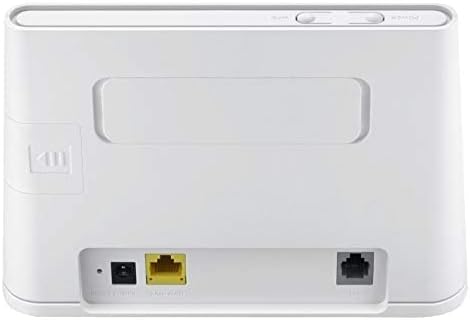
La part posterior view of the router displays the various ports for connectivity. These include the power input, a Gigabit Ethernet LAN/WAN port (yellow), and an RJ11 port for voice services.
3.3 Ranura per a targeta SIM

This image highlights the integrated SIM card slot located on the side of the router, which is essential for 4G LTE connectivity. The slot is shown open, indicating where the SIM card should be inserted.
3.4 Llums indicadors

A close-up of the router's top panel, showing the indicator lights for Power, Wi-Fi, Network Mode, and Signal Strength. These lights provide visual feedback on the router's operational status.
4. Instruccions de configuració
Segueix aquests passos per configurar el teu encaminador HUAWEI B311-221:
- Insereix la targeta SIM: Locate the SIM card slot on the side of the router. Carefully insert your standard-sized 3G/4G SIM card into the slot until it clicks into place. Ensure the SIM card is activated by your service provider.
- Connectar l'alimentació: Connecteu l'adaptador de corrent al port d'entrada d'alimentació del router i després endolleu-lo a una presa de corrent. El router s'engegarà automàticament.
- Encès: Press the Power button on the router. The Power indicator light should turn on.
- Connexió de xarxa: Wait for the Network Mode and Signal Strength indicator lights to stabilize. A solid blue or green light typically indicates a successful 4G LTE connection.
- Connexió de dispositius:
- Wi-Fi: On your device (laptop, phone, tablet), search for available Wi-Fi networks. Select the network name (SSID) printed on the label at the bottom of your router. Enter the Wi-Fi password (Key) also found on the label.
- Ethernet: For wired connections, connect an Ethernet cable from the router's LAN/WAN port to your computer or other network device.
- Interfície de gestió d'accés: Obre a web browser on a connected device and enter the default IP address (usually 192.168.8.1) to access the router's web management page. Log in using the default username and password (found on the router label or in the Quick Start Guide).
- HUAWEI HiLink App: For easier management, download the HUAWEI HiLink app from your device's app store. Connect your phone to the router's Wi-Fi and use the app to monitor network status, manage connected devices, and configure settings.
5. Instruccions de funcionament
5.1 Connexió de dispositius
The router supports up to 32 Wi-Fi devices simultaneously. Ensure your devices are within the Wi-Fi coverage area for optimal performance.

This diagram illustrates the Wi-Fi coverage provided by the HUAWEI B311-221 router within a typical home environment, showing multiple devices connected wirelessly.
5.2 Accés a Internet
Once connected, devices can access the internet via the 4G LTE network. The router provides high-speed data for streaming, browsing, and online activities.

This image demonstrates the router's capability to deliver 4G internet at speeds up to 150Mbps to a connected laptop, facilitating fast downloads and online activities.
5.3 Using the HUAWEI HiLink App
The HUAWEI HiLink app allows you to:
- Check network strength and status.
- Read SMS messages received on the router's SIM card.
- Set data usage limits.
- View and manage all connected devices.
- Modify Wi-Fi settings (SSID, password).
Ensure your smartphone is connected to the router's Wi-Fi network to use the app.
6. Manteniment
To ensure optimal performance and longevity of your HUAWEI B311-221 router, follow these maintenance guidelines:
- Col·locació: Col·loqueu el router en una zona oberta, allunyat d'obstacles, objectes metàl·lics grans i altres dispositius electrònics que puguin causar interferències.
- Neteja: Feu servir un drap suau i sec per netejar el router. No utilitzeu netejadors líquids ni aerosols.
- Ventilació: Ensure the router's ventilation openings are not blocked to prevent overheating.
- Actualitzacions de firmware: Periodically check for firmware updates through the router's web management interface or the HUAWEI HiLink app. Keeping the firmware updated ensures the best performance and security.
- Cicle d'alimentació: If you experience minor issues, try power cycling the router by unplugging it from the power outlet for 10 seconds and then plugging it back in.
7. Solució De Problemes
If you encounter problems with your router, refer to the following common issues and solutions:
| Problema | Possible solució |
|---|---|
| Sense connexió a Internet |
|
| Velocitat Wi-Fi lenta |
|
| Cannot access router management page |
|
| El senyal Wi-Fi cau amb freqüència |
|
8. Especificacions
| Característica | Detall |
|---|---|
| Marca | HUAWEI |
| Nom del model | B311-221 |
| Número de model de l'article | B311-221 |
| Dimensions del producte | 18.1 x 12.6 x 3.6 cm |
| Pes de l'article | 218 grams |
| Color | Blanc |
| Tecnologia de connectivitat | Wi-Fi, 4G LTE |
| Comunicació sense fils estàndard | 802.11n |
| Classe de banda de freqüència | Banda única (2.4 GHz) |
| Velocitat màxima de Wi-Fi | Fins a 300 Mbps |
| Max 4G LTE Speed | Fins a 150 Mbps |
| Ports Ethernet | 1 x Gigabit Ethernet LAN/WAN port |
| Voice Port | 1 x port RJ11 |
| Ranura per a targeta SIM | Integrated (Standard SIM) |
| Característica especial | WPS, HUAWEI HiLink App Management |
| Dispositius compatibles | Smart TV, Tablet, Personal Computer, Laptops, Phones, Gaming Devices |
| Piles incloses | No |
| Operating System (Compatibility) | Windows (and other OS via Wi-Fi/Ethernet) |
9. Informació de la garantia
This HUAWEI product is covered by a limited warranty. The specific terms and duration of the warranty may vary depending on your region and local regulations. Please refer to the warranty card included in your product package or visit the official HUAWEI weblloc web per obtenir informació detallada sobre la garantia. Conserveu el comprovant de compra per a reclamacions de garantia.
10. Suport
For technical support, product inquiries, or service requests, please contact HUAWEI customer support through one of the following methods:
- Assistència en línia: Visita el servei d'assistència oficial de HUAWEI weblloc web per a preguntes freqüents, guies de resolució de problemes i opcions de contacte.
- HUAWEI HiLink App: Use the support features available within the HiLink application.
- Línia directa del servei: Refer to your Quick Start Guide or HUAWEI's official website for regional service hotline numbers.
When contacting support, please have your product model (B311-221) and serial number ready.