1. Introducció
This manual provides comprehensive instructions for the XTRONS 9-Inch Android 12 Car Stereo, Model IQP9246B. Please read this manual thoroughly before installation and operation to ensure proper use and to maximize your experience with the device.
The XTRONS IQP9246B is an advanced car stereo system featuring Android 12, a Qualcomm Snapdragon 665 Octa-core processor, 6GB RAM, 128GB ROM, and a 9-inch high-definition display. It supports Wireless CarPlay, Android Auto, GPS navigation, Bluetooth 5.0, and dual-band Wi-Fi, designed to enhance your in-car entertainment and connectivity.
Compatibilitat de vehicles:
- For BMW E46: 4-door Sedan (1998-2005), 2-door Coupe (1999-2006), 2-door Convertible (1999-2006), 5-door Touring (1999-2005), 3-door Hatchback (2000-2004), M3 (2000-2006)
- For Rover 75: (1999-2005)
- For MG ZT: (2001-2005)
Note: The 4G function is not supported in the Americas (US, Canada, etc.), despite the presence of a SIM slot.

2. Informació de seguretat
- Always ensure the vehicle is parked safely before operating the stereo's advanced features.
- Do not attempt to install or repair the unit if you are not qualified. Refer to a professional installer.
- Eviteu exposar la unitat a temperatures extremes, a la llum solar directa durant períodes prolongats o a una humitat excessiva.
- Keep the volume at a safe level to remain aware of traffic and emergency vehicles.
- Assegureu-vos que tot el cablejat estigui connectat correctament per evitar curtcircuits o danys elèctrics.
3. Contingut del paquet
Verifiqueu que tots els elements que s'enumeren a continuació s'inclouen al vostre paquet:
- 2 × Arnès de cablejat ISO
- 2 cable USB
- 1 × Antena GPS
- 1 × Cable RCA
- 1 × Cable de càmera
- 1 × Adaptador d'antena de ràdio
- 1 × Antena 4G
- 1 × WiFi Antenna
- 1 × Caixa CANbus
- 1 × Manual d'usuari

4. Guia d'instal·lació
Professional installation is recommended. Incorrect installation may damage the unit or your vehicle. Ensure the vehicle's power is disconnected before beginning installation.
4.1 Comprovacions prèvies a la instal·lació
- Confirm vehicle compatibility with the XTRONS IQP9246B.
- Reuneix totes les eines i components necessaris.
- Desconnecteu la bateria del vehicle per evitar curtcircuits.
4.2 Connexions de cablejat
Refer to the wiring diagram for correct connections. Ensure all cables are securely attached.
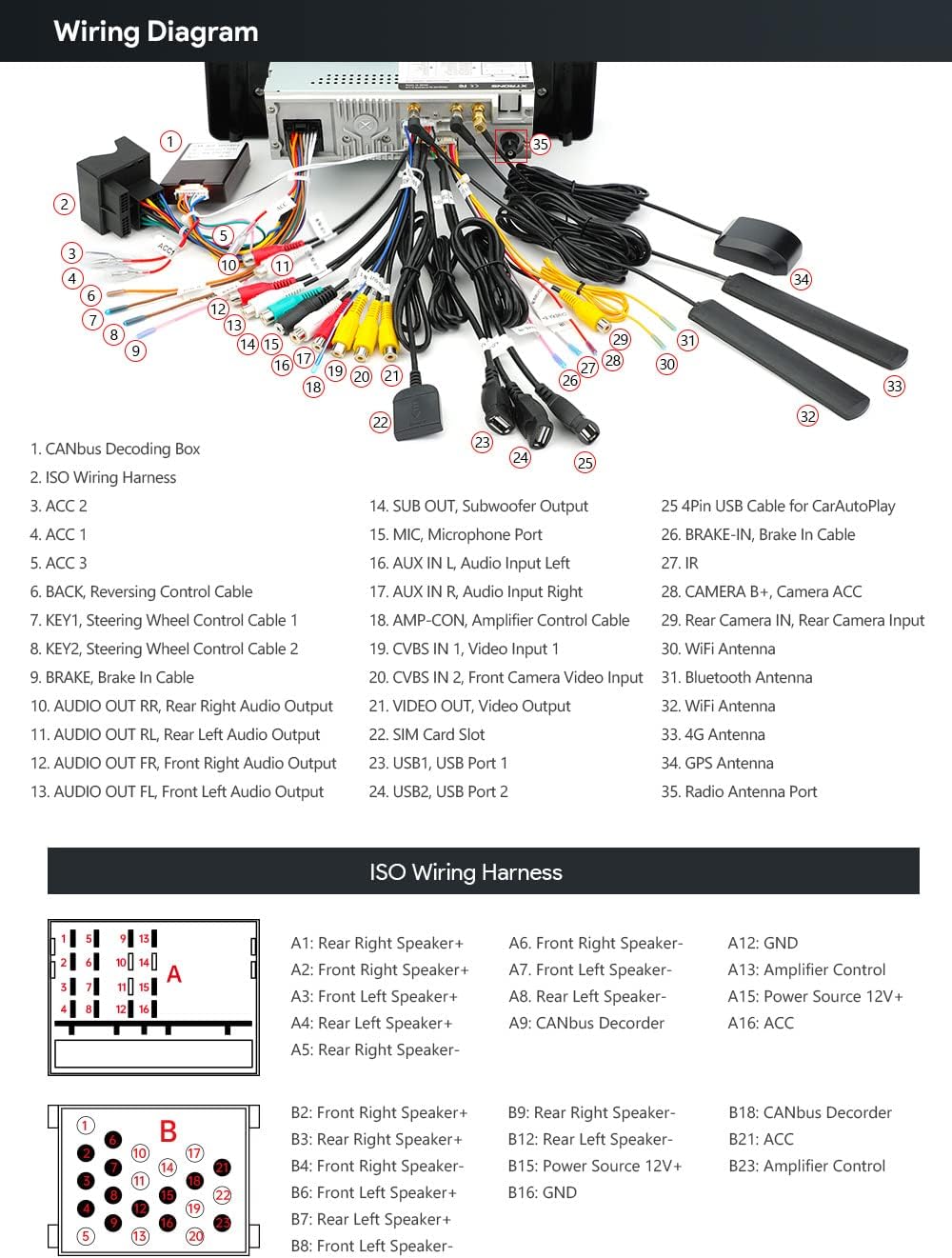
- ISO Wiring Harness: Connects to the vehicle's main power and speaker wiring.
- Cables USB: For connecting external devices or USB tethering.
- Antena GPS: Muntar en un lloc amb claredat view del cel per a una recepció òptima del senyal.
- Cable RCA: For audio/video input/output connections.
- Cable de la càmera: For connecting a reversing camera.
- Radio Antenna Adapter: Ensures compatibility with your vehicle's radio antenna.
- Antena 4G: For 4G network connectivity (where supported).
- Antena WiFi: Per a la connectivitat Wi-Fi.
- CANbus Box: Integrates with the vehicle's CANbus system to retain original functions like steering wheel controls.
4.3 Specific Compatibility Notes:
- If your car's radio antenna port differs, an adapter cable (XTRONS ISOFIZ or F2MF) may be required.
- For vehicles with a 4.3" or 7" screen or navigation drive, an extension cable (EXL005 or EXL007) might be needed.
- If your vehicle has a DSP (Digital Sound Processing) button or Harman Kardon system, an EXL007 adapter is compatible.
- For vehicles with a fiber optic amplifier system, an extra ISO wiring harness (XTRONS FOBB05) may be required.
- For Rover 75 (1999-2005) and MG ZT (2001-2005) vehicles, trimming of the unit and an extra ISO wiring harness may be necessary.

5. Instruccions de funcionament
The XTRONS IQP9246B runs on Android 12, offering a user-friendly interface and a wide range of features.
5.1 Navegació bàsica
- Botó d'encesa: Premeu i manteniu premut per encendre/apagar. Premeu breument per activar/desactivar la pantalla.
- Botó d'inici: Torna a la pantalla d'inici principal.
- Botó enrere: Navega de tornada a la pantalla anterior.
- Controls de volum: Ajusta el nivell de sortida d'àudio.
- Botó RST (Reinici): Use a thin object to press for a system reset if needed.

5.2 Característiques clau
5.2.1 Sistema operatiu Android 12
Experience a stable and responsive interface with Android 12. The Qualcomm Snapdragon 665 Octa-core processor, 6GB LPDDR4 RAM, and 128GB Solid State ROM ensure smooth performance for all applications.

5.2.2 CarPlay sense fil i Android Auto
Connect your iPhone (iOS 8 and above) wirelessly via Bluetooth for CarPlay, or your Android phone (Android 4.3 and above) wirelessly or via USB for Android Auto. Access navigation, calls, music, and voice assistants (Siri/Google Assistant) directly from the stereo's display.

5.2.3 Navegació GPS
The unit supports various Android-compatible navigation software such as Google Maps, Sygic, and Waze, providing reliable guidance for your journeys.

5.2.4 Bluetooth 5.0
Connect your mobile phone via Bluetooth 5.0 for hands-free calls, access to your phone book, call logs, and seamless audio streaming.
5.2.5 Built-in DSP (Digital Sound Processor)
Enhance your audio experience with the built-in DSP, offering advanced sound customization options to fine-tune your music playback.
5.2.6 Dual Band Wi-Fi
Supports both 2.4GHz and 5GHz Wi-Fi bands for faster speeds and improved connectivity, reducing interference.
5.2.7 USB Tethering
Connect your smartphone via USB and enable "USB Tethering" (Android) or "Allow Others to Join" (iPhone) to access online content on the stereo.
5.2.8 Multi-window View (PIP)
The Picture-in-Picture (PIP) mode allows you to watch videos while multitasking, and the multi-window view enables running two applications side-by-side, such as navigation and music.
5.2.9 Vídeo oficial del producte
Mireu aquest vídeo per obtenir una informació detalladaview of the XTRONS IQP9246B features and functionality:
6. Manteniment
- Neteja de pantalla: Use a soft, lint-free cloth to gently wipe the screen. Avoid abrasive cleaners or solvents.
- Actualitzacions de programari: Comproveu periòdicament si hi ha actualitzacions de programari a través de la configuració del sistema per garantir un rendiment òptim i l'accés a les noves funcions.
- Atenció general: Keep the unit free from dust and debris. Avoid spilling liquids on the device.
7. Solució De Problemes
- Sense energia: Check all power connections. Ensure the vehicle's battery is connected and charged. Verify fuses.
- Sense so: Comproveu les connexions dels altaveus. Assegureu-vos que el volum no estigui silenciat ni massa baix. Verifiqueu la configuració d'àudio.
- Pèrdua de senyal GPS: Assegureu-vos que l'antena GPS estigui instal·lada correctament i que tingui una visió clara view del cel.
- Problemes de connectivitat Bluetooth: Ensure Bluetooth is enabled on both the stereo and your mobile device. Try unpairing and re-pairing the devices.
- Pantalla tàctil que no respon: Try restarting the unit. If the issue persists, perform a system reset using the RST button.
- La unitat es congela/es bloqueja: Perform a system reset. If frequent, check for software updates or consult customer support.
8. Especificacions
| Característica | Detall |
|---|---|
| Pes de l'article | 4.54 lliures |
| Dimensions del paquet | 13.35 x 9.25 x 6.25 polzades |
| Número de model de l'article | IQP9246B |
| Mida de la pantalla | 9 polzades |
| Comandament de veu | Micròfon, pantalla tàctil |
| Marca | XTRONS |
| Nom del model | XTRONS Single Din Car Stereo |
| Tipus de servei del vehicle | Cotxe |
| Característica especial | Bluetooth, Touchscreen |
| Tecnologia de connectivitat | Cellular, USB, Wi-Fi |
| Tipus de mapa | Amèrica del Nord |
| Mode de sortida d'àudio | estèreo |
| Tipus de muntatge | Suport al tauler |
9. Garantia i Suport
For warranty information and technical support, please refer to the official XTRONS weblloc web o contacteu directament amb el servei d'atenció al client. Conserveu el rebut de compra com a comprovant de compra per a reclamacions de garantia.
For additional accessories or further assistance, please visit the Botiga XTRONS a Amazon.


