1. Introducció
This manual provides essential instructions for the installation, operation, and maintenance of your Cisco Aironet 2602I Standalone Wireless Access Point. The Cisco Aironet 2602i is an enterprise-grade wireless access point designed to provide secure and reliable Wi-Fi connectivity for various environments. Please read this manual thoroughly before using the device to ensure proper functionality and safety.
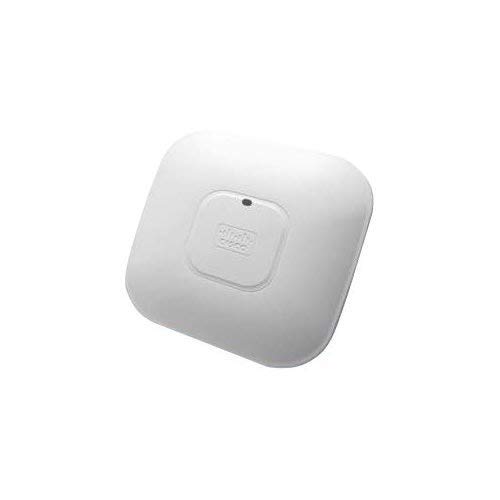
Image showing the front view of the Cisco Aironet 2602I Wireless Access Point.
2. Informació de seguretat
Always observe the following safety precautions to reduce the risk of injury, electric shock, fire, or damage to the device:
- Assegureu-vos que la font d'alimentació coincideixi amb el voltagels requisits especificats per al dispositiu.
- No exposeu el dispositiu a l'aigua, la humitat ni a temperatures extremes.
- Eviteu col·locar el dispositiu a prop de fonts de calor o sota la llum solar directa.
- No intenteu obrir ni reparar el dispositiu vosaltres mateixos. Encarregueu totes les tasques de manteniment a personal qualificat.
- Use only accessories and power adapters approved by the manufacturer.
- Assegureu-vos una ventilació adequada al voltant del dispositiu per evitar el sobreescalfament.
3. Contingut del paquet
Comproveu que el vostre paquet contingui els elements següents:
- Cisco Aironet 2602I Wireless Access Point (1 unit)
- Suport de muntatge (si escau)
- Power Adapter (if included, or PoE injector/switch required)
- Documentació (Guia d'inici ràpid, Informació de seguretat)
Note: Specific accessories may vary based on the product bundle or region.
4. Configuració
4.1 Instal·lació física
- Trieu una ubicació: Select a central location for optimal Wi-Fi coverage, away from obstructions and sources of interference (e.g., microwave ovens, cordless phones).
- Muntatge (opcional): If mounting, use the provided bracket to secure the access point to a wall or ceiling. Ensure it is securely fastened.
- Connecteu el cable Ethernet: Connect an Ethernet cable from your network switch (preferably a Power over Ethernet (PoE) enabled switch) to the Ethernet port on the access point. If PoE is not available, use a compatible power adapter.
- Encès: Once connected, the access point will power on. Observe the LED indicators for status.
4.2 Configuració inicial
The Cisco Aironet 2602I is a standalone access point. Initial configuration typically involves connecting to the device's default Wi-Fi network or via a console cable for command-line interface (CLI) access.
- SSID per defecte: Look for a default Wi-Fi network broadcast by the access point (e.g., "CiscoAP" or similar).
- Adreça IP predeterminada: The device may obtain an IP address via DHCP or have a default static IP (refer to Cisco documentation for specific default IP and credentials).
- Web Interfície: Accedeix al web-based management interface by entering the access point's IP address into a web navegador.
- Security Configuration: Change default passwords immediately. Configure your desired Wi-Fi network name (SSID), security type (WPA2/WPA3 recommended), and password.
For detailed configuration steps, refer to the comprehensive Cisco Aironet 2600 Series documentation available on the Cisco support weblloc.
5. Funcionament
5.1 Connexió de dispositius a la Wi-Fi
- On your wireless device (laptop, smartphone, tablet), open the Wi-Fi settings.
- Scan for available networks.
- Select the SSID you configured for your Cisco Aironet 2602I.
- Introduïu la contrasenya de Wi-Fi quan se us demani.
- El dispositiu ara hauria d'estar connectat a la xarxa sense fil.
5.2 Indicadors LED
The access point features LED indicators that provide status information:
- Verd sòlid: El dispositiu funciona amb normalitat.
- Verd intermitent: El dispositiu s'està engegant o realitzant una actualització del firmware.
- Ambre sòlid: Device has encountered an error or is in a warning state.
- Apagat: El dispositiu no està encès.
Refer to the official Cisco documentation for a complete list of LED behaviors and their meanings.
6. Manteniment
6.1 actualitzacions de microprogramari
Consulteu regularment el suport tècnic de Cisco website for firmware updates. Firmware updates can improve performance, add new features, and address security vulnerabilities. Follow the instructions provided by Cisco for updating the firmware.
6.2 Neteja
To clean the device, power it off and disconnect it from the power source. Use a soft, dry cloth to wipe the exterior. Do not use liquid cleaners or aerosol sprays directly on the device.
6.3 Consideracions ambientals
Ensure the device is operated within its specified temperature and humidity ranges. Avoid placing it in areas with excessive dust or poor ventilation.
7. Solució De Problemes
| Problema | Causa possible | Solució |
|---|---|---|
| Sense alimentació / El dispositiu no s'encén | Power cable disconnected, faulty power adapter, no PoE. | Check power connections. Ensure PoE is active on the switch port or use a functional power adapter. |
| No es pot connectar a la xarxa Wi-Fi | Incorrect Wi-Fi password, SSID not broadcasting, device out of range, Wi-Fi disabled. | Verify password. Check AP configuration. Move closer to the AP. Ensure Wi-Fi is enabled on the AP. |
| Slow Wi-Fi speed or intermittent connection | Interference, too many devices, outdated firmware, poor AP placement. | Change Wi-Fi channel. Reduce number of connected devices. Update firmware. Relocate AP for better signal. |
| No es pot accedir web interfície de gestió | Adreça IP incorrecta, problema de connectivitat de xarxa, tallafocs que bloqueja l'accés. | Verify AP's IP address. Ensure your device is on the same network segment. Temporarily disable firewalls. |
If the problem persists after trying these solutions, contact technical support.
8. Especificacions
| Nom del model | AIR-SAP2602IBK9-WS |
| Marca | CISCO DESIGNED |
| Tipus de producte | Networking Device (Wireless Access Point) |
| Comunicació sense fils estàndard | 802.11a/b/g/n |
| Classe de banda de freqüència | Doble banda |
| Protocol de seguretat | WPS, WPA2, WPA |
| Característica especial | WPS |
| Tecnologia de connectivitat | Sense fil |
| Dispositius compatibles | Ordinador portàtil, telèfon intel·ligent, tauleta |
| Sistema operatiu | Cisco IOS |
| Mètode de control | Toca (Note: This typically refers to configuration via a web interface or CLI, not a physical touch screen on the AP itself.) |
| Pes de l'article | 4 lliures |
| Dimensions del paquet | 10 x 10 x 3 polzades |
9. Garantia i Suport
9.1 Informació de la garantia
This product is sold as "Amazon Renewed." Amazon Renewed products are backed by the Amazon Renewed Guarantee, which provides a replacement or refund within 90 days of receipt if the product does not work as expected. For specific warranty details from Cisco, please refer to the official Cisco website or contact Cisco support directly.
9.2 Suport tècnic
For technical assistance, troubleshooting, or further information regarding your Cisco Aironet 2602I, please visit the official Cisco support website or contact their customer service. For issues related to your Amazon Renewed purchase, please contact Amazon customer service.
- Suport de Cisco: www.cisco.com/c/en/us/support/index.html
- Suport renovat d'Amazon: Refer to your Amazon order details for specific return and support options.


