1. Introducció
Thank you for choosing the Scosche NEXC2128-XCES0 Full HD Two-Way Smart Dash Cam. This device is designed to provide comprehensive security for your vehicle by recording high-quality video footage from both front and rear perspectives. It integrates with the Nexar app for seamless operation, cloud storage, and incident reporting. This manual provides detailed instructions for setup, operation, maintenance, and troubleshooting to ensure optimal performance of your dash cam.

Image: The Scosche NEXC2128-XCES0 Full HD Two-Way Smart Dash Cam, showcasing its compact design and dual camera lenses.
2. Què hi ha a la caixa
Si us plau, verifiqueu que tots els components siguin presents al vostre paquet:
- Scosche NEXC2128-XCES0 Dash Camera
- Muntatge de succió
- Carregador de cotxe
- 10 ft Power Cable
- Clips de gestió de cables
- Eina d'eliminació de panells
- Manual d'usuari (aquest document)

Image: All components included in the Scosche NEXC2128-XCES0 package, laid out for identification.
3. Configuració i instal·lació
Follow these steps to properly install and set up your Scosche NEXC2128-XCES0 Dash Cam:
- Secure the Dash Cam: Attach the dash cam to your windshield using the provided suction mount. Ensure it is placed in a location that does not obstruct your view de la carretera.
- Encamineu el cable d'alimentació: Carefully route the 10 ft power cable along the edge of your windshield and down to your vehicle's 12V power outlet. Use the cable management clips and panel removal tool to tuck the cable neatly and prevent interference with vehicle controls or airbags.
- Connectar l'alimentació: Plug the car charger into your vehicle's 12V power outlet and connect the power cable to the dash cam.
- Download the Nexar App: Download the official Nexar app from your smartphone's app store (iOS or Android).
- Vincula amb l'aplicació: Follow the in-app instructions to pair your dash cam with your smartphone. This typically involves scanning a QR code or connecting via Bluetooth/Wi-Fi.

Image: The dash cam securely mounted to the vehicle's windshield using the suction cup.

Image: A smartphone displaying the Nexar Safe Driving App, ready for download and pairing.
Guia de vídeo de configuració
Video: An official Scosche video demonstrating the installation process for the NEXC2 dash cam, including mounting, cable routing, and app pairing.
4. Instruccions de funcionament
Once installed and paired, your Scosche NEXC2128-XCES0 Dash Cam operates largely automatically:
- Enregistrament automàtic: The dash cam begins recording automatically when your vehicle starts and stops when the ignition is turned off.
- Nexar App Integration: The Nexar app streams your drives to your phone and automatically saves important footage to your free Nexar cloud account.
- Detecció de col·lisions: The built-in G-Sensor detects sudden impacts or collisions, automatically saving and locking the relevant footage per evitar la sobreescritura.
- Mode d'aparcament: When parked, the dash cam can monitor for impacts and record incidents, providing visual proof of damage or vandalism.
- Informe d'incidents: Use the Nexar app to generate detailed post-collision reports, including speed, direction, license plates, and force of impact, which can be shared directly with your insurance company.
- GPS and Siri Integration: The Nexar app provides GPS tracking for your drives and allows you to ask Siri for your parking location.

Image: The dash cam in operation, with a smartphone showing an accident detected and GPS location via the Nexar app.
5. Característiques clau
The Scosche NEXC2128-XCES0 Dash Cam offers a range of advanced features for vehicle security and convenience:
- Cobertura completa: High-quality front and rear cameras capture everything in 1080P Full HD from the 155-degree front camera and 720P from the 140-degree rear camera.
- Visió nocturna millorada: Advanced camera lenses provide superior night vision capabilities, ensuring clear and detailed footagi fins i tot en condicions de poca llum.
- Smart Collision Detection: G-Sensor technology detects collisions or impacts, automatically saving footage for later review, providing visual proof of incidents.
- Seamless Integration with Nexar App: Footage is automatically recorded and saved to your phone, offering wireless convenience and easy access. Enjoy FREE Nexar cloud storage for important event and trip data.
- Easy Incident Reporting: Instantly report video evidence of a crash (speed, direction of travel, license plates, and force of impact) directly to your insurance company using the Nexar app.
- Memòria integrada de 128 GB: Assegura ample on-board storage for front and rear footage.
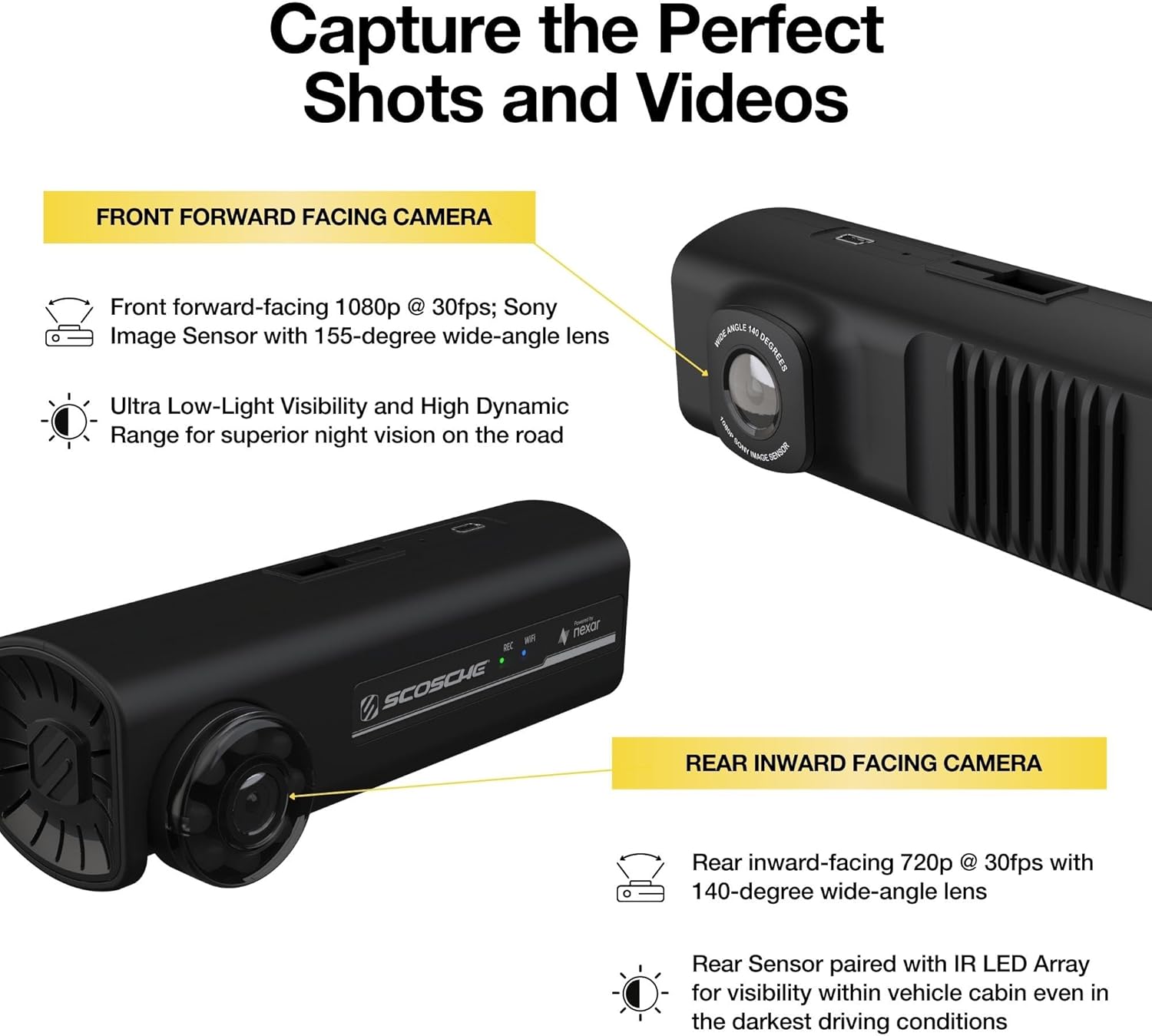
Imatge: Primer pla view of the dash cam highlighting its front-facing 1080p camera and rear-facing 720p camera for comprehensive coverage.
6. Manteniment
To ensure the longevity and optimal performance of your dash cam, follow these maintenance guidelines:
- Neteja: Regularly clean the camera lenses with a soft, dry cloth to ensure clear video recording. Avoid using abrasive cleaners.
- Actualitzacions de firmware: Check the Nexar app periodically for firmware updates. Keeping your dash cam's firmware up-to-date ensures you have the latest features and bug fixes.
- Gestió de targetes de memòria: While the device has built-in memory, if you use an external SD card (not included), ensure it is a high-quality, high-endurance card and format it regularly through the app to prevent data corruption.
- Temperatura: Eviteu exposar la càmera del salpicader a temperatures extremes durant períodes prolongats, ja que això pot afectar la durada de la bateria i la integritat dels components.
7. Solució De Problemes
If you encounter issues with your Scosche NEXC2128-XCES0 Dash Cam, refer to the following common problems and solutions:
| Problema | Causa possible | Solució |
|---|---|---|
| La càmera del salpicader no s'encén | Loose power connection, faulty car charger, vehicle's 12V outlet issue. | Check all cable connections. Ensure the car charger is fully inserted and the vehicle's 12V outlet is functional. Try a different outlet if available. |
| App not connecting to dash cam | Bluetooth/Wi-Fi interference, incorrect pairing, app issues. | Ensure Bluetooth and Wi-Fi are enabled on your phone. Restart both the dash cam and your phone. Re-attempt the pairing process in the Nexar app. Ensure the app is updated to the latest version. |
| Vídeo footage is unclear or blurry | Dirty lens, protective film still on lens, improper mounting. | Clean the camera lenses with a soft cloth. Remove any protective film from the lenses. Ensure the dash cam is securely mounted and not vibrating. |
| La gravació s'atura inesperadament | Power interruption, memory issue. | Verify stable power supply. If using an external SD card, ensure it is formatted and not full or corrupted. |
| Parking mode not working | Incorrect settings, insufficient power. | Check parking mode settings in the Nexar app. Ensure the dash cam receives continuous power when the vehicle is off (if applicable to your vehicle's power outlet). |
If these solutions do not resolve your issue, please contact Scosche customer support.
8. Especificacions
| Característica | Detall |
|---|---|
| Dimensions del producte | 1.93 x 5.44 x 3.89 polzades |
| Pes de l'article | 1.58 unces |
| Número de model de l'article | NEXC2128-XCES0 |
| Tecnologies de connectivitat | USB, sense fil |
| Característiques especials | Parking Monitor, Smartphone App, G-Sensor |
| Resolució de captura de vídeo | 1080p (davant), 720p (posterior) |
| Angle de la càmera frontal | 155-Degree Wide-Angle Lens |
| Angle de la càmera posterior | 140-Degree Wide-Angle Lens |
| Components inclosos | Dash Camera, Suction Mount, Car Charger, Power Cable, Cable Management Clips, Panel Removal Tool |
| Tipus de muntatge | Muntatge de succió |
| Mètode de control | App |
| Memòria interna | 128 GB |
9. Garantia i Suport
The Scosche NEXC2128-XCES0 Full HD Two-Way Smart Dash Cam is backed by Scosche's Limited Lifetime Warranty and Lifetime Tech Support. For warranty claims, technical assistance, or further inquiries, please contact Scosche customer service through their official weblloc web o la informació de contacte que es proporciona a l'embalatge del producte.
For additional resources and frequently asked questions, visit the official Scosche weblloc: Scosche Store on Amazon


