1. Introducció
This manual provides detailed instructions for the installation, operation, and maintenance of your Zemismart TYGWZ-01 Tuya Zigbee 3.0 Smart Gateway Hub. This device serves as a central bridge for connecting various Zigbee 3.0 and Tuya WiFi smart products, enabling comprehensive smart home control.
2. Producte acabatview
The Zemismart TYGWZ-01 is a compact and essential component for any Tuya-based smart home system. It facilitates communication between your smart devices and the Tuya Smart App, allowing for remote control, automation, and integration of Zigbee and WiFi-enabled products. Its robust wireless networking capabilities ensure stable and reliable performance across a wide range.

Imatge 2.1: The Zemismart TYGWZ-01 Smart Gateway Hub demonstrating stable wireless networking capabilities, covering a wide range and offering strong anti-interference ability for a stable intelligent signal.
3. Característiques
- Essential for Tuya Zigbee Devices: Connects a variety of Zigbee smart Tuya WiFi products (e.g., sensors, lights, switches) acting as a central control hub for up to 50 devices.
- Compatibilitat àmplia: Compatible with both Tuya WiFi products and various Zigbee 3.0 intelligent products, allowing for flexible system customization.
- Tuya Smart App Remote Control: Supports device addition, resetting, third-party control, and group control via the Tuya Smart App from anywhere.
- Easy Installation and Configuration: Designed for wireless setup with quick and simple WiFi configuration, requiring no professional technical skills.
- Stable and Reliable Wireless Network: Provides a wide-ranging WiFi signal that is stable and reliable for the normal operation of all connected devices.
- Suport de control per veu: Integrates with Alexa and Google Home for convenient voice control of connected devices.
- Security and Privacy Protection: Ensures relevant data is encrypted during transmission for secure remote control and protection against malicious intrusion.
4. Especificacions
| Nom del producte | Gateway intel·ligent |
| Número de model | TYGWZ-01 |
| Dimensions | 60.5 x 60.5 x 16.1 mm (6 x 6 x 1.5 cm) |
| Pes net | 33 g (37 g amb embalatge) |
| Temperatura de treball | -10 °C a 55 °C |
| Humitat de treball | 10% to 90% RH (non-condensation) |
| Tecnologia sense fils | 2.4G Wi-Fi, ZigBee 3.0 |
| Sortida de l'adaptador | 5V=1A |
| Maximum Device Quantity | 50 |

Imatge 4.1: Detailed product parameters including dimensions, working conditions, and power adapter specifications for the Zemismart TYGWZ-01 Smart Gateway Hub.
5. Instruccions de configuració
Follow these steps to set up your Zemismart TYGWZ-01 Smart Gateway Hub:
- Encès: Connect the provided USB cable to the gateway and plug the adapter into a power outlet. The indicator light on the hub will illuminate.
- Descarrega l'aplicació Tuya Smart: Download and install the "Tuya Smart" or "Smart Life" app from your smartphone's app store (iOS or Android).
- Registra't/Iniciar sessió: Obre l'aplicació i registra't per obtenir un compte nou o inicia la sessió amb un compte existent.
- Afegeix una passarel·la:
- A l'aplicació, toca la icona "+" a la cantonada superior dreta per afegir un dispositiu.
- Select "Gateway" or "Control Hub" from the device categories.
- Follow the on-screen instructions to connect the gateway to your 2.4GHz Wi-Fi network. Ensure your phone is connected to the same 2.4GHz Wi-Fi network during setup.
- The app will guide you through the pairing process, which may involve resetting the device (refer to the device's reset button if needed).
- Afegir subdispositius: Once the gateway is successfully added, you can add Zigbee sub-devices (e.g., sensors, switches) through the gateway interface in the Tuya Smart App.
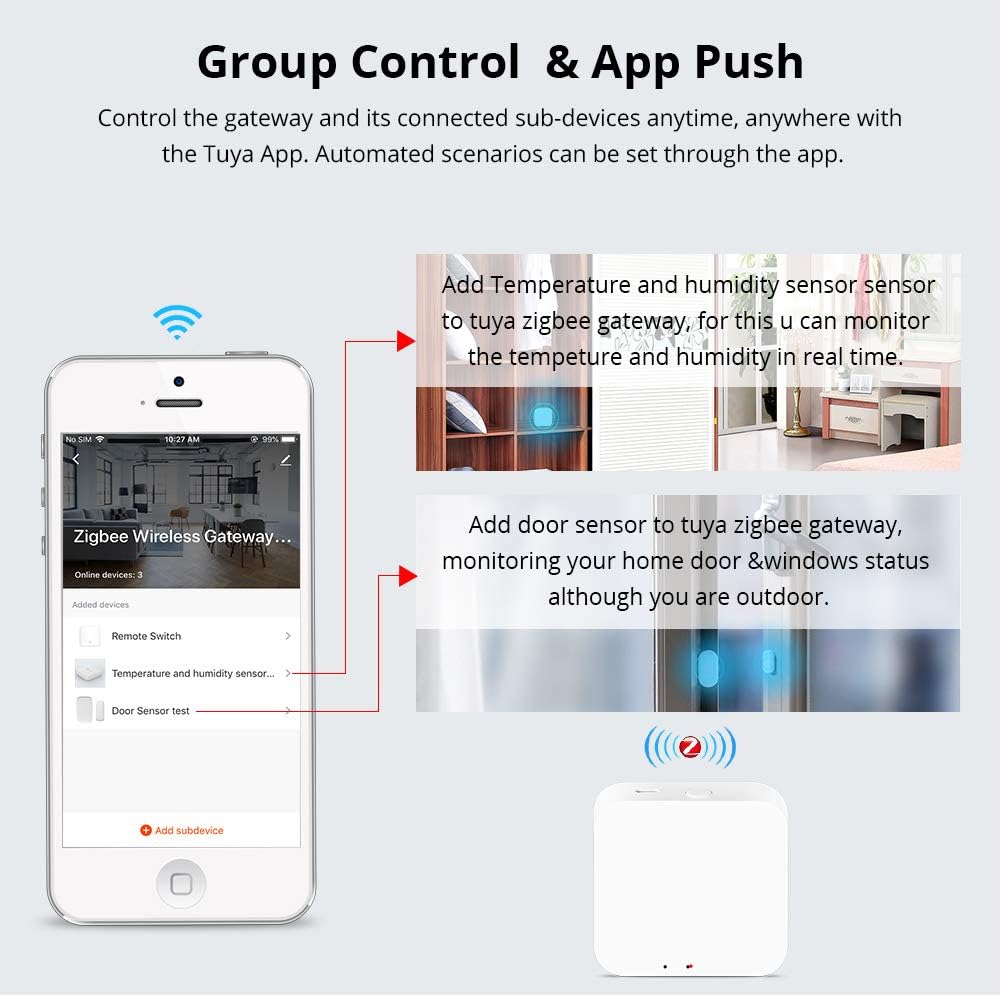
Imatge 5.1: The Tuya Smart App interface showing how to add sub-devices like temperature/humidity sensors and door sensors to the Zigbee Wireless Gateway.
6. Instruccions de funcionament
After successful setup, you can operate your smart home devices through the Zemismart TYGWZ-01 hub using the Tuya Smart App and voice assistants.
6.1. Control d'aplicacions
- Comandament a distància: Control all connected Zigbee and WiFi devices from anywhere using the Tuya Smart App on your smartphone.
- Control de grup: Create groups of devices to control multiple devices simultaneously with a single command.
- Automated Scenarios: Set up smart scenes and automation rules based on time, device status, or environmental conditions (e.g., turn on lights when a door sensor is triggered).
- Gestió de dispositius: Add, remove, or rename devices connected to the gateway within the app.
6.2. Voice Control (Alexa/Google Home)
The Zemismart TYGWZ-01 supports voice control via Amazon Alexa and Google Home. To enable this feature:
- Assegura't que el teu dispositiu Alexa o Google Home estigui configurat i connectat a Internet.
- In the Alexa or Google Home app, enable the "Tuya Smart" or "Smart Life" skill/service.
- Link your Tuya Smart account with your Alexa or Google Home account.
- Discover devices. Once linked, you can use voice commands like "Alexa, open the curtain" or "Hey Google, turn on the living room light" to control your connected devices.

Imatge 6.1: Illustration of how the Tuya Zigbee hub integrates with a WiFi router and an Amazon Echo device to enable voice control for smart devices like curtains.
6.3. Apple HomeKit (Siri) Integration
The ZMHK-01 hub, which is compatible with the TYGWZ-01, allows control of most Tuya Zigbee smart devices on the HomeKit APP. This enables voice control via Siri for your home lights, switches, curtains, and other devices. Alternatively, you can use Alexa/Google Home voice control via the Tuya APP.

Imatge 6.2: The ZMHK-01 hub, compatible with the TYGWZ-01, demonstrating integration with Apple HomeKit for Siri voice control of smart devices.
7. Manteniment
To ensure optimal performance and longevity of your Zemismart TYGWZ-01 Smart Gateway Hub, consider the following maintenance tips:
- Mantenir net: Regularly wipe the device with a soft, dry cloth to remove dust. Avoid using liquid cleaners or abrasive materials.
- Col·locació òptima: Place the hub in a central location within your home to maximize wireless signal coverage and minimize interference. Avoid placing it near large metal objects or other wireless devices that may cause signal disruption.
- Condicions ambientals: Operate the device within the specified working temperature and humidity ranges (-10°C to 55°C, 10% to 90% RH non-condensation). Avoid extreme temperatures or high humidity environments.
- Actualitzacions de firmware: Periodically check the Tuya Smart App for any available firmware updates for the gateway. Updates can improve performance, add new features, and enhance security.
- Cicle d'alimentació: If the device becomes unresponsive, try power cycling it by unplugging it from the power source for a few seconds and then plugging it back in.

Imatge 7.1: The security and privacy protection mechanism of the Zigbee Wireless Gateway, ensuring encrypted data transmission when accessories are remotely controlled.
8. Solució De Problemes
If you encounter issues with your Zemismart TYGWZ-01 Smart Gateway Hub, refer to the following common troubleshooting steps:
- La passarel·la no es connecta a la Wi-Fi:
- Ensure your Wi-Fi network is 2.4GHz. The gateway does not support 5GHz Wi-Fi.
- Comproveu que la vostra contrasenya de Wi-Fi sigui correcta.
- Move the gateway closer to your Wi-Fi router.
- Restart your Wi-Fi router and the gateway.
- Perform a factory reset on the gateway (refer to device instructions for reset method) and try pairing again.
- Sub-devices Not Pairing:
- Ensure the sub-device is in pairing mode (refer to the sub-device's manual).
- Make sure the sub-device is within range of the gateway.
- Check the battery level of the sub-device if it's battery-powered.
- Reset the sub-device and attempt to pair again.
- El control per veu no funciona:
- Verify that the "Tuya Smart" or "Smart Life" skill/service is enabled and linked correctly in your Alexa or Google Home app.
- Assegureu-vos que el vostre dispositiu d'assistent de veu estigui en línia i funcioni correctament.
- Prova de redescobrir dispositius a l'aplicació Alexa o Google Home.
- Check that the device names in the Tuya Smart App match the names you are using for voice commands.
- L'aplicació no respon:
- Comproveu la vostra connexió a Internet.
- Close and reopen the Tuya Smart App.
- Esborra la memòria cau de l'aplicació o torna-la a instal·lar.
- Ensure the gateway has a stable power supply.
9. Garantia i Suport
Zemismart products typically come with a standard manufacturer's warranty. For specific warranty details, please refer to the documentation included with your purchase or visit the official Zemismart website. For technical support, troubleshooting assistance, or warranty claims, please contact Zemismart customer service through their official support channels. Keep your purchase receipt or order number handy when contacting support.


