1. Producte acabatview
The RCA 65-inch 4K UHD Roku Smart Flat Screen LED TV offers an intuitive and immersive entertainment experience. With 4K Ultra HD resolution, it delivers incredible clarity and vibrant colors. The integrated Roku TV platform provides seamless access to a vast library of streaming channels, live TV, and connected devices through a user-friendly interface.
Característiques principals:
- ENDLESS ENTERTAINMENT: Roku TV provides access to over 500,000+ movies and TV episodes across thousands of free or paid channels, including the 4K Spotlight Channel for easy discovery of 4K content.
- UHD RESOLUTION: Experience rich picture quality with High Definition resolution, offering excellent detail, color, and contrast.
- CONNECTIVITAT SENSE FIL: Fast and easy access to your favorite content via dual-band Wi-Fi connection.
- CONTROL DE VEU: Utilize voice search through the remote or the free Roku mobile app to find content, launch channels, or switch inputs. Compatible with Amazon Alexa or Google Assistant.
- TECNOLOGIA INNOVADORA: Features include fast search across top channels, unbiased results ranked by price, and the free Roku mobile app for remote control, voice search, and private listening.

Figura 1: Frontal view of the RCA 65-inch 4K UHD Roku Smart Flat Screen LED TV, showcasing el seu disseny elegant.
2. Configuració inicial
Setting up your RCA Roku TV is straightforward. Follow these steps to get your TV ready for use:
- Desempaquetar el televisor: Traieu amb cura el televisor i tots els accessoris de l'embalatge.
- Attach the Stands (if not wall-mounting): Securely attach the included quad-pedestal stands to the bottom of the TV using the provided screws. Ensure they are firmly in place.
- Connectar l'alimentació: Plug the power cord into the TV's power input and then into a wall outlet.
- Inseriu les piles del comandament a distància: Open the battery compartment on the back of the Roku remote and insert the included batteries, observing polarity.
- Encesa inicial: Premeu el botó d'engegada del comandament a distància per encendre el televisor.
- Follow On-Screen Setup: The TV will guide you through the initial setup process, including language selection, network connection (Wi-Fi), and Roku account activation. An active internet connection is required for full Roku functionality.
- Connectar dispositius externs: Use the HDMI inputs (HDMI 1, HDMI 2, HDMI 3) to connect devices such as cable boxes, gaming consoles, or Blu-ray players. The TV also features USB and VGA connectivity.

Figura 2: posterior view of the TV showing HDMI, USB, and other input ports for connecting external devices.
3. Operating Your RCA Roku TV
Your RCA Roku TV is designed for ease of use, providing a centralized hub for all your entertainment.
Roku Home Screen:
The Roku Home screen is your main navigation point. It displays all your installed streaming channels, connected inputs (like HDMI devices), and options for Live TV, Featured Free content, and Settings.

Figure 3: The intuitive Roku TV home screen, providing quick access to streaming services and inputs.
Canals de transmissió en temps real:
- Canals d'accés: Navigate through the Home screen using the directional pad on your remote to select and launch desired streaming apps (e.g., Netflix, Hulu, Prime Video).
- Adding Channels: Visit the "Streaming Store" from the Home screen to browse and add new channels.
- 4K Spotlight Channel: Discover available 4K content across various services through this dedicated channel.
Control de veu:
Use the voice search feature on your Roku remote or the Roku mobile app to quickly find movies, shows, or switch between inputs. Simply press the microphone button and speak your command.
Dispositius de connexió:
The TV supports multiple HDMI inputs for various devices. Select the appropriate HDMI input from the Home screen to view content from your connected equipment.
4. Cura i Manteniment
Proper care will ensure the longevity and optimal performance of your RCA Roku TV.
- Neteja de la pantalla: Netegeu suaument la pantalla amb un drap de microfibra suau i sec. Per a taques difícils, netegeu suaument.ampNetegeu el drap amb aigua o una solució de neteja específica per a pantalles (no ruixeu mai directament sobre la pantalla).
- Neteja del cos: Use a soft, dry cloth to wipe the TV's frame and stand. Avoid abrasive cleaners or solvents.
- Ventilació: Assegureu-vos que hi hagi un flux d'aire adequat al voltant del televisor. No bloquegeu les obertures de ventilació.
- Apagueu quan no estigui en ús: Apagueu el televisor quan no l'utilitzeu per estalviar energia i allargar-ne la vida útil.
- Eviteu la llum solar directa: No exposeu el televisor a la llum solar directa ni a temperatures extremes.
5. Solució De Problemes
If you encounter issues with your RCA Roku TV, refer to the following common problems and solutions:
| Problema | Possible causa/solució |
|---|---|
| Sense alimentació / El televisor no s'encén |
|
| Sense imatge / Pantalla negra |
|
| Poor Picture Quality (Dark/Washed Out) |
|
| Sense so / So baix |
|
| Lines Across the Screen |
|
| Problemes de connectivitat Wi-Fi |
|
6. Especificacions tècniques
| Característica | Detall |
|---|---|
| Marca | RCA |
| Número de model | RTRU6528-CA |
| Mida de la pantalla | 65 polzades (166 cm en diagonal) |
| Tecnologia de visualització | LED |
| Resolució | 4K UHD (2160p) |
| Freqüència d'actualització | 60 Hz |
| Relació d'aspecte | 16:9 |
| Color | Negre |
| Pes de l'article | 60 lliures |
| Dimensions del producte (P x A x A) | 8" de profunditat x 64" d'amplada x 39" d'alçada (64 x 8 x 39 polzades) |
| Voltage | 110 Volts |
| Tecnologia de connectivitat | VGA, Wi-Fi, USB, HDMI |
| Característica especial | Pantalla plana |
| Tipus d'altaveu | Integrat |
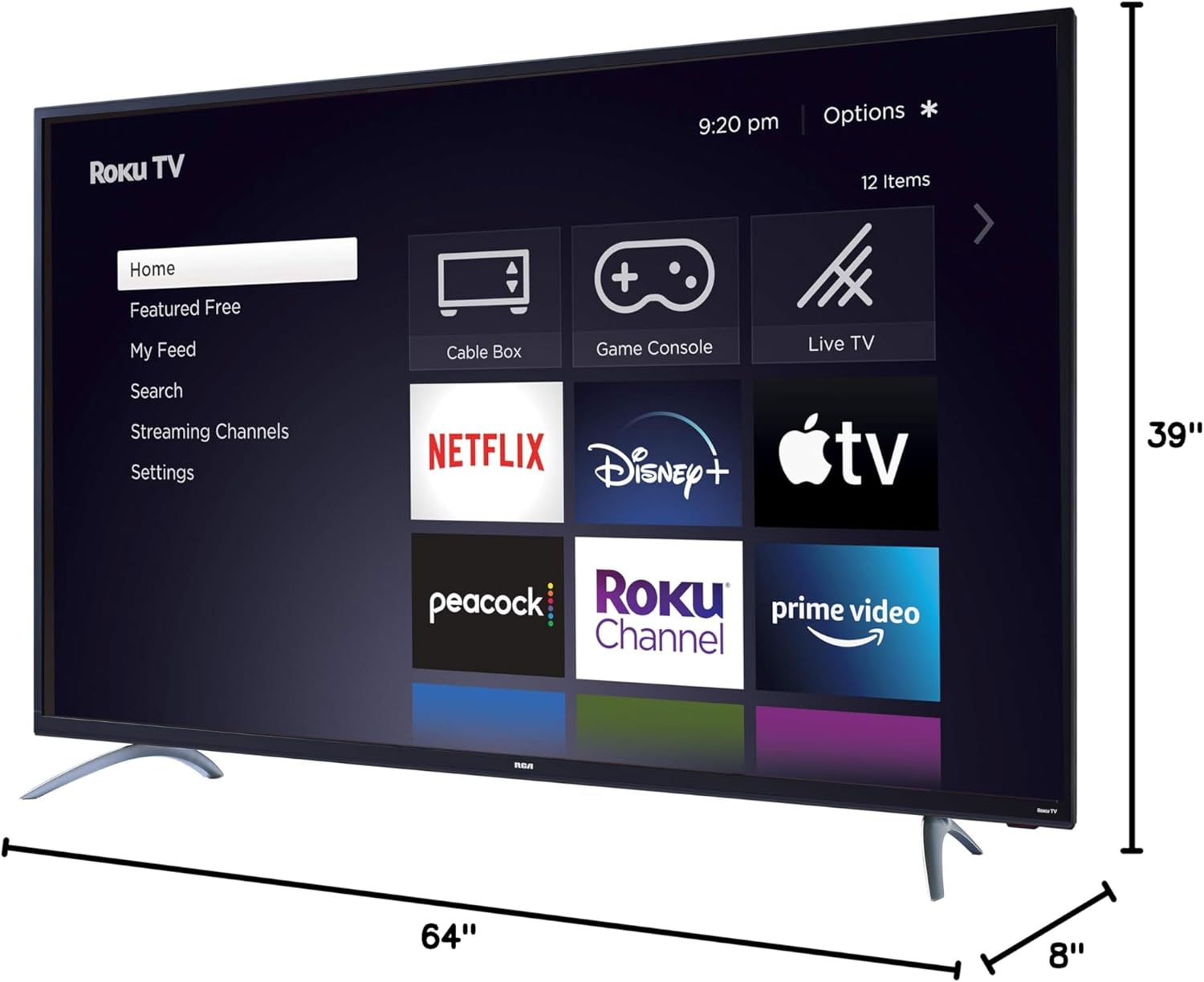
Figure 4: Detailed dimensions of the 65-inch RCA Roku TV.
7. Què hi ha a la caixa
The following items are included with your RCA 65-inch 4K UHD Roku Smart Flat Screen LED TV:
- TV (RCA 65-inch 4K UHD Roku Smart Flat Screen LED TV)
- Roku Remote
- Cable d'alimentació
- Quad-Pedestal Stands (2)
- Cargols per a suports
- Guia d'inici ràpid (aquest manual)
8. Garantia i Suport
Your RCA 65-inch 4K UHD Roku Smart Flat Screen LED TV was first available on November 4, 2019. For specific warranty details and customer support, please refer to the documentation included with your product or visit the official RCA website. RCA is committed to providing reliable products and support.
For customer support inquiries, you may also refer to the Botiga RCA a Amazon or the general Amazon customer support options.


