1. Introducció
Gràcies per la compraasing the OREI DVD-Z9H Region Free HDMI DVD Player. This manual provides essential information for the proper setup, operation, and maintenance of your new device. Please read these instructions thoroughly before use and retain them for future reference.
The OREI DVD-Z9H is designed to play DVDs from any region (0-6) and supports both PAL and NTSC formats, with built-in conversion. It offers 1080p upscaling for enhanced video quality and includes a USB input for media playback.
2. Informació de seguretat
- Font d'alimentació: Ensure the player is connected to a power source within the specified voltagrang e (100-240 V).
- Ventilació: Do not block ventilation openings. Allow adequate space around the player for proper airflow.
- Humitat: Keep the player away from water or excessive moisture. Do not operate with wet hands.
- Neteja: Use a soft, dry cloth for cleaning. Avoid liquid or aerosol cleaners.
- Manteniment: Do not attempt to service the player yourself. Refer all servicing to qualified personnel.
- Seguretat làser: This product utilizes a laser. Do not open the player casing as it may expose you to invisible laser radiation.
3. Contingut del paquet
Verifiqueu que tots els elements siguin presents al paquet:
- 1 x OREI DVD-Z9H HDMI DVD Player
- 1 x comandament a distància (piles no incloses)
- 1 x AV Cable (RCA)
- 1 x Manual d'instruccions (aquest document)
Note: An HDMI cable is not included and must be purchased separately for HDMI connectivity.
4. Producte acabatview
4.1. Tauler frontal
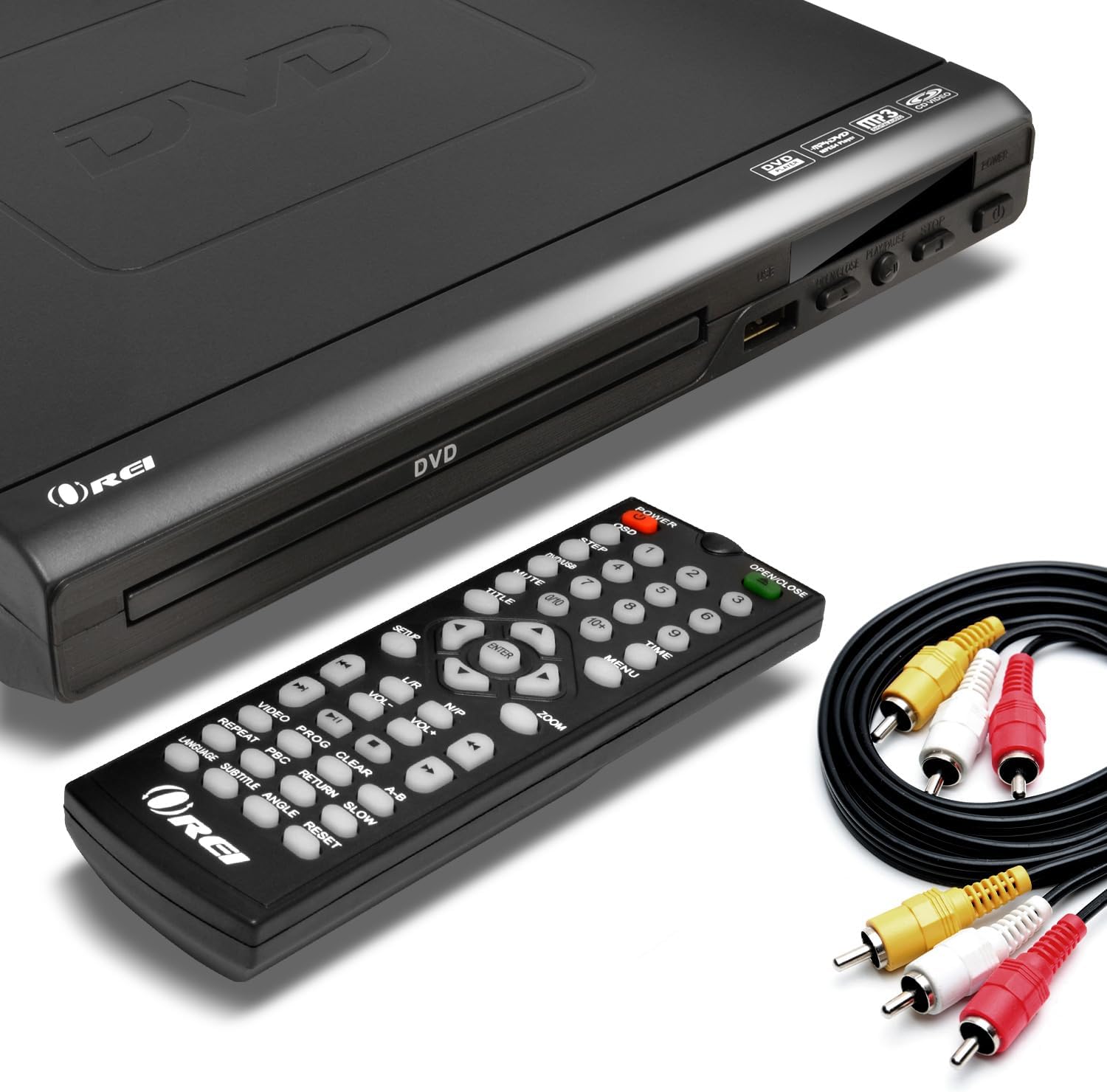
Image: The OREI DVD-Z9H DVD player, its remote control, and included AV cables. The player features a disc tray, power button, and USB port on the front.
- Safata de disc: Insert DVDs or CDs here.
- Port USB: Connect a USB flash drive for media playback.
- Botó d'encesa: Encén o apaga el reproductor.
- Play/Pause, Stop, Open/Close Buttons: Funcions de control bàsiques.
4.2. Panell posterior

Image: The rear panel of the OREI DVD-Z9H DVD player, displaying the HDMI output, composite video/audio (RCA) outputs, coaxial audio output, and power input. Labels indicate model number DVD-Z9H and power specifications.
- Sortida HDMI: Connects to a TV or display for high-definition video and audio.
- Composite Video/Audio Output (RCA x3): Connects to older TVs using red, white, and yellow RCA cables.
- Sortida d'àudio coaxial: For digital audio connection to a compatible receiver.
- Entrada d'alimentació: Connecteu el cable d'alimentació aquí.
4.3. Control remot

Image: The OREI DVD-Z9H DVD player with its remote control positioned above it. The remote features numerous buttons for playback, menu navigation, volume, and special functions.
The remote control provides full functionality for the DVD player. Insert two AAA batteries (not included) into the remote before use. Key functions include:
- Potència: On/Off.
- Obrir tancar: Obre i tanca la safata del disc.
- Botons numèrics (0-9): For direct track selection.
- Navigation (Up/Down/Left/Right, Enter): Per a la navegació pel menú.
- Play, Pause, Stop, Fast Forward, Rewind: Playback controls.
- Volum +/-: Ajusta el nivell de sortida d'àudio.
- Configuració: Accedeix al menú de configuració del sistema.
- Subtitle, Audio, Angle: Controls for DVD features.
- Zoom: Adjusts screen zoom level.
5. Configuració
5.1. Connexió a un televisor
Trieu un dels mètodes de connexió següents:
- Connexió HDMI (recomanada per a HD):
- Connect one end of an HDMI cable (not included) to the HDMI OUT port on the back of the DVD player.
- Connect the other end of the HDMI cable to an HDMI IN port on your television.
- Select the corresponding HDMI input on your TV using its remote control.

Image: A diagram illustrating how to connect the OREI DVD-Z9H DVD player to a TV using an HDMI cable and how to connect a USB flash drive to the player.
- Composite Video/Audio Connection (Standard Definition):
- Connect the yellow plug of the supplied AV cable to the VIDEO OUT port on the DVD player.
- Connect the red and white plugs of the AV cable to the AUDIO OUT (R/L) ports on the DVD player.
- Connect the other ends of the AV cable to the corresponding VIDEO IN and AUDIO IN ports on your television.
- Seleccioneu l'entrada AV corresponent al televisor.
5.2. Connexió d'alimentació
- Connecteu el cable d'alimentació a l'entrada d'alimentació de la part posterior del reproductor de DVD.
- Connecteu l'altre extrem del cable d'alimentació a una presa de corrent estàndard.
5.3. Configuració inicial
After connecting and powering on the player, you may need to configure basic settings:
- Premeu el botó CONFIGURACIÓ botó del comandament a distància.
- Navigate through the menu to set preferences such as:
- Idioma: Select your preferred menu and audio language.
- Sistema de TV: Choose between NTSC or PAL based on your region (the player has built-in conversion).
- Relació d'aspecte: Select 16:9 for widescreen TVs or 4:3 for standard TVs.
- Qualitat del vídeo: Adjust brightness, contrast, etc.
- Premeu CONFIGURACIÓ torneu a sortir del menú.
6. Instruccions de funcionament
6.1. Playing a DVD/CD
- Premeu el botó PODER button to turn on the player.
- Premeu el botó OBRIR/TANCAR botó per obrir la safata del disc.
- Place a DVD or CD onto the disc tray with the label side facing up.
- Premeu el botó OBRIR/TANCAR botó de nou per tancar la safata.
- The player will automatically begin playback or display the disc menu.
- Use the remote control's navigation and playback buttons (PLAY, PAUSE, STOP, FF, REW) per controlar la reproducció.

Image: The OREI DVD-Z9H DVD player and its remote control in front of a television displaying a movie scene, illustrating the player's ability to play DVDs from any region.
6.2. Reproducció multimèdia USB
The player supports playback of video, picture, and music files d'una unitat flash USB.
- Insert a USB 2.0 flash drive (up to 16GB) into the USB port on the front of the player.
- The player should automatically detect the USB drive and display a menu for file selection. If not, press the USB button on the remote (if available) or navigate to the USB input source.
- Use the navigation buttons to browse files i premeu ENTRAR to select and play.
Formats admesos: DVD, AVI, CD, CD-R/RW, DVD-R/RW, DVD+R/RW, Vc1, MPEG1, MPEG-2, MP3.
Note: The HDMI DVD player can only support USB 2.0 Flash drives up to 16 GB and plays video files up to 720p via USB. Blu-ray discs are not supported.

Image: The OREI DVD-Z9H DVD player positioned below a TV displaying a high-definition image. Icons represent various supported media formats including DVD, AVI, CD, CD-R/RW, DVD-R/RW, VCI, MPEG1, MPEG-2, and MP3, highlighting its 1080p upscaling capability.
7. Manteniment
7.1. Cleaning the Player
- Unplug the player from the power outlet before cleaning.
- Use a soft, dry, lint-free cloth to wipe the exterior of the player.
- Do not use liquid cleaners, abrasive pads, or chemical solvents, as these can damage the finish.
7.2. Cura del disc
- Manipuleu els discs per les vores per evitar que deixeu empremtes dactilars a la superfície de reproducció.
- Keep discs clean and free from scratches. Wipe discs gently from the center outwards with a soft, dry cloth if cleaning is necessary.
- Emmagatzemeu els discs als seus estoigs quan no els feu servir.
8. Solució De Problemes
If you encounter issues with your OREI DVD-Z9H player, refer to the following common problems and solutions:
| Problema | Causa possible | Solució |
|---|---|---|
| Sense poder | Cable d'alimentació no connectat; Presa de corrent no activa | Ensure power cord is securely plugged into player and outlet; Test outlet with another device. |
| No hi ha imatge al televisor | Entrada de TV incorrecta seleccionada; connexió del cable de vídeo fluixa | Select the correct HDMI or AV input on your TV; Check that HDMI or AV cables are securely connected. |
| Sense so | TV/player volume too low; Loose audio cable connection; Incorrect audio settings | Increase volume on TV and player; Check audio cable connections; Verify audio settings in the player's setup menu. |
| El disc no es reprodueix / Error "No hi ha disc" | Disc inserted incorrectly; Disc is dirty or scratched; Unsupported disc format | Insert disc with label side up; Clean disc with a soft cloth; Ensure disc is a supported format (not Blu-ray). |
| El comandament a distància no funciona | Les piles estan gastades o inserides incorrectament; Obstrucció entre el comandament a distància i el reproductor | Replace batteries with new ones, ensuring correct polarity; Remove any objects blocking the remote's signal path to the player's sensor. |
| Problemes de reproducció per USB | Unsupported USB drive size/type; Unsupported file format; Video resolution too high | Use a USB 2.0 flash drive up to 16GB; Ensure files are in supported formats (e.g., AVI, MPEG); Video resolution should not exceed 720p. |
9. Especificacions
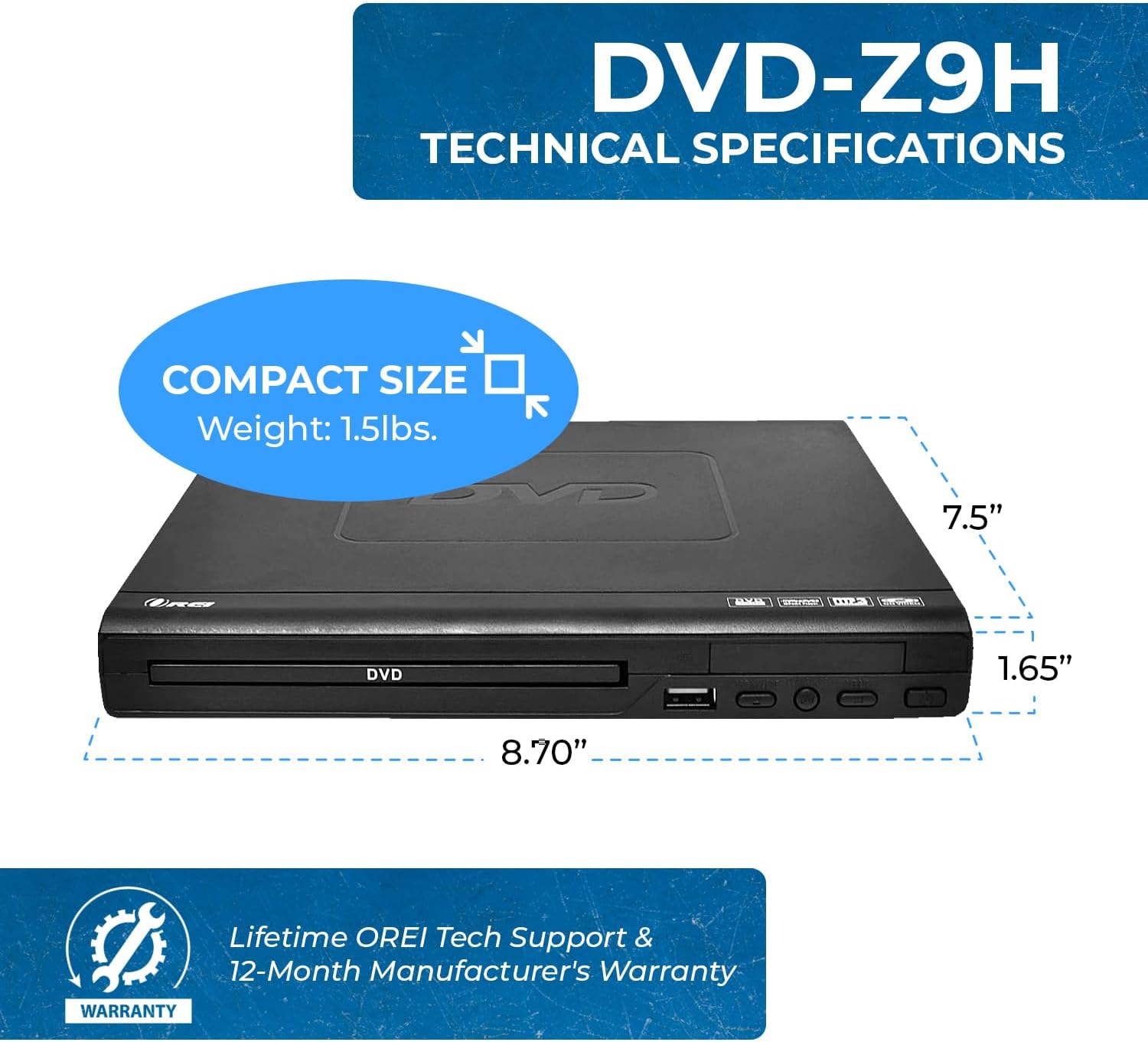
Image: The OREI DVD-Z9H DVD player shown with its compact dimensions: 8.70 inches (length), 7.5 inches (width), and 1.65 inches (height), and a weight of 1.5 lbs.
- Model: DVD-Z9H
- Dimensions (L x A x A): Aproximadament 8.70 x 7.5 x 1.65 polzades (22.1 x 19.05 x 4.19 cm)
- Pes: Aproximadament 1.5 lliures (0.68 kg)
- Tipus de suport: CD, DVD (Does not support Blu-ray discs)
- Formats admesos: DVD, AVI, CD, CD-R/RW, DVD-R/RW, DVD+R/RW, Vc1, MPEG1, MPEG-2, MP3
- Resolució: 1080p (upscaling)
- Connectivitat: HDMI, RCA (Composite Video/Audio), Coaxial Audio, USB 2.0
- Suport USB: Up to 16GB USB 2.0 flash drives, video files up to 720p
- Voltage: Worldwide Dual Voltage (100-240 V)
- Característiques especials: Region Free (0-6), Built-in PAL/NTSC Converter
10. Garantia i Suport
The OREI DVD-Z9H comes with a Garantia del fabricant de 1 anys from the date of purchase. OREI also offers a 30-day money-back guarantee.
For technical support, warranty claims, or any product-related inquiries, please contact OREI customer service. Refer to the contact information provided with your purchase or visit the official OREI weblloc d'assistència.


