1. Introducció
The Ajazz AK325 is a 104-key USB wired desktop computer keyboard featuring a unique retro punk round keycap design and a natural soft backlight. It is engineered to provide a quiet typing experience, making it suitable for various work environments. This manual provides detailed instructions for setting up, operating, maintaining, and troubleshooting your Ajazz AK325 keyboard.
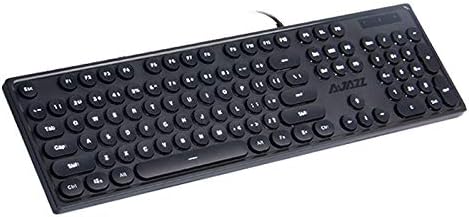
Figure 1.1: Ajazz AK325 Black Keyboard - Top View. This image displays the full layout of the 104-key keyboard, highlighting its distinctive round keycaps and the wired USB connection.
Característiques principals:
- Retro Punk Keycap Design: Unique round keycaps provide a distinctive aesthetic and tactile feel, similar to mechanical keyboards.
- Funcionament ultra silenciós: Designed for minimal noise during typing, ensuring a quiet working environment.
- Natural Soft Backlight: Features a gentle backlight to prevent eye strain, with adjustable effects and intensity.
- Connectivitat USB amb cable: Ensures stable and reliable connection to your computer.
- Àmplia compatibilitat: Supports various operating systems including Windows XP, 7, 8, 10, and IOS.
2. Especificacions
| Especificació | Valor |
|---|---|
| Nom de marca | Ajazz |
| Model | AK325 |
| Referència del fabricant | YX1306825 |
| Nombre de claus | 104 |
| Dimensions del teclat (L x A x A) | 447 x 131 x 31 mm |
| Pes del teclat | 0.77 kg |
| Longitud del cable | 1.6 m |
| Tecnologia de connectivitat | Cable USB |
| Actual / Voltage | 500mA / 5V |
| Requisits del sistema | Windows XP, Windows 7, Windows 8, Windows 10, IOS |
| Orientació de la mà | Ambidextre |
3. Configuració
Setting up your Ajazz AK325 keyboard is a simple plug-and-play process. No additional drivers are typically required for basic functionality.
Passos de connexió:
- Locate an available USB port on your computer (desktop PC, laptop, etc.).
- Take the USB cable attached to your Ajazz AK325 keyboard.
- Insert the USB connector firmly into the chosen USB port on your computer.
- Your operating system should automatically detect and install the necessary drivers for the keyboard. This may take a few moments.
- Once detected, the keyboard is ready for use. You can test it by typing in any text editor.
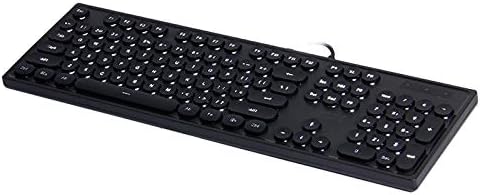
Figure 3.1: Ajazz AK325 Black Keyboard - Angled View. This image provides a perspective of the keyboard's profile and the integrated USB cable, illustrating its wired nature.
4. Instruccions de funcionament
The Ajazz AK325 keyboard offers basic functionality and adjustable backlight features. The primary control for backlight settings is the 'Fn' key combined with other keys.
Control de la llum de fons:
- Canvia els efectes de la llum de fons: Premeu Fn + TAB to cycle through different backlight regulation effects.
- Increase Light Intensity: Premeu Fn + ↑ (Up Arrow key) to make the backlight brighter.
- Decrease Light Intensity: Premeu Fn + ↓ (Down Arrow key) to dim the backlight.
- Adjust Breathing Speed: Premeu Fn + ← (Left Arrow key) or Fn + → (Right Arrow key) to increase or decrease the speed of the breathing backlight effect.
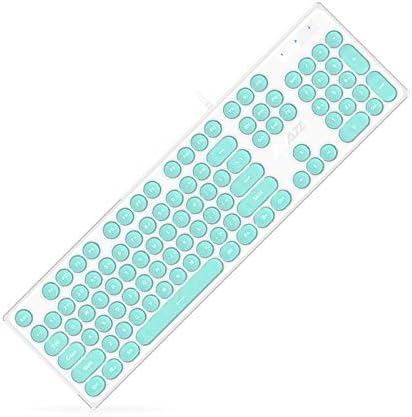
Figure 4.1: Ajazz AK325 Black Keyboard - Detailed Angled View. This image provides a closer look at the keycap texture and the overall ergonomic design of the keyboard.
5. Manteniment
Proper maintenance can extend the lifespan of your Ajazz AK325 keyboard and ensure optimal performance.
Instruccions de neteja:
- Desconnecta primer: Desendolla sempre el teclat de l'ordinador abans de netejar-lo.
- Eliminació de pols: Use a can of compressed air to blow away dust and debris from between the keycaps. Hold the can upright to prevent propellant discharge.
- Neteja de superfícies: Gently wipe the surface of the keycaps and the keyboard body with a soft, lint-free cloth slightly dampnetejar amb aigua o una solució de neteja suau i no abrasiva. Eviteu la humitat excessiva.
- Eviteu productes químics durs: Do not use strong solvents, alcohol, or abrasive cleaners, as these can damage the keycaps or the keyboard finish.
- Assecat: Ensure the keyboard is completely dry before plugging it back into your computer.
Emmagatzematge:
When not in use for extended periods, store the keyboard in a clean, dry place away from direct sunlight and extreme temperatures.
6. Solució De Problemes
If you encounter issues with your Ajazz AK325 keyboard, refer to the following common troubleshooting steps:
Problemes comuns i solucions:
- El teclat no respon:
- Assegureu-vos que el cable USB estigui ben connectat a un port USB que funcioni de l'ordinador.
- Prova de connectar el teclat a un port USB diferent.
- Reinicieu l'ordinador.
- Prova el teclat en un altre ordinador per determinar si el problema és del teclat o de l'ordinador.
- La retroiluminació no funciona o és tènue:
- Premeu Fn + ↑ to increase backlight intensity.
- Premeu Fn + TAB to cycle through different backlight modes, as some modes might appear dim or off.
- Assegureu-vos que el teclat rep prou energia del port USB. Proveu un port diferent o un concentrador USB amb alimentació si en teniu.
- Keys Not Registering or Sticking:
- Clean the keyboard as described in the Maintenance section to remove any debris under the keycaps.
- If specific keys are consistently failing, the keyboard may require service.
7. Contingut del paquet
En obrir l'embalatge del producte, hauríeu de trobar els següents elements:
- 1 x Ajazz AK325 Black Keyboard (with integrated USB cable)
- 1 x Manual d'usuari (aquest document)
Note: At the time of this manual's publication, only the black color variant of the keyboard is available for order.
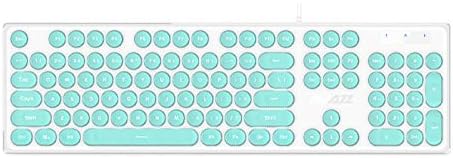
Figure 7.1: Ajazz AK325 White Keyboard with Teal Keycaps. This image shows a color variant of the keyboard, featuring a white body and vibrant teal round keycaps.

Figure 7.2: Ajazz AK325 White Keyboard with Pink Keycaps. Another color variant, this image displays the keyboard with a white body and soft pink round keycaps, offering a different aesthetic.
8. Garantia i Suport
For warranty information and technical support regarding your Ajazz AK325 keyboard, please refer to the specific warranty card included with your purchase or contact the retailer or manufacturer directly.
Keep your purchase receipt or proof of purchase for warranty claims. For the most up-to-date support resources, visit the official Ajazz weblloc o el website of the retailer from whom you purchased the product.
If you have further questions or require assistance beyond the scope of this manual, please reach out to customer service.


