Producte acabatview
The Anlapus 8CH 1080P H.265+ DVR security system provides comprehensive surveillance for your home or business. This system includes an 8-channel 1080p Digital Video Recorder (DVR) with a pre-installed 1TB hard drive and four 2.0MP IP66-rated outdoor surveillance cameras. Designed for reliable 24/7 operation, it offers high-definition video recording and remote access capabilities.

Image: The Anlapus 8-channel DVR system, including the main DVR unit, four dome-style surveillance cameras, and an icon indicating a 1TB hard drive.
Característiques principals:
- H.265+ HD Full 1080p System: Captures clear, detailed video with efficient compression for extended recording times.
- Integrated 1TB Hard Drive: Pre-installed and optimized for continuous surveillance recording, eliminating the need for separate purchase and installation.
- Visió nocturna avançada: Each camera features 24 IR LEDs and an IR-CUT filter, providing clear night vision up to 24 meters (80 feet).
- Múltiples modes d'enregistrament: Supports 24/7 continuous recording, motion detection recording, scheduled recording, and manual recording.
- IP66 Weatherproof Cameras: Durable plastic housing designed to withstand various extreme weather conditions for reliable indoor and outdoor use.
- Remote Access & Alerts: Free mobile application allows remote viewing on smartphones and tablets, with push notifications for motion detection alerts.
Guia de configuració
Follow these steps to set up your Anlapus security system.
Contingut del paquet:
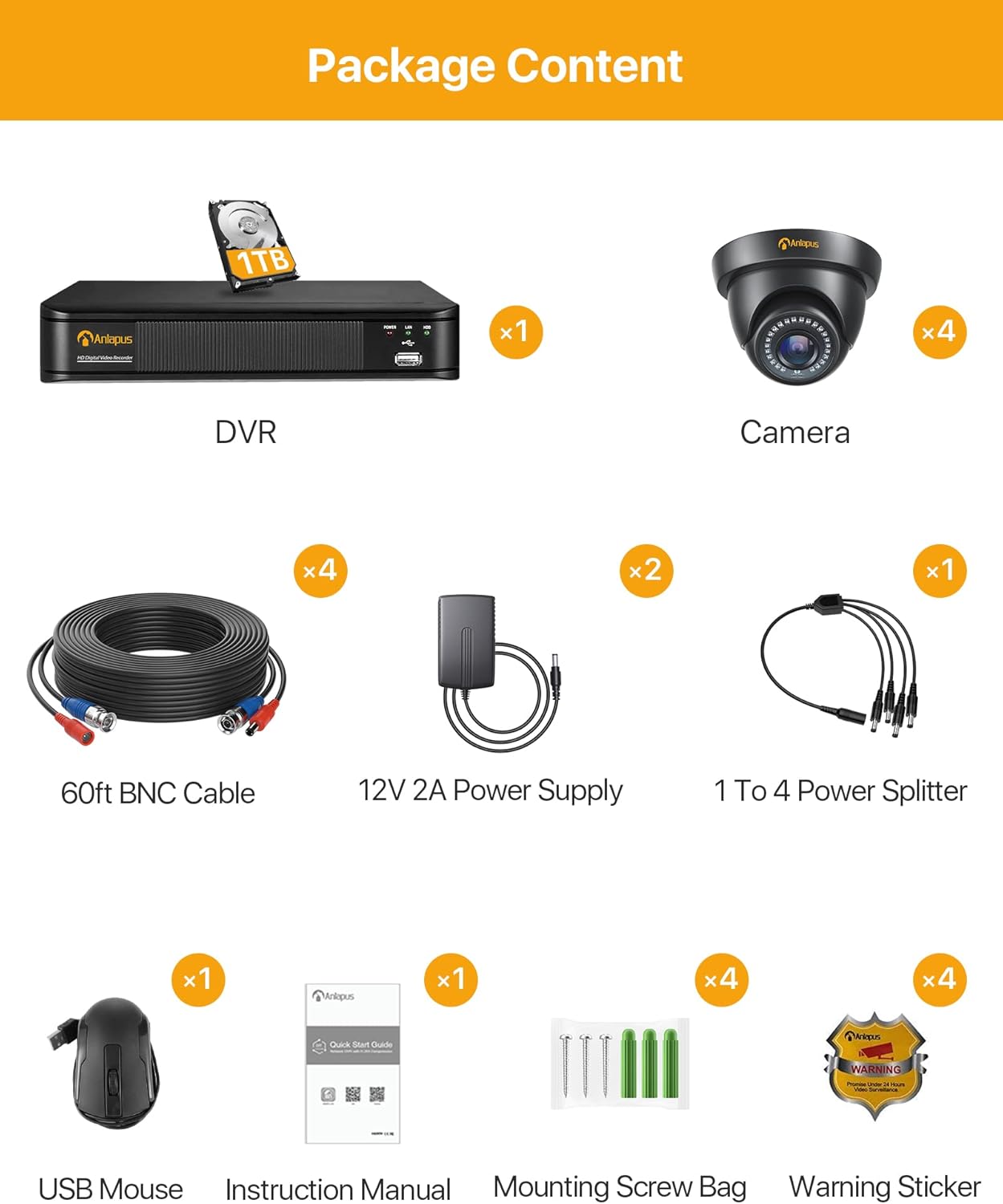
Image: A visual representation of all items included in the Anlapus security system package, such as the DVR, four cameras, BNC cables, power adapters, USB mouse, and documentation.
Ensure all components listed below are present before beginning installation:
- 1 x DVR (with 1TB HDD pre-installed)
- 4 x Surveillance Cameras
- 4 cables BNC de 60 peus
- 2 x 12V 2A Power Supplies
- 1 x 1 to 4 Power Splitter
- 1 x ratolí USB
- 1 x manual d'instruccions
- 1 x bossa de cargol de muntatge
- 4 adhesius d'advertència
Passos d'instal·lació:
- Connecteu les càmeres al DVR: Use the provided BNC cables to connect each camera to the corresponding video input ports on the back of the DVR.
- Power the Cameras: Use the 1 to 4 power splitter and power supplies to provide power to all cameras.
- Connecteu el DVR al monitor: Connecteu el DVR a un monitor mitjançant un cable HDMI o VGA.
- Connect DVR to Network: For remote access, connect the DVR to your router using an Ethernet cable.
- Power the DVR: Connect the DVR to its power supply and plug it into an electrical outlet.
- Configuració inicial: Follow the on-screen prompts to complete the initial setup, including setting up a password and configuring network settings.

Image: A visual guide demonstrating the easy installation process, including connecting the DVR to a network, downloading the Anlapus mobile application, and accessing camera feeds.
Col·locació de la càmera:
The cameras are IP66 weatherproof, suitable for both indoor and outdoor environments. Choose locations that provide optimal viewing angles and are within reach of the provided cables. Ensure the camera's cable is protected, especially in outdoor installations, to prevent damage from weather or tamperrant.

Image: Illustrations of the camera's durability in various conditions, including its IP66 weatherproof rating during rain and its wide 90-degree viewangle de ing.
Instruccions de funcionament
This section details how to operate your Anlapus security system for effective surveillance.
Modes d'enregistrament:
- Gravació contínua: The system records 24 hours a day, 7 days a week.
- Gravació de detecció de moviment: Recording is triggered only when motion is detected by the cameras. This saves storage space and makes reviewing events more efficient.
- Enregistrament programat: Set specific times for the system to record.
- Enregistrament manual: Start and stop recording manually as needed.

Image: Demonstrates the customized motion detection feature, showing an area of interest highlighted for alerts and the corresponding notification on a mobile device.
Accés remot:
Download the free Anlapus application on your smartphone or tablet to view live feeds and recorded footage from anywhere. The app also allows you to receive instant push notifications when motion is detected.

Image: Shows the versatility of remote viewing, with live camera feeds accessible on smartphones, tablets, laptops, and desktop computers.
Visió nocturna:
The cameras automatically switch to night vision mode in low-light conditions, providing clear black and white images. The 24 IR LEDs ensure effective surveillance even in complete darkness.

Image: A comparison demonstrating the system's ability to capture clear 1080P images both during the day (in color) and at night (with infrared night vision).
Video Compression (H.265+):
The system utilizes H.265+ video compression technology, which significantly reduces file sizes compared to H.264, allowing for up to four times longer recording times on the same 1TB hard drive. This also contributes to smoother streaming and faster remote viewing.
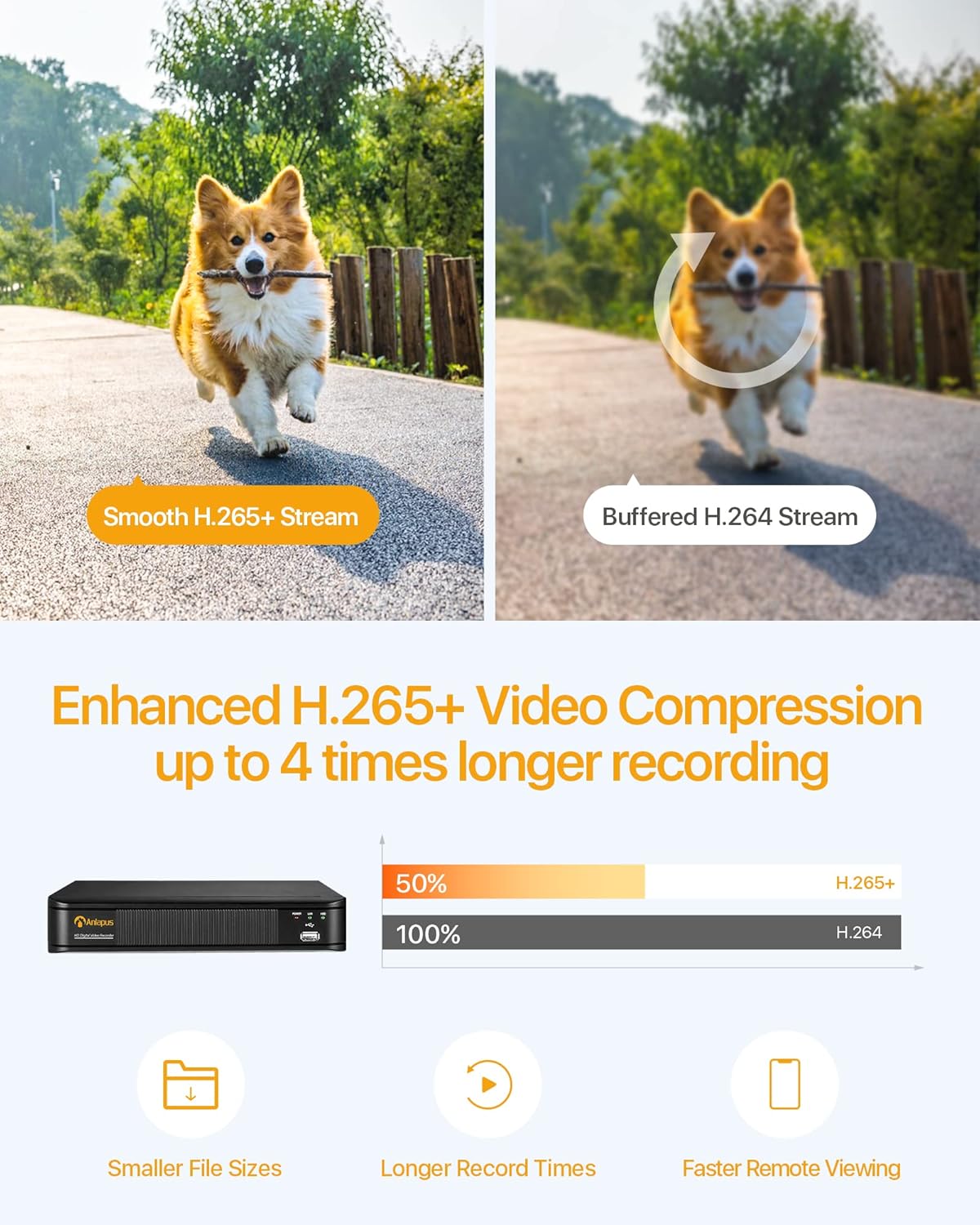
Image: Illustrates the efficiency of H.265+ video compression, showing how it provides smoother streams and allows for significantly longer recording durations compared to H.264.
Manteniment
Un manteniment adequat garanteix la longevitat i el rendiment òptim del vostre sistema de seguretat.
- Neteja de la càmera: Netegeu periòdicament les lents de la càmera amb un drap suau i sec.amp drap per eliminar la pols, la brutícia o les taques d'aigua que puguin obstruir viewEviteu els productes de neteja abrasius.
- Inspecció del cable: Regularly check all cables for any signs of wear, damage, or loose connections, especially for outdoor installations. Secure any loose cables to prevent accidental disconnections or damage.
- Ventilació del DVR: Ensure the DVR unit has adequate ventilation to prevent overheating. Keep it in a cool, dry place away from direct sunlight and obstructions.
- Actualitzacions de programari: Check the Anlapus official website or app for any available firmware or software updates for your DVR and cameras. Updates can improve performance and add new features.
Resolució de problemes
This section addresses common issues you might encounter with your Anlapus security system.
Sense senyal de vídeo:
- Comproveu les connexions: Ensure all BNC cables are securely connected between the cameras and the DVR.
- Font d'alimentació: Verify that all cameras and the DVR are receiving power. Check power adapters and outlets.
- Integritat del cable: Inspect BNC cables for any physical damage. Damaged cables may need replacement.
Mala qualitat d'imatge:
- Neteja la lent: Ensure camera lenses are clean and free from smudges, dust, or water droplets.
- Condicions d'il·luminació: While cameras have night vision, extreme lighting conditions (e.g., direct strong light into the lens) can affect image clarity.
- Configuració de resolució: Verify that the DVR's recording and display resolution settings are configured for 1080p.
No Audio (if applicable):
Some users have reported issues with audio. This system's cameras do not inherently support audio recording. If audio is a critical requirement, please verify product specifications for models that include audio capabilities.
Problemes d'accés remot:
- Connexió de xarxa: Ensure the DVR is properly connected to your router and has internet access. Check your router's internet connection.
- App & Firmware: Make sure you are using the latest version of the Anlapus app and that your DVR's firmware is up to date.
- Configuració del tallafocs/encaminador: Your router's firewall or security settings might be blocking the connection. Consult your router's manual or ISP for port forwarding or firewall configuration.
Especificacions
| Característica | Especificació |
|---|---|
| Marca | Anlapus |
| Número de model | 6972804072726 |
| DVR Channels | 8 canals |
| Resolució de gravació de vídeo | 1080p Full HD |
| Compressió de vídeo | H.265 + |
| Capacitat d'emmagatzematge | 1 TB (terabyte) |
| Resolució de la càmera | 2.0 MP |
| Camera Weatherproof Rating | IP66 |
| Gamma de visió nocturna | Fins a 24 metres (80 peus) |
| Tecnologia de connectivitat | Amb cable |
| Font d'alimentació | Alimentació CA |
| Dimensions (L x A x A) | 19.4 x 30.7 x 44.3 cm |
| Pes | 4.96 quilograms |
Garantia i Suport
Anlapus is committed to providing reliable products and excellent customer service. For any technical assistance, warranty claims, or product inquiries, please refer to the contact information provided in your instruction manual or visit the official Anlapus weblloc.
Customers have reported positive experiences with Anlapus customer support, noting their responsiveness and effectiveness in resolving issues.

Image: A customer service representative ready to assist with any product-related questions or support needs.


