Introducció
The IMPERIAL DB 6 S HD is a compact HDTV satellite and multimedia receiver designed for high-quality DVB-S/S2 program reception. It offers a range of features including EPI program information, automatic software updates, and child safety functions. Its USB port allows for digital media playback in various formats. The receiver's 12V DC external power supply makes it suitable for both home and mobile use, such as camping.
Informació de seguretat
- Ensure the receiver is placed on a stable, flat surface.
- No exposeu el dispositiu a la pluja ni a la humitat per evitar incendis o descàrregues elèctriques.
- Avoid blocking ventilation openings. Proper ventilation is crucial to prevent overheating.
- Feu servir només l'adaptador de corrent proporcionat. L'ús d'adaptadors no autoritzats pot fer malbé el dispositiu i anul·lar la garantia.
- No intenteu obrir ni reparar el dispositiu vosaltres mateixos. Encarregueu totes les tasques de manteniment a personal qualificat.
- Mantingueu el dispositiu allunyat de la llum solar directa, de fonts de calor i de camps magnètics forts.
- Desconnecteu el dispositiu durant les tempestes amb llamps o quan no l'utilitzeu durant llargs períodes.
Contingut del paquet
Si us plau, comproveu que tots els elements siguin presents al paquet:
- IMPERIAL DB 6 S HD Receiver
- Control remot
- Adaptador d'alimentació (12 V CC)
- Manual d'usuari (aquest document)
- 2 piles AAA (per al comandament a distància)
Producte acabatview
Familiarize yourself with the components and ports of your IMPERIAL DB 6 S HD receiver.

Figura 1: Frontal View of the Receiver. This image shows the sleek black design of the IMPERIAL DB 6 S HD receiver from the front. The "HDTV" logo is visible on the left, and "IMPERIAL DB 6 S HD" is printed on the right. A small green indicator light is visible in the center, indicating power status.

Figura 2: posterior View of the Receiver. This image displays the rear panel of the receiver, highlighting its connectivity options. From left to right, you can see the LNB IN (satellite input) port, two USB 2.0 ports, an HDMI output port, and the 12V DC power input. The HDMI logo is also visible on the right side of the panel.

Figura 3: Control remot. This image shows the black remote control for the IMPERIAL DB 6 S HD receiver. It features standard navigation buttons (up, down, left, right, OK), number keys, volume and channel controls, and dedicated buttons for functions like Menu, Timer, Audio, Zoom, Record, Text, Still, HDMI, EPI, Exit, Info, and TV/Radio mode.
Configuració
Follow these steps for the initial setup of your IMPERIAL DB 6 S HD receiver.
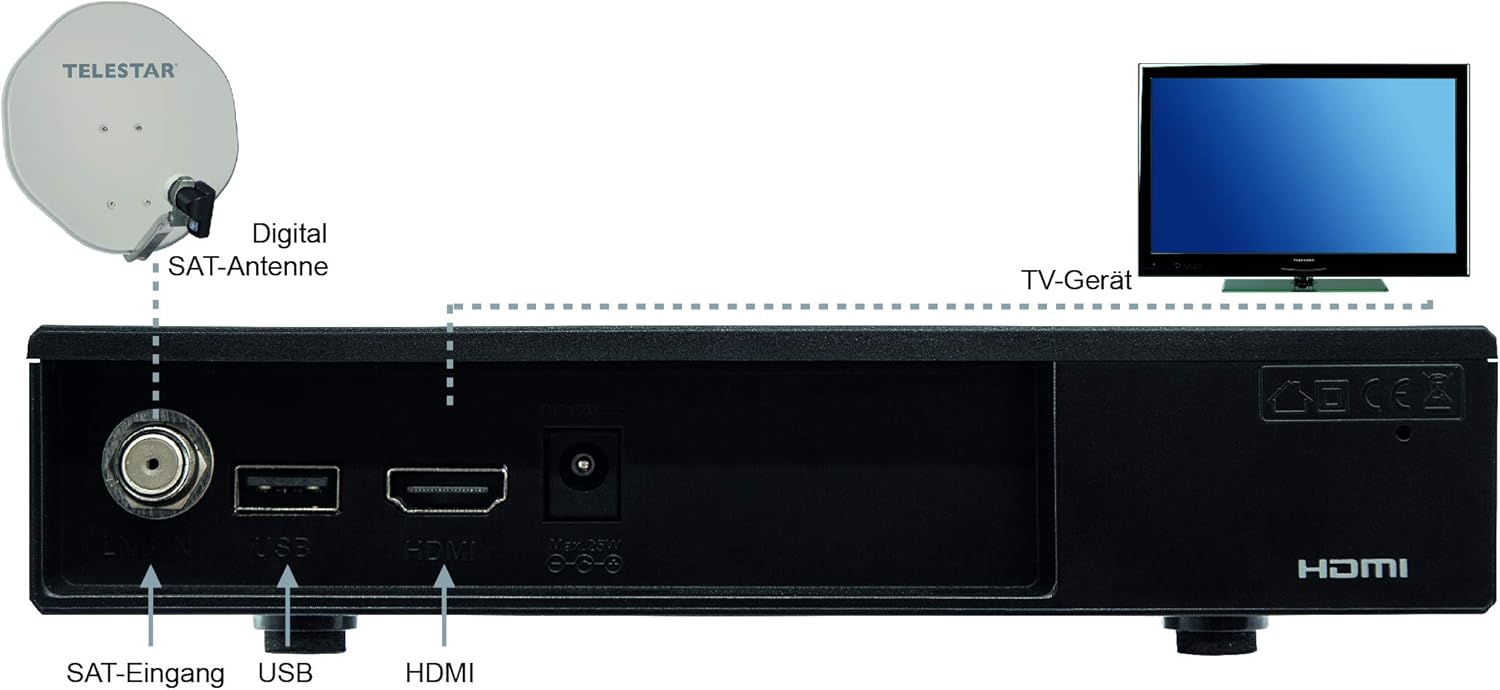
Figure 4: Connection Diagram. This diagram illustrates how to connect the IMPERIAL DB 6 S HD receiver. A digital satellite antenna (SAT-Antenne) is shown connected to the "SAT-Eingang" (SAT Input) port on the receiver. The receiver's HDMI output is connected to a TV (TV-Gerät). The diagram also labels the USB port and the HDMI port on the receiver for clarity.
- Connecteu l'antena del satèl·lit: Connect your satellite dish cable to the "LNB IN" port on the rear of the receiver (refer to Figure 2 and Figure 4).
- Connectar-se al televisor: Use an HDMI cable (not included) to connect the "HDMI" port on the receiver to an HDMI input on your television (refer to Figure 2 and Figure 4).
- Connectar l'alimentació: Plug the provided 12V DC power adapter into the "DC 12V" port on the receiver, then plug the adapter into a wall outlet.
- Inseriu les piles al comandament a distància: Open the battery compartment on the back of the remote control (Figure 3) and insert the two AAA batteries, ensuring correct polarity.
- Encès: Turn on your TV and select the correct HDMI input. The receiver should power on automatically or can be powered on using the remote control.
- Escaneig inicial: Follow the on-screen instructions to perform an initial channel scan. This process will detect and store available satellite channels.
Instruccions de funcionament
Funcionament bàsic
- Encès/apagat: Premeu el botó Poder button on the remote control (Figure 3).
- Selecció de canals: Utilitza el P+/- buttons or the number keys on the remote to change channels.
- Control de volum: Utilitza el +/- buttons (next to NAV) to adjust the volume.
- Navegació del menú: Premeu el botó MENÚ per accedir al menú principal. Feu servir les tecles de fletxa (▲ ▼ ◄ ►) per navegar i OK per confirmar. Premeu Sortida per tornar a la televisió en directe.
- Program Information (EPI): Premeu el botó EPI botó per view informació del programa.
Reproducció multimèdia
The receiver supports multimedia playback via its USB 2.0 ports.
- Insert a USB storage device (e.g., USB flash drive) into one of the USB ports on the rear of the receiver (Figure 2).
- Navigate to the "Multimedia" or "Media Player" section in the main menu.
- Select the type of media you wish to play (e.g., Video, Music, Photo).
- Browse your USB device for the desired file i premeu OK per jugar.
Note: Supported file formats may vary. Ensure your media files are compatible for optimal playback.
Manteniment
- Neteja: Disconnect the power before cleaning. Use a soft, dry cloth to wipe the exterior of the receiver. Do not use liquid cleaners or aerosol sprays.
- Ventilació: Ensure that the ventilation slots on the receiver are not blocked by dust or other objects. Regularly check and clean if necessary.
- Actualitzacions de programari: The receiver supports automatic software updates. Check the system settings menu for options to update the firmware, which can improve performance and add new features.
Resolució de problemes
| Problema | Possible causa/solució |
|---|---|
| Sense imatge ni so. |
|
| "No Signal" message on screen. |
|
| El comandament a distància no funciona. |
|
| USB media not playing. |
|
Especificacions
| Marca | Imperial |
| Número de model | 77-563-00 |
| Color | Negre |
| Tecnologia de connectivitat | Audio-Video-Chinch, HDMI |
| Ports USB totals | 2 |
| Ports HDMI totals | 1 |
| Voltage | 12 Volts |
| Ports de sortida de vídeo | 1 |
| Format d'imatge | 16:9 |
| Font d'alimentació | External 12V DC Adapter |
| DVB Standard | DVB-S / S2 |
| Reproductor multimèdia | USB multimedia player for various formats |
| Característiques especials | EPI program info, automatic software update, child safety, SCR compatible (DIN EN 50494 and 50607) |
Garantia i Suport
For warranty information, please refer to the warranty card included with your product or contact your local retailer. Keep your proof of purchase for any warranty claims.
For technical support or further assistance, please visit the manufacturer's official website or contact their customer service department. Contact details are typically provided in the product packaging or on the manufacturer's weblloc.
Manufacturer: TELESTAR-Digital GmbH


