1. Introducció
Thank you for choosing the KLARSTEIN DryFy Connect 80 Dehumidifier. This manual provides essential information for the safe and efficient operation, maintenance, and troubleshooting of your appliance. Please read these instructions thoroughly before first use and keep them for future reference.
The DryFy Connect 80 is designed to effectively reduce humidity in indoor spaces, helping to prevent mold, mildew, and other moisture-related issues. Its advanced features include Wi-Fi connectivity for app control, adjustable humidity settings, and a continuous drainage option.
2. Instruccions de seguretat
WARNING: Please read all safety warnings and instructions carefully before using this appliance to avoid electric shock, fire, or serious injury.
- Assegureu-vos que la font d'alimentació coincideixi amb el voltage especificat a l'etiqueta de qualificació.
- Do not operate the dehumidifier with a damaged cord or plug. If the supply cord is damaged, it must be replaced by the manufacturer, its service agent, or similarly qualified persons to avoid a hazard.
- Col·loqueu sempre la unitat sobre una superfície estable i anivellada.
- Do not block the air inlet or outlet. Maintain at least 20 cm (8 inches) clearance around the unit for proper airflow.
- No introduïu objectes a les sortides d'aire.
- Unplug the appliance before cleaning, moving, or performing any maintenance.
- No utilitzeu l'aparell en zones on s'emmagatzemin gasos o líquids inflamables.
- Aquest aparell no està pensat per ser utilitzat per persones (inclosos nens) amb capacitats físiques, sensorials o mentals reduïdes, o amb manca d'experiència i coneixements, tret que hagin rebut la supervisió o instruccions sobre l'ús de l'aparell per una persona responsable de la seva seguretat.
- Els nens han de ser supervisats per assegurar-se que no juguin amb l'aparell.
- No utilitzeu l'aparell a l'exterior.
- Do not tilt the unit more than 45 degrees or turn it upside down.
3. Producte acabatview
The KLARSTEIN DryFy Connect 80 Dehumidifier is a powerful and efficient appliance designed for optimal humidity control. Below is an image illustrating the main unit and its key features, including the integrated control panel and the Klarstein app control interface.

Imatge: Frontal view of the KLARSTEIN DryFy Connect 80 Dehumidifier alongside a smartphone displaying the Klarstein app control interface. The dehumidifier is white with a green light indicator on top and a visible water level indicator on the front.
The unit features a robust design with integrated handles and castor wheels for easy portability. The control panel is located on the top surface, providing access to all operational settings. The water tank is located at the bottom front for easy access.
4. Configuració
4.1 Desembalatge
- Traieu amb cura el deshumidificador del seu embalatge.
- Traieu tots els materials d'embalatge, inclosa la cinta adhesiva o les pel·lícules protectores.
- Inspeccioneu la unitat per detectar qualsevol signe de danys. Si està danyada, no la feu funcionar i poseu-vos en contacte amb el servei d'atenció al client.
4.2 Col·locació
Proper placement is crucial for efficient dehumidification. Consider the following:
- Place the dehumidifier on a firm, level surface in the area where humidity control is needed.
- Ensure there is at least 20 cm (8 inches) of clear space around all sides of the unit to allow for adequate airflow. Do not place it against a wall or furniture that would obstruct air intake or exhaust.
- Avoid placing the unit near heat sources (e.g., heaters, ovens) or in direct sunlight, as this can reduce its efficiency.
- Do not place the unit in an area where it might be exposed to splashing water or excessive moisture (e.g., directly next to a shower).
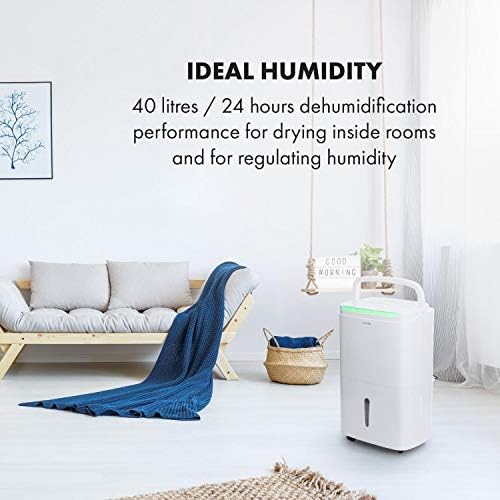
Image: The KLARSTEIN DryFy Connect 80 Dehumidifier placed in a modern living room, demonstrating appropriate placement away from furniture for optimal air circulation. Text overlay indicates "IDEAL HUMIDITY" and "40 litres / 24 hours dehumidification performance".
4.3 Connexió d'alimentació
Connecteu el cable d'alimentació a una presa de corrent amb connexió a terra. Assegureu-vos que la presa compleixi els requisits d'alimentació de la unitat.
4.4 Opcions de drenatge d'aigua
The DryFy Connect 80 offers two drainage methods:
- Drenatge del dipòsit d'aigua: The unit collects condensed water in its internal 7-liter water tank. When the tank is full, the unit will automatically shut off and an indicator light will illuminate. The tank must then be manually emptied.
- Drenatge continu: For extended operation without manual emptying, you can connect a drainage hose (included) to the continuous drainage port on the back of the unit. Ensure the hose is routed downwards to a suitable drain (e.g., floor drain, sink) to allow gravity to drain the water.
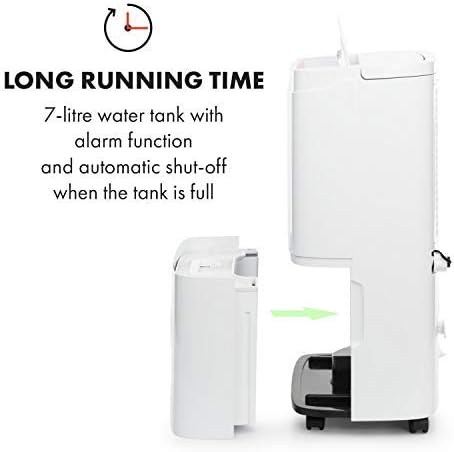
Imatge: Un costat view of the KLARSTEIN DryFy Connect 80 Dehumidifier with its 7-liter water tank being removed from the main unit. An arrow indicates the direction of removal. Text overlay highlights "LONG RUNNING TIME" and "7-litre water tank with alarm function and automatic shut-off when the tank is full".
5. Instruccions de funcionament
5.1 Tauler de control acabatview
The control panel on the top of the unit allows you to manage all functions. Refer to the image below for a visual guide to the buttons and display.

Image: A detailed close-up of the KLARSTEIN DryFy Connect 80 Dehumidifier's control panel. It features a digital display showing "50%" and various touch-sensitive buttons for functions like power, mode, humidity setting, timer, and Wi-Fi. Text overlay indicates "MANY FUNCTIONS" and "With adjustable target humidity and a timer between 1 and 24 hours".
- Botó d'encesa: Encén o apaga la unitat.
- Botó de mode (M): Cycles through operating modes (e.g., Auto, Continuous, Laundry Drying).
- Humidity Setting Buttons (%): Adjusts the desired humidity level (30% - 80%).
- Botó del temporitzador: Sets the auto-on or auto-off timer (1-24 hours).
- Botó de velocitat del ventilador: Adjusts fan speed (Low, High).
- Indicador de Wi-Fi: Mostra l'estat de la connexió Wi-Fi.
- Visualització: Mostra la humitat actual, la humitat configurada o la configuració del temporitzador.
5.2 Engegada/apagada
Premeu el botó Botó d'engegada once to turn the unit ON. Press it again to turn the unit OFF.
5.3 Configuració de la humitat desitjada
En mode automàtic, premeu el botó Humidity Setting Buttons (%) to select your desired humidity level between 30% and 80%. The unit will operate until the room humidity reaches the set level, then cycle on and off to maintain it.
5.4 Funció de temporitzador
Premeu el botó Botó del temporitzador to set an auto-on or auto-off time from 1 to 24 hours. Each press increases the time by one hour. The timer indicator will illuminate when active.
5.5 Velocitat del ventilador
Premeu el botó Botó de velocitat del ventilador to toggle between Low and High fan speeds. Higher fan speed results in faster dehumidification but may produce more noise.
5.6 Continuous Dehumidification
Select the Continuous mode using the Botó de mode (M). In this mode, the unit will run continuously regardless of the humidity level. This is ideal for very damp conditions or for use with continuous drainage.
5.7 App Control (Wi-Fi Setup)
The DryFy Connect 80 can be controlled remotely via the Klarstein app. Follow these steps to connect:
- Download the "Klarstein" app from your smartphone's app store (iOS or Android).
- Ensure your dehumidifier is plugged in and within range of your Wi-Fi router.
- Open the Klarstein app and follow the on-screen instructions to add a new device. You may need to put the dehumidifier into pairing mode (refer to the app or unit's specific Wi-Fi pairing instructions, usually involving holding a button for a few seconds).
- Once connected, you can control all functions of the dehumidifier from your smartphone, including setting humidity, modes, and timers.

Image: A person relaxing on a couch, using a smartphone to control the KLARSTEIN DryFy Connect 80 Dehumidifier via the Klarstein app. The phone screen shows humidity settings. Text overlay indicates "EASY TO USE" and "WiFi interface for easy control via Klarstein app".
5.8 Auto-Swing Function
The auto-swing function helps distribute dry air more evenly and can be particularly useful for drying laundry. Activate this function via the control panel or the Klarstein app. The internal louvers will oscillate to direct airflow across a wider area.

Image: The KLARSTEIN DryFy Connect 80 Dehumidifier positioned in a laundry room setting, with clothes drying on a rack in the background. A child and adult are interacting in the foreground. Text overlay states "ESPECIALLY HANDY" and "Auto-swing function for fast drying of wet laundry".
6. Manteniment
Un manteniment regular garanteix la longevitat i el funcionament eficient del vostre deshumidificador.
6.1 Neteja del filtre d'aire
El filtre d'aire s'ha de netejar cada dues setmanes o amb més freqüència, depenent de l'ús i la qualitat de l'aire.
- Apagueu el deshumidificador i desendolleu-lo de la presa de corrent.
- Localitza el filtre d'aire (normalment a la part posterior o lateral de la unitat).
- Traieu el filtre.
- Clean the filter with a vacuum cleaner to remove dust and debris. For heavy dirt, wash it gently with warm, soapy water. Rinse thoroughly and allow it to air dry completely before reinserting.
- Torneu a inserir el filtre sec a la unitat.
6.2 Buidatge del dipòsit d'aigua
When the water tank is full, the unit will stop operating and an indicator light will signal. Empty the tank as follows:
- Apagueu el deshumidificador i desconnecteu-lo.
- Traieu amb cura el dipòsit d'aigua de la part frontal de la unitat.
- Aboqueu l'aigua recollida.
- Clean the tank with mild detergent and water if necessary, then rinse thoroughly.
- Reinsert the empty tank firmly into the unit. Ensure it is properly seated to allow the unit to resume operation.
6.3 Neteja de l'exterior de la unitat
Netegeu l'exterior del deshumidificador amb un damp drap. No utilitzeu productes químics agressius, netejadors abrasius ni dissolvents, ja que poden danyar la superfície.
6.4 Emmagatzematge
Si emmagatzema la unitat durant un període prolongat:
- Buideu i netegeu el dipòsit d’aigua.
- Netegeu el filtre d'aire.
- Desendolleu la unitat i enrotlleu el cable d'alimentació amb cura.
- Cobriu la unitat amb una bossa de plàstic o un drap per protegir-la de la pols.
- Emmagatzemar en un lloc fresc i sec.
7. Solució De Problemes
Abans de contactar amb l'atenció al client, consulteu la guia de resolució de problemes següent per conèixer els problemes més comuns:
| Problema | Causa possible | Solució |
|---|---|---|
| La unitat no s'encén. | Sense font d'alimentació. Cable d'alimentació no connectat correctament. Dipòsit d'aigua ple o mal col·locat. | Comproveu la presa de corrent i l'interruptor automàtic. Assegureu-vos que el cable d'alimentació estigui ben connectat. Buideu el dipòsit d'aigua i assegureu-vos que estigui correctament tornat a col·locar. |
| La unitat funciona però no deshumidifica. | Filtre d'aire obstruït. Temperatura ambient massa baixa. Ajusteu la humitat massa alt. Entrada/sortida d'aire bloquejada. | Netegeu el filtre d'aire. Els deshumidificadors són menys eficaços per sota dels 5 °C (41 °F). Baixeu el nivell d'humitat desitjat. Ensure adequate clearance around the unit. |
| La unitat fa soroll. | La unitat no està sobre una superfície plana. Filtre d'aire obstruït. Normal operating noise. | Col·loqueu la unitat sobre una superfície plana i estable. Netegeu el filtre d'aire. Some fan noise is normal during operation, especially at high fan speed. |
| S’escapa l’aigua. | El dipòsit d'aigua no està ben col·locat. Continuous drainage hose improperly connected or blocked. | Assegureu-vos que el dipòsit d'aigua estigui completament i correctament inserit. Check the continuous drainage hose for kinks or blockages and ensure it is securely attached and sloped downwards. |
| Problemes de connexió Wi-Fi. | Contrasenya de Wi-Fi incorrecta. Unit too far from router. Problemes amb el router. Aplicació no actualitzada. | Verifica la contrasenya del Wi-Fi. Move unit closer to router or use a Wi-Fi extender. Reinicieu el vostre encaminador Wi-Fi. Update the Klarstein app to the latest version. |
8. Especificacions
| Característica | Especificació |
|---|---|
| Model | DryFy Connect |
| Capacitat de deshumidificació | Up to 40 Liters / 24 hours |
| Capacitat del dipòsit d'aigua | 7 litres |
| Consum d'energia | 2650 watts (Note: This value seems unusually high for a dehumidifier. Please verify with product label if possible.) |
| Mode d'operació | Auto, Continuous, Laundry Drying |
| Interval de configuració d'humitat | 30% - 80% Relative Humidity |
| Temporitzador | 1 - 24 hores |
| Dimensions (L x P x A) | 10.24 x 14.57 x 24.21 polzades (aproximadament 26 x 37 x 61.5 cm) |
| Pes | 40.7 lliures (18.5 kg) |
| Connectivitat | Wi-Fi for App Control |
Nota: Les especificacions estan subjectes a canvis sense previ avís per tal de millorar el producte.
9. Garantia i Suport
For warranty information, technical support, or service inquiries, please refer to the warranty card included with your product or visit the official KLARSTEIN website. Please have your model number (DryFy Connect) and purchase date ready when contacting support.
Podeu trobar més informació i dades de contacte a KLARSTEIN Store on Amazon.


