1. Producte acabatview
The TiVo LUX Remote (Model C00305) is a voice-controlled remote designed for seamless interaction with your TiVo Edge and TiVo Bolt series DVRs, including TiVo Mini VOX. It features a backlit keypad for visibility in low-light conditions and supports both IR and RF signals for flexible placement of your TiVo device.
Característiques principals:
- Control de veu: Use voice commands to search for content across live TV, recordings, and streaming apps.
- Teclat retroil·luminat: Keys illuminate for easy navigation in the dark.
- Control universal: Manage power, input, volume, and mute functions for your TV and/or audio receiver.
- IR/RF Signal: Operates via both Infrared (IR) and Radio Frequency (RF) for line-of-sight or in-cabinet use.
- OnePass Integration: Easily line up every available episode of a series.
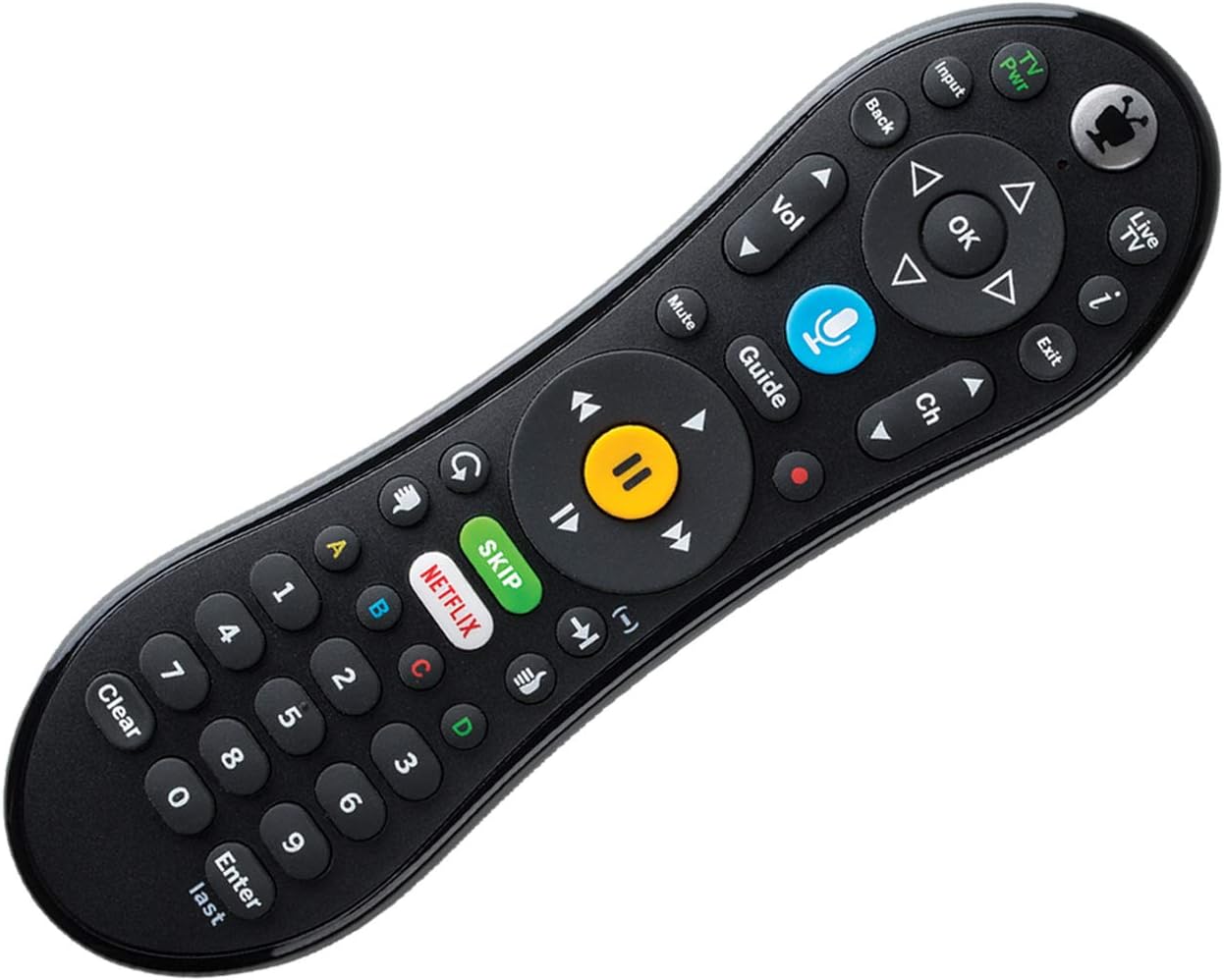
Figura 1: Frontal view of the TiVo LUX Remote, highlighting the button layout.
2. Instruccions de configuració
2.1. Instal·lació de la bateria
The TiVo LUX Remote requires two (2) AA batteries (not included). To install:
- Localitzeu el compartiment de la bateria a la part posterior del comandament a distància.
- Feu lliscar la tapa de la bateria.
- Introduïu dues piles AA, assegurant-vos de la polaritat correcta (+ i -).
- Substituïu la tapa de la bateria.
2.2. Initial Pairing with TiVo Device
The TiVo LUX Remote typically pairs automatically with your TiVo device. If it does not, or if you are pairing a new remote, follow these steps:
- Ensure your TiVo device is powered on.
- Insert the USB dongle (if applicable) into an available USB port on your TiVo device.
- Press any button on the remote. The light at the top of the TiVo button should blink.
- The remote should automatically attempt to pair. Once successfully paired, the light will blink rapidly and then turn off.
Video 1: Instructions on how to pair your TiVo remote with the USB dongle.
3. Operating the TiVo LUX Remote
3.1. Navegació bàsica
- Tecla direccional (fletxes): Navigate menus and guides.
- Botó D'acord: Selecciona un element o confirma una acció.
- Botó enrere: Torna a la pantalla anterior.
- Botó TiVo: Access the TiVo Central menu.
- Botó de TV en directe: Switch to live television.
- Botó de guia: Open the program guide.
3.2. Controls de reproducció multimèdia
- Reproduir/pausa: Inicia o posa en pausa la reproducció.
- Avançar/rebobinar ràpid: Control playback speed.
- Botó Salta: Instantly skip commercial breaks (where available).
- Botó de gravació: Initiate recording of a program.
3.3. Control per veu
The TiVo LUX Remote features a built-in microphone for voice commands:
- Manteniu premut el botó Voice (Microphone) button.
- Speak your command clearly into the microphone at the top of the remote.
- Release the Voice button when finished speaking.
Examples of voice commands include: "Find [Movie Title]", "Go to Netflix", "Change to Channel 7", "Record this show".

Figure 2: The TiVo LUX Remote's backlit keypad feature, enhancing visibility in low-light environments.
4. Manteniment
4.1. Substitució de la bateria
Replace batteries when the remote's performance degrades or the backlight becomes dim. Refer to Section 2.1 for battery installation instructions. Always use fresh AA batteries.
4.2. Neteja
To clean your remote, gently wipe it with a soft, dry cloth. Avoid using liquid cleaners or abrasive materials, as these can damage the remote's surface or internal components.
5. Solució De Problemes
5.1. El comandament a distància no respon
- Comproveu les bateries: Assegureu-vos que les piles estiguin instal·lades correctament i que tinguin la càrrega suficient. Substituïu-les si cal.
- Line of Sight (IR Mode): If using IR mode, ensure there are no obstructions between the remote and your TiVo device.
- Reemparellament del comandament a distància: If the remote is blinking red at the top of the TiVo button, it may be in IR mode and needs to be re-paired for RF and voice functionality.
5.2. Re-pairing Your TiVo LUX Remote
If your remote is not functioning correctly or you need to re-establish an RF connection for voice control, follow these steps:
- Manteniu premut el botó Botó TiVo i el TV Power button simultaneously until the red light at the top of the remote illuminates.
- Premeu ràpidament el botó Thumbs Down button three times, then press Entra.
- The light at the top of the remote will blink slowly, then increase in speed as it attempts to re-pair.
- Once successfully re-paired, the light will blink rapidly and then turn off.
Video 2: Detailed guide on how to re-pair your TiVo Vox Remote (applicable to TiVo LUX Remote).
5.3. Problemes de compatibilitat
This remote is compatible with TiVo EDGE series and TiVo BOLT series DVRs, plus TiVo Mini VOX. Full RF functionality, including voice control, may require TiVo Experience 4 user interface. Older TiVo Experience versions (e.g., TiVo Experience 3 or Classic) may only support IR mode.
6. Especificacions
| Característica | Detall |
|---|---|
| Marca | TiVo |
| Número de model | C00305 |
| Dispositius compatibles | TiVo Bolt, TiVo Edge, TiVo Mini VOX |
| Tecnologia de connectivitat | Infraroig (IR), Radiofreqüència (RF) |
| Característiques especials | Backlit, Voice Search |
| Color | Negre |
| Pes de l'article | 8.8 unces |
| Dimensions del producte | 8.25 x 3.25 x 1.75 polzades |
| Piles necessàries | 2 piles AA (no incloses) |
7. Informació de la garantia
Please refer to the warranty documentation included with your TiVo LUX Remote or visit the official TiVo weblloc web per obtenir informació detallada sobre els termes i condicions de la garantia. Conserveu el comprovant de compra per a reclamacions de garantia.
8. Atenció al client
For further assistance, technical support, or to purchase replacement parts, please visit the official TiVo support website or contact TiVo customer service directly. Contact information can typically be found on the TiVo weblloc web o a l'embalatge del producte.


