1. Introducció
This manual provides instructions for the Apple Smart Battery Case with Qi Wireless Charging, designed specifically for the iPhone 11 Pro. This accessory extends your iPhone's battery life and offers protection, while supporting Qi-compatible wireless charging.
2. Producte acabatview
The Smart Battery Case integrates an additional battery into a protective silicone shell. It features a soft microfiber lining to protect your iPhone and a flexible elastomer hinge for easy installation and removal.
Característiques principals:
- Durada de la bateria ampliada: Provides additional power for longer iPhone usage.
- Càrrega sense fil Qi: Supports wireless charging for both the case and the iPhone simultaneously.
- Disseny de protecció: Durable silicone exterior and soft microfiber interior safeguard the iPhone from daily wear.
- Integrated Battery Status: Battery status is displayed on the iPhone Lock screen and in Notification Center.
- Botó de la càmera: A dedicated camera button on the case allows for quick camera launch and photo/video capture.

Imatge 1: posterior view of the Apple Smart Battery Case for iPhone 11 Pro. This image shows the smooth white silicone exterior with the Apple logo centered on the back, and the camera cutout at the top left.
3. Configuració i instal·lació
Follow these steps to properly install your iPhone 11 Pro into the Smart Battery Case:
- Prepara el teu iPhone: Ensure your iPhone 11 Pro is clean and free of debris.
- Flex the case: Gently bend the top edge of the Smart Battery Case backward at the elastomer hinge.
- Insert iPhone: Slide your iPhone 11 Pro into the case, ensuring the Lightning connector on the case aligns and connects with the iPhone's Lightning port.
- Secure the iPhone: Push the iPhone fully into the case until it is seated securely. The flexible hinge will return to its original position, holding the iPhone firmly.

Imatge 2: posterior view of an iPhone 11 Pro securely installed within the Smart Battery Case. The image highlights how the case fits around the phone, with the camera module visible through the case's cutout.
To remove the iPhone, gently flex the top edge of the case again and slide the iPhone out.
4. Funcionament
Gestió automàtica de l'energia:
Once your iPhone is installed, the Smart Battery Case automatically begins charging your iPhone when its battery level is low. The case prioritizes charging the iPhone first, then itself.
Comprovació de l'estat de la bateria:
The battery status of both your iPhone and the Smart Battery Case can be viewed in two locations:
- Pantalla de bloqueig: When you connect the case or wake your iPhone, the battery status will briefly appear on the Lock screen.
- Centre de notificacions: Swipe down from the top-left corner of your iPhone screen to access the Notification Center. The battery widget will display the charge levels for both your iPhone and the Smart Battery Case.
Using the Camera Button:
The Smart Battery Case features a dedicated camera button on the right side. This button functions as follows:
- Quick Launch: Press the button once to quickly open the Camera app, even if your iPhone is locked.
- Captura de fotos: Press the button once while in the Camera app to take a photo.
- Gravació de vídeo: Press and hold the button to record a QuickTake video. Release to stop recording.

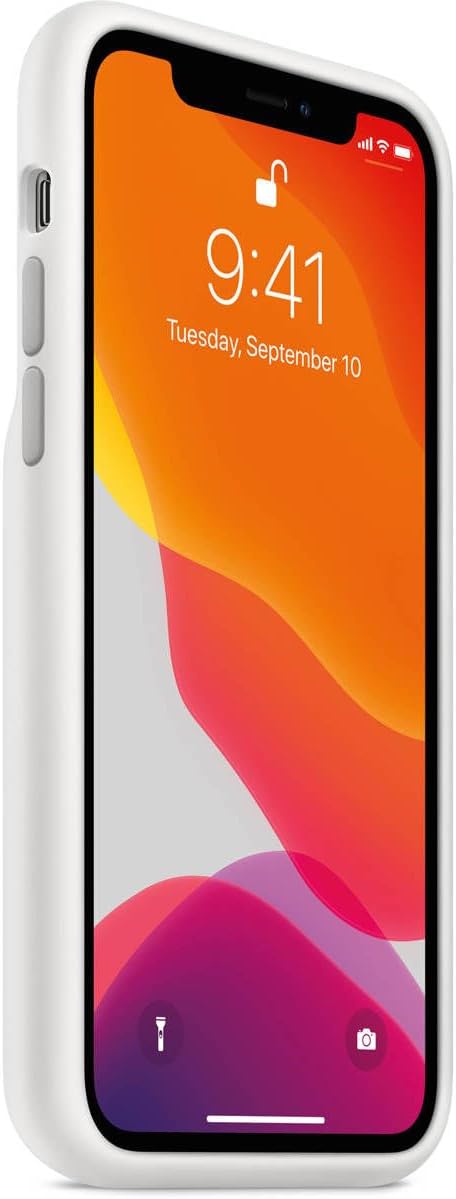
Imatge 3: Lateral view of an iPhone 11 Pro within the Smart Battery Case, highlighting the volume buttons and the dedicated camera button on the right side of the case.
5. Charging the Smart Battery Case and iPhone
The Smart Battery Case and your iPhone can be charged simultaneously using either a Lightning cable or a Qi-compatible wireless charger.
Càrrega per cable:
- Connect a Lightning to USB cable (not included) to the Lightning port at the bottom of the Smart Battery Case.
- Connecteu l'altre extrem del cable a un adaptador de corrent USB (no inclòs) o al port USB d'un ordinador.
- Both the iPhone and the Smart Battery Case will begin charging. For faster charging, use an 18W or higher USB-PD compatible power adapter.
Wireless Charging (Qi-compatible):
- Place the Smart Battery Case with your iPhone installed onto a Qi-certified wireless charging mat or stand.
- Ensure the case is properly aligned with the charging mat's charging coil.
- Both the iPhone and the Smart Battery Case will begin charging wirelessly.
Imatge 4: Part inferior view of an iPhone 11 Pro within the Smart Battery Case, illustrating the Lightning port for wired charging and speaker/microphone cutouts.
6. Manteniment i cura
Proper care ensures the longevity and performance of your Smart Battery Case.
- Neteja de l'exterior: Feu servir un drap suau i sense borrissol, lleugerament humitampened with water, to wipe the silicone exterior. Avoid harsh chemicals or abrasive materials.
- Neteja de l'interior: Periodically remove your iPhone and gently wipe the microfiber lining with a dry, soft cloth to remove any dust or debris.
- Eviteu temperatures extremes: Do not expose the case to extreme heat or cold, as this can affect battery performance and case integrity.
- Protegir dels líquids: The case is not waterproof. Avoid contact with liquids.
7. Solució De Problemes
If you encounter issues with your Smart Battery Case, consider the following common solutions:
- Case Not Charging iPhone:
- Ensure the iPhone is properly seated in the case and the Lightning connector is fully engaged.
- Check the iPhone's battery widget to confirm the case's charge level.
- Remove and re-insert the iPhone into the case.
- Case Not Charging Itself:
- For wired charging, ensure the Lightning cable and power adapter are functioning correctly and securely connected. Try a different cable or adapter.
- For wireless charging, ensure the case is correctly positioned on a Qi-compatible charging mat. Try repositioning or using a different charging mat.
- Ensure the charging port on the case is free of debris.
- iPhone Not Recognizing Case:
- Reinicia el teu iPhone.
- Ensure your iPhone's software is up to date.
- Remove the iPhone from the case, clean the Lightning connector on both the iPhone and the case, then re-install.
If issues persist, contact Apple Support for further assistance.
8. Especificacions
| Marca | Apple |
| Número de model | MWVM2LL/A |
| Models de telèfon compatibles | iPhone 11 Pro |
| Material | Silicone (exterior), Microfiber (interior) |
| Color | Blanc |
| Dimensions (L x A x A) | 6.97 x 3.7 x 0.91 polzades |
| Pes de l'article | 7.2 unces |
| Tipus de bateria | Ió de liti (inclòs) |
| Carregant | Qi Wireless Charging, Lightning Port |
| Característiques especials | Slim Fit, Dedicated Camera Button |
9. Garantia i Suport
Apple products are covered by a limited warranty. For detailed warranty information, please refer to the warranty documentation included with your product or visit the official Apple weblloc.
Atenció al client:
For technical assistance, service, or additional information, please contact Apple Support:
- Assistència en línia: Visita support.apple.com
- Suport telefònic: Refer to the Apple Support weblloc web per a números de contacte locals.
Please have your product's serial number (if applicable) and proof of purchase ready when contacting support.


