1. Introducció
Gràcies per la compraasing the Unic UC68 Multimedia Home Theatre LED Projector. This manual provides essential information for setting up, operating, and maintaining your projector to ensure optimal performance and longevity. Please read this manual thoroughly before using the product and keep it for future reference.
2. Informació de seguretat
Per garantir un funcionament segur i evitar danys, observeu les següents precaucions de seguretat:
- No mireu directament a la lent del projector quan estigui encès.amp is on, as the strong light can cause eye damage.
- Ensure adequate ventilation around the projector. Do not block any ventilation openings.
- Col·loqueu el projector sobre una superfície estable i plana per evitar que caigui.
- Use only the power adapter supplied with the projector. Using an incorrect adapter may cause damage or fire.
- Keep the projector away from water, moisture, and other liquids. Do not operate in wet environments.
- Do not attempt to open or repair the projector yourself. Refer all servicing to qualified service personnel.
- Desendolleu el projector de la presa de corrent durant tempestes o quan no l'utilitzeu durant períodes prolongats.
3. Contingut del paquet
Si us plau, comproveu que tots els elements que s'enumeren a continuació estiguin inclosos al vostre paquet:
- Unic UC68 Projector Host
- Control remot
- Cable d'alimentació
- Cable AV
- Manual d'instruccions
- Lent Cap
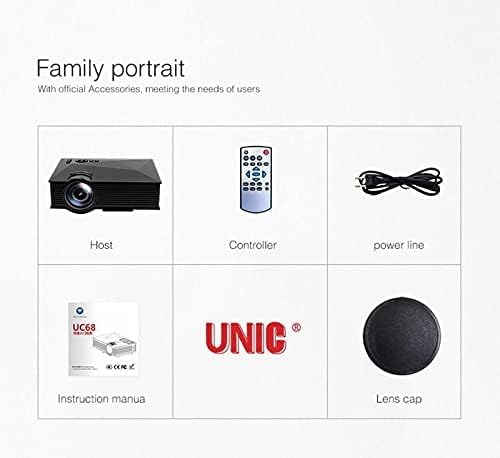
Image: The Unic UC68 projector package contents, showing the main unit, remote control, power cord, instruction manual, and lens cap.
4. Producte acabatview
Familiarize yourself with the various parts and ports of your Unic UC68 projector.

Imatge: Una imatge detallada view of the Unic UC68 projector, highlighting its lens, control buttons on top, and various input/output ports on the side.
Ports d'entrada/sortida

Image: A visual representation of the Unic UC68 projector's rear and side panels, indicating ports for HDMI, USB, SD card, AV, VGA, and audio out, along with examples of devices that can be connected.
| Port | Descripció |
|---|---|
| HDMI | Connect to devices like laptops, Blu-ray players, game consoles. |
| USB 2.0 (x2) | Connect USB flash drives for media playback or power external devices (5Vout-500mA). |
| Ranura per a targeta SD | Insert SD cards for direct media playback. |
| VGA | Connect to older computers or laptops. |
| AV | Connect to devices with composite video and stereo audio output (e.g., DVD players). |
| Headphone Port (3.5mm) | Connecteu altaveus externs o auriculars. |
5. Configuració
Segueix aquests passos per a la configuració inicial del projector:
- Col·locació: Place the projector on a stable, flat surface. Ensure there is enough space around the projector for proper ventilation. The ideal projection distance is between 1.07m and 3.8m.
- Connexió d'alimentació: Connect the power cable to the projector's power input and then plug it into a wall outlet.
- Font d'entrada de connexió: Connect your desired input device (e.g., laptop, game console, USB drive) to the appropriate port on the projector (HDMI, VGA, USB, AV, SD card).
- Encès: Press the power button on the projector or the remote control to turn on the projector. The LED indicator will light up.
- Ajust del focus: Once an image is displayed, rotate the focus ring on the projector lens until the image appears clear and sharp.
- Correcció Keystone: If the projected image appears trapezoidal, adjust the keystone correction (if available on your model, typically a manual slider near the lens) to square the image.
6. Instruccions de funcionament
Encès/Apagat
- Per encendre: Premeu el botó d'encesa del projector o del comandament a distància.
- Per apagar: Press the power button again. Wait for the fan to stop completely before unplugging the power cable.
Selecció de la font d'entrada
Use the 'Source' button on the remote control or the projector's control panel to cycle through available input sources (HDMI, VGA, AV, USB, SD).
Navegació pel menú
Use the arrow keys on the remote or projector to navigate through the on-screen menu. Press 'OK' or 'Enter' to confirm selections. Adjust settings such as picture mode, aspect ratio, and sound.
Media Playback (USB/SD)
Insert a USB flash drive or SD card into the respective port. The projector will typically prompt you to select the media type (Movie, Music, Photo, Text). Navigate to your desired file i premeu "D'acord" per reproduir.
7. Manteniment
Un manteniment adequat garanteix la longevitat i el rendiment del projector:
- Neteja de lents: Feu servir un drap suau i sense borrissol dissenyat específicament per a lents òptiques. No utilitzeu productes de neteja abrasius ni força excessiva.
- Neteja del filtre de pols: Regularly check and clean the dust filter (if accessible) to maintain proper airflow and prevent overheating. Refer to the specific location in your manual if applicable.
- Neteja exterior: Netegeu l'exterior del projector amb un drap suau i sec. Per a marques difícils, feu un drap lleugerament sec.amp Es pot fer servir un drap, però assegureu-vos que no entri humitat a l'aparell.
- Emmagatzematge: When not in use for extended periods, store the projector in a cool, dry, dust-free environment. Use the lens cap to protect the lens.
8. Solució De Problemes
Si teniu problemes amb el projector, consulteu els problemes i solucions més comuns següents:
| Problema | Causa possible | Solució |
|---|---|---|
| Sense poder | Power cable not connected; Power outlet faulty; Projector in standby mode. | Comproveu la connexió del cable d'alimentació; proveu una presa de corrent diferent; premeu el botó d'engegada. |
| Sense imatge | Incorrect input source selected; Input device not connected properly; Lens cap on. | Select correct input source; Reconnect input cable; Remove lens cap. |
| La imatge és borrosa | Focus not adjusted; Projection distance too far/close. | Ajusta l'anell d'enfocament; Ajusta la distància de projecció. |
| Sense so | Volume too low; Muted; External speakers not connected/configured. | Increase volume; Unmute; Check external speaker connection. |
| El control remot no funciona | Piles mortes/inserides incorrectament; Obstrucció entre el comandament a distància i el projector. | Canvieu les piles; assegureu-vos que la línia de visió amb el receptor d'infrarojos estigui clara. |
| Sobreescalfament del projector | Ventilation blocked; Dusty filters. | Ensure clear ventilation; Clean dust filters. |
9. Especificacions
| Característica | Especificació |
|---|---|
| Número de model | UC68 |
| Brillantor | 1800 lúmens (80 ANSI) |
| Resolució nativa | 800 x 480 RGB |
| Suport a la resolució | Up to 1920 x 1080 pixels (1080p) |
| Relació d'aspecte | 4:3 / 16:9 |
| LCD Contrast Ratio | 800:1 |
| LED Lamp La vida | Més de 20,000 hores |
| Lent | F=125 |
| Viewing Distància | 1.07 - 3.8 metres |
| Mida de projecció | 34 - 130 polzades |
| Gestió | Manual |
| Consum d'energia | 55 W màx |
| Sortida USB | 5 Vout-500 mA |
| Font d'alimentació | 100 V - 240 V / 0.9A (50/60Hz) |
| Ports d'entrada/sortida | 1 AV, 1 Headphone (3.5mm), 2 USB 2.0, 1 SD Card Slot, 1 HDMI, 1 VGA |
| Color | Negre |
| Pes de l'article | 1.34 quilos |
| Dimensions del paquet | 30 x 19.3 x 10.6 cm |
10. Garantia i Suport
This product comes with a standard manufacturer's warranty. For warranty claims, technical support, or service inquiries, please refer to the contact information provided with your purchase documentation or visit the official UNIC weblloc web. No intenteu reparar el dispositiu vosaltres mateixos, ja que això podria anul·lar la garantia.


