1. Introducció
The ID-COOLING FROSTFLOW 120 is an All-In-One (AIO) liquid cooling solution designed for Graphics Processing Units (GPUs). This cooler features a 120mm radiator and is engineered to provide efficient thermal management for compatible VGA cards, ensuring stable performance during demanding operations. This manual provides essential information for the proper installation, operation, and maintenance of your FROSTFLOW 120 liquid cooler.
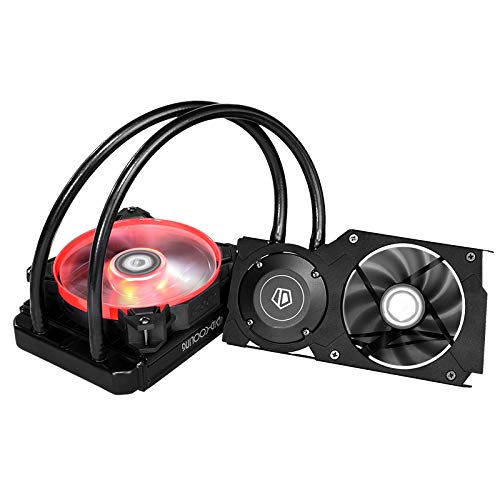
Imatge 1.1: acabatview of the ID-COOLING FROSTFLOW 120 VGA Liquid Cooler components, including the pump/cold plate assembly, radiator, and fan.
2. Compatibilitat
The FROSTFLOW 120 is designed for a range of NVIDIA and AMD graphics cards. Please verify your GPU's mounting hole dimensions and PCB layout against the cooler's specifications before installation.
Sèrie compatible:
- NVIDIA GeForce RTX 2070, RTX 2080, RTX 2080Ti Series
- AMD Radeon RX 5700, RX 5700XT Series
- NVIDIA GeForce GTX 1070, GTX 1080 Series
For specific models within these series, it is recommended to consult the ID-COOLING official website or product documentation for detailed compatibility lists and mounting hole patterns.
3. Contingut del paquet
Before proceeding with installation, ensure all components listed below are present and undamaged. If any parts are missing or damaged, contact customer support.
- FROSTFLOW 120 Pump/Cold Plate Assembly with Tubing
- Radiador de 120 mm
- Ventilador de refrigeració de 120 mm
- Mounting Brackets for various GPU models
- Cargols i elements de fixació
- Pasta tèrmica (preaplicada o en tub)
- VRAM/MOSFET Heatsinks
- Manual d'usuari (aquest document)
4. Configuració i instal·lació
Important: Before beginning installation, power off your computer and disconnect it from the power source. Handle all components with care to avoid damage from static electricity. It is recommended to wear an anti-static wrist strap.
4.1 Preparing Your Graphics Card
- Treure el refrigerador existent: Carefully remove the stock cooler from your graphics card. This typically involves unscrewing the mounting screws around the GPU core and disconnecting any fan or RGB cables.
- Clean GPU Die: Gently clean any residual thermal paste from the GPU die using isopropyl alcohol and a lint-free cloth.
- Install VRAM/MOSFET Heatsinks: Apply the provided VRAM and MOSFET heatsinks to the appropriate components on your graphics card's PCB. Ensure good contact and adhesion.
4.2 Muntatge de la bomba/placa freda
- Select Brackets: Choose the correct mounting brackets for your specific GPU model. Refer to the included installation guide for bracket identification.
- Attach Brackets to Pump: Secure the selected brackets to the pump base using the designated screws.
- Aplicar pasta tèrmica: If not pre-applied, apply a small amount of high-quality thermal paste to the center of the GPU die.
- Muntar la bomba: Carefully align the pump/cold plate assembly with the GPU die and the mounting holes on the PCB. Gently lower the pump onto the GPU.
- Bomba segura: From the back of the VGA card, secure the pump using the spring-loaded screws. Tighten screws in a diagonal pattern until snug, but do not overtighten.

Imatge 4.1: Primer pla view of the ID-COOLING FROSTFLOW 120 pump/cold plate assembly correctly installed on a graphics card, showing the secure mounting.
4.3 Instal·lació del radiador i del ventilador
- Attach Fan to Radiator: Mount the 120mm cooling fan to the radiator using the provided fan screws. Ensure the fan is oriented to push or pull air in the desired direction (typically pushing air through the radiator and out of the case).
- Muntar el radiador: Install the radiator assembly into an available 120mm fan mount in your PC case. Common locations include the rear exhaust, top, or front of the case. Secure with appropriate screws.

Image 4.2: The ID-COOLING FROSTFLOW 120 radiator and fan assembly mounted as a rear exhaust in a PC case, demonstrating proper placement.
4.4 Connexions de cable
- Potència de la bomba: Connect the pump's 3-pin power cable to an available 3-pin fan header on your motherboard or a dedicated pump header.
- Potència del ventilador: Connect the 120mm radiator fan's 3-pin power cable to an available 3-pin fan header on your motherboard.
- VRAM Fan Power (if applicable): If your GPU cooler includes a separate fan for VRAM cooling, connect its 3-pin power cable to an appropriate header.
Note: The pump and fan are typically 3-pin and will run at full speed. If PWM control is desired, a separate adapter or fan controller may be required.
5. Instruccions de funcionament
Once installed, the FROSTFLOW 120 operates automatically to cool your GPU. Upon system startup, the pump and fans will begin operating. Monitor your GPU temperatures using system monitoring software to ensure optimal cooling performance.
- Inici inicial: After installation, power on your system and check for any unusual noises or leaks. Verify that the pump and fan are spinning.
- Monitorització de la temperatura: Use GPU monitoring software (e.g., MSI Afterburner, HWMonitor) to observe GPU core temperatures under idle and load conditions. Typical idle temperatures should be significantly lower than with air cooling, and load temperatures should remain within safe operating limits.
- Control del ventilador: While the included fans are 3-pin, some motherboards or software may offer voltage-based fan control. Adjust fan curves as desired for a balance of cooling performance and noise levels.
6. Manteniment
Regular maintenance helps ensure the longevity and optimal performance of your FROSTFLOW 120 liquid cooler.
- Neteja de pols: Periodically clean dust from the radiator fins and fan blades using compressed air or a soft brush. Excessive dust buildup can impede airflow and reduce cooling efficiency.
- Inspecció de tubs: Inspect the tubing for any signs of kinks, cracks, or leaks. Ensure connections remain secure.
- Comprovació de la bomba: Escolteu qualsevol soroll inusual de la bomba, que podria indicar un problema.
- Pasta tèrmica: While not frequently required, if you notice a significant increase in GPU temperatures over time, reapplying thermal paste to the GPU die may be beneficial.
7. Solució De Problemes
| Problema | Causa possible | Solució |
|---|---|---|
| High GPU Temperatures |
|
|
| Pump or Fan Not Spinning |
|
|
| Sorolls inusuals |
|
|
8. Especificacions
| Característica | Detall |
|---|---|
| Marca | ID-REFREDAMENT |
| Model | FROSTFLOW 120 |
| Mètode de refrigeració | Líquid |
| Mida del radiador | 120 mm |
| Material | Alumini, coure |
| Tipus de connector d'alimentació | 3-Pin (for Pump and Fan) |
| Voltage | 12 Volts |
| Wattage | 2.4 watts |
| Nivell de soroll | 26.4 decibels |
| Velocitat de rotació màxima | 1500 RPM |
| Dispositius compatibles | Desktop (GPU Cooler) |
| Pes de l'article | 2.91 lliures |
| Dimensions del paquet | 11.3 x 7.9 x 5.8 polzades |
9. Garantia i Suport
For warranty information, technical support, or to report missing/damaged parts, please contact ID-COOLING customer service. Refer to the product packaging or the official ID-COOLING weblloc per obtenir dades de contacte.
ID-COOLING Official Weblloc: www.idcooling.com


