1. Introducció
The ANENG AN8009 is a compact, auto/manual ranging True-RMS digital multimeter designed for accurate measurement of various electrical parameters. It is suitable for use in automotive maintenance, electrical engineering, and educational laboratories. This manual provides detailed instructions for the safe and effective operation, setup, and maintenance of your AN8009 multimeter.
2. Informació de seguretat
To ensure safe operation and service of the meter, please read all instructions carefully before use. Failure to observe safety warnings can result in electric shock, fire, or damage to the meter.
- Always disconnect test leads from the circuit before changing functions.
- No apliqueu més del volum nominaltage, tal com està marcat al comptador, entre els terminals o entre qualsevol terminal i terra.
- Tingueu molta precaució quan treballeu amb voltagper sobre de 30 V CA RMS, 42 V pic o 60 V CC. Aquest volumtagsuposen un risc de xoc.
- Keep your fingers behind the probe barriers during measurements.
- No utilitzeu el mesurador si sembla danyat o si l'aïllament dels cables de prova està compromès.
- Ensure the battery cover is securely closed before operating the meter.
- Canvieu les piles immediatament quan aparegui l'indicador de bateria baixa per garantir lectures precises.
3. Producte acabatview
The ANENG AN8009 multimeter features a large, backlit LCD display for clear readings in various lighting conditions. It includes a rotary function switch, input jacks, and various buttons for mode selection and data hold.
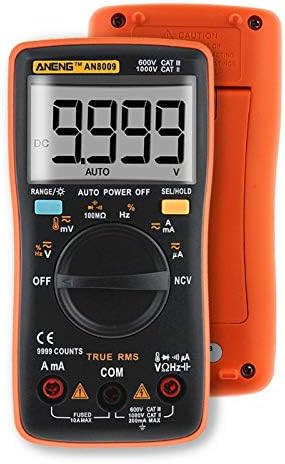
Figura 3.1: Frontal View of ANENG AN8009 Digital Multimeter. This image displays the multimeter's front panel, showing the large digital display, rotary function switch, input jacks (VΩHz, COM, A, mA), and various function buttons. The orange casing is visible around the black main body.
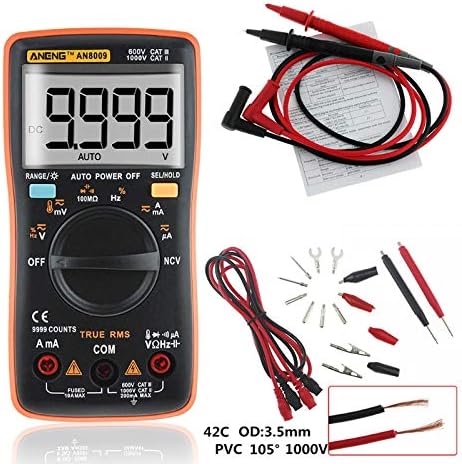
Figure 3.2: ANENG AN8009 Digital Multimeter with Test Leads and Accessories. This image shows the ANENG AN8009 multimeter alongside its standard accessories, including red and black test leads, alligator clips, and various probe tips. A user manual is also visible in the background.
3.1 Components clau
- Pantalla LCD: Mostra lectures de mesura, unitats i indicadors de funció.
- Interruptor de funció: Rotary dial to select measurement modes (Voltage, corrent, resistència, etc.).
- Preses d'entrada: Terminals for connecting test leads (VΩHz, COM, A, mA).
- Botons: For features like RANGE, AUTO POWER OFF, SEL/HOLD, and backlight activation.
4. Configuració
4.1 Instal·lació de la bateria
The ANENG AN8009 requires two 1.5V AAA batteries (not included) for operation.
- Assegureu-vos que el multímetre estigui apagat.
- Localitzeu el compartiment de la bateria a la part posterior del mesurador.
- Feu servir un tornavís per obrir la tapa del compartiment de la bateria.
- Insert two 1.5V AAA batteries, observing the correct polarity (+ and -).
- Substituïu la tapa del compartiment de la bateria i fixeu-la amb el cargol.
4.2 Connexió dels cables de prova
Always connect the black test lead to the COM (common) jack. Connect the red test lead to the appropriate input jack based on the desired measurement:
- VΩHz: Per al voltagMesures de resistència, freqüència, capacitància, díode i continuïtat.
- mA: Per a mesures de corrent de fins a 600 mA.
- A: Per a mesures de corrent fins a 10A.
5. Instruccions de funcionament
Turn the rotary switch to the desired function. The meter typically defaults to auto-ranging. Press the 'SEL' button to switch between functions within a single rotary switch position (e.g., AC/DC voltage, díode/continuïtat).
5.1 DC/AC Voltage Measurement (V, mV)
- Connect the black lead to COM and the red lead to VΩHz.
- Turn the rotary switch to the V (Voltage) position. The meter will typically default to DCV. Press 'SEL' to switch to ACV if needed.
- Connecteu les sondes de prova en paral·lel al circuit o component que s'està provant.
- Llegeix el voltage valor a la pantalla.
5.2 DC/AC Current Measurement (A, mA, uA)
Precaució: Never connect the meter in parallel to a voltage source when measuring current. This can blow the fuse or damage the meter. Always connect in series with the load.
- Connect the black lead to COM. Connect the red lead to mA for currents up to 600mA, or to A for currents up to 10A.
- Turn the rotary switch to the A (Current) position. Press 'SEL' to switch between DC/AC current or different ranges (uA, mA, A) if necessary.
- Open the circuit where current is to be measured and connect the meter in series.
- Llegiu el valor actual a la pantalla.
5.3 Mesura de resistència (Ω)
- Connect the black lead to COM and the red lead to VΩHz.
- Turn the rotary switch to the Ω (Resistance) position.
- Ensure the circuit is de-energized before measuring resistance. Connect the test probes across the component.
- Llegiu el valor de resistència a la pantalla.
5.4 Capacitance Measurement (nF, uF, mF)
- Connect the black lead to COM and the red lead to VΩHz.
- Turn the rotary switch to the Capacitance position.
- Discharge the capacitor completely before measurement. Connect the test probes across the capacitor terminals.
- Llegiu el valor de la capacitat a la pantalla.
5.5 Frequency Measurement (Hz, KHz, MHz)
- Connect the black lead to COM and the red lead to VΩHz.
- Turn the rotary switch to the Hz (Frequency) position.
- Connecteu les sondes de prova en paral·lel a la font de senyal.
- Llegiu el valor de la freqüència a la pantalla.
5.6 Prova de díodes
- Connect the black lead to COM and the red lead to VΩHz.
- Turn the rotary switch to the Diode/Continuity position. Press 'SEL' until the diode symbol appears.
- Connect the red probe to the anode and the black probe to the cathode of the diode.
- A forward voltage drop will be displayed for a good diode. Reverse the probes; the display should show 'OL' (open loop).
5.7 Prova de continuïtat
- Connect the black lead to COM and the red lead to VΩHz.
- Turn the rotary switch to the Diode/Continuity position. Press 'SEL' until the continuity symbol appears.
- Connecteu les sondes de prova a través del circuit o component.
- If continuity exists (resistance below approximately 50Ω), the buzzer will sound.
5.8 Mesura de la temperatura
- Connect the temperature probe (K-type thermocouple) to the VΩHz and COM jacks, observing polarity.
- Turn the rotary switch to the Temp position.
- Col·loqueu la punta de la sonda sobre o a prop de l'objecte la temperatura del qual es vol mesurar.
- Read the temperature value on the display (in °C or °F).
5.9 Vol. sense contactetage (NCV) Detecció
- Gireu l'interruptor giratori a la posició NCV.
- Move the top end of the meter close to the conductor being tested.
- Si AC voltage is detected, the meter will emit an audible beep and the NCV indicator will light up.
5.10 Funció de retenció de dades
Premeu el botó «HOLD» per congelar la lectura actual a la pantalla. Torneu-lo a prémer per desactivar la funció de retenció.
5.11 Llum de fons
Press the backlight button (often combined with 'HOLD' or 'SEL') to turn the display backlight on or off. The backlight typically turns off automatically after a short period to conserve battery life.
6. Manteniment
6.1 Neteja
Netegeu el cas amb l'anunciamp drap i detergent suau. No utilitzeu abrasius ni dissolvents. Mantingueu els terminals d'entrada lliures de brutícia i humitat.
6.2 Substitució de la bateria
When the low battery indicator appears on the display, replace the batteries as described in Section 4.1. Using the meter with a low battery can lead to inaccurate readings.
6.3 Canvi de fusibles
If the current measurement function fails, the fuse may need replacement. The AN8009 typically uses two fuses: a 200mA/250V fast-blow fuse for the mA input and a 10A/250V fast-blow fuse for the A input. Refer to the markings on the meter for exact fuse specifications. Fuse replacement should only be performed by qualified personnel.
- Ensure the meter is powered off and test leads are disconnected.
- Open the battery compartment and then the main casing screws (if applicable, consult the meter's physical design).
- Carefully remove the old fuse and replace it with a new fuse of the identical type and rating.
- Reassemble the meter, ensuring all screws are tightened.
6.4 Emmagatzematge
Si no heu d'utilitzar el mesurador durant un període prolongat, traieu-ne les piles per evitar fuites i danys. Guardeu el mesurador en un lloc fresc i sec, allunyat de la llum solar directa i de temperatures extremes.
7. Solució De Problemes
- No display or faint display: Comproveu la instal·lació i la càrrega de la bateria. Canvieu les bateries si cal.
- Es mostra 'OL' (sobrecàrrega): The input value exceeds the selected range or the maximum measurement capability of the meter. Select a higher range or ensure the input is within specifications.
- Lectures incorrectes: Check battery level, ensure test leads are properly connected, and verify the correct function is selected. Clean input jacks if dirty.
- La mesura de corrent no funciona: Check the fuse for the respective current input (mA or A). Replace if blown.
8. Especificacions
| Paràmetre | Especificació |
|---|---|
| Temperatura de funcionament | 0 - 40 °C |
| Humitat de funcionament | 75% HR |
| Condició d'emmagatzematge | -20 ~ 60 °C |
| Humitat d'emmagatzematge | 80% HR |
| Mode de funcionament | Distància automàtica/manual |
| Interval de temperatura de mesura | -20 ~ 1000 °C / -4 ~ 1832 °F |
| Rang de mesura de capacitança | 9.99nF / 99.99nF / 999.9nF / 9.99uF / 99.99uF / 999.9uF / 9.999mF |
| Volum de mesuratage Range (DC/AC) | 999.9mV / 9.999V / 99.99V / 999.9V (DC) / 750V (AC) |
| Measuring Current Range (DC/AC) | 99.99uA / 999.9uA / 999.9mA / 9.999A |
| Rang de mesura de resistència | 99.99Ω / 999.9Ω / 9.999kΩ / 99.99kΩ / 999.9kΩ / 99.99MΩ |
| Interval de freqüència | 99.99Hz / 999.9Hz / 9.999KHz / 99.99KHz / 999.9KHz / 9.999MHz |
| Sortida d'ona quadrada | 50Hz - 1000Hz (various steps) |
| Tipus de visualització | Digital Display (9999 Counts) |
| Prova de díode | Sí |
| Continuïtat | Sí |
| Cicle de treball | 1% - 99% |
| Sampli Rate | 3 vegades per segon |
| Poder | 2 * 1.5V AAA batteries |
9. Garantia i Suport
Per obtenir informació sobre la garantia i assistència tècnica, consulteu la documentació que s'inclou amb la compra o poseu-vos en contacte directament amb el venedor/fabricant. Conserveu el rebut de compra com a comprovant de compra.


