1. Introducció
The DiamondBoxx PA15 is a versatile, large portable Bluetooth speaker designed for various audio applications, including use as a guitar amplifier, DJ speaker, PA system, or karaoke machine. This manual provides detailed instructions for setting up, operating, and maintaining your PA15 speaker to ensure optimal performance and longevity.
2. Característiques del producte
- High-fidelity audio output suitable for large venues.
- Connectivitat Bluetooth integrada per a la transmissió d'àudio sense fil.
- Multiple input options: USB, XLR, Auxiliary.
- Includes two wireless microphones for vocal performances and karaoke.
- Comandament a distància per a un funcionament còmode.
- Built-in wheels and retractable handle for enhanced portability.
- Adjustable audio controls including Volume, Treble, Bass, Echo, Repeat, and Delay.
- Microphone priority function for clear announcements.
3. Què hi ha a la caixa
Upon unpacking your DiamondBoxx PA15, please verify that all the following items are included:
- DiamondBoxx PA15 Portable Bluetooth Speaker
- 2 micròfons sense fils
- Control remot
- Cable d'alimentació
- Manual d'usuari (aquest document)
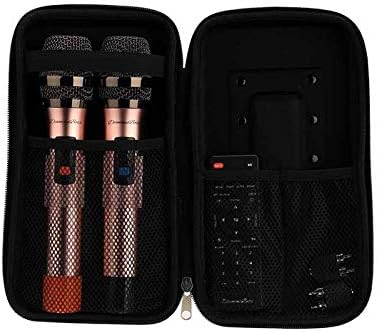
Figura 3.1: Included wireless microphones and remote control in their storage case.
4. Configuració
4.1 Desembalatge i col·locació
- Traieu amb cura l'altaveu i tots els accessoris de l'embalatge.
- Place the speaker on a stable, flat surface. Ensure adequate ventilation around the unit.
- For portability, extend the retractable handle and utilize the built-in wheels.
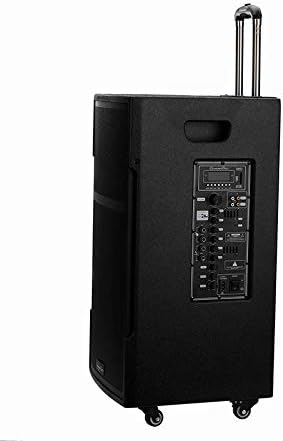
Figura 4.1: DiamondBoxx PA15 speaker with extended handle for transport.
4.2 Connexió d'alimentació
- Connect the provided power cable to the AC INPUT port on the rear control panel of the speaker.
- Plug the other end of the power cable into a standard 110V/60Hz AC power outlet.
- Ensure the POWER switch on the control panel is in the OFF position before connecting to power.
- The speaker can operate on internal battery power or directly from AC power. For initial use, it is recommended to fully charge the battery.
5. Instruccions de funcionament
5.1 Tauler de control acabatview
Familiarize yourself with the control panel located on the rear of the speaker. This panel provides access to all input connections and audio adjustments.
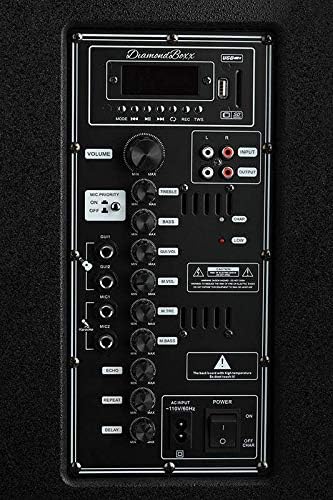
Figura 5.1: DiamondBoxx PA15 Control Panel.
- VOLUM: Master volume control for all audio output.
- AGUTS / BAIXS: Adjusts the high and low frequencies of the main audio output.
- PRIORITAT MIC: When activated, lowers music volume when microphone is in use.
- ENTRADA DE GUITARRA: 1/4-inch input for connecting a guitar.
- MIC1 / MIC2 INPUTS: 1/4-inch inputs for wired microphones.
- MIC VOL / MIC BASS: Volume and bass controls for connected microphones.
- ECHO / REPEAT / DELAY: Effects controls for microphone inputs.
- USB / SD Card Slot: Per reproduir àudio filedes de unitats USB o targetes SD.
- ENTRADA / SORTIDA RCA: Stereo RCA jacks for connecting external audio sources or outputting audio to another device.
- ENTRADA XLR: Professional audio input for microphones or other audio equipment.
- ENTRADA CA: Connexió del cable d'alimentació.
- Interruptor d'alimentació: Activa o desactiva l'altaveu.
5.2 Engegada/apagada
- To power on, flip the PODER switch to the ON position. The display screen will illuminate.
- To power off, flip the PODER canviar a la posició OFF.
5.3 Vinculació Bluetooth
- Assegureu-vos que l'altaveu estigui encès.
- Premeu el botó MODE button on the control panel or remote control until "Bluetooth" mode is selected. The display will show "BLUE" and a blinking Bluetooth icon, indicating it's ready for pairing.
- Al dispositiu mòbil (telèfon intel·ligent, tauleta, ordinador), activeu el Bluetooth i cerqueu els dispositius disponibles.
- Select "DiamondBoxx PA15" from the list of devices.
- Once paired, the speaker will emit a confirmation sound, and the Bluetooth icon on the display will stop blinking.
- Ara pots reproduir àudio en streaming sense fil des del dispositiu a l'altaveu.
5.4 Ús de micròfons sense fil
- Insert two AA batteries into each wireless microphone (batteries not included).
- Turn on the microphones using their respective power switches.
- The microphones will automatically connect to the PA15 speaker.
- Ajusteu el volum del micròfon amb el botó MIC VOL knob and microphone bass using the MIC BASS knob on the control panel.
- Apply echo effects using the ECO, REPETIR, i RETARD knobs as desired.
- Activa el PRIORITAT MIC switch if you want the music volume to automatically lower when speaking into the microphone.
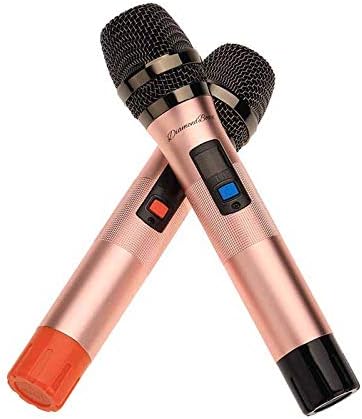
Figura 5.2: Included wireless microphones.
5.5 Other Audio Inputs
- Targeta USB/SD: Insert a USB drive or SD card into the respective slot. The speaker will automatically switch to USB/SD mode and begin playing compatible audio files. Use the playback controls on the panel or remote.
- Entrada XLR: Connect professional audio equipment (e.g., mixers, wired microphones) using an XLR cable.
- Entrada RCA: Connect devices with RCA audio output (e.g., CD players, older media players) using RCA cables.
- Entrada de guitarra: Plug your guitar directly into the GUITARRA 1/4-inch input. Adjust the main VOLUM, AGUTS, i BASS for your desired sound.
6. Manteniment
- Neteja: Feu servir un drap suau i sec per netejar l'exterior de l'altaveu. No utilitzeu productes de neteja abrasius ni dissolvents.
- Emmagatzematge: Quan no l'utilitzeu durant períodes prolongats, guardeu l'altaveu en un lloc fresc i sec.
- Cura de la bateria: For optimal battery life, avoid fully discharging the battery frequently. Recharge the battery regularly, even if the speaker is not in active use.
- Ventilació: Assegureu-vos que les reixetes de ventilació de l'altaveu no estiguin obstruïdes per evitar el sobreescalfament.
7. Solució De Problemes
| Problema | Causa possible | Solució |
|---|---|---|
| Sense poder | Power cable not connected; Power switch off; Battery depleted | Ensure power cable is securely connected and plugged in. Flip POWER switch to ON. Charge the battery. |
| Sense sortida de so | Volum massa baix; Mode d'entrada incorrecte; Dispositiu no connectat correctament | Augmentar VOLUM knob. Press MODE to select correct input (Bluetooth, USB, AUX). Reconnect audio source. |
| Bluetooth no emparellat | Speaker not in pairing mode; Device Bluetooth off; Too far from speaker | Ensure speaker is in Bluetooth mode (blinking BLUE). Turn on Bluetooth on your device. Move device closer to speaker (within 30 feet). |
| El micròfon sense fil no funciona | Microphone off; Batteries depleted; MIC VOL too low | Turn on microphone. Replace batteries. Increase MIC VOL perilla. |
| Distorsió del so | Volume too high; Input signal too strong | Lower the master VOLUM or the volume from the input source. Adjust AGUTS/BASS configuracions. |
8. Especificacions
| Característica | Detall |
|---|---|
| Marca | DiamondBoxx |
| Número de model | 686091727578 (PA15) |
| Font d'alimentació | Hybrid Powered (AC/Battery) |
| Tecnologia de connectivitat | Bluetooth, USB |
| Tipus de connector | USB, XLR, 1/4-inch (Guitar/Mic), RCA |
| Entrada d'àudio | Wireless Microphone, Auxiliary/USB, XLR, Guitar |
| Nombre de canals | 2 |
| Material | Metall, plàstic |
| Pes de l'article | 60 lliures |
| Dimensions del paquet | 33 x 22 x 19 polzades |
| Color | Negre |
| Tipus de muntatge | Taula |
| Usos recomanats | Concerts, Conferences, Places of Worship, Outdoor Events, Schools, Music Performances, Karaoke, General Sound Amplificació |
9. Informació de seguretat
ADVERTIMENT: Aquest producte us pot exposar a substàncies químiques, com ara el plom, que l'estat de Califòrnia sap que causa càncer i defectes de naixement o altres danys reproductius. Per a més informació aneu a www.P65Warnings.ca.gov.
Always follow basic safety precautions when using electrical products to reduce the risk of fire, electric shock, and injury to persons, including the following:
- Llegiu totes les instruccions abans d'utilitzar el producte.
- No utilitzar prop de l'aigua.
- Netegeu només amb un drap sec.
- No obstruïu cap obertura de ventilació.
- No instal·leu a prop de cap font de calor com ara radiadors, registres de calor, estufes o altres aparells (inclosos amplificadors) que produeixen calor.
- Eviteu que el cable d'alimentació sigui trepitjat o pessigat.
- Utilitzeu només accessoris/accessoris especificats pel fabricant.
- Desendolleu aquest aparell durant les tempestes amb llamps o quan no l'utilitzeu durant llargs períodes de temps.
10. Garantia i Suport
For warranty information, technical support, or service inquiries, please contact DiamondBoxx customer service directly. Refer to the official DiamondBoxx weblloc web o la documentació de compra per obtenir dades de contacte específiques i condicions de garantia.


