1. Introducció
This manual provides comprehensive instructions for the setup, operation, and maintenance of your SIMOLIO Wireless TV Headphones. Designed for enhanced voice clarity and comfortable listening, these headphones offer a superior audio experience for television viewing.
2. Contingut del paquet
Si us plau, verifiqueu que tots els elements que s'enumeren a continuació estiguin inclosos al vostre paquet:
- SIMOLIO Wireless Headphones (1 unit)
- Wireless Transmitter (1 unit)
- Optical Fiber Cable (1 unit)
- RCA Audio Cable (1 unit)
- 3.5mm Audio Cable (1 unit)
- USB Charging Cable for Headphone (1 unit)
- Adaptador de corrent (1 unitat)
- Spare Rechargeable Battery (1 unit)
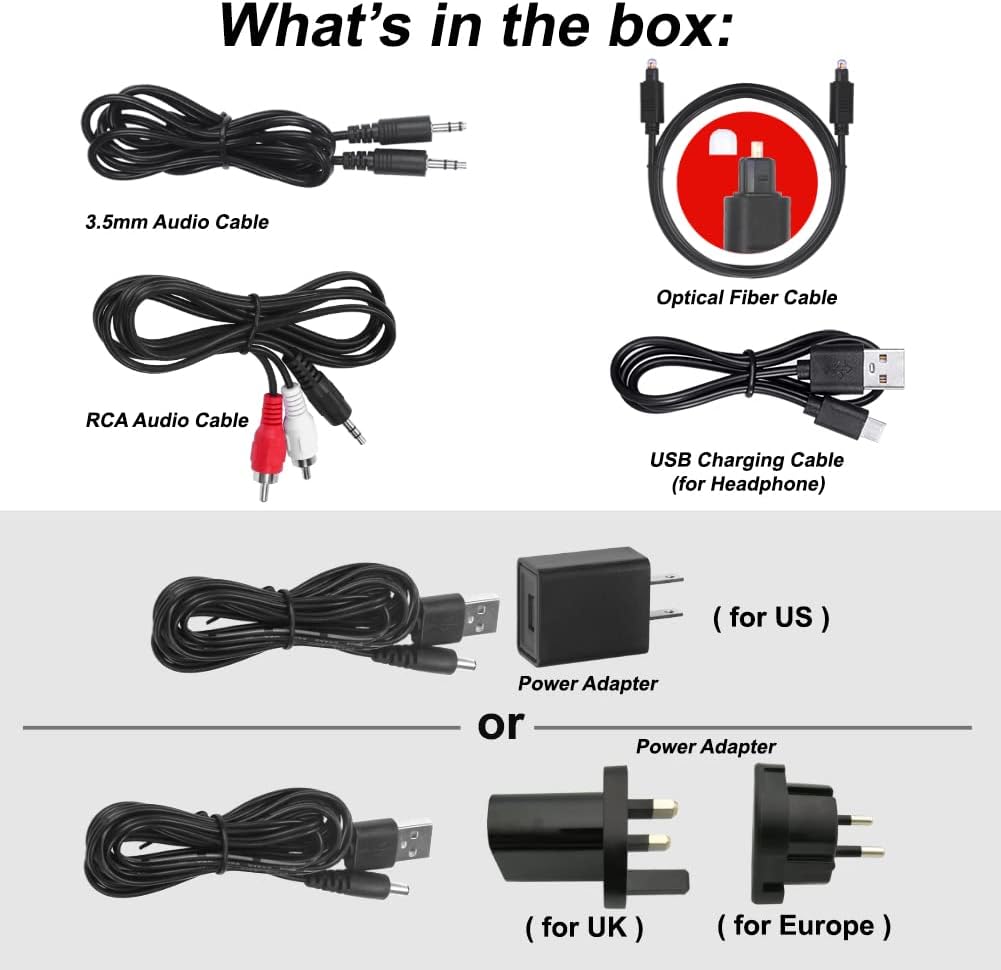
Figura 2.1: Accessoris inclosos i components principals.
3. Producte acabatview
3.1 Auriculars
- Diadema ajustable: Per a un ajustament còmode i segur.
- Noise Isolation Memory Foam Earmuffs: Designed for comfort during extended use and to reduce external noise.
- Bateria recarregable incorporada: Provides up to 10 hours of listening time.
- Control de volum: Independent volume adjustment for left and right ears (Balance Adjustment).
- Ajust de to: Options for Treble, Normal, and Bass to optimize sound clarity.
- Interruptor MONO/STEREO: Select for clearer dialogue or more vivid music.
- Botó d'encesa/apagada del micròfon: Activates a personal sound amplifier function to temporarily hear surrounding conversations without removing the headphones.
- Audio Sharing Port: Allows another wired headphone to connect and share the audio.
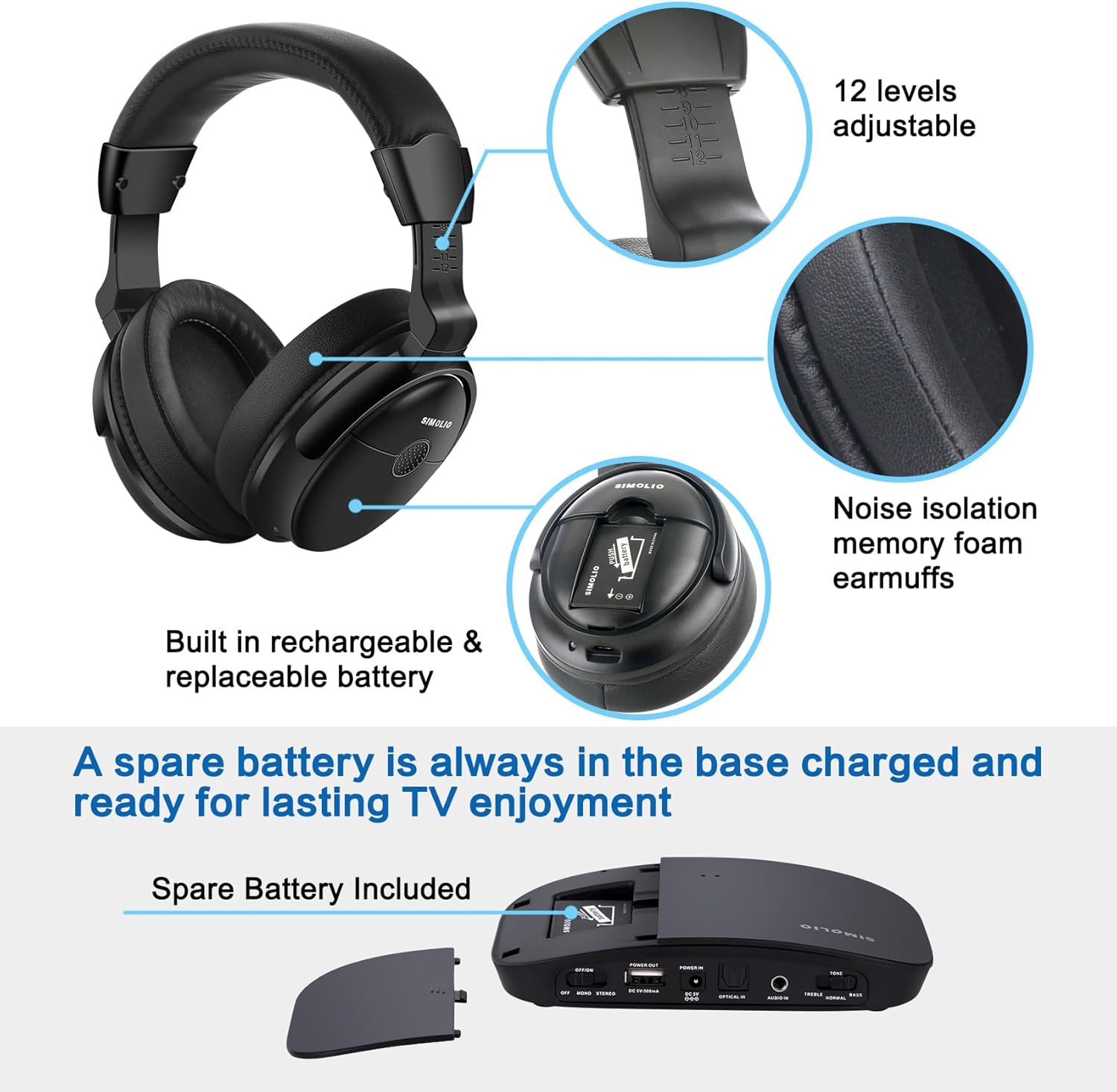
Figure 3.1: Headphone features including comfort elements and battery compartment.

Figure 3.2: Headphone controls for balance adjustment and audio sharing.
3.2 Transmissor sense fils
The transmitter connects to your audio source (e.g., TV, cable box) and wirelessly sends audio to the headphones. It also features a charging slot for the spare battery.
4. Configuració
4.1 Connexió del transmissor a la font d'àudio
The SIMOLIO Wireless TV Headphones support multiple audio output options. Choose the most suitable connection for your TV or audio device:
- Digital Optical (Toslink/SPDIF): For optimal digital audio quality. Ensure your TV's audio format is set to PCM when using this connection.
- RCA (Red/White): For analog audio output.
- 3.5 mm AUX: For devices with a headphone jack or AUX output.
Only one audio cable connection is required. Refer to your TV's manual for specific audio output port locations.

Figure 4.1: Supported audio connection types.
4.2 Initial Pairing and Powering On
The headphones and transmitter are designed for automatic connection. Simply turn on both devices, and they will pair with each other. No manual pairing is required.
4.3 Charging the Headphones and Spare Battery
The headphones can be charged by plugging the USB charging cable into the headphone's charging port and connecting it to a compatible USB power source (e.g., transmitter USB port, PC, or TV USB port). The spare battery can be charged by inserting it into the dedicated charging slot on the transmitter.
5. Instruccions de funcionament
5.1 Voice Enhancement and Noise Reduction
The headphones feature voice highlighting and noise reduction technology to make TV conversations clearer by reducing background noise. Use the Tone adjustment switch (Treble/Normal/Bass) on the headphones to find your preferred audio profile for optimal clarity.

Figure 5.1: Key audio enhancement features.
5.2 L/R Balance Volume Control
Adjust the balance control on the headphones to customize the volume level for your left and right ears, which is particularly useful for individuals with different hearing levels in each ear.
5.3 So personal AmpFunció lifier
Press the MIC ON/OFF button on the headphones to activate the personal sound amplifier. This allows you to temporarily hear external sounds and conversations without needing to remove the headphones, making it convenient for quick interactions.

Figure 5.2: Personal sound amplificador en ús.
5.4 Funció de compartició d'àudio
Connect another wired headphone to the audio sharing port on the right side of the SIMOLIO headphones to share the TV audio with a friend or family member.
5.5 Abast sense fil
The 2.4GHz RF technology provides a stable connection up to 100 feet (30 meters), allowing you to move freely around your home while enjoying clear audio.

Figura 5.3: Capacitat d'abast sense fil.
6. Manteniment
To ensure the longevity and optimal performance of your SIMOLIO Wireless TV Headphones, follow these maintenance guidelines:
- Neteja: Wipe the headphones and transmitter with a soft, dry cloth. Avoid using harsh chemicals or abrasive materials.
- Emmagatzematge: Guardeu els auriculars en un lloc fresc i sec quan no els feu servir.
- Cura de la bateria: Always keep the spare battery charged in the transmitter's charging slot to ensure it's ready for immediate use. Avoid fully discharging the batteries for extended periods.
- Comoditat: For prolonged listening sessions, it is recommended to take off the headphones every 1-2 hours to allow your ears to rest.
7. Solució De Problemes
If you encounter any issues with your SIMOLIO Wireless TV Headphones, please refer to the solutions below. For more detailed visual guides, refer to the official video tutorials.
7.1 No Sound from TV
This is a common issue, often related to TV audio settings. Please check the following:
- Connexió per cable: Ensure the optical, RCA, or AUX cable is securely connected to both the TV/audio source and the transmitter.
- TV Audio Output Setting (PCM): For optical connections, your TV's digital audio output format MUST be set to PCM.
- TV Speaker Output: Some TVs may mute internal speakers when an external audio device is connected. Check your TV's sound output settings.
- TV Power Cycle: Unplug your TV from the power outlet for a few minutes, then plug it back in.
- Factory Reset TV (as a last resort): If other methods fail, a factory reset of your TV might resolve software conflicts. Consult your TV's manual before proceeding.
Specific TV Brand Troubleshooting Videos:
Philips TV No Sound Troubleshooting:
This video provides detailed steps to resolve 'no sound' issues when connecting to a Philips TV via optical cable, including power cycling the TV, performing a factory reset, and adjusting sound settings to PCM and disabling surround sound.
LG TV No Sound Troubleshooting:
Watch this video for instructions on fixing 'no sound' problems with your LG TV's optical output, focusing on setting the digital sound out to PCM.
Samsung TV No Sound Troubleshooting:
This video guides you through resolving 'no sound' issues when connecting to a Samsung TV's optical output, including setting the digital output audio format to PCM.
7.2 Audio Lag/Delay
The SIMOLIO headphones utilize 2.4GHz RF technology, which is designed to provide virtually no audio lag. If you experience delay, ensure there are no significant obstructions between the transmitter and headphones, and that the transmitter is placed optimally.
7.3 Mala qualitat de so
- Ajust de to: Experiment with the Treble/Normal/Bass settings on the headphones to find the best sound for your content.
- Control d'equilibri: Adjust the L/R balance to ensure sound is evenly distributed or optimized for your hearing.
- Qualitat de la font: Assegureu-vos que la font d'àudio en si mateixa proporciona un senyal clar.
7.4 Headphones Not Charging / Low Battery Life
- Cable de càrrega: Verify the USB charging cable is correctly connected to the headphones and a working USB power source.
- Bateria de recanvi: Utilize the included spare battery to avoid interruptions during long listening sessions. Ensure the spare battery is always charged in the transmitter.
- Adaptador d'alimentació: Confirm the power adapter for the transmitter is securely plugged in and functioning.
8. Especificacions
| Característica | Especificació |
|---|---|
| Nom del model | SM-825D Pro |
| Tecnologia de connectivitat | Sense fil (RF) |
| Tecnologia de comunicació sense fils | RF (2.4 GHz) |
| Control de soroll | Cancel·lació activa del soroll |
| Conector d'auriculars | 3.5 mm Jack (for sharing port) |
| Durada de la bateria | Fins a 10 hores |
| Temps de càrrega | 3 hores |
| Interval de freqüència | 20 Hz - 20,000 Hz |
| Impedància | 32 ohms |
| abast sense fils | Fins a 100 peus (30 metres) |
| Dimensions del producte | 6.7 x 8.5 x 3.3 polzades |
| Pes de l'article | 1.89 lliures (0.86 quilograms) |
9. Garantia i Suport
SIMOLIO products are designed for quality and reliability. For any questions, technical assistance, or warranty inquiries, please contact the SIMOLIO support team. We are committed to providing excellent customer service and finding a solution for any issues you may encounter.
Contact information can typically be found on the SIMOLIO official weblloc web o a través de la vostra plataforma de compra.


