Introducció
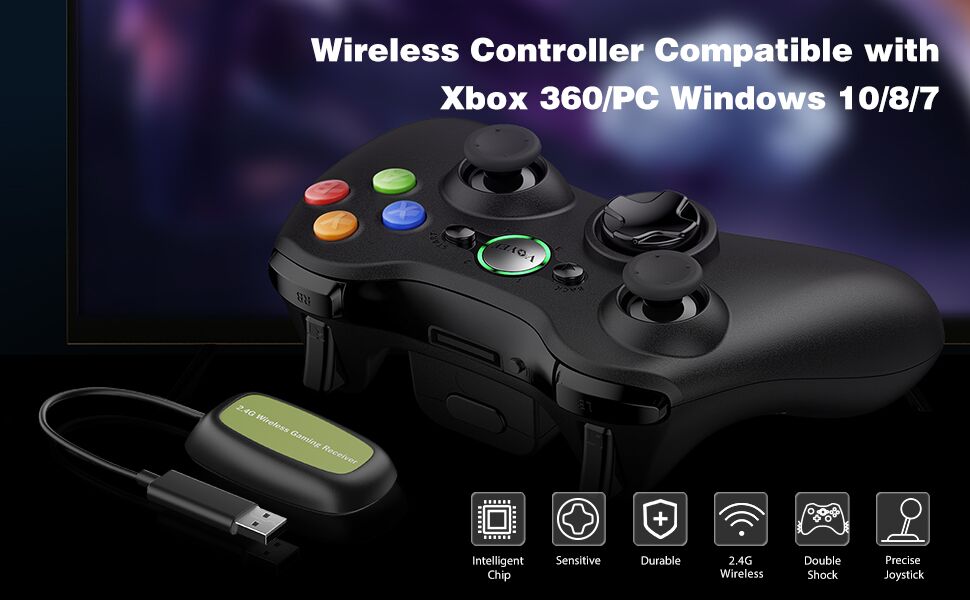
Aquest manual proporciona instruccions detallades per a la configuració, el funcionament i el manteniment del comandament sense fil VOYEE. Dissenyat per ser compatible amb Microsoft Xbox 360/Slim i PC amb Windows 11/10/8/7, aquest comandament ofereix una experiència de joc millorada amb controls sensibles i un disseny ergonòmic.
Característiques del producte
- Àmplia compatibilitat: Es connecta perfectament amb consoles Microsoft Xbox 360/Slim i PC amb Windows 11, 10, 8 o 7. Cal un receptor sense fil dedicat per a la connexió.
- Control de joc millorat: Inclou disparadors esquerre i dret millorats, joysticks d'alta sensibilitat i botons sensibles per a una execució precisa d'ordres sense demora.
- Experiència de joc immersiva: El control de vibració integrat proporciona una resposta automàtica de vibració, adaptant-se als esdeveniments del joc per a una experiència més atractiva.
- Disseny ergonòmic: Les empunyadures contornejades tenen una forma que s'adapta còmodament a les mans, cosa que redueix la fatiga durant sessions de joc prolongades. Gaudeix de llibertat de moviment amb una distància de control sense fil de fins a 30 metres.

Imatge: Frontal view del controlador sense fil VOYEE.

Imatge: Transparent view del comandament sense fil VOYEE que destaca els motors vibrants interns.

Imatge: Primer pla del joystick sensible i del D-pad d'alta precisió del comandament sense fil VOYEE.

Imatge: Primer pla dels botons d'acció (A, B, X, Y) i els disparadors lineals (LT, RT) del comandament sense fil VOYEE.
Contingut del paquet
En obrir el paquet del comandament sense fil VOYEE, hauríeu de trobar els elements següents:
- 1 x Comandament sense fil VOYEE
- 1 x Receptor sense fil
- 1 x Guia de l'usuari (aquest manual)
Si falta algun article o està malmès, poseu-vos en contacte amb el servei d'atenció al client de VOYEE immediatament.
Configuració
1. Instal·lació de la bateria
El controlador sense fil VOYEE requereix dues (2) piles AA per funcionar. Segueix aquests passos per instal·lar-les:
- Localitza el compartiment de la bateria a la part posterior del controlador.
- Premeu la pestanya d'alliberament i obriu la tapa de la bateria.
- Introduïu dues piles AA, assegurant-vos que els terminals positiu (+) i negatiu (-) estiguin alineats amb les marques de l'interior del compartiment.
- Tanqueu la tapa de la bateria fins que sentiu un clic i que quedi ben fixada al seu lloc.
- Premeu el botó Inici del controlador per confirmar que l'aparell està encès.
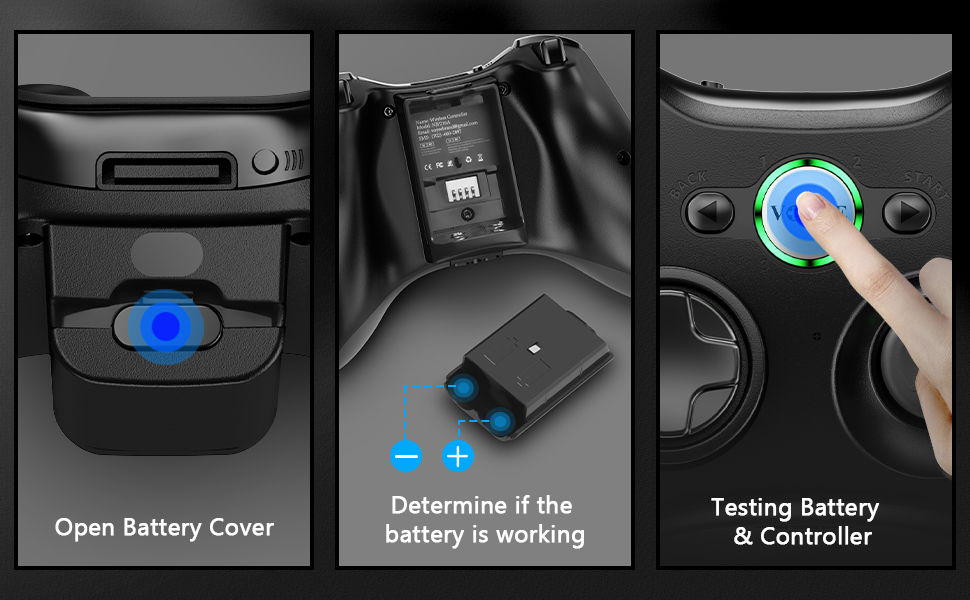
Imatge: Guia visual per obrir la tapa de la bateria, inserir piles AA i provar l'alimentació del controlador.
2. Connexió a la consola Xbox 360
Per connectar el comandament sense fil VOYEE a una consola Xbox 360 o Xbox 360 Slim:
- Assegureu-vos que la consola Xbox 360 estigui engegada.
- Connecta el receptor sense fil a un port USB disponible de la consola Xbox 360. L'indicador lluminós del receptor començarà a parpellejar.
- Premeu el botó Inici del controlador VOYEE. El llum indicador del controlador també començarà a parpellejar.
- Premeu i manteniu premut el botó de sincronització del receptor sense fil (normalment un botó petit al lateral o a la part posterior del receptor) fins que la llum parpellegi ràpidament.
- En un termini de 20 segons, premeu i manteniu premut el botó de sincronització a la part superior del controlador VOYEE fins que els llums parpellegin ràpidament.
- Un cop emparellat, l'indicador lluminós del controlador (un dels quatre quadrants al voltant del botó Xbox) romandrà fix, cosa que indica que la connexió s'ha realitzat correctament.
Nota: Cada controlador sense fil VOYEE requereix el seu propi receptor sense fil dedicat. Si connecteu diversos controladors, assegureu-vos que teniu prou ports USB i receptors.
Imatge: Instruccions visuals pas a pas per connectar el comandament sense fil VOYEE a una consola Xbox 360.
3. Connexió a l'ordinador (Windows 11/10/8/7)
Per connectar el controlador sense fil VOYEE a un ordinador:
- Assegureu-vos que l'ordinador estigui engegat i que el sistema operatiu estigui en funcionament.
- Connecteu el receptor sense fil a un port USB disponible del vostre ordinador. L'indicador lluminós del receptor començarà a parpellejar.
- L'ordinador hauria d'instal·lar automàticament els controladors necessaris per al controlador. Això pot trigar uns instants.
- Premeu el botó Inici del controlador VOYEE. El llum indicador del controlador també començarà a parpellejar.
- Premeu i manteniu premut el botó de sincronització del receptor sense fil fins que la llum parpellegi ràpidament.
- En un termini de 20 segons, premeu i manteniu premut el botó de sincronització a la part superior del controlador VOYEE fins que els llums parpellegin ràpidament.
- Un cop emparellat, l'indicador lluminós del controlador romandrà fix. Podeu verificar la connexió i provar la funcionalitat del controlador a través de la configuració dels controladors de joc del vostre PC (per exemple, a Windows, cerqueu "Configura controladors de joc USB").
Nota: Per als sistemes operatius Windows 7, 8 i 10, el controlador normalment s'instal·larà automàticament. Si l'emparellament no funciona, assegureu-vos que el Bluetooth o l'adaptador sense fil del vostre ordinador estigui habilitat i que els controladors estiguin actualitzats.
Imatge: Instruccions visuals pas a pas per connectar el controlador sense fil VOYEE a un PC.
Instruccions de funcionament
Controls bàsics
El comandament sense fil VOYEE presenta un disseny estàndard familiar per als usuaris de Xbox 360:
- Sticks analògics esquerre i dret: S'utilitza per al moviment i el control de la càmera. Prem els joysticks per a pulsacions addicionals (L3/R3).
- D-Pad (coixinet direccional): Proporciona una entrada direccional precisa, sovint utilitzada per a la navegació pels menús o per a accions específiques del joc.
- Botons A, B, X, Y: Botons d'acció, normalment codificats per colors (Verd A, Vermell B, Blau X, Groc Y) per a una fàcil identificació.
- Para-xocs esquerre i dret (LB, RB): Botons situats a la vora frontal superior del controlador.
- Disparadors esquerre i dret (LT, RT): Disparadors analògics situats sota els para-xocs, que ofereixen una entrada sensible a la pressió per a accions com l'acceleració o el tret.
- Botó d'inici: Normalment s'utilitza per pausar jocs o obrir menús dins del joc.
- Botó enrere: Sovint s'utilitza per accedir a menús secundaris o tornar a pantalles anteriors.
- Botó Inici (logotip VOYEE): Encén/apaga el controlador, accedeix al menú de la Guia de l'Xbox a l'Xbox 360 o obre la barra de jocs/funcions similars al PC.

Imatge: El comandament sense fil VOYEE que es mostra juntament amb diverses captures de pantalla de jocs, que il·lustren el seu ús en diferents escenaris de joc.
Feedback de vibracions
El comandament sense fil VOYEE compta amb motors de vibració dual que proporcionen retroalimentació tàctil durant el joc. Aquesta retroalimentació s'activa automàticament per esdeveniments del joc com ara explosions, col·lisions o accions específiques, cosa que millora la immersió.

Imatge: Detallada view del motor de vibració intern dins del controlador.
Vídeo oficial del producte
Vídeo: Un vídeo oficial del producte de VOYEE showcasinel comandament sense fil actualitzat per a Xbox 360, destacant-ne les característiques i el disseny.
Manteniment
Una cura i un manteniment adequats allargaran la vida útil del vostre controlador sense fil VOYEE:
- Neteja: Feu servir un drap suau i sec per netejar el controlador regularment. Per a la brutícia persistent, netegeu lleugerament.ampNetegeu el drap amb aigua o una solució de neteja suau. Eviteu productes químics agressius o materials abrasius.
- Emmagatzematge: Guardeu el controlador en un lloc fresc i sec, allunyat de la llum solar directa, de temperatures extremes i d'humitat excessiva.
- Cura de la bateria: Traieu les piles del controlador si no l'utilitzeu durant un període prolongat per evitar fuites de piles i possibles danys.
- Eviteu les gotes: Protegiu el controlador de caigudes i impactes, que poden danyar els components interns o externs.asing.
Resolució de problemes
| Problema | Causa possible | Solució |
|---|---|---|
| El controlador no s'encén. | Piles baixes o gastades; piles inserides incorrectament. | Substituïu-les per piles AA noves. Assegureu-vos que les piles estiguin inserides amb la polaritat correcta (+/-). |
| El controlador no es connecta/emparella. | El receptor no està connectat correctament; el procés de sincronització ha fallat; interferències. | Assegureu-vos que el receptor sense fil estigui ben connectat a un port USB. Repetiu el procés d'emparellament (vegeu la secció Configuració). Acosteu-vos a la consola/PC. Eviteu altres dispositius de 2.4 GHz si és possible. |
| Retard d'entrada o botons/joysticks que no responen. | Bateria baixa; interferències sense fil; distància del receptor. | Canvieu les piles. Reduïu la distància entre el controlador i el receptor. Assegureu-vos que no hi hagi objectes metàl·lics grans que bloquegin el senyal. |
| La vibració no funciona. | El joc no admet vibració; la funció de vibració està desactivada a la configuració del joc/sistema. | Revisa la configuració del joc i la configuració de la consola/PC per assegurar-te que la vibració estigui activada. No tots els jocs admeten la resposta per vibració. |
Si teniu problemes que no figuren aquí, consulteu la secció Garantia i assistència per obtenir informació de contacte.
Especificacions
| Número de model: | XW-360 |
| Marca: | VOYEE |
| Dimensions (L x A x A): | 6.1 x 4.33 x 2.17 polzades |
| Pes de l'article: | 8.4 unces |
| Font d'alimentació: | 2 piles AA (no incloses) |
| Connectivitat: | Sense fil de 2.4 GHz (mitjançant el receptor inclòs) |
| Interval sense fil: | Fins a 30 peus (aproximadament 9 metres) |
| Dispositius compatibles: | Xbox 360, Xbox 360 Slim, PC (Windows 11/10/8/7) |

Imatge: El comandament sense fil VOYEE amb les seves dimensions aproximades indicades.
Garantia i Suport
Els productes VOYEE es fabriquen amb alts estàndards de qualitat. Per obtenir informació sobre la garantia, assistència tècnica o qualsevol consulta sobre el vostre controlador sense fil VOYEE, poseu-vos en contacte amb el nostre equip d'atenció al client.
Informació de contacte:
- Correu electrònic: Consulteu l'embalatge del producte o el servei oficial de VOYEE. weblloc web per obtenir l'adreça de correu electrònic més actual.
- Telèfon: Consulteu l'embalatge del producte o el servei oficial de VOYEE. weblloc web per obtenir el número de telèfon més actual.
- Assistència en línia: Visita la botiga de la marca VOYEE a Amazon o la seva botiga oficial weblloc web per a preguntes freqüents i recursos addicionals.
Si us plau, tingueu a mà el número de model del vostre producte (XW-360) i els detalls de compra quan us poseu en contacte amb el servei d'assistència.


