Introducció
The SilverStone FARA B1 is an ATX tower chassis designed to provide efficient cooling and ample space for various hardware configurations. This manual provides detailed instructions for the assembly, operation, and maintenance of your FARA B1 chassis.

Figure 1: SilverStone FARA B1 ATX Chassis
Configuració i instal·lació
1. Desembalatge i inspecció
Carefully remove the chassis from its packaging. Inspect for any damage that may have occurred during transit. Retain the packaging for future transport or storage.
2. Tempered Glass Side Panel Removal
To access the interior, unscrew the four thumb screws securing the tempered glass side panel. Gently pull the panel away from the chassis and set it aside on a soft, flat surface to prevent scratches.
3. Instal·lació de la placa base
The FARA B1 supports ATX, Micro-ATX, and Mini-ITX motherboards. Ensure the standoffs align with your motherboard's mounting holes. Install the I/O shield into the rear opening of the chassis. Carefully place the motherboard onto the standoffs and secure it with screws.
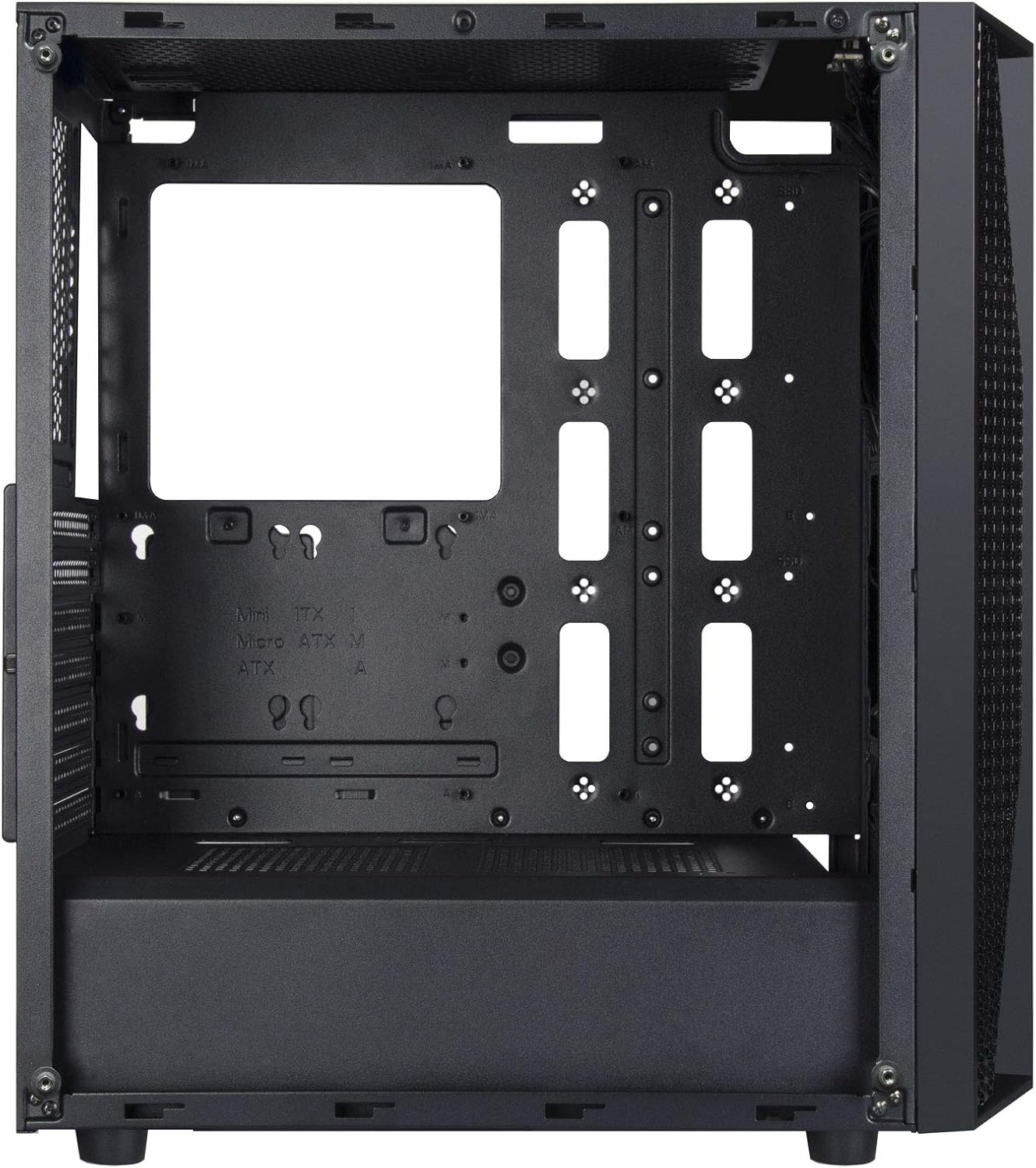
Figure 2: Chassis Interior with Motherboard Tray
4. Instal·lació de la unitat d'emmagatzematge
The chassis supports one 3.5" drive and four 2.5" drives.
- Disc dur de 3.5 polzades: Locate the drive cage beneath the PSU shroud. Slide the 3.5" HDD into the drive tray and secure it with screws.
- SSD de 2.5 polzades: Mount 2.5" SSDs to the dedicated mounting points behind the motherboard tray or on top of the PSU shroud. Secure with screws.

Figure 3: 3.5" HDD Drive Cage

Figure 4: 2.5" SSD Mounting Points
5. Instal·lació de la font d'alimentació
Install the ATX power supply into the dedicated compartment at the bottom rear of the chassis. Secure it with screws from the rear of the case.
6. Instal·lació de la targeta gràfica i la targeta d'expansió
Remove the necessary PCIe slot covers from the rear of the chassis. Insert your graphics card or other expansion cards into the motherboard's PCIe slots and secure them with screws.
7. Fan and Cooling System Installation
The FARA B1 supports multiple cooling options, including up to four 140mm fans or five 120mm fans. Install fans in the front, top, and rear positions as desired. Ensure proper airflow direction for optimal cooling.
8. Gestió de cables
Aprofita els retalls de cables i els punts d'amarratge que hi ha darrere de la safata de la placa base per gestionar els cables. Això millora la circulació del flux i l'estètica.
9. Connexions d'E/S frontals
Connect the front panel cables (USB 3.0, USB 2.0, HD Audio, Power, Reset, LED indicators) to the corresponding headers on your motherboard. Refer to your motherboard manual for specific header locations.

Figure 5: Top I/O Panel
Instruccions de funcionament
1. Encès / apagat
Press the power button located on the top I/O panel to turn your system on or off. A short press typically initiates a soft shutdown, while a long press (several seconds) forces a hard shutdown.
2. Using Front Panel Ports
The front I/O panel provides convenient access to USB 3.0, USB 2.0 ports, and a combined 3.5mm audio jack for headphones or headsets with a microphone. Ensure all necessary drivers are installed for proper functionality.

Figura 6: Example of a Built System
Manteniment
1. Neteja del filtre de pols
The FARA B1 features a magnetic dust filter on the top panel and a removable filter at the bottom for the power supply intake. Regularly clean these filters to maintain optimal airflow and prevent dust buildup inside the chassis.
- Gently lift the magnetic top filter for cleaning.
- Slide out the bottom filter from the rear of the chassis.
- Use compressed air or a soft brush to remove accumulated dust.

Figure 7: Removing Top Dust Filter
2. Neteja general
Wipe the exterior of the chassis with a soft, damp drap. Eviteu utilitzar productes químics agressius o materials abrasius que puguin danyar l'acabat o el vidre temperat.
Resolució de problemes
El sistema no s'encén
- Assegureu-vos que la font d'alimentació estigui engegada i connectada correctament a la presa de corrent.
- Verify all power cables (24-pin ATX, 8-pin CPU, PCIe power) are securely connected to the motherboard and components.
- Comproveu que el cable de l'interruptor d'alimentació del panell frontal estigui connectat correctament al capçal del panell frontal de la placa base.
Poor Airflow or Overheating
- Netegeu tots els filtres de pols regularment.
- Ensure case fans are installed with the correct orientation for intake and exhaust.
- Verify that CPU cooler and GPU fans are functioning correctly.
- Millorar la gestió del cablejat per reduir les obstruccions al flux d'aire.
Front Panel Ports Not Working
- Check that the USB and audio cables from the front panel are securely connected to the corresponding headers on your motherboard.
- Ensure necessary drivers for USB and audio are installed and up to date.
Especificacions
| Característica | Detall |
|---|---|
| Marca | SilverStone |
| Nom del model | FARA B1 |
| Número de model de l'article | SST-FAB1B-G |
| Tipus de cas | Torre mitja |
| Compatibilitat amb la placa base | ATX, Micro ATX, Mini ITX |
| Material | Vidre temperat, acer |
| Dimensions (LxWxH) | 15.79 x 8.15 x 17.56 polzades (401 x 207 x 446 mm) |
| Pes de l'article | 13.12 lliures (5.95 kg) |
| Drive Bays | 1 x 3.5", 4 x 2.5" |
| Mètode de refrigeració | Aire, Aigua |
| Suport dels fans | Up to four 140mm fans / five 120mm fans |
| Ports d'E / S frontals | USB 3.0 x 2, USB 2.0 x 1, Audio x 1 (combined 3.5mm) |
| Tipus de muntatge de la font d'alimentació | Muntatge inferior |
Garantia i Suport
For warranty information, technical support, or further assistance, please visit the official SilverStone Technology weblloc web o poseu-vos en contacte amb el seu departament d'atenció al client. Conserveu el comprovant de compra per a reclamacions de garantia.
Official SilverStone Weblloc: www.silverstonetek.com


