1. Introducció
The NUMERIC Digital 600 EX V is an Uninterruptible Power Supply (UPS) designed to provide reliable backup power and protection for your electronic devices. This manual provides essential information for the safe and efficient operation of your UPS, including setup, operation, maintenance, and troubleshooting.
Key features of this UPS include cold start capability, extended battery run time models, full-time EMI/RFI suppression, microprocessor-based design, smart battery management, super boost automatic voltage regulator, and telephone/modem/fax/Ethernet line surge protection.
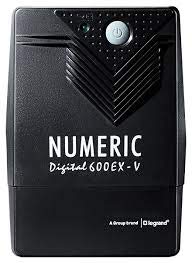
Figura 1.1: Frontal view of the NUMERIC Digital 600 EX V UPS, showing the power button and indicator lights.
2. Informació de seguretat
Please read and follow all safety instructions carefully before installing or operating the UPS. Failure to do so may result in damage to the unit, connected equipment, or personal injury.
- Col·locació: Install the UPS in a well-ventilated area, away from direct sunlight, heat sources, and moisture. Ensure adequate clearance around the unit for proper airflow.
- Font d'alimentació: Connect the UPS to a grounded AC power outlet. Do not remove the grounding prong.
- Capacitat de càrrega: Do not overload the UPS. Ensure the total power consumption of connected devices does not exceed the UPS's rated capacity (0.6 Watts for this model).
- Bateria: The UPS contains a sealed lead-acid battery. Do not attempt to open or service the battery yourself. Refer to qualified service personnel for battery replacement.
- Liquid and Foreign Objects: Keep liquids and foreign objects away from the UPS to prevent electric shock or damage.
- Apagada d'emergència: In an emergency, immediately disconnect the UPS from the AC power source and all connected equipment.
3. Contingut del paquet
Verifiqueu que tots els elements siguin presents al paquet:
- NUMERIC Digital 600 EX V UPS Unit
- Manual d'usuari (aquest document)
- Power Cord (if not integrated)
- Output Power Cables (if included)
If any items are missing or damaged, contact your dealer or NUMERIC customer support.
4. Característiques del producte
The NUMERIC Digital 600 EX V UPS offers several advanced features to protect your equipment:
- Capacitat d'arrencada en fred: Allows the UPS to power on directly from its battery without AC input.
- Extended Battery Run Time Models: Provides longer backup duration during power outages.
- Full Time EMI/RFI Suppression: Filters out electromagnetic and radio frequency interference for cleaner power.
- Microprocessor Based Design: Ensures precise control and reliable performance.
- Smart Battery Management: Optimizes battery charging to extend battery life.
- Super Boost Automatic Voltage Regulador (AVR): Corregeix petites fluctuacions de potència sense canviar a l'alimentació de la bateria, preservant la vida útil de la bateria.
- Telephone/Modem/Fax/Ethernet Line Surge Protection: Protects connected communication lines from power surges.
5. Instruccions de configuració
Follow these steps to set up your UPS:
- Desembaleu el SAI: Traieu amb cura el SAI del seu embalatge. Inspeccioneu-lo per detectar qualsevol dany durant l'enviament.
- Col·locació: Place the UPS on a flat, stable surface in a cool, dry, and well-ventilated area. Avoid placing it near windows or areas with excessive dust or moisture.
- Càrrega inicial: Connect the UPS to a standard grounded AC wall outlet. Allow the UPS to charge for at least 8 hours before connecting any equipment to ensure optimal battery performance. The UPS will charge whether it is turned on or off.
- Connexió d'equips: After the initial charge, connect your computer, monitor, and other critical electronic devices to the UPS output receptacles. Ensure the total load does not exceed the UPS capacity.
- Connecteu les línies de dades (opcional): If desired, connect your telephone, modem, fax, or Ethernet line through the surge protection ports on the UPS.

Figura 5.1: lateral view of the NUMERIC Digital 600 EX V UPS, illustrating typical power input and output connections.
6. Funcionament del SAI
This section details how to power on and off your UPS and understand its indicators.
6.1 Engegada/apagada
- Per encendre: Press and hold the power button on the front panel for approximately 2 seconds until you hear a beep and the indicator light illuminates.
- Per apagar: Press and hold the power button for approximately 2 seconds until you hear a beep and the indicator light turns off.
6.2 Llums indicadors
The front panel features indicator lights to communicate the UPS status:
- LED verd (sòlid): UPS is operating normally on AC power.
- Green LED (Flashing) & Audible Alarm: UPS is operating on battery power during an outage.
- Red LED (Solid) & Continuous Alarm: Battery low or UPS fault.
- Red LED (Flashing) & Intermittent Alarm: Condició de sobrecàrrega.
7. Manteniment
Un manteniment adequat garanteix la longevitat i el rendiment òptim del vostre SAI.
- Cura de la bateria: The internal battery is designed for a specific lifespan. To maximize battery life, avoid frequent deep discharges. If the UPS is stored for an extended period, recharge it every three months for at least 8 hours.
- Neteja: Netegeu periòdicament l'exterior del SAI amb un drap suau i sec. No utilitzeu netejadors líquids ni en aerosol. Assegureu-vos que les obertures de ventilació estiguin lliures de pols i deixalles.
- Substitució de la bateria: The battery is not user-replaceable. If the battery needs replacement, contact qualified service personnel.
8. Solució De Problemes
Aquesta secció ofereix solucions a problemes comuns que podeu trobar amb el vostre SAI.
| Problema | Causa possible | Solució |
|---|---|---|
| El SAI no s'encén. | No AC input power; Battery discharged; UPS fault. | Check AC power connection and wall outlet. Allow UPS to charge for several hours. If problem persists, contact support. |
| UPS beeps intermittently on AC power. | Condició de sobrecàrrega. | Disconnect non-essential equipment to reduce the load. Ensure total load is within UPS capacity. |
| Temps de reserva de bateria curt. | Bateria no completament carregada; Bateria a punt d'arribar al final de la seva vida útil; Sobrecàrrega. | Ensure initial charge of 8 hours. Reduce connected load. If battery is old, consider professional replacement. |
| UPS continuously beeps and red LED is solid. | Battery low or internal fault. | Allow UPS to charge. If problem persists after charging, contact support. |
| Els dispositius connectats no reben alimentació. | UPS is off; Output receptacles not connected; UPS fault. | Ensure UPS is powered on. Verify all cables are securely connected. |
9. Especificacions tècniques
Detailed specifications for the NUMERIC Digital 600 EX V UPS:
| Especificació | Valor |
|---|---|
| Marca | NUMÈRIC |
| Model | 600 EX V |
| Dimensions del producte (LxWxH) | 28 x 18 x 10 cm |
| Pes de l'article | 5 kg |
| Capacitat de potència de sortida | 0.6 watts |
| Voltage | 12 Volts |
| Composició de les cèl·lules de la bateria | Àcid de plom segellat |
| Temps de càrrega | 2 INR (Approximate, refer to full manual for details) |
| Material | Plàstic |
| Factor de forma | Rack (Note: This may refer to a rack-mountable option or general form factor, actual unit is typically tower) |
| Color | Negre |
| Data de primera disponibilitat | 17 de desembre de 2019 |
10. Garantia i Suport
The NUMERIC Digital 600 EX V UPS typically comes with a 2 anys de garantiaSi us plau, conserveu el rebut de compra per a reclamacions de garantia.
For technical assistance, warranty service, or to report issues, please contact NUMERIC customer support. Refer to the contact information provided with your product packaging or visit the official NUMERIC weblloc web per obtenir els detalls d'assistència més actualitzats.
When contacting support, please have your product model (600 EX V) and serial number ready.