1. Introducció
Gràcies per la compraasing the E-YOOSO Z-7900 Gaming Mouse. This manual provides detailed instructions for setting up, operating, and maintaining your new gaming mouse. Please read this manual thoroughly to ensure optimal performance and longevity of your device.

Figure 1: E-YOOSO Z-7900 Gaming Mouse and its storage case.
2. Característiques del producte
- Disseny ergonòmic: Engineered for comfort during extended use, reducing hand fatigue.
- Sensor òptic d'alta precisió: Utilizes an optical sensor for accurate movement detection.
- 14 botons programables: Customize functionality for various tasks and gaming scenarios.
- DPI ajustable: Up to 10000 DPI for precise movement control.
- Àmplia compatibilitat: Compatible with Windows 8, Windows 7, Windows Vista, Windows XP, and Windows 10 operating systems.
- Weight Tuning Set: Allows for adjustment of mouse weight to suit user preference.
- Il·luminació RGB: Customizable RGB lighting effects.

Figure 2: Illustration of the ergonomic design for comfortable grip.
3. Contingut del paquet
Si us plau, comproveu el contingut del paquet en desempaquetar-lo:
- E-YOOSO Z-7900 Gaming Mouse
- Weight Tuning Set (pre-installed or separate)
- Manual d'usuari (aquest document)
- Note: Software CD may not be included. Refer to Section 5 for software installation.
4. Configuració
- Connecteu el ratolí: Plug the USB connector of the E-YOOSO Z-7900 Gaming Mouse into an available USB port on your computer.
- Instal·lació del controlador: Your operating system (Windows) should automatically detect and install the necessary drivers. This is a plug-and-play device for basic functionality.
- Instal·lació de programari (opcional però recomanada): For full customization of programmable buttons, DPI settings, and RGB lighting, install the dedicated software. Refer to Section 5 for detailed instructions.

Figure 3: The mouse is compatible with various Windows operating systems.
5. Software Installation and Customization
To unlock the full potential of your E-YOOSO Z-7900 Gaming Mouse, including macro programming, advanced DPI settings, polling rate adjustments, and RGB lighting customization, you will need to install the dedicated software.
5.1 Obtaining the Software
As a physical software CD may not be included, please visit the official E-YOOSO support website or the product page where you purchased the mouse to find the download link for the latest software. Look for a link typically labeled "Driver Download" or "Software."
5.2 Passos d'instal·lació
- Download the software package to your computer.
- Localitzeu el descarregat file (usually a .exe or .zip file) and extract it if necessary.
- Executeu l'instal·lador i seguiu les indicacions a la pantalla per completar la instal·lació.
- Once installed, launch the software. Ensure your mouse is connected to the computer.
5.3 Opcions de personalització
- Assignació de botons: Reassign functions to any of the 14 programmable buttons, including keyboard keys, multimedia controls, or macros.
- Configuració de DPI: Adjust DPI levels and create custom profiles per a diferents aplicacions o jocs.
- Taxa de votació: Modify the mouse's polling rate (e.g., 125/250/500/1000Hz) for faster response times.
- Il·luminació RGB: Customize lighting effects, colors, and brightness.
- Editor de macros: Create and assign complex macro sequences to programmable buttons.

Figure 4: The mouse supports macro editing for customizable keys.
6. Instruccions de funcionament
6.1 Funcionament bàsic
- Clic esquerre: Acció primària.
- Clic dret: Menú contextual/d'acció secundària.
- Roda de desplaçament: Desplaça't amunt/avall, fes clic amb el botó central.

Figure 5: Main click buttons and scroll wheel.
6.2 Ajust de DPI
The mouse features dedicated DPI buttons (usually located near the scroll wheel) to cycle through preset DPI levels. You can customize these levels using the software.
- Premeu el botó DPI+ botó per augmentar la sensibilitat.
- Premeu el botó DPI- botó per reduir la sensibilitat.
- Default DPI settings typically include 500, 1000, 2000, 3000, 5000, and up to 10000 DPI.
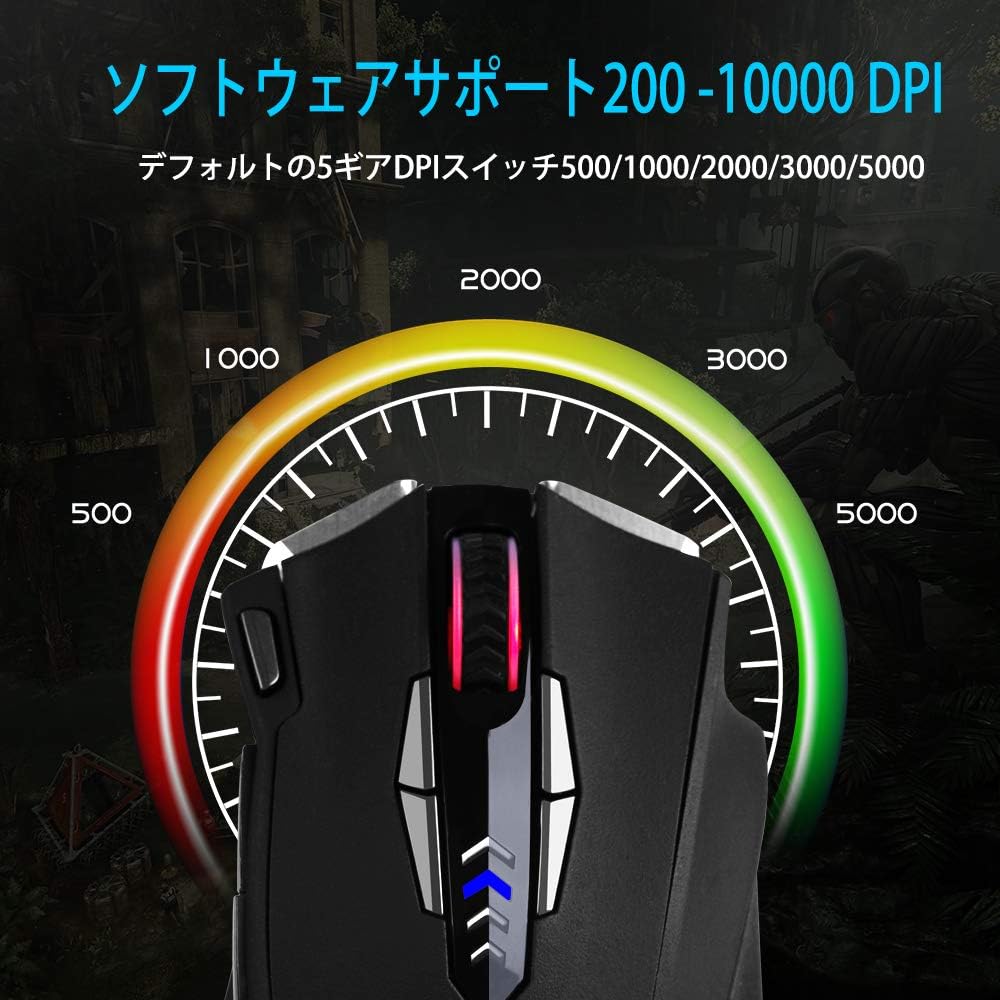
Figure 6: Visual representation of adjustable DPI levels.
6.3 Ajust de la taxa de sondeig
The polling rate determines how often the mouse reports its position to the computer. A higher polling rate results in faster response times. This can typically be adjusted via the software or a physical switch on the mouse's underside.
- Common polling rates: 125Hz, 250Hz, 500Hz, 1000Hz.
- Adjust the polling rate according to your preference and system capabilities.

Figure 7: Polling rate switch located on the underside of the mouse.
7. Manteniment
Proper maintenance ensures the longevity and performance of your gaming mouse.
- Neteja: Feu servir un drap suau i sec per netejar la superfície del ratolí. Per a la brutícia persistent, netegeu lleugerament.ampNetegeu el drap amb aigua o una solució de neteja suau. Eviteu productes químics agressius.
- Neteja del sensor: Occasionally clean the optical sensor on the underside of the mouse with a cotton swab to prevent tracking issues.
- Cura del cable: Eviteu doblegar bruscament o estirar excessivament el cable USB per evitar danys.
- Emmagatzematge: When not in use, store the mouse in a clean, dry environment, away from extreme temperatures.
8. Solució De Problemes
| Problema | Causa possible | Solució |
|---|---|---|
| El ratolí no respon | Connexió USB fluixa, port USB defectuós, problema amb el controlador. |
|
| Inaccurate tracking or cursor jumps | Dirty sensor, unsuitable mouse pad surface, high DPI setting. |
|
| Els botons programables no funcionen | Software not installed, incorrect button assignment, software conflict. |
|
| La il·luminació RGB no funciona | Configuració del programari, problema d'alimentació. |
|
9. Especificacions
| Característica | Detall |
|---|---|
| Marca | E-YOOSO |
| Número de model | Z-7900 |
| Tecnologia de connectivitat | USB, per cable |
| Tecnologia de detecció de moviment | Òptic |
| Nombre de botons | 14 (including scroll wheel click) |
| Rang de DPI | Fins a 10000 DPI (ajustable) |
| Taxa de votació | 125/250/500/1000Hz (Adjustable) |
| Característica especial | Ergonomic Design, Programmable Buttons, RGB Lighting, Weight Tuning |
| Dimensions del producte | 4.8 x 2.8 x 1.5 polzades |
| Pes de l'article | 4.6 unces |
| Compatibilitat | Windows 8, 7, Vista, XP, 10 |
10. Garantia i Suport
E-YOOSO products are designed for reliability and performance. For specific warranty information, please refer to the warranty card included with your product or visit the official E-YOOSO website. For technical support, driver downloads, or further assistance, please contact E-YOOSO customer service through their official channels.
Nota: Les especificacions i les característiques del producte estan subjectes a canvis sense previ avís.


