1. Producte acabatview
The Walfront RF Signal Generator is a compact, full touch screen device designed for generating radio frequency signals. It supports both dot frequency and sweep frequency modes and can be controlled via its integrated touch screen or a connected PC. This manual provides instructions for the safe and effective use of the ADF4351 and ADF4350 models.

Figura 1.1: Walfront RF Signal Generator (ADF4351/ADF4350) and included USB Type-C data cable.
Contingut del paquet
- 1 x RF Signal Generator (ADF4351 or ADF4350 model)
- 1 cable de dades USB tipus C
Nota: The product may be shipped as either the new or old type randomly. Both types function identically for the specified models.

Figura 1.2: Visual comparison of the new and old types of the RF Signal Generator.
2. Configuració
2.1 Connexió d'alimentació
Connect the provided USB Type-C data cable to the Type-C port on the side of the generator. Connect the other end of the cable to a 5V, 0.2A power source (e.g., a computer USB port or a USB wall adapter).
2.2 Connexió de sortida
The RF signal output is available via the SMA Female connector labeled "RFout". Connect your test equipment (e.g., spectrum analyzer, oscilloscope) to this port using an appropriate SMA cable.
2.3 PC Control Setup (Optional)
The generator can be controlled via a PC. To enable this, connect the USB Type-C data cable to your computer. You will need to obtain the specific PC control software from the manufacturer or seller. Once the software is installed and the device is connected, you can manage the generator's functions from your computer.
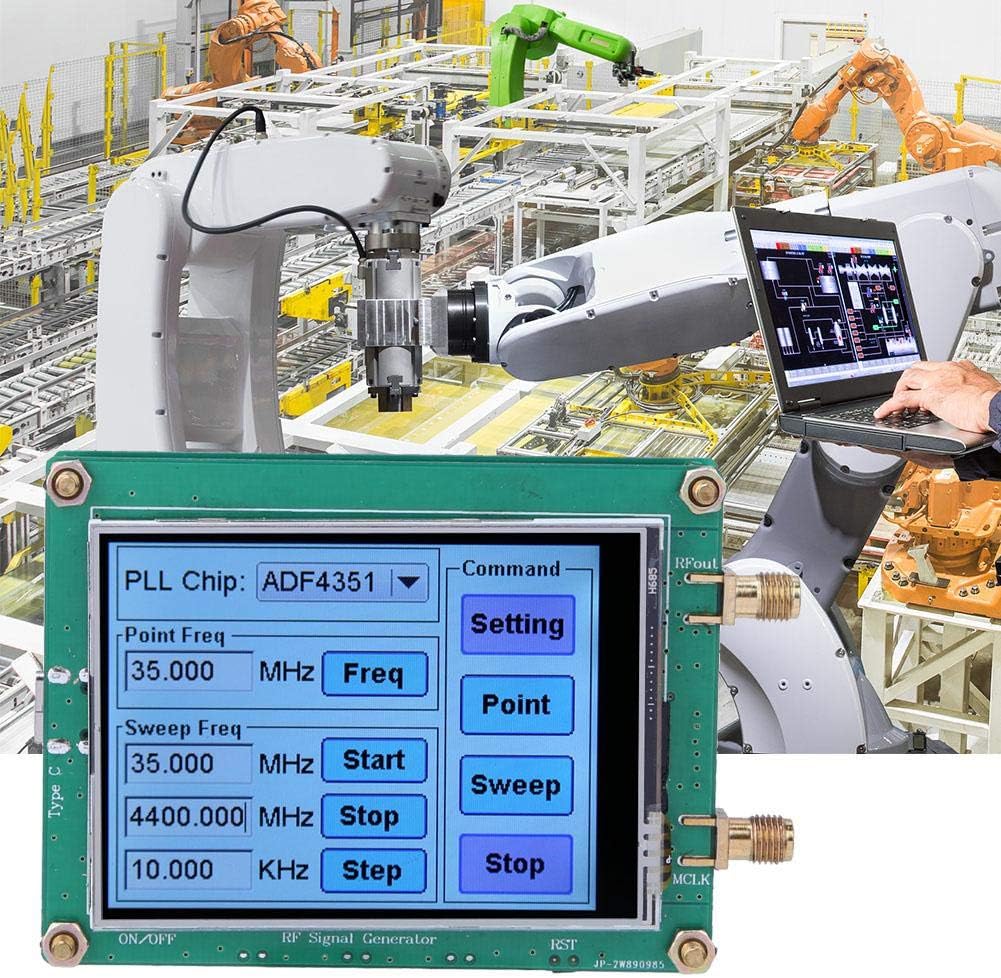
Figura 2.1: RF Signal Generator connected to a PC for remote control.
3. Instruccions de funcionament
The RF Signal Generator features a full touch screen interface for direct control of its functions.

Figura 3.1: Touch screen interface for frequency control.
3.1 Encès/Apagat
Locate the "ON/OFF" switch on the device. Toggle it to power the unit on or off.
3.2 Selecting PLL Chip (ADF4351/ADF4350)
On the touch screen, you may find an option to select the PLL chip, typically labeled "PLL Chip: ADF4351" (or ADF4350). Tap this area to switch between the available chip configurations if your device supports both or if you need to match specific operational parameters.
3.3 Dot Frequency Mode
- Tap the "Point Freq" input field to enter the desired frequency.
- Use the on-screen keypad to input the frequency value.
- Select the appropriate unit (MHz, GHz, etc.) if available.
- Tap "Freq" or a similar button to apply the setting.
- Tap "Point" under the "Command" section to activate dot frequency output.
3.4 Sweep Frequency Mode
- Tap the "Sweep Freq Start" input field to set the starting frequency for the sweep.
- Tap the "Sweep Freq Stop" input field to set the ending frequency for the sweep.
- Tap the "Step" input field to define the frequency increment for the sweep.
- Tap "Sweep" under the "Command" section to initiate the frequency sweep.
- To stop the sweep, tap "Stop".
3.5 Menú de configuració
Tap the "Setting" button under the "Command" section to access additional configuration options, which may include output power adjustment, modulation settings, or display preferences. Refer to the on-screen prompts for specific options.
4. Manteniment
4.1 Neteja
To clean the device, gently wipe the exterior with a soft, dry cloth. For the touch screen, use a microfiber cloth specifically designed for electronics. Avoid using abrasive cleaners, solvents, or excessive moisture, as these can damage the device.
4.2 Emmagatzematge
Store the RF Signal Generator in a cool, dry place away from direct sunlight, extreme temperatures, and high humidity. Keep it protected from dust and physical impact.
5. Solució De Problemes
| Problema | Causa possible | Solució |
|---|---|---|
| Inaccurate Frequency Output | Calibration deviation; inherent device tolerance. |
|
| Erratic Touch Screen Response | Dust/debris on screen; software glitch; hardware issue. |
|
| Signal Strength Drops at Higher Frequencies | Normal characteristic for some RF generators; cable loss. |
|
| Cannot Find PC Control Software | Software not readily available or provided. |
|
6. Especificacions
| Característica | Detall |
|---|---|
| Model | ADF4351 / ADF4350 |
| Output Frequency Range (ADF4351) | 35 MHz - 4.4 GHz |
| Output Frequency Range (ADF4350) | 138 MHz - 4.4 GHz |
| Power Supply & Communication Interface | Type-C, 5V at 0.2A |
| Output Waveform (2.2-4.4 GHz) | Fundamental (Sine Wave) |
| Output Waveform (35 MHz - 2.2 GHz) | Fundamental Frequency Division (Square Wave) |
| Interfície de sortida | SMA Femení |
| Mètode de control | Full Touch Screen, PC Control (via data cable and software) |
| Pes de l'article | 18 g |
| Fabricant | Walfront |
| Número de peça del fabricant | Walfrontipb9kx4z8c-12 |
7. Garantia i Suport
Per obtenir informació sobre la garantia, consulteu els termes i condicions proporcionats en el moment de la compra o poseu-vos en contacte amb el vostre distribuïdor.
For technical support, assistance with PC control software, or any other inquiries, please contact Walfront customer service through their official weblloc web o la plataforma on es va comprar el producte.

