1. Introducció
This manual provides detailed instructions for the installation, operation, and maintenance of your GIGABYTE Z590 UD motherboard. Designed for 11th and 10th Gen Intel Core Series Processors, this ATX motherboard features an LGA 1200 socket, Intel Z590 chipset, and supports dual-channel DDR4 memory. Key features include a robust 12+1 Phases Digital VRM Solution, Triple Ultra-Fast NVMe PCIe 4.0/3.0 x4 M.2 slots with Thermal Guard, 2.5GbE LAN, and USB 3.2 Gen2 connectivity. Please read this manual thoroughly before proceeding with installation.

Figura 1: De dalt a baix view of the GIGABYTE Z590 UD motherboard, showcasing the LGA 1200 socket, VRM heatsinks, DIMM slots, and M.2 slots.
2. Configuració i instal·lació
Proper installation is crucial for the stability and performance of your system. Ensure your power supply is disconnected before handling any components.
2.1. Instal·lació de la CPU
- Localitzeu el sòcol LGA 1200 a la placa base.
- Obriu la palanca del sòcol de la CPU i retireu la tapa protectora.
- Carefully align the triangular mark on your Intel LGA 1200 CPU with the mark on the socket.
- Col·loca suaument la CPU al sòcol sense forçar-la.
- Tanqueu la palanca del sòcol per fixar la CPU.
2.2. Instal·lació de memòria (RAM)
The motherboard supports Dual Channel Non-ECC Unbuffered DDR4 memory across 4 DIMM slots.
- Obriu els clips dels dos extrems de les ranures DIMM.
- Alineeu l'osca del mòdul de memòria DDR4 amb la clau de la ranura DIMM.
- Insert the memory module firmly into the slot until the clips snap into place. For dual-channel configuration, refer to the motherboard's specific slot pairing (usually A2/B2 or A1/B1).
2.3. Instal·lació d'un SSD M.2
The Z590 UD features Triple Ultra-Fast NVMe PCIe 4.0*/3.0 x4 M.2 slots with Thermal Guard. Note that the top M.2 slot (M2A_CPU) only supports 11th Gen Intel CPUs for PCIe 4.0 functionality. With a 10th Gen CPU, this slot will be disabled. Use the other M.2 slots (M2P_SB and M2M_SB) for 10th Gen CPUs.
- Locate an available M.2 slot and remove the screw and standoff.
- Inseriu l'SSD M.2 a la ranura amb un angle de 30 graus.
- Push the SSD down and secure it with the standoff and screw.
- Install the M.2 Thermal Guard heatsink if applicable, ensuring proper contact for heat dissipation.
2.4. Instal·lació de la targeta d'expansió
Install your graphics card and other PCIe expansion cards into the appropriate PCIe slots.
- Alineeu la targeta amb la ranura PCIe.
- Premeu fermament fins que la targeta quedi correctament col·locada.
- Fixeu la targeta al xassís amb un cargol.
2.5. Connexió de perifèrics i alimentació
Connect all necessary cables, including the 24-pin ATX power connector, 8-pin CPU power connector, SATA devices, front panel connectors (power switch, reset switch, USB, audio), and case fans. The motherboard features a pre-installed I/O Shield for easy and quick installation of external devices.
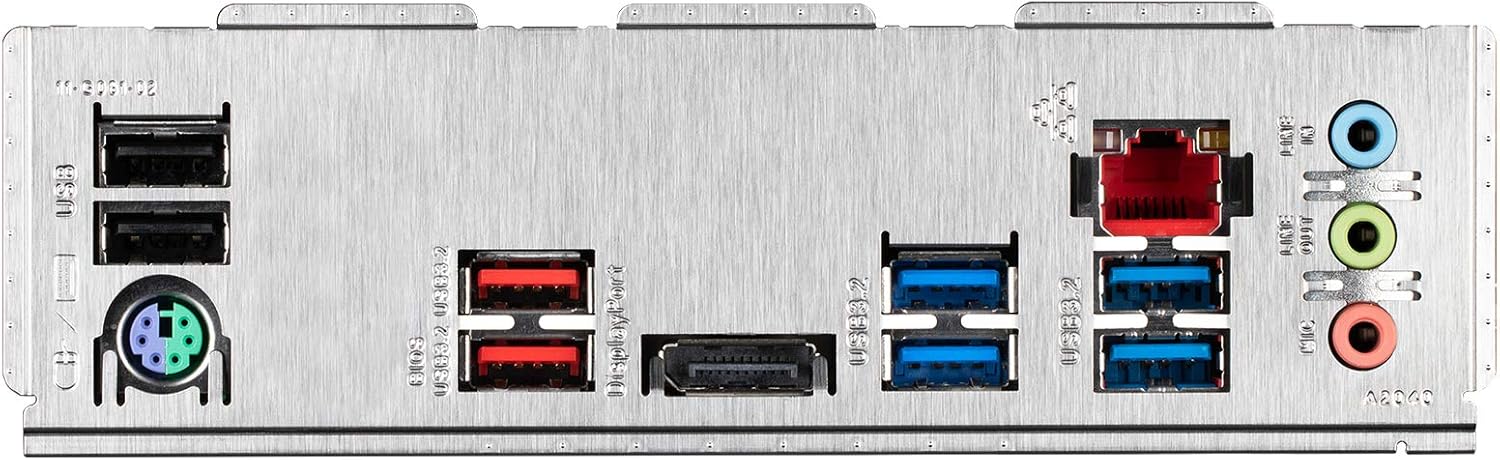
Figure 2: Rear I/O panel of the GIGABYTE Z590 UD motherboard, showing USB ports, LAN port, audio jacks, and PS/2 port.
3. Instruccions de funcionament
3.1. Arrencada inicial i configuració de la BIOS
Després de muntar el sistema, connecteu un monitor, un teclat i un ratolí. Engegueu el sistema.
- Per entrar a la configuració de la BIOS/UEFI, premeu la tecla DEL key repeatedly during startup.
- In the BIOS, you can configure boot order, system time, fan speeds (Smart Fan 6), and enable/disable various features.
- Save changes and exit the BIOS to boot into your operating system installation media.
3.2. Instal·lació del controlador
After installing your operating system, install the necessary drivers for optimal performance. These typically include:
- Chipset drivers
- LAN drivers (for 2.5GbE LAN)
- Controladors d'àudio
- Controladors USB
- Graphics drivers (for integrated graphics or discrete GPU)
Els controladors es poden trobar a la pàgina oficial de GIGABYTE. weblloc web per al model específic de la placa base.
3.3. GIGABYTE Software Utilities
GIGABYTE ofereix diverses utilitats per millorar l'experiència de l'usuari:
- FUSIÓ RGB 2.0: Control the multi-zone addressable LED light show design and support addressable LED & RGB LED strips.
- Ventilador intel·ligent 6: Monitor multiple temperature sensors and control hybrid fan headers with FAN STOP functionality for optimized cooling and noise levels.
4. Manteniment
4.1. BIOS Updates (Q-Flash Plus)
Regularly updating your BIOS can improve system stability, compatibility, and performance. The Z590 UD supports Q-Flash Plus, allowing you to update the BIOS without installing the CPU, memory, or GPU.
- Baixeu la darrera BIOS file de GIGABYTE weblloc.
- Canvieu el nom de la BIOS file to GIGABYTE.bin and save it to a USB flash drive (FAT32 format).
- Inseriu la unitat flaix USB al port USB Q-Flash Plus designat al panell d'E/S posterior.
- With the system powered off but connected to the PSU, press the Q-Flash Plus button. The LED will flash, indicating the update process.
- Wait for the LED to stop flashing, indicating the update is complete.
4.2. Driver and Software Updates
Keep your drivers and GIGABYTE utilities updated to ensure optimal performance and security. Check the GIGABYTE website periodically for new versions.
4.3. Neteja física
Dust accumulation can lead to overheating and component failure. Periodically clean your motherboard and PC case using compressed air. Ensure the system is powered off and unplugged before cleaning.
5. Solució De Problemes
Si teniu problemes, tingueu en compte els passos següents per resoldre'ls:
- Sense energia: Assegureu-vos que tots els cables d'alimentació (ATX de 24 pins, CPU de 8 pins) estiguin connectats correctament. Comproveu la font d'alimentació (PSU) i la presa de corrent.
- Sense pantalla: Verify that your monitor is connected to the correct graphics output (either integrated or discrete GPU). Reseat the graphics card and RAM modules.
- Inestabilitat/Avaries del sistema: Check for proper CPU and GPU cooling. Ensure RAM modules are correctly seated. Update BIOS and drivers.
- M.2 SSD Not Detected (10th Gen CPU): If using a 10th Gen Intel CPU, the top M.2 slot (M2A_CPU) is disabled. Ensure your M.2 SSD is installed in one of the other available M.2 slots (M2P_SB or M2M_SB).
- Problemes perifèrics: If USB ports or other peripherals are not functioning, ensure drivers are installed. Try different ports.
- Restabliment de la BIOS: If system settings become unstable, you can clear the CMOS by removing the CMOS battery for a few minutes or using the CLR_CMOS jumper (refer to the full manual for location).
For more complex issues, refer to the comprehensive GIGABYTE Z590 UD user manual available on the official GIGABYTE weblloc o contacteu amb l'assistència tècnica.
6. Especificacions
| Característica | Especificació |
|---|---|
| Socket de CPU | LGA 1200 |
| Processadors compatibles | Processadors Intel Core Series de 11a i 10a generació |
| Chipset | Intel Z590 Express Chipset |
| Memòria | 4 x DDR4 DIMM sockets, up to 128 GB (32 GB single DIMM capacity), Dual Channel, Non-ECC Unbuffered, Supports up to 4400 MHz (O.C.) |
| Ranures d'expansió | 1 x PCI Express x16 slot (PCIe 4.0 for 11th Gen CPU, PCIe 3.0 for 10th Gen CPU) 2 x PCI Express x16 slots (PCIe 3.0 x4) 2 x PCI Express x1 slots (PCIe 3.0 x1) |
| Interfície d'emmagatzematge | 1 x M.2 connector (Socket 3, M key, type 2260/2280/22110 PCIe 4.0 x4/x2 SSD support) (M2A_CPU - 11th Gen CPU only) 2 x M.2 connectors (Socket 3, M key, type 2260/2280/22110 PCIe 3.0 x4/x2 SSD support) (M2P_SB, M2M_SB) 6 x connectors SATA 6 Gb/s |
| Ports USB | Rear: 1 x USB 3.2 Gen 2 Type-A, 1 x USB 3.2 Gen 2 Type-C, 4 x USB 3.2 Gen 1 Type-A, 2 x USB 2.0/1.1 Front: 1 x USB 3.2 Gen 1 header, 2 x USB 2.0/1.1 headers |
| LAN | Realtek 2.5GbE LAN chip (2.5 Gbit/1 Gbit/100 Mbit) |
| Àudio | Còdec Realtek ALC897, àudio d'alta definició, 2/4/5.1/7.1 canals |
| Factor de forma | ATX Form Factor (30.5cm x 24.4cm) |
| Pes | Aproximadament 3.32 lliures |
7. Informació de la garantia
GIGABYTE motherboards are covered by a manufacturer's limited warranty. The duration and terms of the warranty may vary by region and retailer. Please retain your proof of purchase for warranty claims. For specific warranty details, refer to the warranty card included with your product or visit the official GIGABYTE weblloc.
8. Suport
For further assistance, technical support, or to download the latest drivers and BIOS updates, please visit the official GIGABYTE support weblloc:
You can also find frequently asked questions (FAQs) and community forums on the support page.


