1. Introducció
This manual provides comprehensive instructions for the setup, operation, maintenance, and troubleshooting of your MSI G271 27-inch FHD IPS 1ms 144Hz FreeSync Gaming Monitor. Please read this manual thoroughly before using the product to ensure proper functionality and safety.

Figura 1.1: Frontal view of the MSI G271 Gaming Monitor.
2. Informació de seguretat
Observe the following safety precautions to prevent damage to the monitor and ensure your personal safety.
- Desconnecteu sempre el cable d'alimentació de la presa de corrent abans de netejar el monitor.
- No exposeu el monitor a la pluja ni a la humitat per evitar riscos d'incendi o descàrrega elèctrica.
- No obriu el monitor casing. No hi ha peces a l'interior que l'usuari pugui reparar. Demaneu totes les tasques de manteniment a personal de servei qualificat.
- Col·loqueu el monitor sobre una superfície estable i plana per evitar que caigui.
- Assegureu-vos que hi hagi una ventilació adequada al voltant del monitor. No bloquegeu les obertures de ventilació.
- Use only the power adapter and cables provided or recommended by MSI.
3. Contingut del paquet
Verifiqueu que tots els articles siguin presents i en bon estat. Si falta algun article o està malmès, poseu-vos en contacte amb el vostre distribuïdor.
- MSI G271 Gaming Monitor
- Adaptador d'alimentació
- Cable d'alimentació
- Cable HDMI
- Cable DisplayPort
- Suport de monitor (base i coll)
- Manual d'usuari (aquest document)
- Guia d'inici ràpid
4. Configuració
4.1 Muntatge del suport del monitor
- Traieu amb cura els components del monitor i del suport de l'embalatge.
- Attach the stand neck to the monitor panel. Ensure it clicks securely into place or is fastened with screws if applicable.
- Fixeu la base del suport al coll del suport. Estrenyeu el cargol o cargols de polze a la part inferior de la base.
- Col·loqueu el monitor muntat sobre una superfície plana i estable.

Figura 4.1: posterior view of the monitor showing the stand attachment point.
4.2 Connexió del monitor
Connecteu el monitor al vostre ordinador o a altres dispositius mitjançant els cables adequats.
- Connexió d'alimentació: Connect the power adapter to the monitor's power input, then plug the power cord into the adapter and a wall outlet.
- Connexió de vídeo:
- For optimal performance (144Hz), use the provided DisplayPort cable to connect the monitor to your graphics card.
- Alternatively, use an HDMI cable to connect the monitor to your device. Note that HDMI may support lower refresh rates depending on the version.
- Connexió d'àudio: If desired, connect headphones or external speakers to the audio output jack on the monitor.

Figura 4.2: A baix view of the monitor displaying HDMI, DisplayPort, Audio, and Power input ports.
5. Instruccions de funcionament
5.1 Engegada/apagada
Press the power button, typically located on the bottom right side of the monitor, to turn it on or off. The power LED indicator will illuminate when the monitor is on.
5.2 Menú de visualització en pantalla (OSD)
The OSD menu allows you to adjust various display settings. Access the OSD menu using the joystick or buttons located on the back or bottom of the monitor.
- Navegació: Use the joystick (if present) or directional buttons to navigate through the menu options.
- Selecció: Press the joystick or a dedicated button to select an option.
- Sortida: Move the joystick left or press the 'Exit' button to go back or exit the OSD menu.
5.3 Configuració principal de l'OSD
- Mode de joc: Select from various preset gaming modes (e.g., FPS, RTS, RPG) to optimize display settings for different game genres.
- Brillantor/Contrast: Adjust the overall brightness and contrast levels of the display.
- Temperatura de color: Modify the color warmth or coolness (e.g., Warm, Cool, User).
- Font d'entrada: Seleccioneu manualment la font d'entrada (HDMI 1, HDMI 2, DisplayPort).
- FreeSync: Enable or disable AMD FreeSync technology for tear-free gaming (requires compatible AMD graphics card).
- Temps de resposta: Adjust the pixel response time for reduced motion blur.
6. Manteniment
6.1 Neteja del monitor
To clean the monitor, ensure it is turned off and unplugged.
- Pantalla: Netegeu suaument la pantalla amb un drap suau i sense borrissol. Per a marques difícils, netegeu suaument.ampNetegeu el drap amb aigua o una solució netejadora de pantalles. No ruixeu líquid directament sobre la pantalla.
- Casing: Netegeu el monitor casinNetegeu amb un drap suau i sec. Eviteu utilitzar productes de neteja o dissolvents abrasius.
6.2 Emmagatzematge
When storing the monitor for an extended period, keep it in a cool, dry place, away from direct sunlight and extreme temperatures. Use the original packaging if available to protect it from dust and physical damage.
7. Solució De Problemes
Si teniu problemes amb el monitor, consulteu els problemes i solucions més comuns següents.
| Problema | Causa possible | Solució |
|---|---|---|
| Sense poder | Cable d'alimentació no connectat; Presa de corrent defectuosa. | Assegureu-vos que el cable d'alimentació estigui ben connectat. Proveu la presa de corrent amb un altre dispositiu. |
| Sense senyal | Cable de vídeo no connectat; font d'entrada incorrecta seleccionada. | Check video cable connections. Select the correct input source via the OSD menu. |
| Pantalla parpellejant | Cable de vídeo fluix; Problema amb el controlador de la targeta gràfica; Discrepància de freqüència d'actualització. | Secure video cable. Update graphics drivers. Adjust refresh rate in display settings. |
| Poor Image Quality | Incorrect resolution; OSD settings not optimized. | Set display resolution to 1920x1080. Adjust brightness, contrast, and color settings in OSD. |
8. Especificacions
| Característica | Detall |
|---|---|
| Nom del model | MSI Optix G271 |
| Mida de la pantalla | 27 polzades |
| Tipus de panell | IPS |
| Resolució | 1920 x 1080 (FHD) |
| Freqüència d'actualització | 144 Hz |
| Temps de resposta | 1 ms |
| Sincronització adaptativa | AMD FreeSync |
| Viewangle ing | 178° (H) / 178° (V) |
| Brillantor | 250 nits (típ.) |
| Relació de contrast | 1000:1 |
| Ports de vídeo | 2x HDMI, 1x DisplayPort |
| Ports d'àudio | 1x Headphone Out |
| Dimensions (LxWxH) | 21.4 x 7.1 x 15.8 polzades |
| Pes | 9.02 lliures |
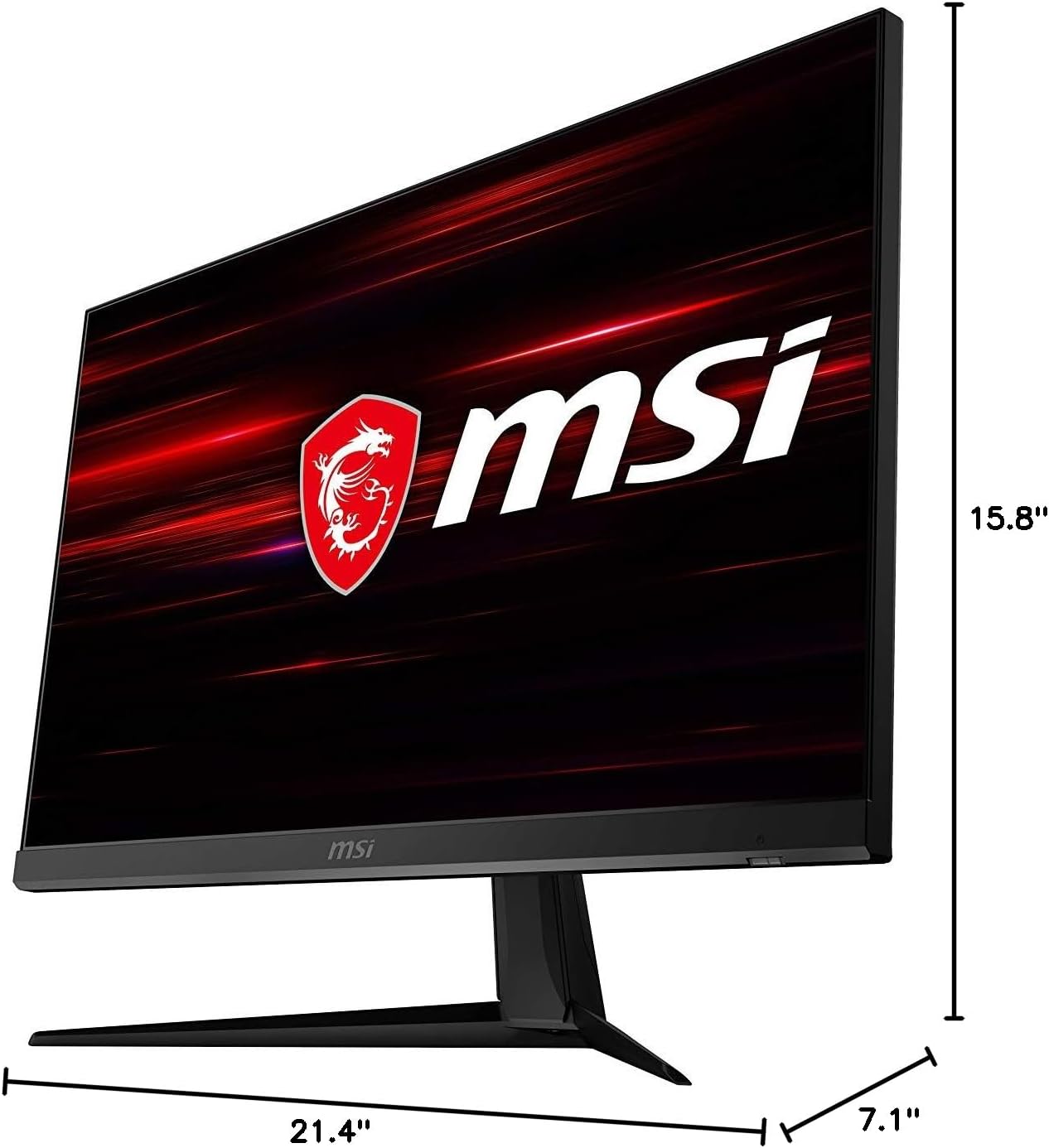
Figure 8.1: Physical dimensions of the MSI G271 monitor.
9. Garantia i Suport
For detailed warranty information, please refer to the warranty card included with your product or visit the official MSI weblloc.
For technical support, driver downloads, and frequently asked questions, please visit the MSI support page: www.msi.com/support.
You can also contact MSI customer service directly for assistance.


