Introducció
Thank you for choosing the Walfront TM919A-3 Digital Programmable 7-Day Timer. This device is designed for precise control of electrical equipment, allowing you to set up to 16 ON/OFF programs daily across a 7-day cycle. Its clear LCD display and easy-to-use interface make it suitable for various applications, from home automation to industrial control. Please read this manual thoroughly before installation and operation to ensure safe and correct usage.
Informació de seguretat
Avís: Electrical installation should only be performed by qualified personnel. Always disconnect power before installing or servicing the timer to prevent electric shock or equipment damage. Ensure all wiring complies with local electrical codes and regulations. Do not exceed the specified current rating of 16A.
- Assegureu-vos que la font d'alimentació coincideixi amb el volum del temporitzadortage (24 V CC).
- No submergiu el dispositiu en aigua ni l'exposeu a una humitat excessiva.
- Mantenir fora de l'abast dels nens.
- No intenteu desmuntar ni reparar la unitat vosaltres mateixos. Poseu-vos en contacte amb personal de servei qualificat.
Característiques del producte
- Pantalla LCD: Digital LCD display with LED indicator for clear and intuitive readings.
- Fàcil instal·lació: Designed for 35mm DIN rail mounting, suitable for various electrical panels.
- Configuració programable: Up to 16 ON/OFF programs per day, with 15 weekly combinations. Manual ON/OFF control also available.
- Funció de compte enrere: Features a countdown timer up to 24 hours before switching OFF.
- Còpia de seguretat de memòria: Equipped with a replaceable CR2032 battery to save programmed settings during power outages.
- Interval de temps: 1 minut a 168 hores.
- Visualització del rellotge: Supports 12-hour and 24-hour formats.
Contingut del paquet
- 1 x Walfront TM919A-3 Digital Programmable Timer
- 1 x manual d'instruccions
Configuració
1. Instal·lació/substitució de la bateria
The timer includes a replaceable CR2032 battery for memory backup. If the display is blank or programs are not retained after a power cut, the battery may need replacement.
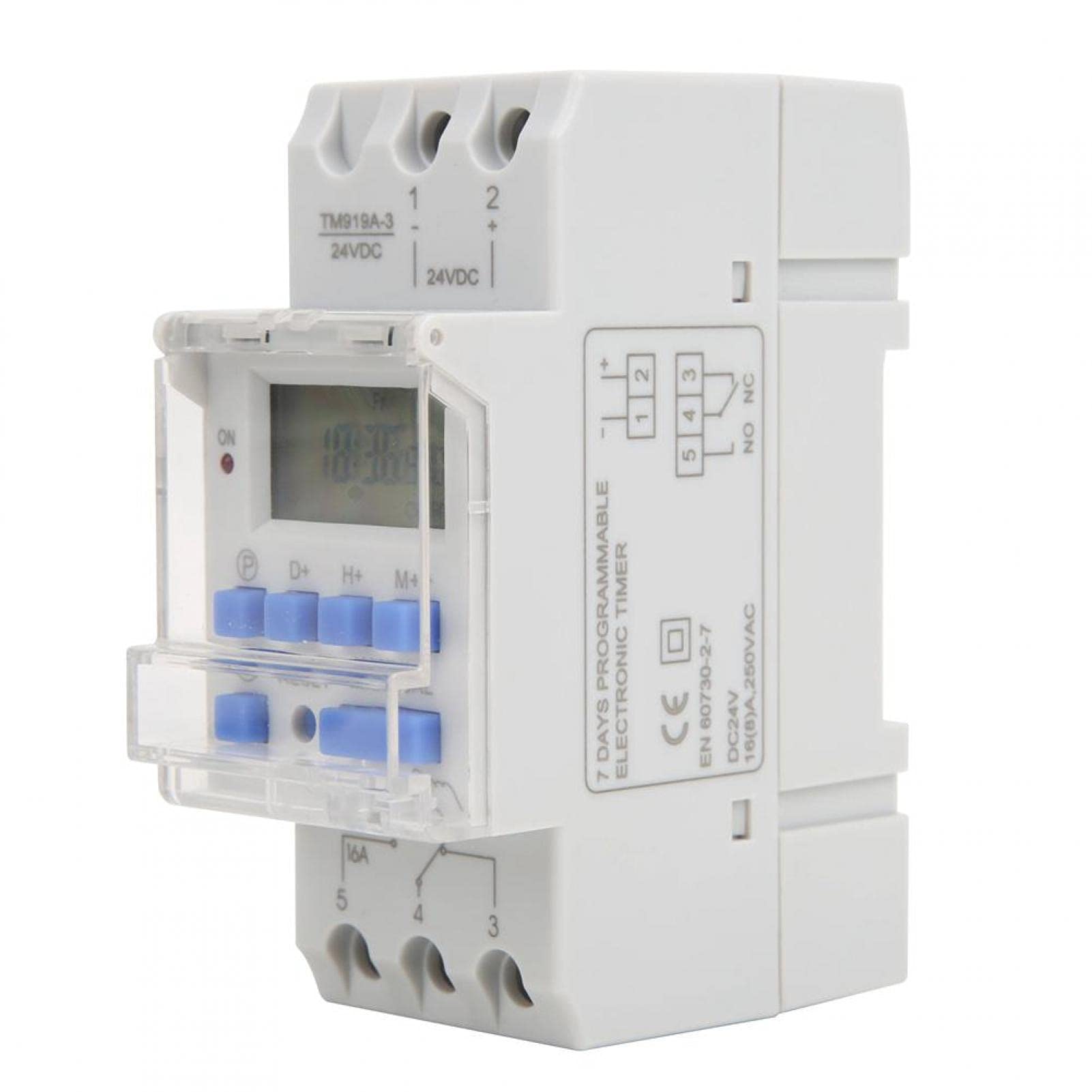
Image: Walfront TM919A-3 timer with an arrow pointing to the replaceable CR2032 battery compartment on the side.
- Localitza el compartiment de les piles al lateral del temporitzador.
- Carefully open the compartment.
- Remove the old CR2032 battery and insert a new one, ensuring correct polarity.
- Tanqueu el compartiment de manera segura.
2. Muntatge en carril DIN
The timer is designed for standard 35mm DIN rail mounting. Simply clip the timer onto the DIN rail in your electrical panel.
3. Instruccions de cablejat
Important: Ensure power is disconnected before wiring. Refer to the diagrams below for correct wiring. The TM919A-3 model operates on 24V DC.

Image: Simple wiring diagram for connecting the timer directly to a load (e.g., a light bulb). Terminals 1 and 2 are for 24V DC input, and terminals 3, 4, 5 are for the switch output.

Image: Advanced wiring diagram showing the timer connected to an external contactor (ABB AX-09-30-10) for controlling higher power loads. The timer's output controls the contactor coil, which then switches the main load.
- Connect the 24V DC power supply to terminals 1 (+) and 2 (-).
- Terminals 3, 4, and 5 are the switch output. Terminal 4 is the common (COM), Terminal 3 is normally closed (NC), and Terminal 5 is normally open (NO).
- Connect your load (e.g., light, pump) to the appropriate output terminals based on whether you need it to be ON or OFF when the timer is active. For most applications, connect the load between terminal 5 (NO) and the power supply.
- For high-power loads, use an external contactor as shown in the advanced wiring diagram.
Instruccions de funcionament
1. Initial Power On and Reset
Upon initial power-up or after battery replacement, the display may be blank. Press the RESET button (usually a small recessed button requiring a pointed object) to clear all settings and initialize the timer.

Imatge: Frontal view of the Walfront TM919A-3 timer, highlighting the LCD and control buttons (P, D+, H+, M+, RESET, MANUAL).
2. Configuració de l'hora i el dia actuals
- Premeu el botó P button (Program) once. The display will show the current time setting.
- Premeu el botó D+ botó per configurar el dia actual de la setmana.
- Premeu el botó H+ botó per configurar l'hora actual.
- Premeu el botó M+ botó per configurar el minut actual.
- Premeu el botó P button again to exit time setting mode and return to the normal clock display.
3. Programació de cicles d'encesa/apagada
El temporitzador admet fins a 16 programes d'encesa/apagada. Cada programa consta d'una hora d'encesa i una hora d'apagada.
- Premeu el botó P button repeatedly until "1 ON" appears on the display. This is the first ON program.
- Premeu D+ to select the day(s) for this program. You can choose individual days, weekdays, weekends, or all 7 days.
- Premeu H+ to set the desired hour for the "ON" event.
- Premeu M+ to set the desired minute for the "ON" event.
- Premeu P again. "1 OFF" will appear. This is the first OFF program.
- Repeat steps 2-4 to set the day(s), hour, and minute for the "OFF" event.
- Continueu prement P to cycle through "2 ON", "2 OFF", up to "16 ON", "16 OFF". Set all desired programs.
- Per sortir del mode de programació, premeu P button until the current time is displayed, or wait for approximately 30 seconds for it to automatically exit.
4. Control manual
Premeu el botó MANUAL button to cycle through different operating modes:
- ACTIVITAT: La sortida del temporitzador està contínuament activada, anul·lant tots els programes.
- AUTOMÀTIC: The timer operates according to the programmed ON/OFF cycles.
- DESACTIVAT: La sortida del temporitzador està contínuament en OFF, anul·lant tots els programes.
Assegureu-vos que el temporitzador estigui configurat a AUTO mode for programmed operations to function.
5. Funció de compte enrere
The countdown function allows you to set a specific duration after which the timer will switch OFF. This function is typically accessed by holding a specific button or through a dedicated menu. Refer to the specific button layout on your device for activation, usually by pressing a combination of buttons or a dedicated countdown button if available. The maximum countdown is 24 hours.
Manteniment
The Walfront TM919A-3 timer requires minimal maintenance. The primary maintenance task is the replacement of the CR2032 memory backup battery when needed. Regularly check connections for tightness and ensure the unit is free from dust and moisture.
- Neteja: Netegeu l'exterior amb un drap suau i sec. No utilitzeu productes de neteja abrasius ni dissolvents.
- Bateria: Replace the CR2032 battery as described in the Setup section if programs are not retained during power outages.
Resolució de problemes
- El temporitzador no s'encén/apaga segons la programació:
- Comproveu si el temporitzador està activat AUTO mode.
- Verify that the ON/OFF programs are set correctly for the desired days and times.
- Ensure the current time and day are set accurately.
- Comproveu totes les connexions del cablejat per garantir la seguretat i la polaritat correcta.
- La pantalla està en blanc:
- Check if the 24V DC power supply is connected and active.
- Premeu el botó RESET botó.
- If the power is on but the display is still blank, the unit may be faulty.
- Els programes es perden després d'apagar l'alimentaciótage:
- The internal CR2032 battery may be depleted. Replace the battery as described in the Setup section.
- Timer is ON/OFF continuously, ignoring programs:
- Premeu el botó MANUAL button to cycle back to AUTO mode.
Especificacions

Image: Dimensions of the Walfront TM919A-3 timer, indicating measurements such as 8.7cm height, 3.5cm width, and 6.5cm depth.
| Característica | Especificació |
|---|---|
| Marca | Walfront |
| Número de model | TM919A-3 |
| Material | Plàstic |
| Font d'alimentació | 24V DC |
| Valoració actual | 16A |
| Interval de temps | 1 minute ~ 168 hours |
| Programes | 16 ON/OFF per dia |
| Consum d'energia | <5 VA |
| Error mitjà | <2 seconds/day |
| Temperatura de funcionament | -10 ~ 50 ℃ |
| Humitat | <95% |
| Còpia de seguretat de la memòria | CR2032 replaceable battery |
| Muntatge | Carril DIN de 35 mm |
| Referència del fabricant | Walfrontigu1qrv9xk |
| UPC | 738589915582 |
Informació de la garantia
This product comes with a standard manufacturer's warranty. Please refer to your purchase documentation or contact the retailer for specific warranty terms and conditions. Keep your proof of purchase for any warranty claims.
Suport
For technical assistance, troubleshooting not covered in this manual, or inquiries about your Walfront TM919A-3 timer, please contact Walfront customer support or your authorized dealer. You can typically find contact information on the product packaging or the retailer's weblloc.