1. Introducció
The V7 KW550ESBT Bluetooth Keyboard is designed to enhance your productivity with versatile connectivity options. This compact, ultra-slim keyboard offers a comfortable and quiet typing experience, featuring laser-etched keys for long-lasting durability. It supports connection to multiple devices via Bluetooth or a 2.4 GHz USB dongle.
Les característiques clau inclouen:
- Seamless switching between up to 2 Bluetooth devices or connection via the included 2.4 GHz USB dongle.
- Scissor-switch keys for comfortable and quiet typing.
- Laser-etched keys for enhanced durability.
- Ultra-slim and compact design.
- Includes two AAA batteries for immediate use.
2. Contingut del paquet
Si us plau, comproveu el paquet per veure si hi ha els elements següents:
- V7 KW550ESBT Bluetooth Keyboard
- 2.4 GHz USB Receiver (dongle)
- 2 x piles AAA
- Manual d'usuari (aquest document)

Image: The V7 KW550ESBT keyboard shown with its accompanying 2.4 GHz USB receiver, ready for connection.
3. Configuració
3.1. Instal·lació de la bateria
- Localitzeu el compartiment de la bateria a la part inferior del teclat.
- Obriu la tapa del compartiment de la bateria.
- Introduïu les dues piles AAA, assegurant-vos de la polaritat correcta (+/-).
- Tanqueu bé la tapa del compartiment de la bateria.
3.2. Connecting via 2.4 GHz USB Dongle
- Remove the 2.4 GHz USB receiver from its storage slot (usually within the battery compartment or a dedicated slot).
- Connecteu el receptor USB a un port USB disponible de l'ordinador o dispositiu.
- The keyboard should automatically connect. If not, ensure the keyboard is powered on and the connection indicator light (if present) is active.
3.3. Connexió mitjançant Bluetooth
The V7 KW550ESBT keyboard supports connecting to up to two Bluetooth devices.
- Assegureu-vos que el teclat estigui encès.
- Press and hold the Bluetooth pairing key (refer to keyboard layout for specific key, often indicated by a Bluetooth symbol or 'BT1'/'BT2') for a few seconds until the Bluetooth indicator light starts blinking, indicating it's in pairing mode.
- Al dispositiu (ordinador, tauleta, telèfon intel·ligent), aneu a la configuració de Bluetooth.
- Cerca available devices and select "V7 KW550ESBT" (or similar name) from the list.
- Segueix les instruccions que apareixen a la pantalla per completar el procés d'emparellament. És possible que se't demani que introdueixis un codi que es mostra a la pantalla amb el teclat.
- Repeat for a second Bluetooth device if desired, using the other Bluetooth pairing key.
3.4. Canviar entre dispositius connectats
To switch between connected devices (Bluetooth 1, Bluetooth 2, or 2.4 GHz USB), press the corresponding function key (e.g., Fn + BT1, Fn + BT2, or Fn + 2.4G if available). Refer to your keyboard's specific layout for these keys.
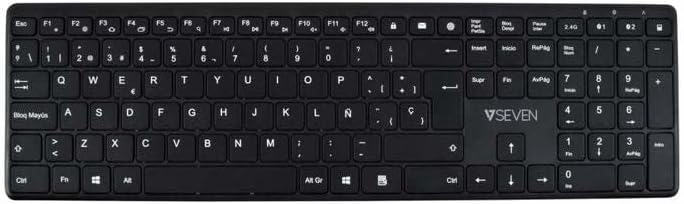
Imatge: De dalt a baix view of the V7 KW550ESBT keyboard, showing the full QWERTY layout and function keys.
4. Funcionament del teclat
4.1. Standard Key Functions
The keyboard features a standard QWERTY layout with all essential alphanumeric keys, punctuation, and modifier keys (Shift, Ctrl, Alt, Windows/Command).
4.2. Tecles multimèdia i de funció
The top row of keys (F1-F12) often doubles as multimedia or special function keys. These functions are typically accessed by pressing the Fn key simultaneously with the desired F-key. Common functions include:
- Volume control (mute, decrease, increase)
- Reproducció multimèdia (reproduir/pausa, anterior, següent)
- Ajust de la brillantor de la pantalla
- Funció de cerca
- Pantalla de bloqueig
Refer to the icons printed on your specific keyboard's F-keys for exact functionality.
4.3. Experiència d'escriptura silenciosa
The scissor-switch key design minimizes typing noise, making it suitable for quiet environments.

Imatge: Side profile of the V7 KW550ESBT keyboard, highlighting its ultra-slim design.
5. Manteniment
5.1. Neteja
Per netejar el teclat:
- Turn off the keyboard and disconnect it from your device.
- Utilitzeu un drap suau i sense pelusa lleugerament dampamb aigua o una solució de neteja suau.
- Wipe the keycaps and surface gently. Avoid excessive moisture.
- Per a la pols i les restes entre les tecles, feu servir aire comprimit.
5.2. Substitució de la bateria
When the keyboard's performance degrades or the battery indicator (if present) signals low power, replace the AAA batteries as described in Section 3.1.
6. Solució De Problemes
If you encounter issues with your V7 KW550ESBT keyboard, try the following solutions:
| Problema | Possible solució |
|---|---|
| El teclat no respon |
|
| Les tecles són enganxoses o no responen |
|
| L'aparellament de Bluetooth falla |
|
7. Especificacions
| Característica | Detall |
|---|---|
| Marca | V7 |
| Número de model | KW550ESBT |
| Tecnologia de connectivitat | Bluetooth, 2.4 GHz Wireless (USB Dongle) |
| Descripció del teclat | Multimèdia |
| Ús recomanat | Oficina |
| Característica especial | Bluetooth |
| Color | Negre |
| Estil | Clàssic |
| Dimensions del producte | 16.1 L x 4.7 W x 0.8 H centímetres |
| Material | Plàstic |
| Font d'alimentació | 2 piles AAA (incloses) |
8. Garantia i Suport
For warranty information and technical support, please refer to the documentation provided with your purchase or visit the official V7 weblloc web. Conserveu el comprovant de compra per a reclamacions de garantia.