1. Introducció
Gràcies per la compraasing the TWS i17 Dual Earbuds. This manual provides essential information for setting up, operating, and maintaining your new wireless earbuds. Please read this manual thoroughly before use to ensure optimal performance and longevity of your device.
2. Informació de seguretat
To prevent damage to your earbuds or injury to yourself or others, please observe the following precautions:
- No exposeu els auriculars ni l'estoig de càrrega a temperatures extremes, humitat o líquids.
- Eviteu deixar caure, colpejar o desmuntar el dispositiu.
- Do not use abrasive cleaners or solvents. Clean with a soft, dry cloth.
- Escolteu a un volum moderat per evitar danys auditius.
- Mantenir fora de l'abast dels nens.
- This product is not water resistant. Avoid exposure to water or excessive moisture.
3. Contingut del paquet
Verifiqueu que tots els elements siguin presents al vostre paquet:
- TWS i17 Dual Earbuds (Left and Right)
- Estoig de càrrega
- Cable de càrrega USB
- Manual d'usuari

Image: The TWS i17 Dual Earbuds, with one earbud partially removed from its charging case, showcasinl'elegant disseny negre.
4. Configuració
4.1 Càrrega dels auriculars i l'estoig
Abans del primer ús, carregueu completament els auriculars i l'estoig de càrrega.
- Col·loca els dos auriculars a l'estoig de càrrega. Assegura't que estiguin correctament col·locats.
- Connect the USB charging cable to the charging port on the bottom of the case and the other end to a USB power source (e.g., computer, wall adapter).
- The indicator light on the case will show charging status. It will turn off or change color when fully charged.
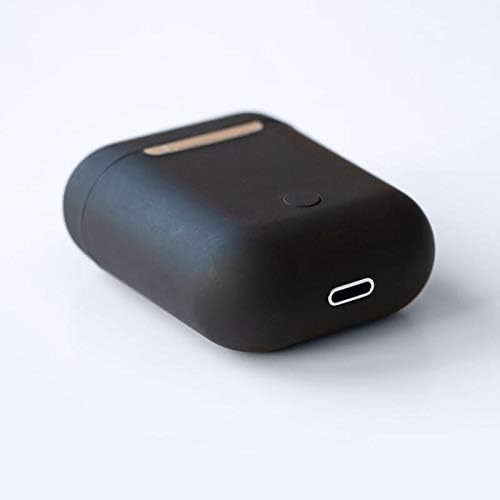
Imatge: Un primer pla view of the bottom of the TWS i17 charging case, highlighting the USB charging port and a small button.
4.2 Emparellament amb el dispositiu
The i17 earbuds use Bluetooth for wireless connection.
- Assegureu-vos que els auriculars estiguin carregats.
- Obre l'estoig de càrrega. Els auriculars entraran automàticament en mode d'emparellament (els indicadors lluminosos parpellejaran).
- On your mobile phone or Bluetooth-enabled device, go to Bluetooth settings and turn Bluetooth on.
- Cerca available devices. Select "i17" from the list.
- Once connected, the indicator lights on the earbuds will stop flashing. You are now ready to use your earbuds.

Image: The TWS i17 Dual Earbuds resting inside their open charging case, ready for pairing or use.
5. Instruccions de funcionament
5.1 Encès/Apagat
- Encès: Take the earbuds out of the charging case. They will automatically power on and connect to the last paired device.
- Apagar: Torna a col·locar els auriculars a l'estoig de càrrega. S'apagaran automàticament i començaran a carregar-se.
5.2 Reproducció de música
- Reproduir/pausa: Toqueu qualsevol dels auriculars una vegada.
- Pista següent: Fes doble toc a l'auricular dret.
- Pista anterior: Fes doble toc a l'auricular esquerre.
5.3 Gestió de trucades
- Respondre/Finalitzar la trucada: Toqueu qualsevol dels auriculars una vegada.
- Rebutja la trucada: Manteniu premut qualsevol dels auriculars durant 2 segons.
5.4 Assistent de veu
- Activa l'assistent de veu (Siri/Assistent de Google): Toqueu tres vegades qualsevol dels auriculars.
6. Manteniment
Proper maintenance ensures the longevity of your earbuds:
- Neteja: Use a soft, dry, lint-free cloth to clean the earbuds and charging case. Do not use liquids or sprays.
- Emmagatzematge: Quan no els utilitzeu, guardeu els auriculars a la seva funda de càrrega per protegir-los i mantenir-los carregats. Guardeu-los en un lloc fresc i sec.
- Cura de la bateria: Per allargar la durada de la bateria, evita descarregar completament els auriculars amb freqüència. Carrega'ls regularment.

Image: The TWS i17 Dual Earbuds securely stored within their closed charging case, ready for transport or charging.
7. Solució De Problemes
| Problema | Causa possible | Solució |
|---|---|---|
| Els auriculars no s'aparellen | Low battery; Out of range; Not in pairing mode; Bluetooth off on device. | Charge earbuds; Move closer to device; Ensure case is open for pairing; Turn on Bluetooth on device. |
| Només funciona un auricular | One earbud not charged; Earbuds not properly synced. | Ensure both earbuds are charged; Place both earbuds back in case, close, then reopen to re-sync. |
| Sense so | Volume too low; Not connected; Media paused. | Increase volume on device; Reconnect earbuds; Check media playback status. |
| La funda de càrrega no es carrega | Faulty cable/adapter; Loose connection. | Try a different USB cable or power adapter; Ensure cable is securely plugged in. |
8. Especificacions
| Característica | Detall |
|---|---|
| Número de model | i17 |
| Marca | TWS |
| Tecnologia de connectivitat | Sense fil (Bluetooth) |
| Factor de forma dels auriculars | In-orella |
| Micròfon inclòs | Sí |
| Cancel·lació de soroll | No |
| Compatible amb | Telèfons mòbils |
| Color | Negre |
| Material | Plàstic |
| Característica del cable | Cable-free |
| Nivell de resistència a l'aigua | No resistent a l'aigua |
| Dimensions d'enviament | 12.6 x 8.8 x 3.6 cm |
| Pes | 96 grams |
| Primera data disponible | 15 de gener de 2020 |
9. Garantia i Suport
For warranty information and customer support, please refer to the contact details provided on the product packaging or the official TWS weblloc web. Conserveu el comprovant de compra per a reclamacions de garantia.
For further assistance, please contact TWS customer service.


