Introducció
The Fender Mustang LT50 is a versatile 50-watt guitar amplifier designed for both practice and performance. It features a high-quality 12-inch speaker, a user-friendly interface with a full-color display, and a comprehensive collection of presets and effects. This amplifier is equipped with a USB audio interface for recording and can be managed with the free Fender TONE 3.0 software.
Característiques clau
- 50 watts de potència: Proporciona ample volume for home practice, rehearsals, and small to medium-sized gigs.
- 12-inch Speaker: Delivers clear and full sound across various volume levels.
- Interfície fàcil d'utilitzar: Features a full-color display for easy navigation and control.
- 30 Preloaded Presets: Offers a wide range of electric guitar tones suitable for various music genres.
- 25 Onboard Effects: Includes multiple distortion, overdrive, compression, modulation, reverb, delay, and octave effects.
- Interfície d'àudio USB: Enables direct recording to a computer and integration with Fender TONE 3.0 software for editing and managing presets.
- Entrada auxiliar: Allows connection of external audio devices for playing along with music.
- Sortida d'auriculars: Per a la pràctica silenciosa.
Configuració
- Desembalatge: Traieu amb cura amplifier from its packaging. Ensure all components are present and undamaged.
- Connexió d'alimentació: Connecteu el cable d'alimentació a la xarxa amplifier's input and then to a grounded electrical outlet.
- Connexió de guitarra: Connecta la teva guitarra al ENTRADA jack al amplifier's control panel using a standard 1/4-inch instrument cable.
- Auxiliary Devices (Optional): For playing along with external audio, connect your device to the AUX input using a 1/8-inch stereo cable.
- Auriculars (opcionals): For silent practice, plug headphones into the AURICULAR jack.
- Connexió USB (opcional): Connecteu el amplifier to your computer via the USB port for recording or using Fender TONE 3.0 software.
Before powering on, ensure all connections are secure and volume knobs are set to a low level.
Instruccions de funcionament
Controls acabatsview

This image displays the top control panel of the Fender Mustang LT50, highlighting the various knobs and buttons for sound shaping and navigation.
- ENTRADA: 1/4-inch jack for connecting your guitar.
- AUX: 1/8-inch stereo input for external audio sources.
- HEADPHONE: 1/8-inch stereo output for headphones.
- GUANY: Adjusts the input sensitivity and amount of overdrive/distortion.
- VOLUM: Controls the overall output volume of the selected preset.
- TREBLE, MIDDLE, BASS: Tone controls to shape the high, mid, and low frequencies.
- MÀSTER: Controla el volum de sortida general del ampmés viu.
- DATA WHEEL: Used to scroll through presets, adjust parameters, and navigate menus. Press to confirm selections.
- ESQUENA: Torna al menú o pantalla anterior.
- DESA: Saves current amplifier settings as a preset.
- MENÚ: Accesses the main menu for advanced settings and options.
- TAP/TUNER: Tap to set delay/tremolo tempo; hold to activate the built-in tuner.
- COMMUTADOR ON / OFF: Potencia el ampmés viu encès o apagat.
- USB: Connects to a computer for recording and software control.
Selecting and Saving Presets
The Mustang LT50 comes with 30 preloaded presets and offers 30 user-programmable slots. To select a preset, rotate the RODA DE DADES. The display will show the preset number and name. To save your customized settings as a new preset or overwrite an existing one, press the DESA button and follow the on-screen prompts.
Using Onboard Effects
El amplifier includes 25 different effects. These effects are integrated into the presets. You can edit the effects within a preset by navigating through the menu using the MENÚ botó i RODA DE DADES. Adjust individual effect parameters to customize your sound.
USB Audio Interface and Fender TONE 3.0
The integrated USB audio interface allows you to connect the amplifier directly to your computer for recording your guitar. Additionally, you can download the free Fender TONE 3.0 software for Mac or PC. This software provides an intuitive platform to edit, store, and manage your amplifier's presets, and access a community of user-created tones.
Manteniment
- Neteja: Utilitzeu un drap suau i sec per netejar l'exterior ampEviteu netejadors o dissolvents abrasius.
- Emmagatzematge: Emmagatzemar el amplificador en un ambient sec, allunyat de temperatures extremes i de la llum solar directa.
- Ventilació: Assegureu-vos una ventilació adequada al voltant amplifier to prevent overheating. Do not block air vents.
- Cura del cable: Regularly inspect all cables for damage. Replace frayed or damaged cables immediately.
- Protecció de l'altaveu: Avoid placing heavy objects on the speaker grille.
Resolució de problemes
| Problema | Causa possible | Solució |
|---|---|---|
| Sense so | Power not connected, amplifier off, volume low, guitar cable faulty, incorrect input selected. | Check power connection, turn on amplifier, increase volume (Gain, Volume, Master), test guitar cable, ensure guitar is plugged into INPUT. |
| So distorsionat | Gain too high, faulty cable, speaker damage. | Reduce GAIN setting, test with a different cable, contact support if speaker damage is suspected. |
| Els controls no responen | Error temporal de programari. | Gireu el amplifier off, wait 10 seconds, then turn it back on. |
If you encounter issues not covered here, or if solutions do not resolve the problem, please contact Fender customer support for assistance.
Especificacions
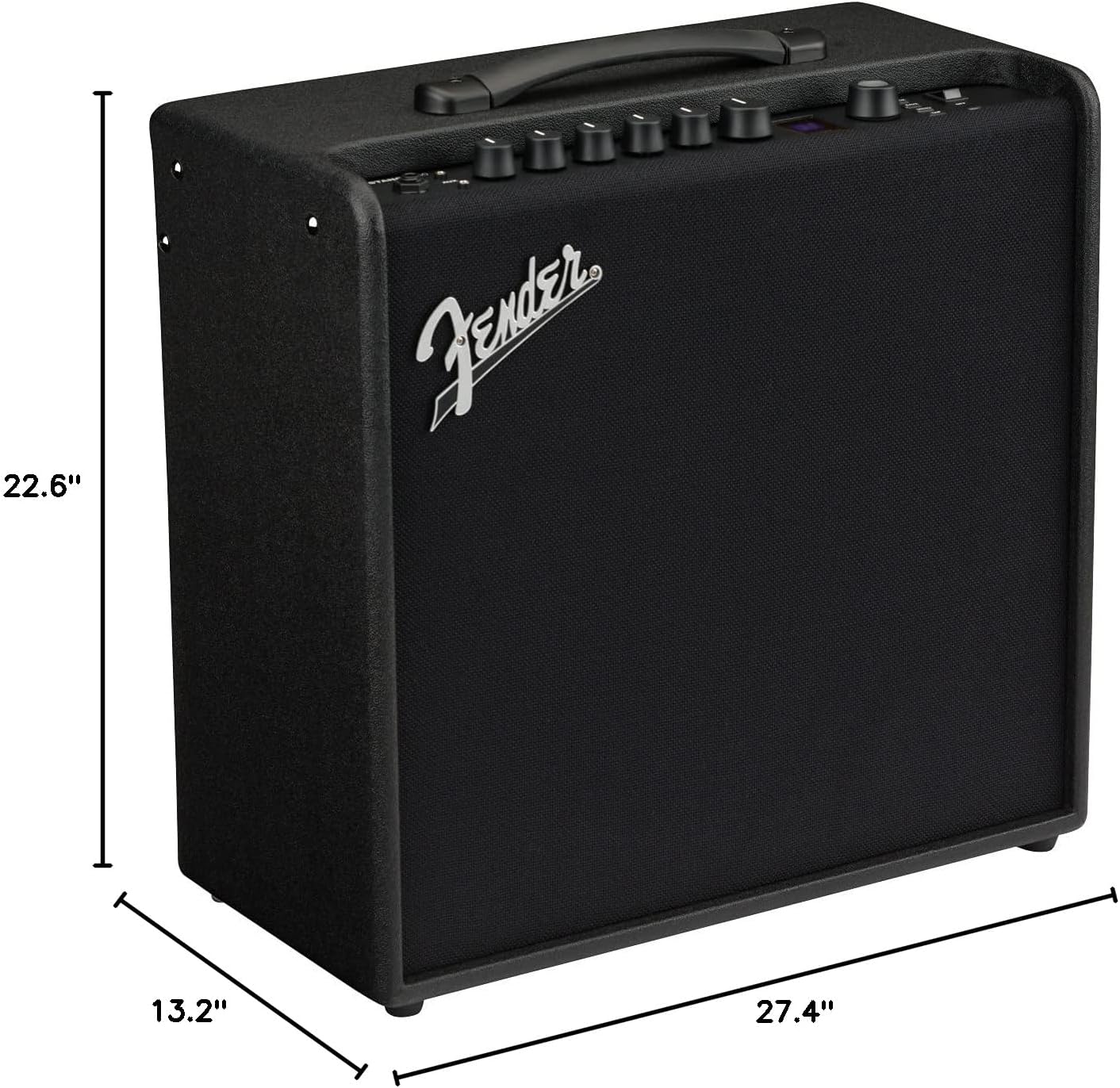
This image illustrates the physical dimensions of the Fender Mustang LT50 ampmés viu.
- Número de model: 2311200000
- Potència de sortidatage: 50 watts
- Mida de l'altaveu: 12 polzades
- Pes de l'article: 23.5 lliures
- Dimensions del producte: 27.4 x 22.6 x 13.2 cm (amplada x alçada x profunditat)
- Tipus de material: Fusta
- Tipus de connectors: 6.35 mm jack (Input), USB, 1/8-inch Aux, 1/8-inch Headphone
- Font d'alimentació: Elèctric amb cable
Garantia i Suport
The Fender Mustang LT50 Guitar Amplifier ve amb a Garantia limitada de 2 anys. This warranty covers defects in materials and workmanship from the original purchase date. For detailed warranty terms, service, or technical support, please visit the official Fender website or contact Fender customer service directly.
For additional resources and community support, consider exploring the Fender TONE community online.


