Introducció
This manual provides essential instructions for the safe and efficient operation of your Xiaomi AI Bluetooth Speaker Mini (Model MDZ-28-DE). Please read this manual thoroughly before using the product and retain it for future reference.
Producte acabatview
The Xiaomi AI Bluetooth Speaker Mini is a compact, portable wireless speaker designed for high-definition audio playback and hands-free calling. Its small size and lightweight design make it ideal for on-the-go use.

Figura 1: Davant view of the Xiaomi AI Bluetooth Speaker Mini. This image displays the speaker's cylindrical shape and the perforated grille on top, which houses the speaker driver.
Característiques principals:
- Compacte i portàtil: Disseny lleuger per facilitar el transport.
- Connectivitat Bluetooth 4.2: Stable wireless connection to smartphones and other devices.
- Trucades mans lliures: Integrated microphone for clear voice calls.
- Integració de la IA: Supports voice assistant functions when connected to a compatible smartphone.
- Port USB: Per carregar el dispositiu.
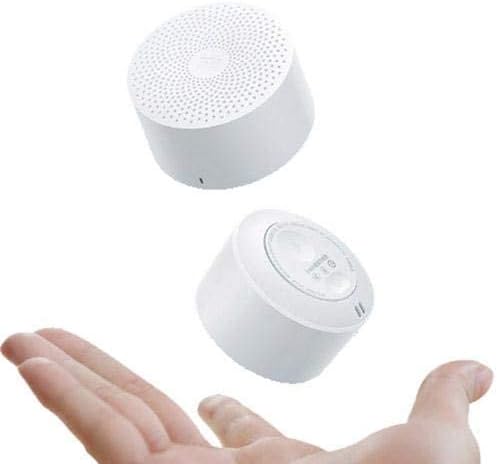
Figura 2: The Xiaomi AI Bluetooth Speaker Mini held in a hand, illustrating its compact and portable size. The speaker's small form factor is evident, making it easy to carry.
Configuració
1. Carregant l’altaveu
Before initial use, fully charge the speaker. Connect the provided USB charging cable to the speaker's USB port and the other end to a standard USB power adapter (not included) or a computer's USB port. The charging indicator light will illuminate during charging and turn off when fully charged.
2. Encendre/apagar
- Per encendre: Press and hold the power button (usually located on the bottom or side) for approximately 2-3 seconds until you hear an audible prompt or see an indicator light.
- Per apagar: Press and hold the power button again for approximately 2-3 seconds until you hear an audible prompt or the indicator light turns off.

Figura 3: A dalt view of the speaker, showing the perforated grille and the Xiaomi logo at its center. This is where the sound emanates from.
3. Emparellament Bluetooth
- Ensure the speaker is powered on and in pairing mode. The indicator light will typically flash blue rapidly.
- Al telèfon intel·ligent o al dispositiu amb Bluetooth, navegueu fins a la configuració de Bluetooth.
- Cerca available devices. The speaker should appear as "Xiaomi AI Bluetooth Speaker Mini" or a similar name.
- Seleccioneu l'altaveu de la llista per iniciar l'emparellament.
- Once successfully paired, you will hear a confirmation tone, and the indicator light will typically turn solid blue or flash slowly.
- Si se us demana una contrasenya, introduïu "0000".
Instruccions de funcionament
Reproducció de música
After successful pairing, you can play audio from your connected device. Use your device's controls to manage playback (play, pause, skip tracks) and volume. The speaker's volume can also be adjusted via its physical buttons, if present, or through the connected device.
Trucades mans lliures
Quan està connectat a un telèfon intel·ligent, l'altaveu es pot utilitzar per a trucades de mans lliures.
- Respondre una trucada: Press the multi-function button (often the power button or a dedicated call button) once to answer an incoming call.
- Finalització d'una trucada: Press the multi-function button once during a call to end it.
- Rebutjar una trucada: Premeu i manteniu premut el botó multifunció durant aproximadament 2 segons per rebutjar una trucada entrant.
Assistent de veu AI
The speaker supports AI voice assistant functionality through your connected smartphone. To activate, ensure your phone's voice assistant (e.g., Google Assistant, Siri) is enabled. Press the multi-function button twice quickly to activate the voice assistant. You can then speak commands through the speaker's microphone.
Manteniment
- Neteja: Feu servir un drap suau i sec per netejar l'exterior de l'altaveu. No utilitzeu netejadors líquids ni materials abrasius.
- Emmagatzematge: Guardeu l'altaveu en un lloc fresc i sec, allunyat de la llum solar directa i de temperatures extremes.
- Resistència a l'aigua: This speaker is not waterproof. Avoid exposure to water or high humidity.
- Cura de la bateria: Per allargar la durada de la bateria, eviteu descarregar completament l'altaveu amb freqüència. Carregueu-lo regularment, fins i tot si no l'utilitzeu durant períodes prolongats.
Resolució de problemes
| Problema | Causa possible | Solució |
|---|---|---|
| L'altaveu no s'encén. | Bateria baixa. | Carregueu l'altaveu completament. |
| No es pot emparellar amb el dispositiu. | Bluetooth no habilitat al dispositiu; l'altaveu no està en mode d'emparellament; massa lluny del dispositiu. | Ensure Bluetooth is on; put speaker in pairing mode; move device closer (within 10 meters). |
| No hi ha so durant la reproducció. | Volume too low; device not connected; incorrect audio output selected on device. | Increase volume on speaker and device; re-pair the device; check audio output settings on your device. |
| Mala qualitat de trucada. | Weak signal; microphone obstruction. | Move to an area with better signal; ensure microphone is not covered. |
Especificacions

Figura 4: lateral view of the Xiaomi AI Bluetooth Speaker Mini, showcasing its compact design. Note: The dimensions shown in this image are illustrative and may not reflect the exact product measurements. Refer to the specifications below for accurate details.
- Número de model: MDZ-28-DE
- Tipus d'altaveu: Altaveu Bluetooth
- Connectivitat: Sense fil (Bluetooth 4.2)
- Sortida nominal: Less than 5 Watt (Max 5 Watts)
- Mode de sortida d'àudio: estèreo
- Tipus de port: USB
- Material: Plàstic
- Pes del producte: 0.107 kg
- Approximate Dimensions (Package): 8.8 x 7.2 x 3.4 cm
- Compatible amb: Telèfons intel·ligents, tauletes, ordinadors
- Característiques especials: Bluetooth, Portable, Wireless, Hands-free Call, AI Voice Assistant support.
Garantia i Suport
Per obtenir informació sobre la garantia, assistència tècnica o consultes sobre el servei, consulteu la targeta de garantia inclosa amb el producte o visiteu el lloc web d'assistència oficial de Xiaomi. weblloc web. Conserveu el rebut de compra com a comprovant de compra.
Fabricant: Xiaomi
Data de primera disponibilitat: 6 de febrer de 2020


