1. Introducció
This manual provides essential information for the installation, operation, and maintenance of your FORTINET FortiGate-40F Firewall Appliance. The FortiGate-40F is designed to deliver enterprise-grade security and performance in a compact form factor, ideal for small to mid-sized businesses and branch offices. It integrates advanced threat protection with comprehensive network security features.
2. Contingut del paquet
Verifiqueu que tots els elements siguin presents al vostre paquet:
- 1x FortiGate-40F Firewall Appliance
- 1x Power Adapter (DC+12V)
- 1x cable USB
- 1 cable de consola
- Documentació (Guia d'inici ràpid, Informació de seguretat)
3. Producte acabatview
The FortiGate-40F features a robust design with multiple ports for flexible network connectivity and management.

Figura 3.1: Frontal view of the FortiGate-40F Firewall Appliance.
3.1 Indicadors del panell frontal
The front panel includes LED indicators for power, status, and network activity for each port, providing quick visual feedback on the device's operational state.

Figura 3.2: Detallada view of the FortiGate-40F front and rear panels, highlighting port labels and LED indicators.
3.2 Ports del panell posterior
The rear panel provides the following connectivity options:
- 1x USB Port (for management or auxiliary functions)
- 1x Console Port (RJ45 for direct management access)
- 1x GE RJ45 WAN Port (for internet connection)
- 1x GE RJ45 FortiLink Port (for connecting to FortiSwitch or FortiAP devices)
- 3x GE RJ45 Ethernet Ports (internal network connections)
- Botó de restabliment
- DC+12V Power Input

Figure 3.3: Close-up of the FortiGate-40F rear panel, showing the various ports and their labels.
3.3 Dimensions i pes
The FortiGate-40F is designed for compact deployment.
- Dimensions del producte: 12 x 9 x 5 polzades
- Pes de l'article: 3.47 lliures
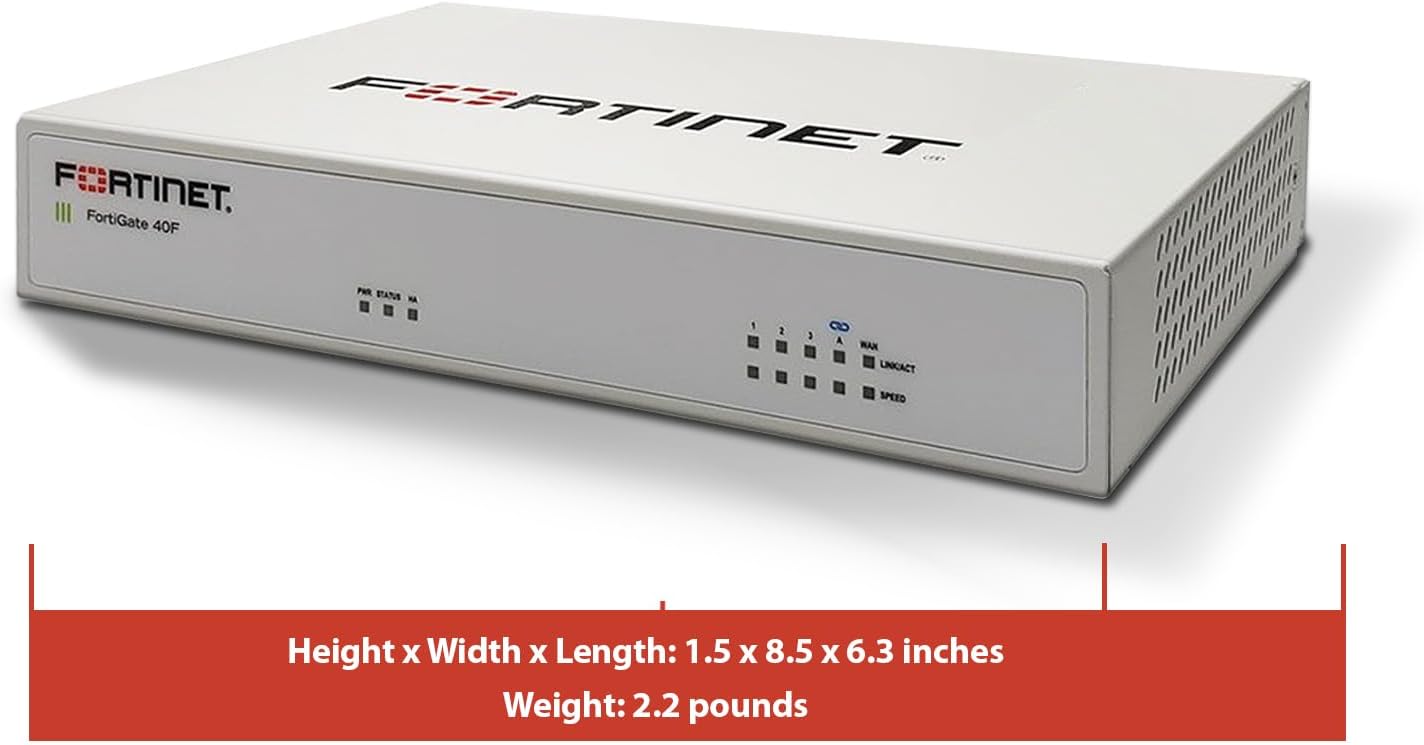
Figure 3.4: FortiGate-40F with its physical dimensions indicated.
4. Característiques
The FortiGate-40F offers a comprehensive suite of features for robust network security:
- Integrated Firewall Appliance and Security Services: Comes with FortiGate-40F Firewall Appliance, 1 year of FortiCare Premium, and FortiGuard Unified Threat Protection.
- UTP Security Features: Offers protection from advanced threats with DNS filtering, URL filtering, video filtering, and controls against botnets.
- Ideal for Smaller Settings: Best suited for small to mid-sized businesses needing reliable security without the complexity of larger systems.
- Continuous Support and Maintenance: FortiCare Premium ensures that technical help is readily available to manage and troubleshoot issues.
- Compacte i eficaç: Provides a powerful, yet compact security solution that effectively protects against a wide range of cyber threats.
5. Configuració
Follow these general steps for initial setup. For detailed instructions, refer to the Quick Start Guide included in your package or visit the official Fortinet support weblloc.
- Connecteu-vos a l'alimentació: Connect the DC+12V power adapter to the appliance and plug it into a power outlet.
- Connexió a Internet (WAN): Connect your internet modem or upstream network device to the WAN port on the FortiGate-40F using an Ethernet cable.
- Connexió a la xarxa local (LAN): Connect your local network switch or a computer directly to one of the internal GE RJ45 Ethernet ports.
- Configuració inicial: Access the device's management interface via a web browser (typically 192.168.1.99 by default) or through the console port for command-line interface (CLI) access. Follow the on-screen prompts to complete the initial setup, including setting up network parameters and registering the device.
Vídeo 5.1: Aquest vídeo ofereix una visió generalview of the Fortinet FortiGate 40F Firewall, including its features and a general review. It can assist with understanding the device's capabilities during setup.
6. Instruccions de funcionament
Once the initial setup is complete, you can manage your FortiGate-40F through its web-based graphical user interface (GUI) or the command-line interface (CLI).
6.1 Webbasada en GUI
Access the GUI by entering the device's IP address in a web browser. From the GUI, you can:
- Configure firewall policies and rules.
- Manage VPN connections (IPSec, SSL VPN).
- Monitor network traffic and security events.
- Apply FortiGuard Unified Threat Protection (UTP) services like antivirus, web filtering, and intrusion prevention.
- Manage user authentication and access control.
6.2 Command-Line Interface (CLI)
The CLI provides advanced configuration and troubleshooting options. Access it via the console port using a terminal emulator.
7. Manteniment
Regular maintenance ensures optimal performance and security for your FortiGate-40F appliance.
- Actualitzacions de firmware: Regularly check for and apply the latest firmware updates from Fortinet to ensure you have the most current security patches and features.
- Còpies de seguretat de configuració: Periodically back up your device configuration to a secure location.
- Inspecció física: Ensure the device's vents are clear of obstructions to prevent overheating.
- Actualitzacions del servei de seguretat: Ensure your FortiGuard UTP subscriptions are active and receiving regular updates for threat intelligence.
8. Solució De Problemes
This section addresses common issues you might encounter with your FortiGate-40F.
8.1 Problemes de connectivitat
- Sense accés a Internet: Verify WAN cable connection, modem status, and FortiGate WAN interface configuration. Check firewall policies to ensure traffic is allowed.
- Local Network Issues: Confirm LAN cable connections, IP address settings on connected devices, and FortiGate internal interface configuration.
8.2 Management Access Problems
- Cannot Access GUI: Ensure your computer is on the correct subnet, try clearing browser cache, or attempt access via the console port.
- Has oblidat la contrasenya: Use the console port to access the CLI and reset the password if necessary, following Fortinet's recovery procedures.
8.3 Registre del dispositiu
Some users have reported issues with device registration if Amazon is not listed as an 'approved reseller'. Ensure you follow the registration steps carefully and contact Fortinet support if issues persist.
Video 8.1: This video provides pre-purchase information on router compatibility, which can be helpful for understanding potential setup and integration challenges.
9. Especificacions
Key technical specifications for the FortiGate-40F Firewall Appliance:
| Atribut | Valor |
|---|---|
| Dimensions del producte | 12 x 9 x 5 polzades |
| Pes de l'article | 3.47 lliures |
| Número de model de l'article | 40F |
| Marca | FORTINET |
| Nom del model | FortiGate 40F |
| Característica especial | Seguretat de la xarxa |
| Classe de banda de freqüència | Banda única |
| Comunicació sense fils estàndard | 802.11ac |
| Dispositius compatibles | Escriptori |
| Usos recomanats per al producte | Tallafoc |
| Tecnologia de connectivitat | Ethernet |
| Color | Multicolor |

Figure 9.1: A table detailing the performance specifications of the FortiGate-40F, including IPS, NGFW, and Threat Protection throughputs.

Figure 9.2: Diagram illustrating the interfaces and hardware features of the FortiGate-40F series, including port types and hardware capabilities.
10. Garantia i Suport
Your FortiGate-40F Firewall Appliance includes 1 year of FortiCare Premium and FortiGuard Unified Threat Protection (UTP).
- FortiCare Premium: Provides comprehensive technical support, hardware replacement, and firmware upgrades. This ensures you have access to expert assistance and the latest software.
- FortiGuard UTP: Delivers real-time threat intelligence updates for services such as antivirus, web filtering, intrusion prevention, and anti-spam, protecting your network from evolving cyber threats.
For detailed information on your warranty and support services, please refer to the documentation provided with your product or visit the official Fortinet weblloc.

Figura 10.1: Mésview of FortiGuard Security Services and FortiCare Support Subscriptions, detailing various service offerings and bundles.
11. Informació important de seguretat
Please read and follow all safety instructions to prevent injury or damage to the device.
- Feu funcionar el dispositiu dins dels rangs de temperatura i humitat especificats.
- No exposeu el dispositiu a l'aigua ni a una humitat excessiva.
- Assegureu-vos una ventilació adequada per evitar el sobreescalfament.
- Utilitzeu només l'adaptador d'alimentació subministrat amb el dispositiu.
- No obriu el dispositiu casing; demaneu totes les tasques de manteniment a personal qualificat.


