1. Introducció
This user manual provides essential information for the safe and efficient operation of your AGFA PHOTO Realipix Mini P portable photo printer. Please read this manual thoroughly before using the device and retain it for future reference. The Realipix Mini P allows you to print high-quality 5.3 x 8.6 cm photos directly from your smartphone or tablet via Bluetooth, utilizing 4Pass thermal sublimation technology for durable prints.

Figure 1: AGFA PHOTO Realipix Mini P Portable Photo Printer.
2. Informació important de seguretat
To ensure safe operation and prevent damage to the device, please observe the following precautions:
- No exposeu la impressora a l'aigua ni a una humitat excessiva.
- Do not attempt to disassemble, repair, or modify the printer. Refer all servicing to qualified personnel.
- Use only the specified power adapter and USB cable for charging.
- Keep the printer away from direct sunlight, high temperatures, and open flames.
- Assegureu-vos una ventilació adequada durant el funcionament i la càrrega.
- Mantenir fora de l'abast dels nens.
3. Contingut del paquet
Verifiqueu que tots els elements siguin presents al paquet:
- AGFA PHOTO Realipix Mini P Portable Photo Printer
- Guia d'inici ràpid
- Cable de càrrega USB
- All-in-one Photo Cartridge (8 photos)

Figure 2: Product packaging showing the printer and included items.
4. Impressora sobreview
Familiarize yourself with the components of your Realipix Mini P printer:

Figura 3: superior view of the AGFA PHOTO Realipix Mini P printer, showing the power button and status indicators.
- Botó d'encesa: Press and hold to turn the printer on or off.
- Llums indicadores d'estat: Provide information on power, battery, and printing status.
- Ranura de sortida de paper: On emergeixen les fotos impreses.
- Ranura per a cartutxos: Located on the side or back, for inserting the all-in-one photo cartridge.
- Port USB: For charging the printer.
5. Configuració inicial
5.1 Càrrega de la impressora
- Connect the supplied USB cable to the printer's USB port.
- Connecteu l'altre extrem del cable USB a un adaptador de corrent USB compatible (no inclòs) o al port USB d'un ordinador.
- The status indicator light will show charging progress. A full charge typically takes approximately 90 minutes.
5.2 Installing the AgfaPhoto Realipix App
The AGFA PHOTO Realipix Mini P requires the dedicated AgfaPhoto Realipix app for operation.
- Download the "AgfaPhoto Realipix" app from the Apple App Store (for iOS 11.0 and above) or Google Play Store (for Android 4.2 and above).
- Instal·leu l'aplicació al telèfon intel·ligent o a la tauleta.
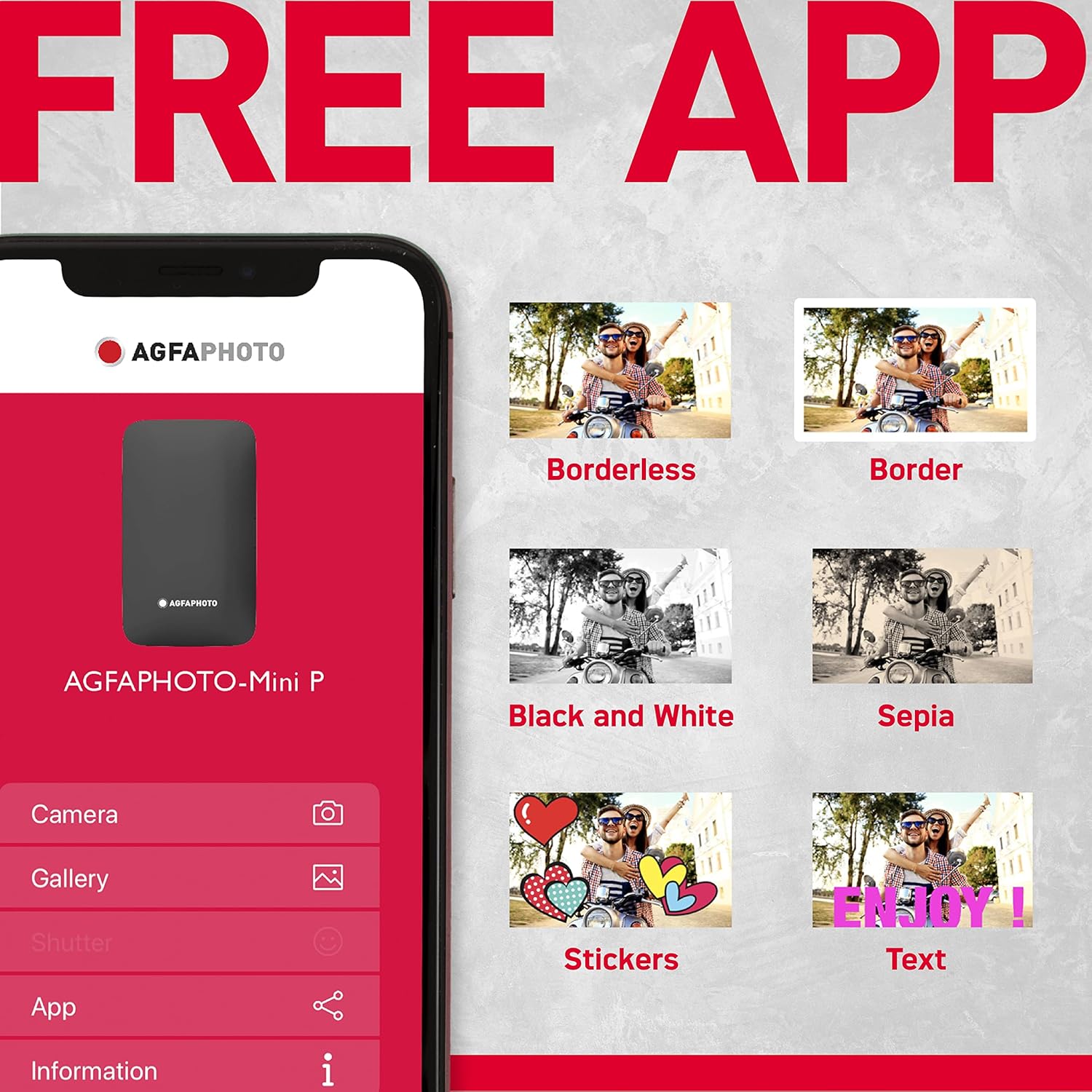
Figure 4: The AgfaPhoto Realipix app interface, showing various editing and printing options.
5.3 Loading the Photo Cartridge
The printer uses an all-in-one cartridge containing both ink and photo paper.
- Open the cartridge cover on the printer.
- Insert a compatible AgfaPhoto Realipix cartridge (e.g., AMC20, AMC30, AMC50) into the slot, ensuring it is correctly oriented.
- Close the cartridge cover securely.
6. Funcionament de la impressora
6.1 Connexió mitjançant Bluetooth
- Turn on the Realipix Mini P printer by pressing and holding the power button.
- Activeu el Bluetooth al telèfon intel·ligent o a la tauleta.
- Open the AgfaPhoto Realipix app. The app will guide you through connecting to the printer. Select "Realipix Mini P" from the list of available devices.
- Once connected, the app will indicate that the printer is ready.

Figure 5: Demonstrating wireless printing from a smartphone to the Realipix Mini P printer.
6.2 Impressió de fotos
- In the AgfaPhoto Realipix app, select the photo you wish to print from your device's gallery.
- Use the app's editing features to crop, apply filters, add stickers, frames, or text as desired.
- Confirm your selections and initiate the print command within the app.
- The printer will begin the 4Pass printing process, which involves multiple passes for each color layer (yellow, magenta, cyan) and a final protective layer.
- Once printing is complete, the photo will emerge from the paper output slot.

Figure 6: A printed photo demonstrating the 5.3 x 8.6 cm (2.1 x 3.4 inch) output size.

Figure 7: Illustration of 4Pass thermal sublimation technology, producing water and light resistant photos with 16 million colors.
7. Manteniment
7.1 Neteja de la impressora
To maintain optimal performance, keep the printer clean:
- Netegeu l'exterior de la impressora amb un drap suau i sec.
- No utilitzeu netejadors líquids ni dissolvents.
- Ensure no dust or debris accumulates in the paper output slot or cartridge area.
7.2 Substitució de cartutxos
When the cartridge is empty, replace it with a new AgfaPhoto Realipix all-in-one cartridge. Follow the instructions in section 5.3 for loading a new cartridge.
7.3 Cura de la bateria
The printer contains a rechargeable Lithium-ion battery:
- Charge the printer regularly, even if not in use, to prolong battery life.
- Eviteu descarregar completament la bateria amb freqüència.
- No exposeu la bateria a temperatures extremes.
8. Solució De Problemes
If you encounter issues with your Realipix Mini P, refer to the following common problems and solutions:
| Problema | Causa possible | Solució |
|---|---|---|
| La impressora no s'encén. | Bateria baixa o sense energia. | Charge the printer using the supplied USB cable. Ensure the power button is pressed and held sufficiently. |
| No es pot connectar per Bluetooth. | Bluetooth is off on device, printer is off, or out of range. | Ensure Bluetooth is enabled on your smartphone/tablet. Turn on the printer. Move the printer closer to your device. Restart both devices. |
| Poca qualitat d'impressió. | Cartridge issue, dirty print head, or low battery. | Replace the photo cartridge. Ensure the printer is clean. Charge the printer fully before printing. |
| Paper jam or photo not ejecting. | Improper cartridge insertion or foreign object. | Turn off the printer. Carefully open the cartridge cover and check for obstructions. Reinsert the cartridge correctly. Do not force the paper. |
| App not recognizing printer. | App or printer software issue. | Ensure the app is updated to the latest version. Restart the app and the printer. Re-pair the Bluetooth connection. |
9. Especificacions tècniques
Model: AMP23-WH
| Característica | Especificació |
|---|---|
| Dimensions del producte | 12.1 de profunditat x 7.9 d'amplada x 2.2 d'alçada cm |
| Pes de l'article | 255 grams |
| Tecnologia d'impressió | 4Pass Dye Sublimation (Thermal) |
| Sortida de la impressora | Color |
| Resolució d'impressió màxima | 300 ppp o superior |
| Profunditat de color | 24 bpp |
| Maximum Print Speed (Color/Mono) | 1 page per minute |
| Mida màxima del suport | 5.3 x 8.6 cm |
| Capacitat màxima de fulls | 10 sheets (per cartridge) |
| Impressió dúplex | No |
| Tecnologia de connectivitat | Bluetooth, USB |
| Ports USB totals | 1 |
| Sistemes operatius compatibles | Android (4.2+), iOS (11.0+) |
| Composició de la bateria | Ió de liti (1 inclòs) |
| Característiques especials | Rechargeable, Compact |
| Color | Blanc |
10. Garantia i Suport
10.1 Garantia del fabricant
The AGFA PHOTO Realipix Mini P comes with a 2 any de garantia del fabricantSi us plau, conserveu el comprovant de compra per a reclamacions de garantia.
10.2 Disponibilitat de peces de recanvi
Spare parts are generally available for 2 anys des de la data de compra.
10.3 Actualitzacions de programari
Actualment no hi ha informació disponible sobre les actualitzacions de programari garantides.
10.4 Atenció al client
For technical assistance, warranty service, or further inquiries, please refer to the contact information provided in your Quick Start Guide or visit the official AgfaPhoto weblloc de recursos de suport.


