Introducció
This manual provides comprehensive instructions for the Doro 6040 Senior Mobile Phone, model 7826. Designed for ease of use, this phone features a clear display, large buttons, and essential functions to keep you connected. Please read this manual carefully to ensure proper operation and maintenance of your device.
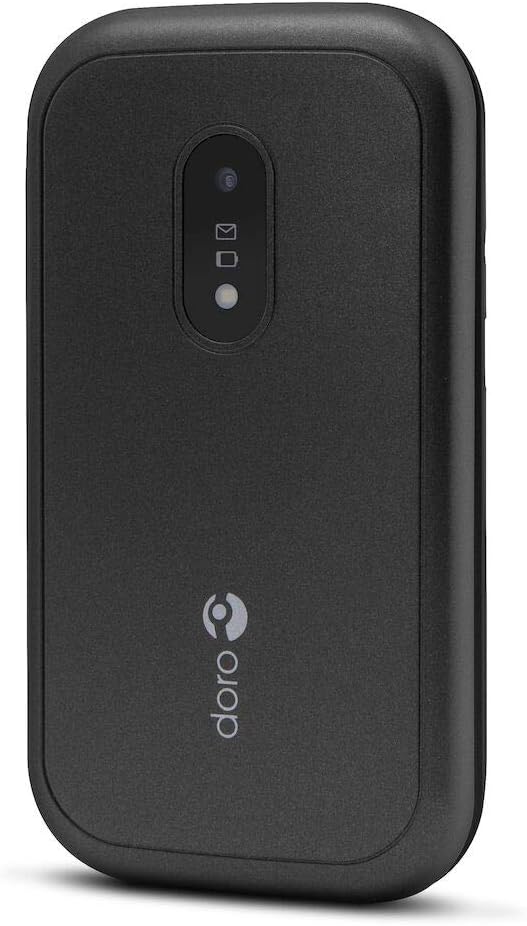
Figure 1: Doro 6040 Senior Mobile Phone (Rear View)
This image displays the rear of the Doro 6040 mobile phone, featuring its black casing. Visible elements include the rear camera lens, indicators for messages and notifications, and the Doro brand logo positioned vertically on the lower part of the phone's back.
Què hi ha a la caixa
En obrir el paquet, comproveu que hi hagi tots els components:
- Doro 6040 Mobile Phone
- Bateria (ió de liti)
- Adaptador (carregador)
- Guia de configuració ràpida
Configuració
1. Instal·lació de la bateria
- Traieu amb cura la tapa posterior del telèfon.
- Insert the Lithium Ion battery into the battery compartment, ensuring the gold contacts align with those in the phone.
- Torneu a col·locar la coberta posterior fins que sentiu un clic i que quedi ben fixada al seu lloc.
2. Instal·lació de la targeta SIM
The Doro 6040 uses a MicroSIM card.
- Amb la bateria treta, localitzeu la ranura de la targeta SIM.
- Insert your MicroSIM card into the designated slot, ensuring the cut corner aligns correctly.
- Torneu a instal·lar la bateria i la coberta posterior.
3. Carregant el telèfon
Abans del primer ús, carregueu completament la bateria del telèfon.
- Connecteu l'adaptador a una presa de corrent.
- Plug the charging cable into the phone's charging port.
- The battery indicator on the screen will show charging progress. Disconnect the charger once the battery is full.
4. Encès / apagat
- Per engegar: premeu i manteniu premut el botó d'engegada fins que la pantalla s'il·lumini.
- Per apagar: manteniu premut el botó d'engegada i, a continuació, seleccioneu "Apagar" de les opcions.
Instruccions de funcionament
Fer i rebre trucades
- Per marcar: Introduïu el número de telèfon amb el teclat numèric i premeu el botó verd de trucada.
- Respondre: Press the green call button when the phone rings.
- Per finalitzar la trucada: Press the red end call button.
- Answering by opening: The phone supports answering calls by simply opening the flip.
Contacts (Phonebook)
- Navegueu fins al menú "Contactes".
- Use the navigation keys to scroll through your contacts.
- To call a contact, select their name and press the green call button.
Messaging (SMS/MMS)
- Go to the "Messages" menu to read or compose new messages.
- The phone supports both Short Message Services (SMS) and Multimedia Messaging System (MMS).
Càmera
- Accediu a la càmera des del menú principal.
- Point the camera at your subject and press the capture button to take a photo.
- The phone features a 2 MP rear camera with a built-in flash.
Botó d'emergència
The Doro 6040 is equipped with an emergency button on the back, which can be activated if configured. Refer to the Quick Setup Guide for instructions on setting up emergency contacts and functions.
Característiques addicionals
- Llanterna: An integrated flashlight is available for convenience.
- Funció d'alarma: Estableix alarmes per a recordatoris o trucades de despertador.
- Calculadora: A basic calculator is included for simple arithmetic.
- Calendari: Keep track of dates and appointments.
- Bluetooth: Connect to compatible Bluetooth devices (version 3.0).
Manteniment
- Neteja: Feu servir un drap suau i sec per netejar l'exterior del telèfon. Eviteu utilitzar netejadors líquids o aerosols.
- Cura de la bateria: To prolong battery life, avoid exposing the phone to extreme temperatures. Charge the battery regularly, but avoid overcharging.
- Emmagatzematge: If storing the phone for an extended period, ensure the battery is partially charged (around 50%) and store it in a cool, dry place.
- Actualitzacions de programari: Keep your phone's software updated if prompted, to ensure optimal performance and security.
Resolució de problemes
If you encounter issues with your Doro 6040, refer to the following common problems and solutions:
| Problema | Possible causa/solució |
|---|---|
| El telèfon no s'encén. | Battery may be depleted. Charge the phone for at least 30 minutes. Ensure battery is correctly installed. |
| No es poden fer ni rebre trucades. | Check if the SIM card is properly inserted. Ensure you have network coverage. Contact your service provider. |
| Audio quality is poor during calls. | Adjust the call volume. Move to an area with better network signal. Ensure the speaker/microphone is not obstructed. |
| Difficulty finding contacts in phonebook. | Scrolling through contacts using only up/down keys can be slow. Ensure contacts are saved correctly. |
| Ringtone volume is low (custom tones). | Custom ringtones via microSD or Bluetooth may have lower volume than pre-installed tones. Adjust phone volume settings. |
| El telèfon es bloqueja o deixa de respondre. | Traieu i torneu a inserir la bateria per dur a terme un restabliment suau. |
Especificacions
| Característica | Detall |
|---|---|
| Nom del model | Doro 6040 (Model 7826) |
| Dimensions del producte | 2.24 x 0.79 x 4.17 polzades (57 x 20 x 106.7 mm) |
| Pes de l'article | 4.2 unces (118 g) |
| Mostra | 2.8 Inches, 320 x 240 pixels resolution |
| Capacitat de la bateria | 1000 mAh d'ions de liti |
| Talk Time (2G) | 6.8 hores |
| Standby Time (2G) | 420 hores |
| Càmera posterior | 2 MP with built-in flash |
| Tipus de targeta SIM | MicroSIM (Single SIM capacity) |
| Connectivitat | Bluetooth 3.0, 2G Cellular Technology |
| Conector d'auriculars | 3.5 mm |
| Sistema operatiu | Android (Note: This is from the product data, but for a feature phone, it's likely a highly customized or simplified version, not full Android OS as on smartphones.) |
| Capacitat d'emmagatzematge de memòria | 1.58 MB |
| Color | Negre |
| Característiques | Calculator, Calendar, Alarm function, Integrated flashlight, SMS, MMS, Emergency button. |
Garantia i Suport
Informació de la garantia
The Doro 6040 Senior Mobile Phone comes with a Dos anys de garantia contra defectes de fàbrica. Si us plau, conserveu el comprovant de compra per a reclamacions de garantia.
Atenció al client
For further assistance, technical support, or warranty inquiries, please contact Doro customer service. Refer to the contact information provided in your Quick Setup Guide or visit the official Doro weblloc.
For online resources and frequently asked questions, you may visit the Doro Support Page.


