Introducció
This manual provides detailed instructions for the setup, operation, maintenance, and troubleshooting of your Montech AIR X ARGB-White Midi-Tower PC Case. Please read this manual thoroughly before beginning installation to ensure proper assembly and optimal performance.
Producte acabatview
The Montech AIR X ARGB-White is a Midi-Tower PC case designed for high airflow and aesthetic appeal. It features a unique diamond mesh front panel, tempered glass side panel, and comes with pre-installed Addressable RGB (ARGB) fans and a controller for customizable lighting.

Figura 1: Frontal esquerre view of the Montech AIR X ARGB-White PC Case, showcasing its mesh front panel and tempered glass side panel.

Figura 2: Interior view of the Montech AIR X ARGB-White PC Case, highlighting the spacious layout for components.
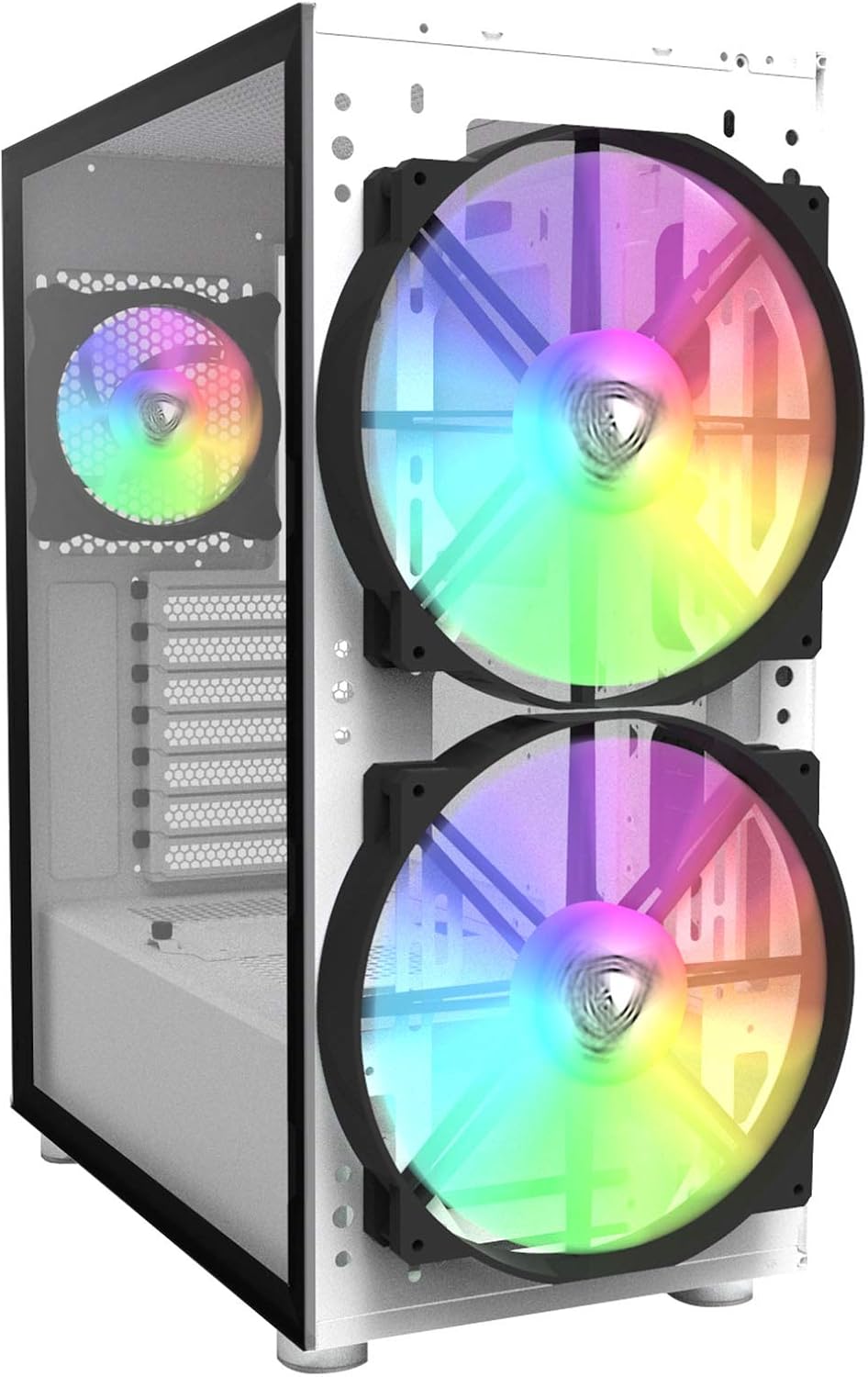
Figura 3: Frontal view of the Montech AIR X ARGB-White PC Case, showing the two large ARGB fans behind the mesh panel.
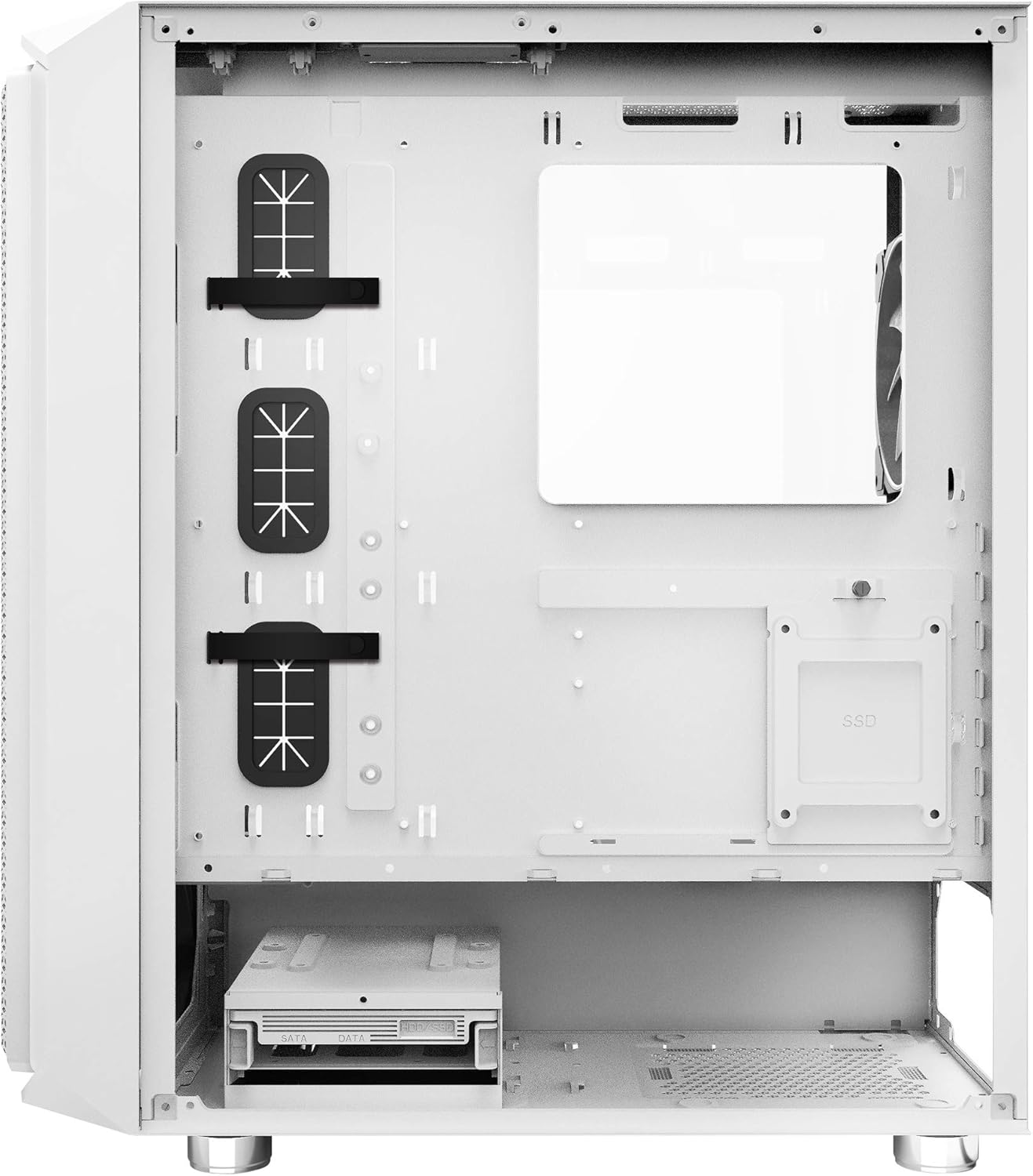
Figura 4: Interior posterior view of the Montech AIR X ARGB-White PC Case, illustrating cable management options and drive bays.
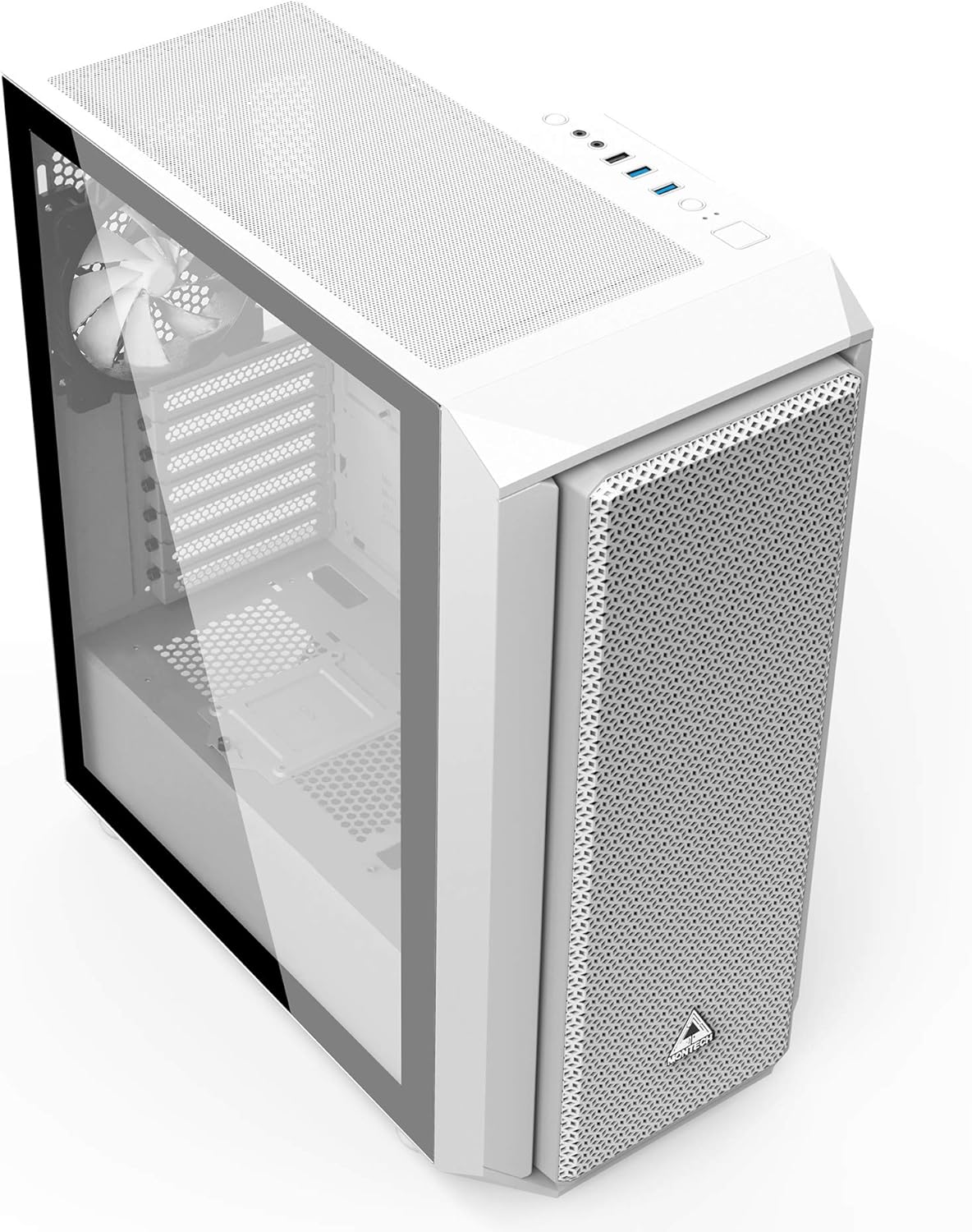
Figura 5: Angle superior frontal view of the Montech AIR X ARGB-White PC Case, highlighting the top I/O panel and magnetic dust filter.
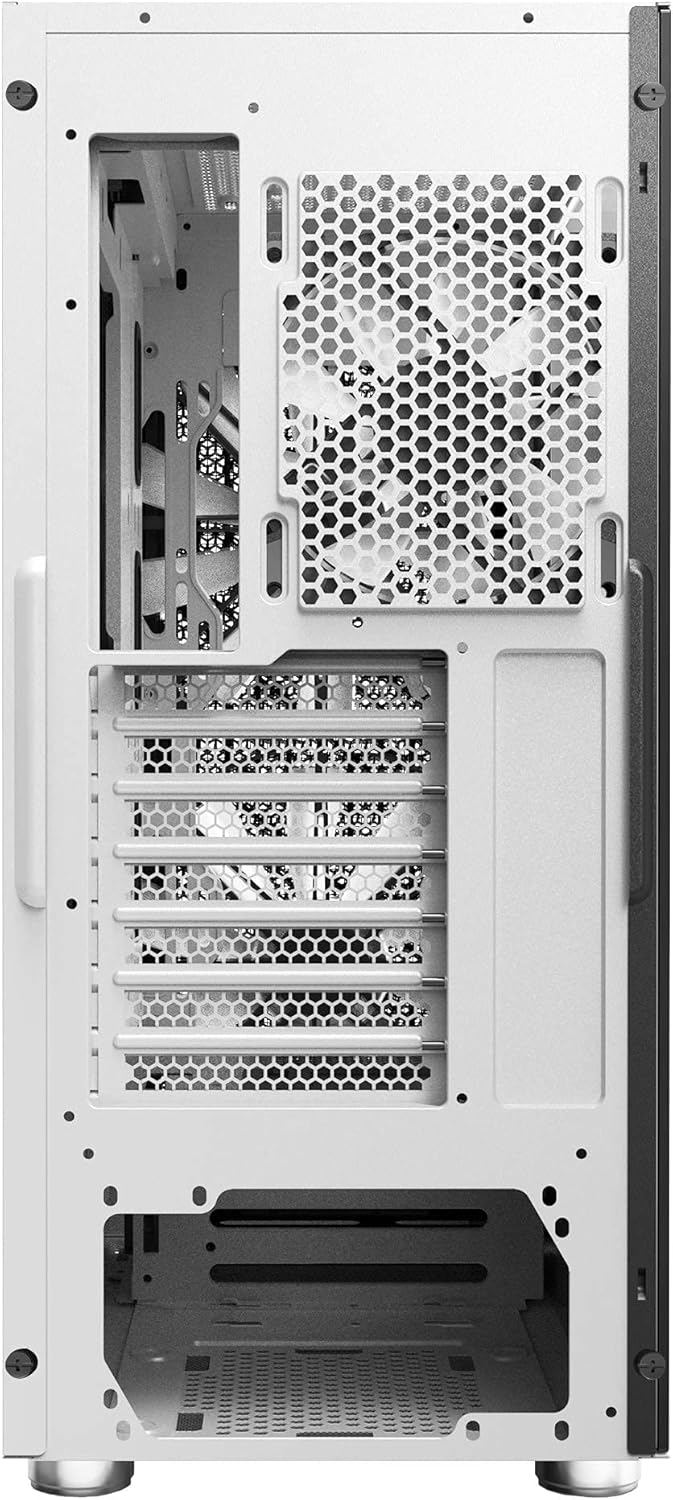
Figure 6: Rear exterior view of the Montech AIR X ARGB-White PC Case, showing the rear exhaust fan and PCIe slots.

Figura 7: Explotat view of the Montech AIR X ARGB-White PC Case, illustrating its modular components including panels, fans, and drive cages.
Video 1: Official Montech AIR X Series overview, demonstrating key features and design elements of the PC case.
Configuració i instal·lació
1. Removing the Side Panel
The tempered glass side panel is secured by two thumbscrews at the rear. Unscrew these, then gently slide the panel backward and lift it off. Place the panel on a soft, flat surface to prevent scratches or damage.
2. Instal·lació de la placa base
The Montech AIR X ARGB-White supports Mini-ITX, Micro-ATX, and ATX motherboards. Ensure the correct standoffs are installed for your motherboard size. The large cutout on the motherboard tray allows for easy installation of CPU coolers without removing the motherboard.
3. Instal·lació de la unitat
The case includes one 3.5-inch drive slot, which can also accommodate a 2.5-inch SSD/HDD. Additionally, there are dedicated mounts for 2.5-inch SSDs behind the motherboard tray. The 3.5-inch drive cage is removable if not needed, providing more space for power supply cables.
4. Instal·lació de la font d'alimentació
The power supply mounts at the bottom of the case. Ensure adequate space for cable routing, especially if using a non-modular power supply. The case supports power supplies up to 200mm in length.
5. Instal·lació de la targeta gràfica (VGA)
The case supports VGA cards up to 340mm in length. Install your graphics card into the appropriate PCIe slot on your motherboard. The rear PCIe slots feature a reusable design.
6. Gestió de cables
El cas ofereix ample space behind the motherboard tray with rubber grommets and Velcro cable ties to facilitate clean cable routing. Utilize these features to maintain optimal airflow and a tidy interior.
7. Fan/ARGB Hub Connection
The case comes with a pre-installed fan/ARGB hub located behind the motherboard tray. This hub supports up to six fans and six ARGB inputs. The three included ARGB fans are already connected. Connect the hub to your power supply via SATA power and to your motherboard's 5V ARGB header (if desired for software control) or use the case's LED button for control.
Instruccions de funcionament
Encès/Apagat
Press the power button located on the top I/O panel to turn your PC on or off.
Control d'il·luminació ARGB
The ARGB lighting for the pre-installed fans can be controlled in two ways:
- Case LED Button: Use the dedicated LED button on the top I/O panel to cycle through various lighting modes and colors.
- Programari de la placa base: If the ARGB hub is connected to your motherboard's 5V ARGB header, you can control the lighting effects using your motherboard's proprietary RGB software (e.g., ASUS Aura Sync, MSI Mystic Light, Gigabyte RGB Fusion).
Important: When connecting the ARGB hub to your motherboard, ensure you connect either the 3-pin ARGB connector OR the VDG connector, but not both simultaneously. Connecting both can prevent the power supply from switching on.
Ports d'E / S frontals
El panell d'E/S superior proporciona un accés convenient a:
- 2 x ports USB 3.0
- 1 x port USB 2.0
- Conector d'auriculars
- Connector de micròfon
- Botó d'engegada
- Botó de restabliment
- Botó de control de LED
Manteniment
Neteja del filtre de pols
The Montech AIR X ARGB-White is equipped with fine mesh dust screens on the front diamond mesh panel, and magnetic dust filters on the top and bottom vents. Regularly clean these filters to maintain optimal airflow and prevent dust buildup inside your PC.
- Panell frontal: The front mesh panel can be carefully removed for cleaning.
- Top/Bottom Filters: The magnetic filters can be easily removed, cleaned with water and mild soap, and then air-dried before reattaching.
Neteja general
Use a soft, dry cloth to wipe down the exterior of the case. For the tempered glass panel, use a glass cleaner applied to a cloth (not directly to the glass) to avoid streaks.
Resolució de problemes
PC Not Powering On
- Ensure all power cables are securely connected to the power supply, motherboard, and components.
- Verify that the power supply switch is in the 'ON' position.
- Check the front panel header connections to the motherboard (Power SW, Reset SW).
- If using the ARGB hub, ensure only one ARGB signal cable (either 3-pin ARGB or VDG) is connected to the motherboard. Connecting both can cause power issues.
Fans Not Spinning or RGB Not Working
- Confirm that the fan/ARGB hub is receiving power via its SATA power connector.
- Check all fan and ARGB connections to the hub.
- If controlling via motherboard software, ensure the hub's ARGB cable is correctly connected to a 5V ARGB header on the motherboard and the software is installed and running.
- If using the case's LED button, try cycling through modes to see if the lights respond.
Flux d'aire deficient/Temperatures altes
- Ensure all dust filters are clean and free of obstructions.
- Verify that all fans are spinning correctly and oriented for optimal airflow (front fans as intake, rear/top fans as exhaust).
- Check for any obstructions to airflow inside the case, such as poorly managed cables.
Especificacions
| Característica | Especificació |
|---|---|
| Nom del model | AIR X ARGB |
| Tipus de cas | Torre del Midi |
| Dimensions (LxWxH) | 16.73 x 8.27 x 18.7 polzades |
| Pes de l'article | 16 lliures |
| Color | Blanc |
| Material | Vidre temperat |
| Compatibilitat amb la placa base | Mini-ITX, Micro-ATX, ATX |
| Tipus de muntatge de la font d'alimentació | Muntatge inferior |
| Mètode de refrigeració | Aire |
| Ventiladors preinstal·lats | 2 x 200mm ARGB (Front), 1 x 120mm ARGB (Rear) |
| Fan Size (Front) | 200 mm |
| Ports USB 2.0 | 1 |
| Ports USB 3.0 | 2 |
| Drive Bays | 1 x 3.5" HDD/2.5" SSD, Multiple 2.5" SSD mounts |
| Longitud de la targeta VGA | Fins a 340 mm |
Garantia i suport
For warranty information and technical support, please refer to the official Montech weblloc web o poseu-vos en contacte amb el vostre distribuïdor. Conserveu el comprovant de compra per a qualsevol reclamació de garantia.
Per obtenir més ajuda, visiteu el Montech Store on Amazon.


