1. Introducció
Thank you for choosing the TechniSat DIGITRADIO 371 CD BT. This versatile stereo digital radio system offers a wide range of audio entertainment options, including DAB+ digital radio, FM radio, a CD player, Bluetooth audio streaming, and USB playback. This manual provides detailed instructions to help you set up, operate, and maintain your device for optimal performance.
2. Instruccions de seguretat importants
- Llegiu atentament totes les instruccions abans d'utilitzar el dispositiu.
- Conserveu aquest manual com a referència futura.
- No exposeu el dispositiu a la pluja ni a la humitat per evitar incendis o descàrregues elèctriques.
- Assegureu-vos que hi hagi una ventilació adequada. No bloquegeu cap obertura de ventilació.
- Col·loqueu el dispositiu sobre una superfície plana i estable.
- Utilitzeu només accessoris/accessoris especificats pel fabricant.
- Desconnecteu el dispositiu durant les tempestes amb llamps o quan no l'utilitzeu durant llargs períodes.
- Demaneu tot el servei a personal de servei qualificat.
- The device may only be operated within the specified environmental conditions.
3. Contingut del paquet
Si us plau, comproveu que tots els elements siguin presents al paquet:
- TechniSat DIGITRADIO 371 CD BT unit
- Comandament a distància
- Manual d'usuari (aquest document)
- 2 piles AAA (per al comandament a distància)
4. Producte acabatview
4.1 Tauler frontal

The front panel features a clear color display, control buttons for mode selection, information, menu navigation, and preset access. Two rotary knobs are provided for volume control and tuning/entering selections.
4.2 Panell posterior
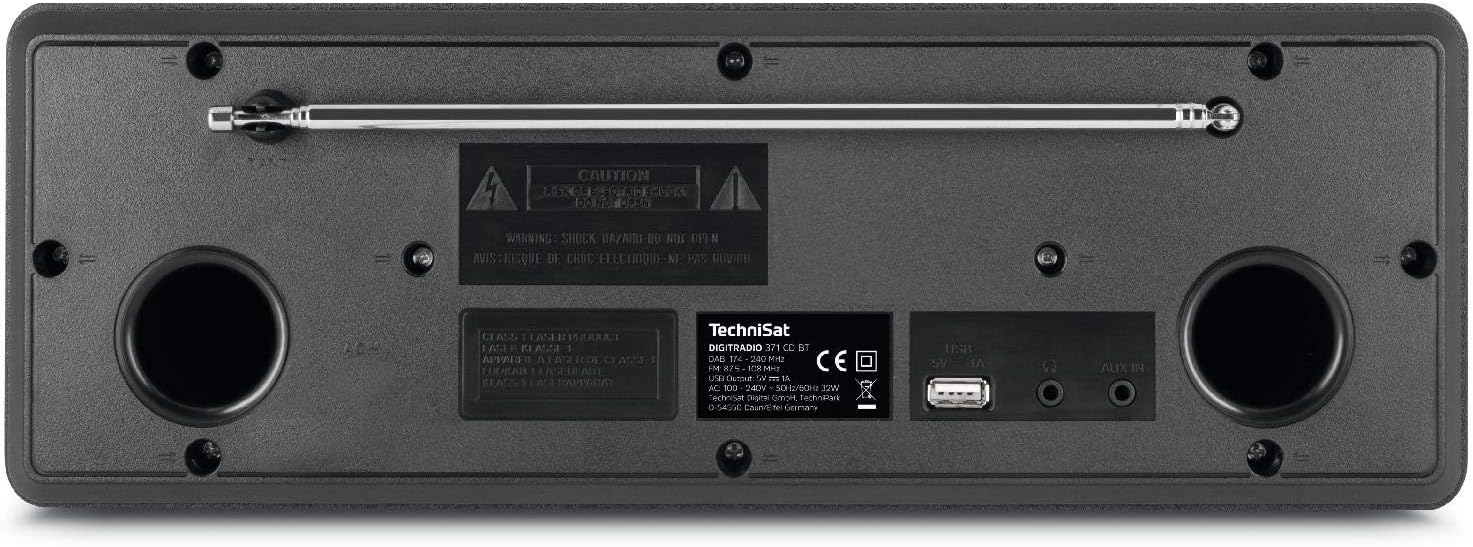
The rear panel includes the telescopic antenna for radio reception, a USB port for MP3 playback and device charging, and a 3.5mm AUX input for connecting external audio sources.
4.3 Control remot

The included remote control provides convenient access to all functions of the DIGITRADIO 371 CD BT, including power, mode selection, volume, tuning, and preset management.
5. Configuració
5.1 Connexió d'alimentació
- Assegureu-vos que el dispositiu estigui col·locat en una superfície estable.
- Connect the power cable to the AC inlet on the rear of the unit.
- Plug the other end of the power cable into a standard wall outlet (230V).
5.2 Ajust de l'antena
For optimal DAB+ and FM radio reception, fully extend the telescopic antenna located on the rear of the unit. Adjust its position and angle to achieve the best signal quality.
5.3 Initial Power On and Scan
- Press the Power button on the front panel or remote control to turn on the device.
- Upon first use, the radio will typically initiate an automatic scan for DAB+ stations. This process may take a few minutes.
- Once the scan is complete, the first available DAB+ station will begin playing.
6. Instruccions de funcionament
6.1 Selecció del mode
Premeu el botó MODE button on the front panel or remote control to cycle through available modes: DAB+, FM, CD, Bluetooth, and AUX.
Ràdio DAB+ 6.2
- Seleccioneu el mode DAB+ amb el botó MODE botó.
- If an automatic scan has not been performed or you wish to rescan, navigate to the menu and select 'Full Scan'.
- Utilitza el TUNING/ENTER knob or the navigation buttons on the remote to browse available stations. Press ENTRAR per seleccionar una estació.
- Per desar una emissora com a predefinida, manteniu premut el botó PRESET button, then select a preset number (1-20) and confirm.
6.3 Ràdio FM
- Seleccioneu el mode FM amb el botó MODE botó.
- To automatically scan for stations, press the ESCANEAR button on the remote or navigate through the menu.
- Per sintonitzar manualment, gireu el TUNING/ENTER perilla.
- Per desar una emissora com a predefinida, manteniu premut el botó PRESET button, then select a preset number (1-20) and confirm.
6.4 Reproductor de CD
- Seleccioneu el mode CD amb el botó MODE botó.
- Gently insert an audio CD or MP3 CD into the CD slot. The device will automatically load and begin playback.
- Use the playback control buttons (Play/Pause, Skip Forward/Backward) on the front panel or remote control.
Transmissió d'àudio Bluetooth 6.5
- Seleccioneu el mode Bluetooth amb el botó MODE button. The display will show 'Pairing'.
- On your Bluetooth-enabled device (e.g., smartphone, tablet), search for available Bluetooth devices and select 'DIGITRADIO 371 CD BT'.
- Once paired, you can stream audio from your device to the DIGITRADIO 371 CD BT.
6.6 USB Playback and Charging
- Inseriu una unitat flash USB que contingui MP3 files al port USB del panell posterior.
- Select USB mode (if available, otherwise it may automatically switch).
- Use the navigation and playback controls to browse and play MP3 files.
- The USB port also provides a charging function for compatible devices like smartphones.
6.7 Entrada AUX
- Connect an external audio device (e.g., MP3 player) to the 3.5mm AUX IN jack on the rear panel using an appropriate audio cable (not included).
- Seleccioneu el mode AUX amb el botó MODE botó.
- Audio from the external device will now play through the DIGITRADIO 371 CD BT speakers. Control playback from the external device.
6.8 Despertador i temporitzador de son
- Despertador: Accediu a la configuració de l'alarma mitjançant MENÚ button. Follow the on-screen prompts to set alarm time, source (buzzer, radio), and volume.
- Temporitzador de son: Access the sleep timer settings via the MENÚ button. Set a duration after which the radio will automatically turn off.
7. Manteniment
7.1 Neteja
- Desendolleu sempre el dispositiu de la presa de corrent abans de netejar-lo.
- Feu servir un drap suau i sec per netejar les superfícies exteriors.
- No utilitzeu netejadors abrasius, ceres o dissolvents, ja que poden danyar l'acabat.
- For the display, use a soft, lint-free cloth.
7.2 Cura del reproductor de CD
- Agafeu els CD per les vores per evitar les empremtes dactilars.
- Netegeu els CD amb un drap suau i sense borrissol, netejant des del centre cap a fora.
- Do not use scratched or damaged CDs, as they may harm the player mechanism.
8. Solució De Problemes
| Problema | Causa possible | Solució |
|---|---|---|
| Sense poder | Cable d'alimentació no connectat; Presa de corrent no activa | Comproveu la connexió del cable d'alimentació; proveu una presa de corrent diferent |
| Mala recepció de ràdio | Antena no estesa; Zona de senyal feble | Fully extend and adjust antenna; Try repositioning the unit |
| El CD no es reprodueix | CD inserted incorrectly; CD is dirty or scratched | Reinsert CD correctly; Clean or replace CD |
| Bluetooth no connectat | El dispositiu no està en mode d'emparellament; Bluetooth desactivat al dispositiu extern | Ensure radio is in Bluetooth mode; Enable Bluetooth on your device and search again |
| No hi ha so des de l'AUX | Cable not connected; Incorrect mode selected | Check AUX cable connection; Select AUX mode |
9. Especificacions
- Número de model:
- DIGITRADIO 371 CD BT (0000/2948)
- Dimensions (L x A x P):
- 34.5 x 12.3 x 21 cm
- Pes:
- 2.7 quilos
- Font d'alimentació:
- Wired, internal power supply
- Voltage:
- 230 Volts
- Wattage:
- 10 watts (speaker output)
- Recompte de parlants:
- 2 (estèreo)
- Sintonitzador de ràdio:
- DAB+, FM
- Connectivitat:
- Bluetooth (reception), USB (MP3 playback, charging), 3.5mm AUX In, 3.5mm Headphone Jack
- Visualització:
- 2.4 inch color display (dimmable)
- Reproductor de CD:
- Plays Audio CDs, MP3 CDs, CD-R, CD-RW
- Característiques:
- Alarm clock, Sleep timer, Station memory (20x DAB+/20x FM), EQ Predefined
- Idiomes OSD:
- Anglès, alemany, francès, italià
10. Garantia i Suport
For warranty information, please refer to the warranty card included with your product or contact your local TechniSat dealer or customer support. If you encounter any issues not covered in the troubleshooting section, please visit the official TechniSat weblloc o poseu-vos en contacte amb el seu servei d'atenció al client per obtenir ajuda.


