1. Introducció
This manual provides detailed instructions for the proper use and maintenance of your Blu Smart Electric Toothbrush. Please read this manual thoroughly before using the product to ensure optimal performance and longevity.
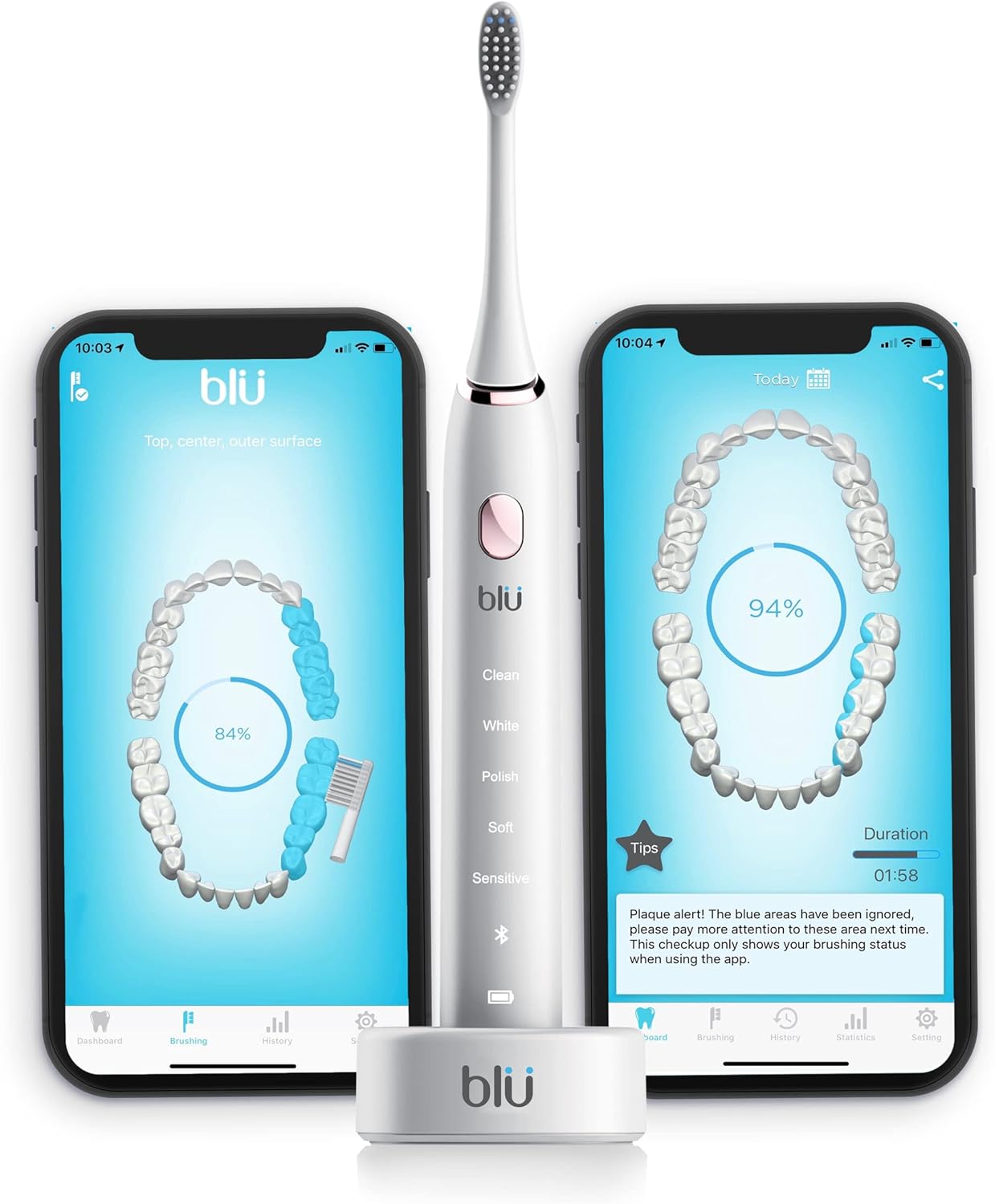
Image: The Blu Smart Electric Toothbrush in white, displayed alongside two smartphones showing the interactive live tracking app interface. The app visualizes brushing coverage and provides feedback.
2. Què hi ha a la caixa
Upon receiving your Blu Smart Electric Toothbrush package, you will find the following components:
- 1 x Blu Smart Electric Toothbrush Body
- 1 x suport de càrrega sense fil
- 2 x Blu Brush Heads

Image: The Blu Smart Electric Toothbrush handle and its wireless charging base. The brush head is detached, showing the connection point.
3. Configuració i primer ús
3.1. Fixació del capçal del raspall
The brush heads are designed to fit securely onto the top of the toothbrush body. Align the brush head with the metal shaft on the toothbrush handle and push down firmly until it clicks into place.
3.2. Càrrega inicial
For the first use, place the toothbrush onto the charging stand with the logo side facing outwards. Charge the toothbrush for a full 8 hours to ensure the battery is fully conditioned. After the initial charge, your toothbrush will last up to one month with regular use (brushing twice a day for the recommended two minutes per session).
The charging stand is USB compatible, allowing for convenient charging via a computer or any USB-compatible device, which is ideal for travel.
3.3. Downloading the Blu App
The Blu Smart Electric Toothbrush utilizes an interactive app for enhanced brushing experience and tracking. The app is compatible with both iOS and Android devices.
- Open your device's App Store (for iOS) or Google Play Store (for Android).
- Cerca "Blu Toothbrush".
- Locate the app with the Blu logo and download the latest version.
3.4. App Registration and Device Pairing
Upon opening the Blu app for the first time, you will be prompted to sign in or register. You can sign in using your Apple ID, Facebook account, or via email. After successful registration, you will be directed to the home screen.
To connect your toothbrush to the app:
- Navigate to the "Settings" icon located at the lower right-hand corner of the app.
- Select "Device Management".
- Click the "Pair Device" button. Ensure your Blu toothbrush is nearby.
- Any available Blu devices will appear in the device list. Select your toothbrush to pair. If you have multiple brushes (e.g., for family members), ensure you select the correct one and name it accordingly.
Video: This official video from Blu provides a step-by-step guide on how to set up your Blu toothbrush, including attaching brush heads, initial charging, downloading the app, and pairing your device.
4. Instruccions de funcionament
4.1. Brushing Modes
The Blu Smart Electric Toothbrush offers five distinct brushing modes for a tailored experience:
- Neteja: Standard daily cleaning.
- Blanc: For surface stain removal and whitening.
- polonès: For polishing and brightening teeth.
- suau: Neteja suau per a dents i genives sensibles.
- Sensible: Extra gentle cleaning for highly sensitive areas.
4.2. Using the App for Live Tracking
To begin a brushing session with live tracking:
- Ensure your smartphone is available and your toothbrush is within reach.
- From the app's dashboard, press the large "BRUSH" circle button in the center.
- Select the user who will be brushing (e.g., "You" or a child's named profile).
- The app will display a visual representation of your teeth and guide you through brushing different zones of your mouth. It will show where you should be brushing along the gum lines and in specific zones.
4.3. Understanding Brushing Feedback
After completing a brushing session, the app will provide a percentage of coverage. Any areas that were missed during brushing will be highlighted in blue on the teeth diagram. You have a 10-minute window to go back and correct these missed areas by re-brushing them.
4.4. Family Connect (Connecting with Kids' Brushes)
The Blu app allows you to monitor the brushing habits of your children. To connect a child's brush:
- From the dashboard, press the "Connect With Your Kids" button.
- The app will scan for nearby Blu brushes.
- Select the child's brush from the list and assign a name to it (e.g., "Thomas"). This allows for individual tracking.
4.5. Brushing History and Statistics
The Blu app stores brushing data for up to 45 days without needing to be connected to the app. You can review past brushing sessions and overall statistics:
- Història: Click the "History" button at the bottom of the app. You can view a calendar where days with brushing activity are circled in blue. Clicking on a specific date will show the brushing chart for that day, including duration and coverage.
- Estadístiques: The "Statistics" screen provides an overview of your brushing habits, including duration, frequency (e.g., 1.8 times/day), and average coverage percentage.
5. Manteniment
5.1. Substitució del capçal del raspall
It is recommended to replace your Blu brush head every three months. The blue bristles on the brush head will fade to white over time, indicating that it's time for a replacement. The app also features a "Brush Head Monitor" that tracks usage and will remind you when to order new brush heads.
5.2. Neteja del raspall de dents
Regularly clean your toothbrush handle and brush head with water after each use. Ensure the charging stand is kept dry.
6. Especificacions
| Característica | Detall |
|---|---|
| Marca | Blu |
| Número de model | Adult Black-White |
| Font d'alimentació | Elèctric amb cable (compatible amb USB) |
| Modes de raspallat | 5 (Clean, White, Polish, Soft, Sensitive) |
| Brush Strokes per Minute | 40,000 |
| Temporitzador | Temporitzador automàtic de 2 minuts |
| Classificació impermeable | IPX7 |
| Durada de la bateria | Up to 1 month per full charge |
| Fermesa de les truges | Suau |
| Compatibilitat d'aplicacions | iOS i Android |
| Dimensions | 8.7 x 6.3 x 1.5 polzades |
| Pes | 1 lliures |
7. Solució De Problemes
If you encounter any issues with your Blu Smart Electric Toothbrush or the accompanying app, please refer to the app's "Home Care Instructions" section under settings for common solutions. For further assistance, please contact customer support.
8. Informació important
8.1. Avís legal
Les declaracions sobre suplements dietètics no han estat avaluades per la FDA i no tenen la intenció de diagnosticar, tractar, curar o prevenir cap malaltia o afecció de salut.
9. Suport
For any questions or assistance regarding your Blu Smart Electric Toothbrush, please feel free to email our support team.
Correu electrònic de contacte: Support@Blutoothbrush.com
També pots visitar el nostre weblloc per a més informació: www.blutoothbrush.com


