Producte acabatview
The Cisco 2811 Security Bundle Router is a versatile and robust networking device designed for secure data communication. This renewed unit has been professionally inspected and tested to ensure it functions and appears like new, offering reliable performance for various network environments.
Les característiques clau inclouen:
- Manufacturer Part Number: CISCO2811-HSEC/K9
- Bundle includes AIM-VPN/SSL-2, Advanced IP Services, 10 SS
- Form Factor: External - modular - 1U
- Data Link Protocol: Ethernet, Fast Ethernet
- Advanced IP services, firewall protection, hardware encryption, VPN support, MPLS support, URL filtració
- Power: AC 120/230 V (50/60 Hz)
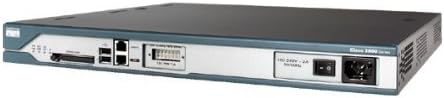
Figura 1: Davant i darrere view of the Cisco 2811 Security Bundle Router, highlighting its various ports and power input.
Configuració i instal·lació
Follow these steps to properly set up your Cisco 2811 router.
- Desembalatge i inspecció: Carefully remove the router from its packaging. Inspect the device for any visible damage. Ensure all components listed in the packing slip are present.
- Muntatge en bastidor (opcional): The Cisco 2811 is a 1U device. If rack mounting, secure the router using appropriate rack-mount kits (sold separately) in a standard 19-inch equipment rack. Ensure adequate ventilation around the unit.
- Connexió d'alimentació: Connect the provided AC power cord to the power input on the rear of the router and then to a grounded electrical outlet. The router supports AC 120/230 V (50/60 Hz).
- Connexions de xarxa:
- Connect your WAN (Internet) cable to the appropriate Fast Ethernet port (typically labeled "FastEthernet0/0" or "FastEthernet0/1").
- Connect your LAN devices (computers, switches) to the available Fast Ethernet ports.
- For console access, connect a console cable (RJ-45 to DB-9) from the router's console port to your computer's serial port.
- Encesa inicial: Flip the power switch on the rear of the router to the ON position. Observe the system LEDs on the front panel. The "SYS" LED should turn green, indicating successful boot-up.
Instruccions de funcionament
This section provides basic operating guidelines for the Cisco 2811 router.
Accés al router
The router is primarily configured via the Cisco IOS Command Line Interface (CLI).
- Port de la consola: Use a terminal emulation program (e.g., PuTTY, Tera Term) on your computer, configured for 9600 baud, 8 data bits, no parity, 1 stop bit, no flow control.
- Telnet/SSH: Once configured with an IP address and VTY lines, you can access the router remotely via Telnet or SSH. SSH is recommended for secure access.
Basic Configuration Commands (Example)
A continuació es mostren examples of common commands. Refer to Cisco IOS documentation for comprehensive configuration details.
enable: Enters privileged EXEC mode.configure terminal: Enters global configuration mode.interface FastEthernet0/0: Enters interface configuration mode for FastEthernet0/0.ip address 192.168.1.1 255.255.255.0: Assigns an IP address and subnet mask to the interface.no shutdown: Activates the interface.copy running-config startup-config: Saves the current configuration to NVRAM.
Característiques de seguretat
The 2811 Security Bundle includes advanced security features:
- Protecció del tallafoc: Configure Cisco IOS Firewall features to protect your network from unauthorized access.
- Suport VPN: Utilize the integrated VPN capabilities (IPsec, SSL VPN) for secure remote access and site-to-site connectivity.
- Xifratge de maquinari: Leverage hardware-accelerated encryption for efficient VPN performance.
- URL Filtrat: Implementar URL filtering to control web accés.
Manteniment
Regular maintenance ensures optimal performance and longevity of your Cisco 2811 router.
- Actualitzacions de firmware: Periodically check the Cisco website for the latest IOS software releases. Apply updates as recommended to benefit from new features, bug fixes, and security patches. Always back up your configuration before updating.
- Neteja física: Keep the router free from dust and debris. Use a soft, dry cloth to clean the exterior. Ensure ventilation slots are clear to prevent overheating. Do not use liquid cleaners.
- Control ambiental: Operate the router within recommended temperature and humidity ranges. Avoid direct sunlight, excessive heat sources, and high humidity.
- Còpia de seguretat de la configuració: Regularly back up your router's configuration to a TFTP server or local storage. This allows for quick restoration in case of data loss or misconfiguration.
- Monitorització LED: Periodically check the status of the front panel LEDs (SYS, ACT, LINK) to ensure normal operation. Refer to the troubleshooting section for LED interpretations.
Resolució de problemes
This section provides solutions to common issues you might encounter with your Cisco 2811 router.
| Problema | Causa possible | Solució |
|---|---|---|
| El router no s'encén. | Sense alimentació, cable d'alimentació defectuós, problema amb la font d'alimentació. |
|
| Sense connectivitat de xarxa. | Incorrect cabling, interface shut down, IP address misconfiguration, firewall blocking. |
|
| Console access issues. | Incorrect console cable, wrong terminal settings. |
|
| Rendiment lent de la xarxa. | High CPU utilization, insufficient bandwidth, misconfigured QoS, network loops. |
|
Especificacions
Detailed technical specifications for the Cisco 2811 Security Bundle Router.
| Característica | Detall |
|---|---|
| Nom del model | Cisco 2811 |
| Número de peça del fabricant | CISCO2811-HSEC/K9 |
| Tipus de producte | Encaminador |
| Factor de forma | External - modular - 1U |
| Protocol d'enllaç de dades | Ethernet, Fast Ethernet |
| Nombre de Ports | 4 (LAN Port Bandwidth: 10/100 megabits per second) |
| Tecnologia de connectivitat | Amb cable |
| Característiques especials | Cisco IOS Advanced IP services, firewall protection, hardware encryption, VPN support, MPLS support, URL filtering, WPS |
| Poder | AC 120/230 V (50/60 Hz), 230 Volts (AC) |
| Dimensions del producte | 16.38 x 17.24 x 1.73 polzades |
| Pes de l'article | 19.8 lliures |
| Usos recomanats | Seguretat |
| Dispositius compatibles | Ordinador personal |
Garantia i Suport
As a renewed product, the Cisco 2811 Security Bundle Router is backed by the Amazon Renewed Guarantee.
- Garantia renovada d'Amazon: If you are not satisfied with your purchase, renewed products are eligible for replacement or refund under the Amazon Renewed Guarantee. Please refer to the Amazon Renewed program terms for full details.
- Suport tècnic: For technical assistance with Cisco IOS configuration or router functionality, please refer to official Cisco documentation and support resources. For issues related to the renewed product's condition or functionality as received, contact the Amazon Renewed seller or Amazon customer service.
- Avís legal: All sales are final and as is in working condition. (Note: This disclaimer is from the product page and may apply to the specific seller's terms, but the Amazon Renewed Guarantee typically overrides this for product functionality.)


