1. Introducció
Welcome to the user manual for your Nokia 216 Dual SIM mobile phone. This guide provides essential information to help you set up, operate, and maintain your device. The Nokia 216 (RM-1187) is a classic feature phone designed for reliable communication, featuring dual SIM capability, a 2.4-inch display, and a VGA camera.
Please read this manual carefully to ensure proper use and to get the most out of your phone.
2. Contingut del paquet
Assegureu-vos que tots els elements estiguin presents al paquet del producte:
- Nokia 216 Dual SIM Mobile Phone (RM-1187)
- Bateria
- Adaptador d'alimentació
- Cable USB
3. Dispositiu acabatview
Familiarize yourself with the key components of your Nokia 216 phone.
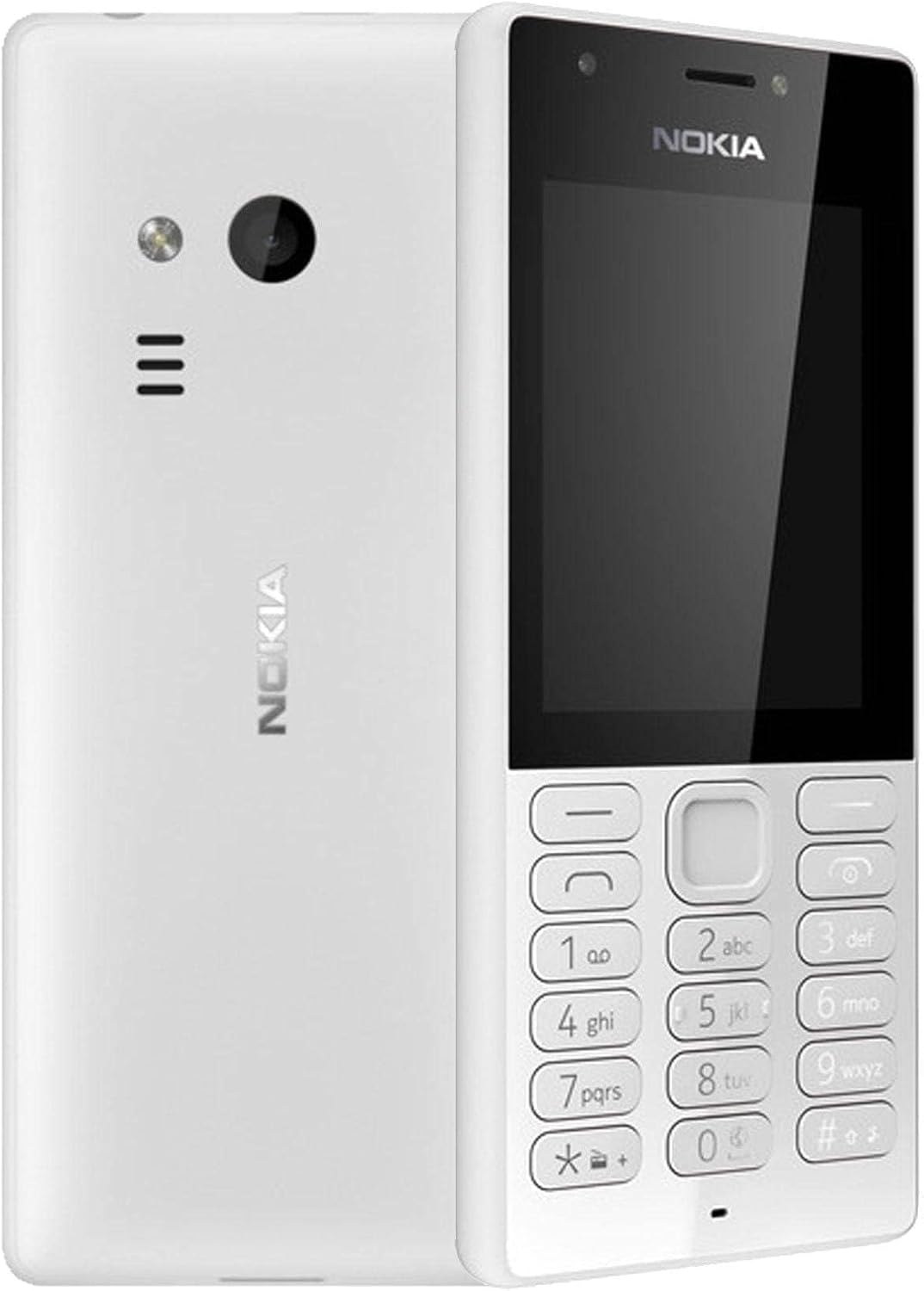
Figura 3.1: Davant i darrere view of the Nokia 216 Dual SIM mobile phone. The front shows the display, earpiece, and numeric keypad. The back features the rear camera, LED flash, and loudspeaker grille.

Figura 3.2: Davant view of the Nokia 216 Dual SIM mobile phone. This image highlights the 2.4-inch display, the navigation keys, and the alphanumeric keypad for dialing and text input.

Figura 3.3: Enrere view of the Nokia 216 Dual SIM mobile phone. This view shows the rear VGA camera lens, the LED flash, and the Nokia branding.
Components clau:
- Visualització: 2.4-inch QVGA screen.
- Teclat: Alphanumeric keypad for dialing and text entry, with navigation keys.
- Càmera posterior: VGA camera with LED flash.
- Altaveu: For audio playback and hands-free calls.
- Micròfon: Per a l'entrada de veu durant les trucades i les gravacions.
- Conector d'àudio de 3.5 mm: Per a auriculars o altaveus externs.
- Port de càrrega: Port micro-USB per a càrrega i transferència de dades.
4. Configuració
4.1. Insert SIM Card(s)
- Turn off the phone and disconnect any charger.
- Carefully remove the back cover by prying it open from the notch.
- Si la bateria està dins, traieu-la.
- Insert the SIM card(s) into the designated slot(s) with the gold contacts facing down. For dual SIM models, ensure both SIMs are correctly seated.
- If applicable, insert a microSD card into its slot for additional storage.
- Substituïu la bateria.
- Align the back cover and press it firmly until it clicks into place.
4.2. Carregueu la bateria
- Connecteu l'adaptador de corrent a una presa de corrent.
- Plug the micro-USB end of the cable into the phone's charging port.
- L'indicador de bateria a la pantalla mostrarà l'estat de càrrega.
- Un cop carregat completament, desconnecteu el carregador del telèfon i després de la presa de corrent.
5. Instruccions de funcionament
5.1. Encendre/apagar
- Per encendre: Press and hold the power key (usually the red 'End Call' key) until the phone vibrates and the Nokia logo appears.
- Per apagar: Press and hold the power key until the 'Power off' option appears on the screen, then select it.
5.2. Realització de trucades
- Des de la pantalla d'inici, introduïu el número de telèfon amb el teclat numèric.
- Press the green 'Call' key to initiate the call.
- To end a call, press the red 'End Call' key.
5.3. Sending Text Messages (SMS)
- Vés a Menú > Missatges > Crear missatge.
- Escriviu el vostre missatge amb el teclat.
- Introduïu el número de telèfon del destinatari o seleccioneu-lo dels contactes.
- Seleccioneu Enviar.
5.4. Ús de la càmera
- Vés a Menú > Càmera.
- Enquadra la teva foto utilitzant la pantalla.
- Press the center navigation key to take a photo.
6. Manteniment i cura
To ensure the longevity and optimal performance of your Nokia 216, follow these care guidelines:
- Keep the device dry: Moisture can damage electronic circuits.
- Use original accessories: Only use batteries, chargers, and accessories approved by Nokia.
- Netegeu suaument: Use a soft, clean, dry cloth to clean the surface of the device.
- Eviteu temperatures extremes: Do not expose your device to very high or low temperatures.
- Manipular amb cura: Eviteu deixar caure o sotmetre el dispositiu a forts impactes.
7. Solució De Problemes
If you encounter issues with your Nokia 216, try these common troubleshooting steps:
| Problema | Solució |
|---|---|
| El telèfon no s'encén | Assegureu-vos que la bateria estigui carregada. Connecteu el carregador i torneu-ho a provar. Comproveu si la bateria està inserida correctament. |
| Sense senyal de xarxa | Check if the SIM card is correctly inserted. Move to an area with better network coverage. Restart the phone. |
| La bateria no es carrega | Assegureu-vos que el carregador estigui connectat correctament tant al telèfon com a la presa de corrent. Proveu una presa de corrent o un carregador diferent. Comproveu si hi ha algun dany al port de càrrega. |
| No puc fer ni rebre trucades | Check network signal. Ensure your SIM card is active and has sufficient credit/plan. Verify that call barring is not enabled. |
8. Especificacions
| Característica | Detall |
|---|---|
| Marca | Nokia |
| Nom del model | RM-1187 |
| Sistema operatiu | Symbian 9.1 (Series 30) |
| Mida de la pantalla | 2.4 polzades |
| Resolució de pantalla | 240 x 320 píxels |
| Freqüència d'actualització | 90 Hz |
| Mida de la RAM instal·lada | 256 MB |
| Capacitat d'emmagatzematge de memòria | 3.9 GB (Internal, likely for system/apps, expandable via microSD) |
| Model de CPU | A10 |
| Tecnologia cel·lular | 2G |
| Tecnologies de comunicació sense fil | Cel·lular |
| Tecnologies de connectivitat | USB, Bluetooth, Wi-Fi |
| GPS | A-GPS |
| Primary Device User Interface | Botons, teclat numèric, micròfon |
| Altres funcions de la càmera | Rear Camera (VGA) |
| Jack d'àudio | 3.5 mm |
| Factor de forma | Clàssic |
| Color | Gris |
| Temps de conversa | Fins a 18 hores |
| Pes de l'article | 339 grams |
| Dimensions del paquet | 13.4 x 12.6 x 3.6 cm |
| Què hi ha a la caixa | Adaptador de corrent, cable USB |
9. Garantia i Suport
For warranty information, please refer to the warranty card included in your product package or visit the official Nokia website. If you require further assistance or technical support, please contact Nokia customer service through their official channels.
Conserveu el rebut de compra com a comprovant de compra per a reclamacions de garantia.