1. Introducció
The LAUNCH CRP239 is an intelligent and networkable automotive diagnostic tool designed for passenger cars. It offers comprehensive OBD II full functionality and rapid testing capabilities for four major vehicle systems: Engine, Automatic Transmission (A/T), Anti-lock Braking System (ABS), and Supplemental Restraint System (SRS). Additionally, the CRP239 includes advanced reset functions such as Oil Reset, Steering Angle Reset, Brake-Pad Reset, Battery Matching, Throttle Adaptation, and Diesel Particulate Filter (DPF) Regeneration, catering to the needs of professional technicians and DIY enthusiasts.
2. Informació de seguretat
Always observe the following safety precautions when operating the LAUNCH CRP239:
- Ensure the vehicle's ignition is off before connecting or disconnecting the diagnostic tool.
- No feu servir l'eina en condicions humides ni a prop de líquids o gasos inflamables.
- Wear appropriate personal protective equipment, such as safety glasses, when working on vehicles.
- Consulteu el manual de servei del vehicle per obtenir informació sobre els procediments de diagnòstic i els avisos de seguretat específics.
- Keep the tool away from strong magnetic fields.
- Only use the provided cables and accessories.
3. Contingut del paquet
Verifiqueu que tots els elements siguin presents al paquet:
- LAUNCH CRP239 Main Unit
- Cable de diagnòstic OBD II
- Cable USB
- Manual d'usuari
- Maleta de transport

Figure 3.1: Contents of the LAUNCH CRP239 package, showing the diagnostic tool, cables, and storage case.
4. Producte acabatview
The LAUNCH CRP239 features a robust design with a 5.0-inch 720p touch screen for intuitive navigation. It includes physical buttons for common operations and a durable rubber exterior for protection.

Figura 4.1: Frontal view of the LAUNCH CRP239, highlighting the touch screen display and navigation buttons.
4.1. Components
- Pantalla tàctil de 5.0 polzades: High-resolution display for clear data presentation and touch input.
- Botons de navegació: Directional pad, OK button, and Return button for menu navigation.
- OBD II Connector: Standard 16-pin connector for vehicle communication.
- Port USB: For connecting to a computer for updates or data transfer.
- Indicador d'alimentació: Llum LED que indica l'estat de l'alimentació.
5. Configuració
Follow these steps for initial setup of your LAUNCH CRP239:
- Carregueu el dispositiu: Connect the CRP239 to a power source using the provided USB cable to ensure the internal 4000mAh lithium-polymer battery is fully charged before first use.
- Encès: Manteniu premut el botó d'engegada per encendre el dispositiu.
- Selecció d'idioma: On the initial setup screen, select your preferred language. The device supports multilingual operation.
- Connexió Wi-Fi: Navigate to the 'Settings' menu and select 'Wi-Fi'. Connect to an available wireless network to enable online updates and diagnostic report sharing.
- Actualització de programari: It is recommended to perform a software update immediately after connecting to Wi-Fi to ensure you have the latest features and vehicle coverage. Navigate to the 'Update' section and follow the on-screen prompts.

Figure 5.1: The LAUNCH CRP239 with its diagnostic cable connected, ready for vehicle communication.
6. Instruccions de funcionament
The LAUNCH CRP239 provides a comprehensive suite of diagnostic functions. Below are instructions for common operations.
6.1. Connexió al vehicle
- Locate the vehicle's 16-pin OBD II diagnostic port (usually under the dashboard).
- Assegureu-vos que el contacte del vehicle estigui apagat.
- Connect the OBD II diagnostic cable to the vehicle's OBD II port and to the CRP239.
- Turn the vehicle's ignition to the ON position (engine off). The CRP239 will power on automatically.
6.2. Navegació del menú principal
From the main menu, you can access various functions:
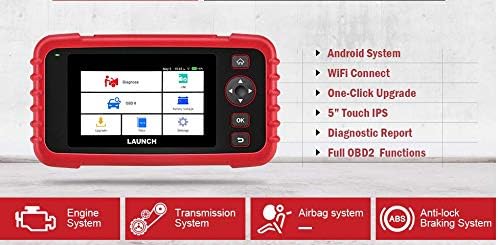
Figure 6.1: The main menu interface of the LAUNCH CRP239, providing access to all primary functions.
- Diagnosticar: For full system diagnostics (Engine, A/T, ABS, SRS).
- Jo/M: Readiness status for emissions.
- OBD II: Standard OBD II functions (read/clear DTCs, live data, freeze frame, O2 sensor test, etc.).
- Restablir: Access various maintenance reset functions.
- Voltage: Displays real-time vehicle battery voltage.
- Actualització: For software and firmware updates via Wi-Fi.
- Dades: Review saved diagnostic data and reports.
- Configuració: Configure device settings such as language, Wi-Fi, and display.
6.3. Realització d'una exploració de diagnòstic
- Al menú principal, seleccioneu "Diagnose".
- The tool will attempt to automatically identify the vehicle via VIN scan. If unsuccessful, you may need to manually select the vehicle make, model, and year.
- Choose the system you wish to diagnose (e.g., Engine, Transmission, ABS, SRS).
- Seleccioneu "Read Fault Codes" a view Diagnostic Trouble Codes (DTCs).
- Seleccioneu "Clear Fault Codes" to erase DTCs after repairs have been made. Caution: Clearing codes without addressing the underlying issue will result in the codes reappearing.
- Seleccioneu "Read Data Stream" a view dades de sensors en directe.
6.4. Using Reset Functions
The CRP239 supports several common maintenance reset functions:
- Reinicialització d'oli: Restableix el recordatori de vida útil de l'oli després d'un canvi d'oli.
- Restabliment de l'angle de direcció: Resets the steering angle sensor after alignment or component replacement.
- Brake-Pad Reset (EPB): Restableix el sistema de fre d'estacionament electrònic després de la substitució de les pastilles de fre.
- Battery Matching (BMS): Registers a new battery with the vehicle's Battery Management System.
- Adaptació de l'accelerador: Relearns the throttle body position after cleaning or replacement.
- Regeneració del DPF: Initiates the Diesel Particulate Filter regeneration process.
To use a reset function, select "Reset" from the main menu, then choose the desired function and follow the on-screen instructions.
6.5. Actualitzacions de programari
The CRP239 supports one-click Wi-Fi updates for software and vehicle coverage, ensuring you always have the latest diagnostic capabilities.
- Assegureu-vos que el dispositiu estigui connectat a una xarxa Wi-Fi estable.
- Al menú principal, seleccioneu "Actualització".
- The device will check for available updates. Select the updates you wish to install and confirm.
- Allow the update process to complete without interruption. The device may restart during this process.

Figure 6.2: The update screen on the LAUNCH CRP239, showing available software updates for various vehicle brands.
6.6. Generació d'informes de diagnòstic
The CRP239 can automatically generate diagnostic reports, which can be shared via email.
- After completing a diagnostic session, the tool will prompt you to generate a report.
- Confirm to generate the report.
- Navegueu fins a "Data" menú a view saved reports.
- Select a report and choose the option to share via email. Ensure your Wi-Fi is connected and email settings are configured in the 'Settings' menu.
7. Manteniment
Proper maintenance ensures the longevity and optimal performance of your LAUNCH CRP239:
- Neteja: Feu servir un drap suau i sec per netejar el dispositiu. No utilitzeu productes de neteja abrasius ni dissolvents.
- Emmagatzematge: Store the device in its carrying case in a cool, dry place when not in use. Avoid extreme temperatures.
- Cura de la bateria: Carregueu la bateria regularment, fins i tot si el dispositiu no s'utilitza amb freqüència, per mantenir-ne l'estat. Eviteu descarregar completament la bateria durant períodes prolongats.
- Inspecció del cable: Periodically inspect the diagnostic and USB cables for any signs of damage. Replace damaged cables immediately.
8. Solució De Problemes
This section addresses common issues you might encounter with the LAUNCH CRP239.
| Problema | Causa possible | Solució |
|---|---|---|
| El dispositiu no s'encén. | Low battery; faulty connection to vehicle. | Charge the device fully. Ensure the OBD II cable is securely connected to both the CRP239 and the vehicle. Check vehicle's ignition is ON. |
| Cannot communicate with vehicle. | Incorrect vehicle protocol; faulty OBD II port; damaged cable. | Verify vehicle compatibility. Check the vehicle's OBD II port for power. Try a different vehicle or cable if available. Ensure vehicle ignition is ON. |
| L'actualització del programari falla. | Connexió Wi-Fi inestable; emmagatzematge insuficient. | Assegureu-vos de tenir una connexió Wi-Fi forta i estable. Comproveu l'espai d'emmagatzematge disponible al dispositiu. Reinicieu el procés d'actualització. |
| La pantalla no respon. | Error de programari; danys físics. | Perform a soft reset by holding the power button until the device restarts. If the issue persists, contact customer support. |
9. Especificacions
| Característica | Detall |
|---|---|
| Model | CRP239 (CREADER PROFESSIONAL 239) |
| Mostra | 5.0-inch 720p Touch Screen |
| Bateria | 4000mAh Rechargeable Lithium Polymer (included) |
| Connectivitat | OBD II, Wi-Fi, USB |
| Cobertura de vehicles | Domestic, Asian, European vehicles (1996 and newer OBD2) |
| Sistemes suportats | Engine, Automatic Transmission (A/T), ABS, SRS |
| Funcions especials | Oil Reset, Steering Angle Reset, Brake-Pad Reset (EPB), Battery Matching (BMS), Throttle Adaptation, DPF Regeneration |
| Dimensions | 32.4 x 25.4 x 8 cm (Paquet) |
| Pes de l'article | 560 g |
| Material exterior | Cautxú |
10. Informació de la garantia
The LAUNCH CRP239 comes with a standard manufacturer's warranty. For specific warranty terms and conditions, please refer to the warranty card included in your product package or visit the official Launch weblloc web. Conserveu el rebut de compra com a comprovant de compra per a reclamacions de garantia.
Pot haver-hi opcions de garantia estesa disponibles a través de proveïdors externs. Per exemple,ample, 1-Year and 2-Year Extended Warranties by Salama Care are offered for this product.
11. Suport
For technical assistance, product inquiries, or support, please contact Launch customer service through their official website or the contact information provided in your product documentation. Ensure you have your product model number (CRP239) and serial number ready when contacting support.
Per a recursos addicionals, visiteu el Launch Official Weblloc.


