1. Introducció
This user manual provides essential information for the setup, operation, maintenance, and troubleshooting of your MSI GS66 Stealth 10SE-039 gaming laptop. Please read this manual thoroughly to ensure proper usage and to maximize the performance and longevity of your device.
2. Informació de seguretat
- Always use the original power adapter and battery provided by MSI. Using incompatible accessories may cause damage or safety hazards.
- Mantingueu el portàtil allunyat de temperatures extremes, llum solar directa i humitat elevada.
- Eviteu col·locar objectes pesats sobre el portàtil o aplicar una pressió excessiva a la pantalla.
- Do not attempt to disassemble or repair the laptop yourself. Refer to qualified service personnel for assistance.
- Ensure proper ventilation to prevent overheating. Do not block the ventilation openings.
3. Contingut del paquet
En obrir el paquet, comproveu que hi hagi tots els elements i que estiguin en bon estat:
- MSI GS66 Stealth 10SE-039 Laptop Computer
- Adaptador d'alimentació
- Manual d'usuari (aquest document)
4. Acabat amb el portàtilview
The MSI GS66 Stealth 10SE-039 is a high-performance gaming laptop designed for demanding applications and immersive gaming experiences. It features a sleek, thin, and light design.

Figura 4.1: Davant view of the MSI GS66 Stealth 10SE-039 laptop, showcasinla seva pantalla i el teclat.
4.1. Característiques clau
- Visualització: 15.6-inch Full HD Anti-Glare Wide View Angle display with a 240Hz refresh rate and 3ms response time.
- Processador: Intel Core i7-10750H (10th Gen) processor.
- Gràfics: NVIDIA GeForce RTX 2060 with 6GB GDDR6.
- Memòria: 16GB DDR4 2666MHz RAM (expandable up to 64GB across 2 sockets).
- Emmagatzematge: 512GB NVMe SSD.
- Sistema operatiu: Windows 10 Professional.
- Àudio: Dynaudio Speakers (2W x 2).
- Teclat: SteelSeries per-Key RGB keyboard with Anti-Ghost key technology.
- Connectivitat: Intel Wi-Fi 6 AX201, Thunderbolt 3 (with PD charge), USB-C Gen1, USB 3.2 Gen2.
- Bateria: 4-cell (99.9Whr) Li-Polymer battery.
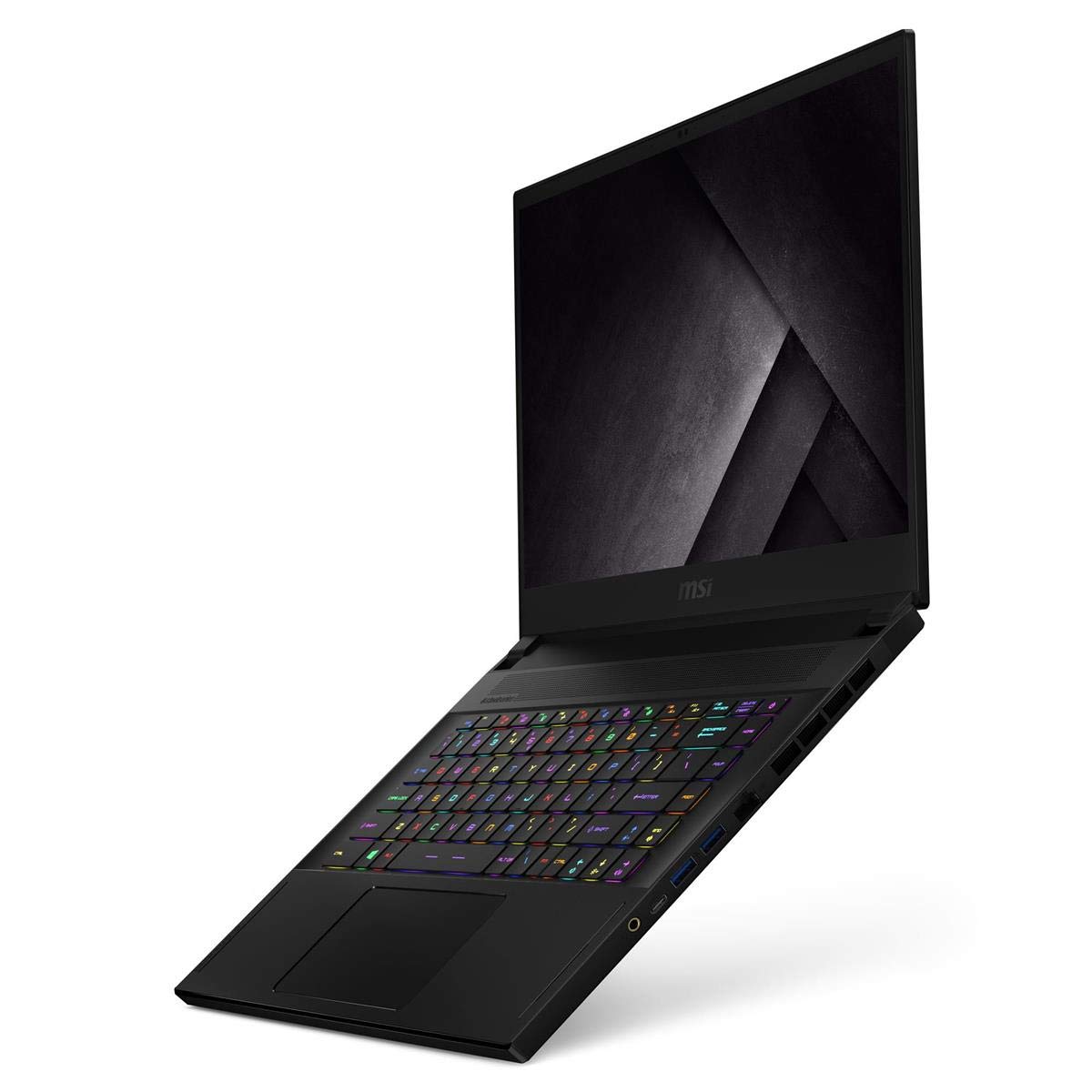
Figura 4.2: lateral view of the MSI GS66 Stealth 10SE-039, illustrating its various ports and thin profile.
5. Configuració
5.1. Connexió de l'adaptador de corrent
- Connect the AC adapter to the power jack on the side of your laptop.
- Connecteu el cable d'alimentació a una presa de corrent.
- La bateria començarà a carregar-se automàticament. Es recomana carregar completament la bateria abans del primer ús.
5.2. Arrencada inicial i configuració del sistema operatiu
- Obriu la tapa de l'ordinador portàtil.
- Press the power button, typically located above the keyboard.
- Follow the on-screen instructions to complete the Windows 10 Pro setup process. This includes selecting your region, language, and setting up user accounts.
- Connect to a Wi-Fi network when prompted to ensure the operating system can download necessary updates.
6. Com fer servir el portàtil
6.1. Teclat i touchpad
The MSI GS66 Stealth features a SteelSeries per-Key RGB keyboard, allowing for customizable backlighting. The touchpad supports multi-touch gestures for navigation.
- Retroil·luminació del teclat: Use the SteelSeries Engine software (pre-installed) to customize RGB lighting effects for individual keys.
- Anti-fantasma: The keyboard's anti-ghosting feature ensures accurate input even when multiple keys are pressed simultaneously, crucial for gaming.
- Gestos del touchpad: Refer to Windows settings for a full list of supported multi-touch gestures.
6.2. Configuració de la pantalla
Your laptop is equipped with a 240Hz display for smooth visuals. Ensure your display settings are configured to utilize the full refresh rate.
- Feu clic amb el botó dret a l'escriptori i seleccioneu "Configuració de la pantalla".
- Scroll down and click "Advanced display settings".
- Select the 240Hz refresh rate from the dropdown menu.
6.3. Sistema d'àudio
The Dynaudio speakers provide enhanced audio quality. Adjust sound settings via the Windows Sound Control Panel or MSI's Nahimic audio software for optimal experience.
6.4. Connectivitat
- Wi-Fi 6: Connect to high-speed wireless networks for faster internet access.
- Thunderbolt 3: This versatile port supports high-speed data transfer, video output, and power delivery (PD charge).
- Ports USB: Utilize the USB-C Gen1 and USB 3.2 Gen2 ports for connecting peripherals and external storage devices.
6.5. Gestió de la bateria
The 99.9Whr battery offers extended usage. To optimize battery life:
- Ajusteu la brillantor de la pantalla.
- Enable battery saver mode in Windows settings.
- Utilize MSI Dragon Center to switch between performance modes and manage power consumption.
- Consider setting the display refresh rate to 60Hz for non-gaming tasks to conserve power.
6.6. Sistema de refrigeració
The Cooler Boost Trinity+ system with 0.1mm thin fan blades ensures efficient heat dissipation. Maintain clear airflow around the laptop to prevent overheating, especially during intensive tasks.
7. Manteniment
7.1. Neteja del teu ordinador portàtil
- Feu servir un drap suau i sense borrissol per netejar la pantalla i el xassís.
- Per a taques difícils, fregueu lleugeramentampNetegeu el drap amb aigua o una solució netejadora de pantalles.
- Netegeu regularment el teclat i el touchpad per eliminar la pols i les restes.
- Periodically use compressed air to clear dust from the ventilation openings.
7.2. Actualitzacions de programari
Keep your operating system, drivers, and MSI utilities updated to ensure optimal performance and security.
- Actualitzacions de Windows: Access through Windows Settings > Update & Security.
- Actualitzacions de controladors: Use MSI Dragon Center or visit the official MSI website for the latest drivers for your model.
7.3. Cura de la bateria
- Eviteu descarregar completament la bateria amb freqüència.
- Si guardeu el portàtil durant un període prolongat, carregueu la bateria aproximadament al 50-60% abans d'apagar-lo.
8. Solució De Problemes
This section addresses common issues you might encounter. For more complex problems, refer to MSI's official support resources.
8.1. Problemes d'energia
- El portàtil no s'encén:
- Assegureu-vos que l'adaptador de corrent estigui connectat correctament tant al portàtil com a una presa de corrent que funcioni.
- Verifiqueu que la presa de corrent funciona connectant-hi un altre dispositiu.
- Si la bateria està completament esgotada, deixeu-la carregar durant almenys 30 minuts abans d'intentar encendre-la.
- La bateria no es carrega:
- Comproveu si l'adaptador de corrent i el cable estan danyats.
- Ensure the power adapter is correctly seated in the laptop's power port.
- Update the battery drivers via Device Manager in Windows.
8.2. Problemes de pantalla
- La pantalla està en blanc o negra:
- Connect an external monitor to check if the display output is working.
- Premeu Fn + F2 (or the appropriate function key for display toggle) to switch display modes.
- Reinicieu l'ordinador portàtil.
- Incorrect refresh rate:
- Verify display settings as described in Section 6.2.
- Assegureu-vos que els controladors gràfics estiguin actualitzats.
8.3. Problemes de rendiment
- Laptop is slow or lagging:
- Tanca les aplicacions de fons innecessàries.
- Comproveu si hi ha programari maliciós o virus.
- Assegureu-vos que hi hagi prou espai lliure a l'SSD.
- Monitor CPU/GPU temperatures using MSI Dragon Center; excessive heat can lead to throttling.
- Sobreescalfament:
- Assegureu-vos que les obertures de ventilació estiguin clares i sense obstruccions.
- Feu servir el portàtil sobre una superfície dura i plana.
- Considera utilitzar una base de refrigeració per a portàtils.
- Clean dust from fan vents (refer to Section 7.1).
9. Especificacions
Detailed technical specifications for the MSI GS66 Stealth 10SE-039.
| Característica | Especificació |
|---|---|
| Nom del model | GS66 Stealth 10SE-039 |
| Processador | Intel Core i7-10750H (2.6 - 5.0GHz) |
| Gràfics | NVIDIA GeForce RTX 2060 6G GDDR6 |
| Mostra | 15.6" FHD Anti-Glare Wide View Angle 240Hz 3ms |
| RAM | 16GB (16G x 1) DDR4 2666MHz (Max 64GB, 2 Sockets) |
| Emmagatzematge | SSD NVMe de 512 GB |
| Sistema operatiu | Windows 10 Pro |
| Connectivitat sense fil | Intel Wi-Fi 6 AX201 (2x2 ax) |
| Ports | Thunderbolt 3 (with PD charge), USB-C Gen1, 3x USB 3.2 Gen2 |
| Weblleva | 720p HD Weblleva |
| Bateria | 4-cell (99.9Whr) Li-Polymer |
| Adaptador d'alimentació | Slim de 180 W |
| Dimensions | 14.17 x 9.65 x 0.71 polzades |
| Pes | 4.63 lliures |
10. Vídeo oficial del producte
Watch the official product video from MSI to learn more about the features and design of the GS66 Stealth laptop.
Descripció del vídeo: This official MSI video highlights key features of the GS66 Stealth laptop, including its Core Black design, Intel Core i9 processor (up to 10th Gen), NVIDIA GeForce RTX 2080 Super Max-Q graphics, Cooler Boost Trinity+ cooling with 0.1mm thin fan blades, 99.9 Whr battery capacity, Duo Wave Speakers, and up to 300Hz display. It demonstrates the laptop's capabilities for work, content creation, and gaming.
11. Garantia i Suport
MSI provides a limited warranty for its products. For detailed warranty terms, conditions, and registration, please refer to the warranty card included with your product or visit the official MSI weblloc.
For technical support, driver downloads, and frequently asked questions, please visit the MSI support page:


