1. Introducció
Thank you for choosing the Nedis TVSM7060BK TV Floor Stand. This manual provides essential information for the safe and correct assembly, operation, and maintenance of your new TV mount. Please read these instructions carefully before installation and keep them for future reference.
Instruccions de seguretat
- Assegureu-vos que tots els components siguin presents i no estiguin danyats abans del muntatge. No utilitzeu el producte si hi falta alguna peça o si està defectuosa.
- This TV stand is designed for televisions between 50 and 65 inches, with a maximum weight capacity of 35 kg. Do not exceed these limits.
- The VESA mounting interface compatibility ranges from 200x200 mm to 400x400 mm. Verify your TV's VESA pattern before installation.
- Assembly requires at least two people to ensure safety and proper handling of the television.
- Place the TV stand on a stable, level surface to prevent tipping.
- Mantingueu els nens i les mascotes allunyats de la zona de reunió.
- No estrenyeu massa els cargols, ja que això pot causar danys.
- Regularly check all connections to ensure they remain secure.
2. Contingut del paquet
Please verify that all parts listed below are included in your package. If any parts are missing or damaged, contact your retailer.

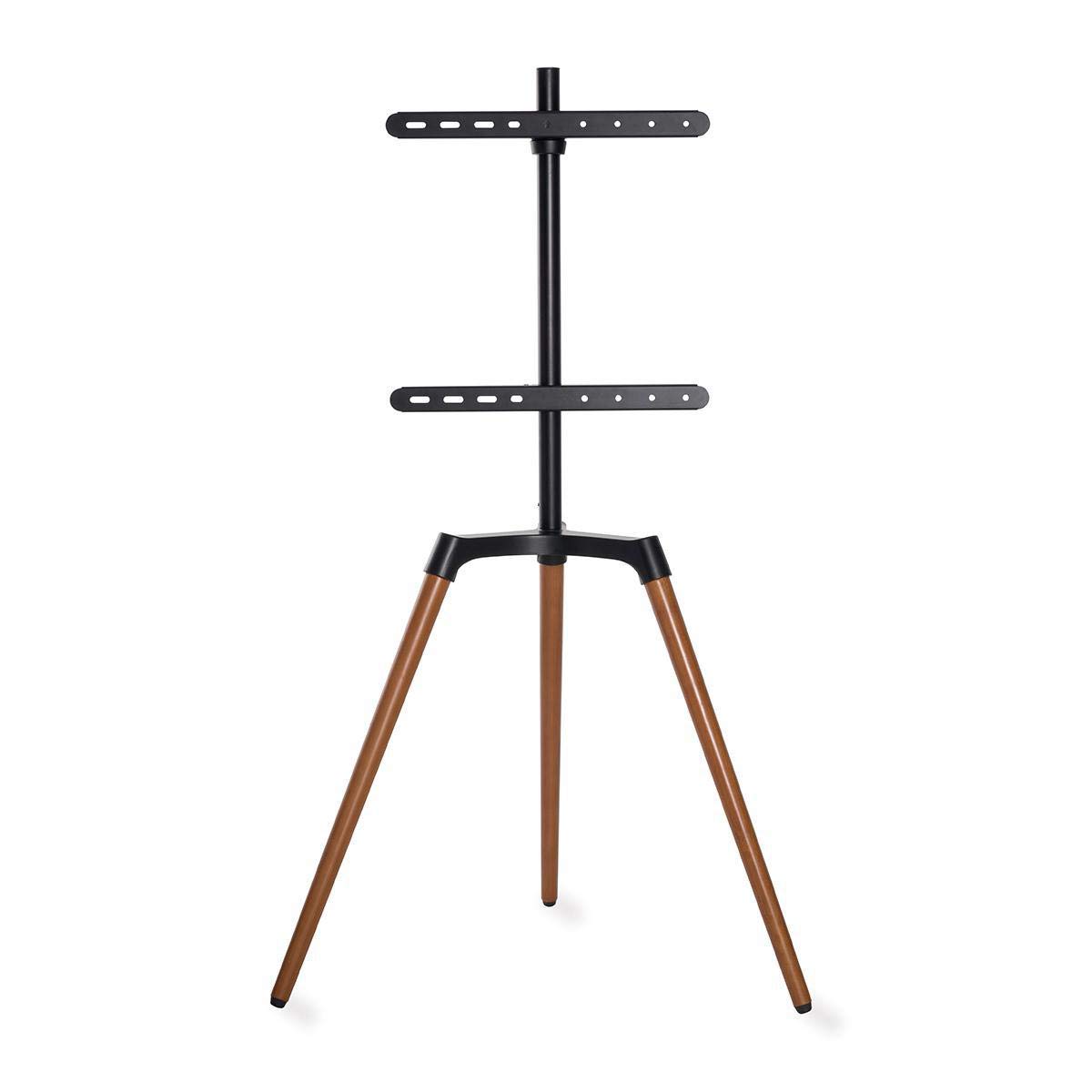
Imatge: Acabatview of the Nedis TVSM7060BK TV Floor Stand components. This image displays the main stand structure, including the central pole, VESA mounting brackets, and the tripod base with wooden legs, before assembly.
- Central Support Pole (1x)
- Tripod Base Assembly (1x)
- VESA Mounting Brackets (2x)
- Cable Management Clip (1x)
- Hardware Kit (screws, washers, spacers for TV attachment, assembly tools)
- Manual d'instruccions (aquest document)
3. Muntatge i muntatge
Follow these steps carefully to assemble your Nedis TVSM7060BK TV Floor Stand. It is recommended to have a second person assist during the TV mounting process.
Step 1: Assemble the Tripod Base
- Unpack the tripod base and extend the legs. Ensure they are securely locked into position.
- Attach the central support pole to the tripod base. Align the holes and secure with the provided screws and Allen key.

Imatge: lateral view of the fully assembled Nedis TVSM7060BK TV Floor Stand without a television attached. This shows the central pole connected to the tripod base and the VESA brackets in place.
Step 2: Attach VESA Mounting Brackets to the Central Pole
- Slide the two VESA mounting brackets onto the central support pole. Position them according to your TV's VESA pattern and desired height.
- Secure the brackets in place using the locking mechanisms or screws provided. Ensure they are level and firmly tightened.

Imatge: Primer pla view of how the VESA mounting bracket attaches to the central support pole. This highlights the secure connection point and adjustment mechanism.
Step 3: Attach VESA Brackets to Your TV
- Col·loqueu amb cura el televisor cara avall sobre una superfície suau i neta.
- Identifiqueu els forats de muntatge VESA a la part posterior del vostre televisor.
- Attach the VESA mounting arms (from the stand) to the back of your TV using the appropriate screws, washers, and spacers from the hardware kit. Ensure the screws are tightened securely but do not overtighten.
Pas 4: Munteu el televisor al suport
- With the help of a second person, carefully lift the TV and align the VESA mounting arms attached to the TV with the brackets on the central pole.
- Hook the TV onto the stand's brackets. Ensure the TV is securely seated.
- Engage any safety locks or screws on the stand's brackets to prevent the TV from accidentally dislodging.
Imatge: The Nedis TVSM7060BK TV Floor Stand with a transparent outline of a television, illustrating how a TV would appear once mounted. This provides a visual guide for the final setup.
4. Instruccions de funcionament
Adjusting TV Position
- Funció giratòria: The TV stand allows for swivel adjustment. Gently rotate the TV to achieve the desired viewing angle. Do not force the rotation beyond its natural limits (approximately ±70 degrees).
- Ajust d'alçada: To adjust the TV height, you will need to loosen the screws securing the VESA mounting brackets to the central pole. With assistance, carefully raise or lower the TV to the desired position, then re-tighten the screws firmly.
Gestió de cables
The Nedis TVSM7060BK features improved cable management to keep your setup tidy and safe.
- Gather all TV and accessory cables.
- Route the cables along the central support pole.
- Use the provided cable management clip to secure the cables neatly to the pole, preventing tangles and reducing trip hazards.

Imatge: Detallada view of the cable management clip attached to the central pole of the TV stand. This shows how cables can be neatly routed and secured for a clean setup.
5. Manteniment
- Neteja: Netegeu el suport amb un drap suau i sec. Per a marques difícils, feu un drap lleugerament sec.amp es pot fer servir un drap i assecar-lo immediatament. Eviteu netejadors o dissolvents abrasius.
- Comprovacions periòdiques: Reviseu periòdicament tots els cargols i connexions per assegurar-vos que estiguin ben ajustats i segurs. Torneu a apretar-los si cal.
- Danys: If any part of the stand becomes damaged, discontinue use immediately and contact customer support for assistance.
6. Solució De Problemes
- El televisor no està anivellat: Ensure the VESA mounting brackets are level on the central pole and securely tightened. Adjust if necessary.
- La posició de suport es nota inestable: Verify that the tripod legs are fully extended and locked, and the stand is placed on a flat, stable surface. Check all assembly screws for tightness. Ensure the TV weight does not exceed 35 kg.
- Difficulty swiveling the TV: Check for any obstructions behind the TV or around the stand. Ensure cables are not snagging. Do not force the swivel.
- Peces que falten: Refer to the "Package Contents" section. If parts are missing, contact your retailer for replacements.
7. Especificacions
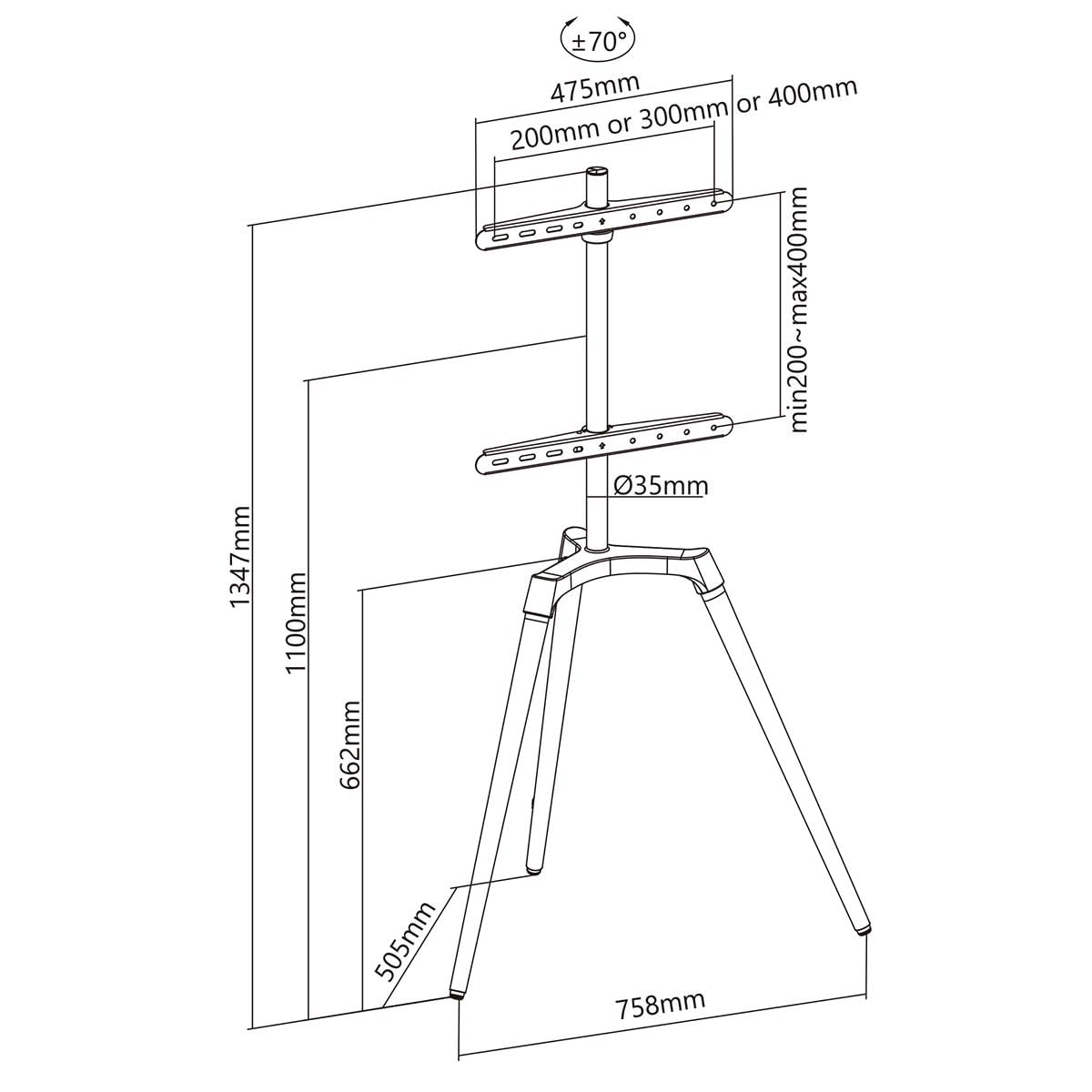
Imatge: Technical diagram showing the key dimensions of the Nedis TVSM7060BK TV Floor Stand, including height, width, and VESA mounting ranges. This helps in planning placement and compatibility.
| Model: | TVSM7060BK |
| Marca: | NEDIS |
| Material: | Alumini, Acer |
| Color: | Black, Brown (wooden legs) |
| Compatibilitat de la mida de la pantalla: | 127 cm (50") - 165.1 cm (65") |
| Capacitat de pes màxim: | 35 kg |
| VESA Compatibility (Min): | 200 x 200 mm |
| VESA Compatibility (Max): | 400 x 400 mm |
| Angle de gir: | ±70° |
| Number of Displays Supported: | 1 |
8. Garantia i Suport
For warranty information or technical support, please refer to the documentation provided with your purchase or visit the official Nedis weblloc web. Conserveu el comprovant de compra per a reclamacions de garantia.
Nedis Weblloc: www.nedis.com


