1. Introducció
Thank you for choosing the KINGONE K5 Bluetooth Speaker. This manual provides essential information for setting up, operating, and maintaining your speaker. Please read it carefully to ensure proper use and to maximize your listening experience.
2. Informació de seguretat
- No exposeu l'altaveu a temperatures extremes, llum solar directa ni humitat elevada.
- Eviteu deixar caure o sotmetre l'altaveu a forts impactes.
- Do not disassemble or attempt to repair the speaker yourself. Contact qualified service personnel.
- Mantingueu l'altaveu lluny de l'aigua i altres líquids.
- Feu servir només el cable de càrrega i l'adaptador de corrent especificats.
3. Contingut del paquet
Si us plau, comproveu que tots els articles estiguin presents al vostre paquet:
- KINGONE K5 Bluetooth Speaker
- Cable de càrrega micro-USB
- Cable d'àudio (AUX)
- Manual d'usuari
4. Producte acabatview
Familiaritzeu-vos amb els components i els controls de l'altaveu.

Imatge 1: Frontal view of the KINGONE K5 Bluetooth Speaker, showcasing its perforated grille and the KINGONE logo.
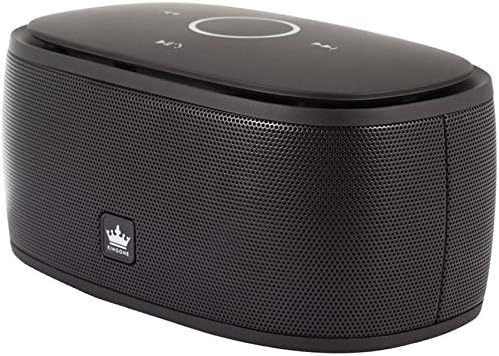
Imatge 2: Anglesa view of the speaker, highlighting the touch-sensitive control panel on the top surface with playback and mode buttons.
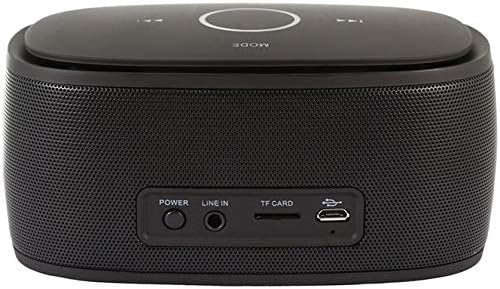
Imatge 3: posterior view of the speaker, displaying the power button, Line In (AUX) port, TF card slot, and Micro-USB charging port.
Tauler de control (superior)
- Touch Wheel: For volume adjustment. Swirl clockwise to increase volume, anti-clockwise to decrease.
- Botó Reproduir/Pausa: Controla la reproducció de suports.
- Botons de pista anterior/següent: Navega per les pistes.
- Botó de mode: Switches between input modes (Bluetooth, TF Card, AUX). Long press to toggle automatic call answering.
- Botó de resposta de trucada: Located at the center of the touch wheel, used to answer incoming calls.
Panell posterior
- Botó d'encesa: Activa o desactiva l'altaveu.
- LINE IN (AUX) Port: Per a connexió d'àudio amb cable.
- Ranura per a targetes TF: Per reproduir música directament des d'una targeta TF (MicroSD).
- Port de càrrega micro-USB: Per carregar la bateria interna de l'altaveu.
5. Configuració
5.1 Càrrega de l'altaveu
- Connecteu el cable de càrrega micro-USB al port micro-USB de l'altaveu.
- Connecteu l'altre extrem del cable a una font d'alimentació USB (per exemple, un port USB de l'ordinador o un adaptador de paret USB).
- El llum indicador de càrrega s'il·luminarà. Un cop completament carregat, el llum pot canviar de color o apagar-se.
- Una càrrega completa proporciona fins a 8 hores de reproducció de música.
5.2 Encès/Apagat
- Per encendre: Press and hold the Power button on the rear panel until you hear a power-on sound or voice prompt.
- Per apagar: Press and hold the Power button again until you hear a power-off sound or voice prompt.
6. Instruccions de funcionament
6.1 Vinculació Bluetooth
- Ensure the speaker is powered on and in Bluetooth mode (indicated by a voice prompt or LED).
- Al telèfon intel·ligent, la tauleta o l'ordinador, activeu el Bluetooth i cerqueu els dispositius disponibles.
- Select "KINGONE K5" from the list of devices.
- Once paired, you will hear a confirmation voice prompt. The speaker is now ready to play audio from your device.
- L'abast efectiu del Bluetooth és d'aproximadament 10 metres (33 peus).
Reproducció d'àudio 6.2
- Bluetooth: After successful pairing, play audio from your connected device. Use the Play/Pause and track navigation buttons on the speaker or your device.
- Targeta TF: Inseriu una targeta TF (MicroSD) amb àudio files a la ranura de la targeta TF. L'altaveu canviarà automàticament al mode de targeta TF i començarà la reproducció.
- AUX (Line In): Connect an audio device using the provided 3.5mm audio cable to the LINE IN port. Press the Mode button to switch to AUX mode if it doesn't switch automatically.
- Funcionalitat de l'aplicació: An optional app can be installed on Apple/Android systems, offering features like Clock, FM radio, and music control.
6.3 Control de volum
Adjust the volume by swirling your finger around the touch wheel on the top panel:
- En sentit horari: Augmenta el volum.
- En sentit contrari a les agulles del rellotge: Disminuir el volum.
6.4 Trucades mans lliures
The KINGONE K5 speaker features a built-in microphone for hands-free calls.
- Contestar trucades: When an incoming call is received, touch the Call Answer button (center of the touch wheel) to answer.
- Finalització de trucades: Touch the Call Answer button again to end the call.
- Resposta automàtica: To enable or disable automatic answering of incoming calls, long press the MODE key. The speaker will provide a voice prompt to indicate the status.
6.5 Indicacions de veu
The speaker provides voice prompts to indicate its status, available in both English and Chinese languages.
7. Manteniment
- Netegeu l'altaveu amb un drap suau i sec. No utilitzeu productes de neteja abrasius ni dissolvents.
- Guardeu l'altaveu en un lloc fresc i sec quan no l'utilitzeu.
- Eviteu bloquejar la reixeta de l'altaveu per garantir una qualitat de so òptima.
8. Solució De Problemes
| Problema | Causa possible | Solució |
|---|---|---|
| L'altaveu no s'encén. | La bateria està esgotada. | Charge the speaker using the Micro-USB cable. |
| No es pot emparellar per Bluetooth. | El Bluetooth no està activat al dispositiu o l'altaveu no està en mode d'emparellament. | Ensure Bluetooth is active on both devices. Restart both devices and try pairing again. Ensure no other device is currently connected to the speaker. |
| No hi ha so durant la reproducció. | El volum és massa baix o silenciat. Mode d'entrada incorrecte. | Increase volume on both the speaker and the connected device. Check that the correct input mode (Bluetooth, TF, AUX) is selected. |
| Mala qualitat de so. | Device is out of Bluetooth range. Interference. | Move the connected device closer to the speaker. Avoid obstacles between the speaker and the device. |
9. Especificacions
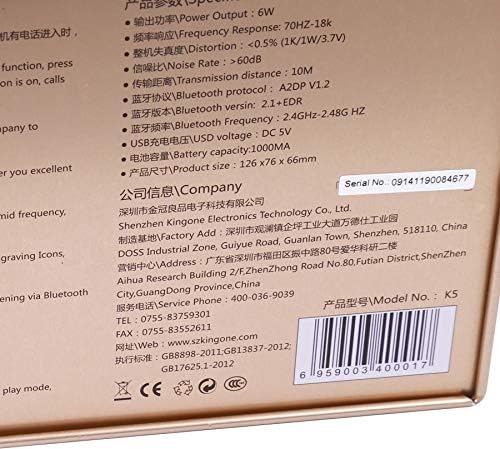
Image 4: Detailed specifications printed on the product packaging.
| Característica | Especificació |
|---|---|
| Número de model | K5 |
| Versió Bluetooth | V2.0 EDR A2D (compatible with V2.1+EDR) |
| Protocol Bluetooth | A2DP V1.2 |
| Freqüència Bluetooth | 2.4GHZ-2.48G HZ |
| Distància de transmissió | Fins a 10 metres |
| Potència de sortida | 6W |
| Resposta de freqüència | 70Hz-18KHz |
| Distorsió | <0.5% (1K/1W/3.7V) |
| Relació senyal/soroll (S/N) | > 60 dB |
| Ampaixecadors | 2pcs NdFeB magnet Dia(40mm) |
| Diafragma vibrant | 50x90mm |
| Capacitat de la bateria | 1000 mAh |
| Temps de reproducció | Fins a 8 hores |
| Càrrega USB Voltage | DC 5V |
| Dimensions del producte | 126 x 76 x 66 mm |
| Tecnologia de connectivitat | Bluetooth, Wired (AUX) |
| Mode de sortida d'àudio | estèreo |
| Tipus d'altaveu | Multimèdia |
| Característiques especials | Bluetooth, Portable, Hands-free with MIC, TF Card Support, Touch Control |
| Dispositius compatibles | Ordinador portàtil, telèfon intel·ligent, tauleta |
10. Garantia i Suport
For warranty information, please refer to the documentation provided at the time of purchase or contact your retailer. For technical support or inquiries, you may contact the manufacturer:
- Fabricant: Shenzhen Kingone Electronics Technology Co., Ltd.
- Telèfon de servei: 400-036-9039
- Telèfon: 0755-83759301
- Fax: 0755-83552611
- Weblloc: www.szkingone.com


