Introducció
This manual provides detailed instructions for the setup, operation, and maintenance of your KINGONE K9 Super Bass Portable Wireless Bluetooth NFC 2.1 Speaker. Please read this manual thoroughly before using the device to ensure proper functionality and longevity.
Producte acabatview
The KINGONE K9 is a portable wireless speaker designed for high-quality audio playback. It features Bluetooth and NFC connectivity, allowing for seamless pairing with various devices. Its compact design and robust sound make it ideal for both indoor and outdoor use.

Figura 1: Frontal view of the KINGONE K9 speaker, highlighting its green color and minimalist design.
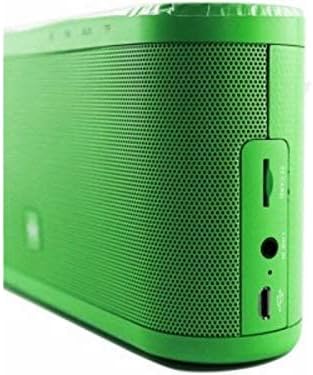
Figure 2: Side panel of the KINGONE K9 speaker, detailing the various input ports for versatile connectivity.
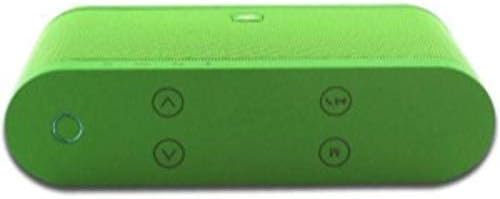
Figure 3: Top panel of the KINGONE K9 speaker, illustrating the intuitive button layout for easy control.
Contingut del paquet
- KINGONE K9 Super Bass Portable Wireless Bluetooth NFC 2.1 Speaker
- Cable de càrrega (Micro USB)
- Manual d'usuari (aquest document)
- Embalatge de protecció

Figure 4: The KINGONE K9 speaker alongside its charging cable and elegant product packaging.
Configuració
1. Carregant l’altaveu
Before first use, fully charge the speaker. Connect the provided Micro USB cable to the charging port on the side of the speaker (refer to Figure 2) and the other end to a USB power adapter (not included) or a computer's USB port. The charging indicator light will illuminate during charging and turn off when fully charged.
2. Encès / apagat
To power on the speaker, press and hold the power button located on the top panel (refer to Figure 3) until you hear an audible prompt. To power off, press and hold the same button again.
Instruccions de funcionament
1. Emparellament Bluetooth
- Assegureu-vos que l'altaveu estigui encès i en mode d'emparellament Bluetooth (indicat per un llum LED intermitent).
- Al dispositiu (telèfon intel·ligent, tauleta, ordinador portàtil), activeu el Bluetooth i cerqueu els dispositius disponibles.
- Select "KINGONE K9" from the list of found devices.
- Once paired, the LED indicator will become solid, and you will hear a confirmation tone.
2. Emparellament NFC (comunicació de camp proper)
If your device supports NFC, simply tap your NFC-enabled device to the NFC area on the speaker (usually indicated by an NFC logo). The speaker will automatically pair with your device.
3. Mode d'entrada AUX
Connect an audio device to the speaker's AUX input port (refer to Figure 2) using a 3.5mm audio cable (not included). The speaker will automatically switch to AUX mode.
4. Reproducció amb targeta Micro SD
Inseriu una targeta Micro SD amb àudio files (MP3, WAV, etc.) into the Micro SD card slot on the side of the speaker (refer to Figure 2). The speaker will automatically detect the card and begin playing music.
5. Control de volum
Feu servir el botó per pujar el volum (+) i baixar el volum (-) buttons on the top panel (refer to Figure 3) to adjust the playback volume.
6. Track Navigation
Use the previous track (◀◀) and next track (▶▶) buttons on the top panel (refer to Figure 3) to skip between songs.
7. Canvi de mode
Press the 'M' (Mode) button on the top panel to cycle through available modes: Bluetooth, AUX, Micro SD, and FM Radio (if supported by your model).
Note: The product specifications mention "Controller type: Remote Control". However, no remote control is typically included or depicted with this model. All primary functions are controlled via the speaker's top panel buttons.
Manteniment
- Neteja: Feu servir un drap suau i sec per netejar la superfície de l'altaveu. No utilitzeu productes de neteja abrasius ni dissolvents.
- Emmagatzematge: Guardeu l'altaveu en un lloc fresc i sec, allunyat de la llum solar directa i de temperatures extremes.
- Cura de la bateria: Per allargar la durada de la bateria, eviteu descarregar-la completament amb freqüència. Carregueu l'altaveu regularment, fins i tot si no l'utilitzeu durant períodes prolongats.
- Resistència a l'aigua: This speaker is not water-resistant. Avoid exposure to liquids.
Resolució de problemes
| Problema | Causa possible | Solució |
|---|---|---|
| L'altaveu no s'encén. | Bateria baixa. | Carregueu l'altaveu completament. |
| No es pot emparellar per Bluetooth. | L'altaveu no està en mode d'emparellament; el Bluetooth del dispositiu està desactivat; massa lluny de l'altaveu. | Ensure speaker is in pairing mode. Turn on device Bluetooth. Move device closer to speaker (within 10 meters). |
| Sense so. | Volume too low; incorrect mode selected; audio cable not connected properly. | Increase speaker and device volume. Switch to correct input mode (Bluetooth, AUX, SD). Reconnect audio cable. |
| Distorsió del so. | Volume too high; weak signal. | Reduce volume. Move speaker closer to the audio source. |
Especificacions
- Número de model: K9
- Marca: KINGONE
- Tecnologia de connectivitat: Wireless, Bluetooth, NFC
- Tipus d'altaveu: Altaveus Bluetooth
- Dispositius compatibles: Multi (Laptop, Tablet, Smartphone)
- Tipus de port: Micro USB (Charging), AUX (3.5mm), Micro SD Card Slot
- Sortida nominal: 10 - 20 Watt (Max 20 Watts)
- Mode de sortida d'àudio: estèreo
- Tipus de muntatge: Taula
- Dimensions: 21 x 12.3 x 9 cm
- Pes del producte: 1 kg
- Característiques especials: Portàtil
- External Product ID (EAN-13): 6959003400116
Garantia i Suport
Please refer to the product packaging or the retailer's website for specific warranty information. For technical support or inquiries, please contact KINGONE customer service through their official channels. No specific warranty period or support contact details are provided in this manual.


