1. Introducció
Thank you for choosing the VMAI 38 Inch 2.1 Sound Bar. This sound bar is designed to enhance your home entertainment experience with powerful audio, featuring dual built-in subwoofers and versatile connectivity options. Please read this manual thoroughly before use to ensure proper operation and to maximize your enjoyment of the product.
2. Informació de seguretat
- Do not expose this appliance to dripping or splashing liquids.
- No bloquegeu cap obertura de ventilació. Instal·leu-ho d'acord amb les instruccions del fabricant.
- No instal·leu a prop de cap font de calor com ara radiadors, registres de calor, estufes o altres aparells (inclosos amplificadors) que produeixen calor.
- Protegiu el cable d’alimentació perquè no es pugui caminar ni pessigar, sobretot als endolls, endolls i el punt on surten de l’aparell.
- Utilitzeu només accessoris/accessoris especificats pel fabricant.
- Desendolleu aquest aparell durant les tempestes amb llamps o quan no l'utilitzeu durant llargs períodes de temps.
3. Contingut del paquet
Si us plau, comproveu que tots els articles estiguin inclosos al vostre paquet:
- VMAI 38 Inch Sound Bar
- Comandament a distància
- Premium 5 ft Optical cable
- 5 ft RCA cable
- Adaptador d'alimentació
- Suports i cargols de muntatge a la paret
- Manual d'usuari
4. Producte acabatview
The VMAI Sound Bar HD-019 is engineered to deliver a powerful and clear audio experience. It features dual 25W built-in subwoofers and four speakers, providing 90W of total power for room-shaking bass and precise sound.

Figure 4.1: VMAI 38 Inch Sound Bar and included remote control.
The sound bar incorporates advanced DSP technology and Bluetooth 5.0 for stable and fast wireless transmission. It offers multiple input connections including HDMI ARC, Optical, AUX, and USB (for flash drives only).

Figure 4.2: Internal components of the VMAI Sound Bar, highlighting the 6 speakers and 90 watts of power for a superb sound experience.

Figure 4.3: Illustration of the sound bar's dual built-in subwoofers, designed to deliver deep bass.
5. Configuració
5.1 Opcions de col·locació
The VMAI Sound Bar offers flexible placement options to suit your home theater setup:
- Ubicació d'escriptori: Position the sound bar directly in front of your TV on a flat surface, ensuring it does not obstruct the TV's remote sensor.
- Muntatge en paret: For an elegant, space-saving setup, the sound bar can be mounted on the wall using the included mounting brackets and template. Ensure the wall can support the weight of the sound bar.

Figure 5.1: The sound bar's mountable design allows for both wall mounting and desktop placement.
5.2 Connecting Your Sound Bar
The sound bar supports various connection methods to integrate with your devices:
- ARC HDMI: Connect an HDMI cable from the sound bar's HDMI ARC port to your TV's HDMI ARC port. This allows for audio return channel functionality, simplifying control.
- Entrada òptica: Use the included optical cable to connect the sound bar to your TV's optical audio output.
- Entrada AUX: Connect devices using the included RCA cable to the AUX input.
- Entrada USB: Per reproduir àudio des d'una unitat flash USB.
- Bluetooth 5.0: Wirelessly connect your Bluetooth-enabled devices.

Figure 5.2: The sound bar supports HDMI (ARC), AUX, Optical, USB, and Bluetooth 5.0 connections.
5.3 Important Note for Optical Mode (PCM Setting)
When using the Optical input, it is crucial to adjust your TV's audio settings to PCM (Pulse Code Modulation). Failure to do so may result in no sound or distorted audio.
Steps to enable PCM (may vary by TV brand):
- Go to the 'Settings' menu on your TV.
- Navigate to 'Audio Format' or 'Sound Output' settings.
- Select 'PCM' as the digital audio output format.
- If using HDMI ARC, also check 'HDMI Audio Format' and set it to 'PCM'.
6. Instruccions de funcionament
6.1 Engegada/apagada
Premeu el botó Potència/Mode botó de la barra de so o del comandament a distància per encendre o apagar la unitat.
6.2 Selecció d'entrada
Premeu el botó Selection (M) botó de la barra de so o ENTRADA button on the remote control to cycle through available input sources (HDMI ARC, Optical, AUX, USB, Bluetooth).
6.3 Control de volum
Utilitza el Volum + i Volum - buttons on the sound bar or remote control to adjust the volume level.
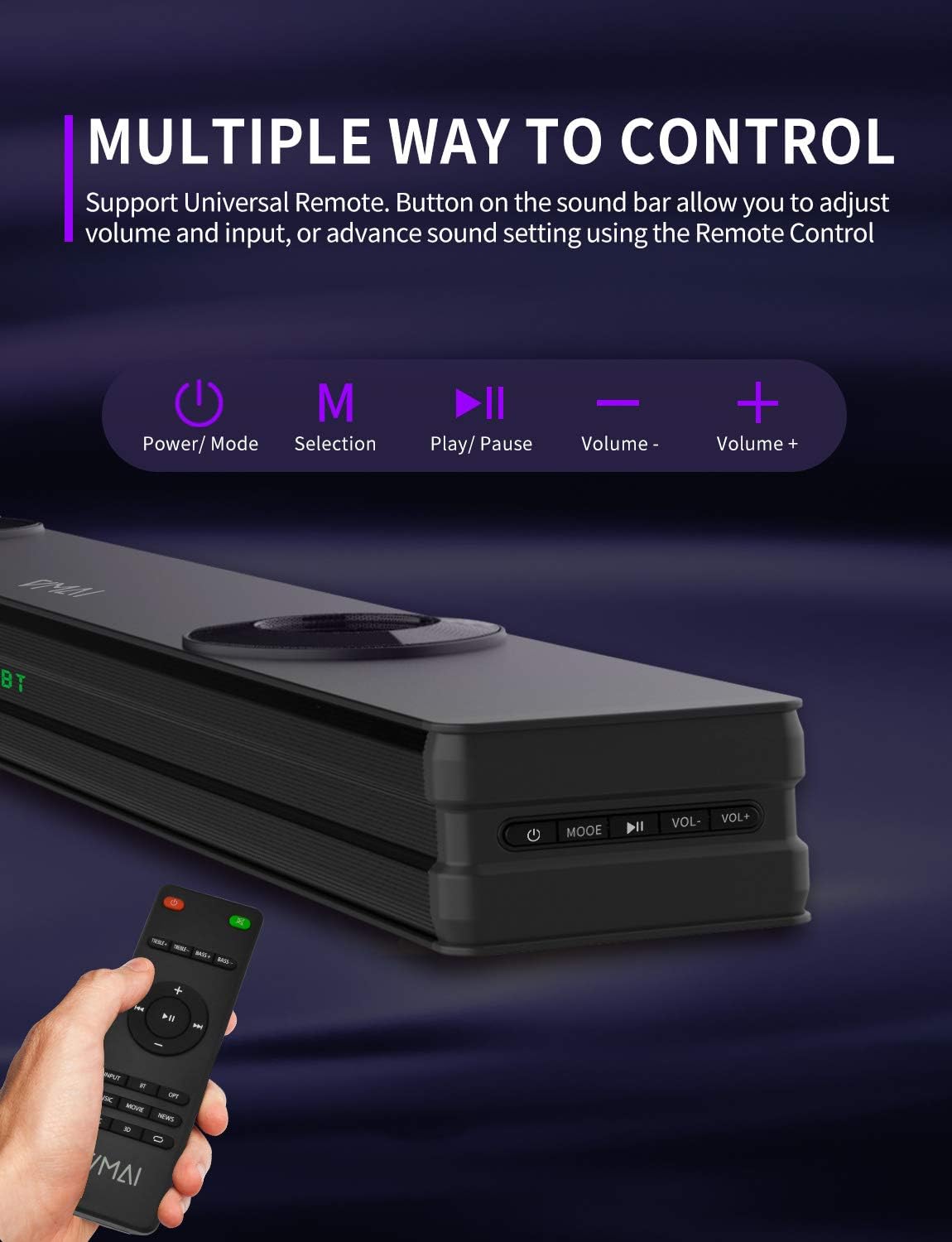
Figure 6.1: The sound bar can be controlled via its integrated buttons or the included remote control.
6.4 Modes d'equalitzador
The sound bar features 4 distinct sound modes to optimize your listening experience. Use the remote control to switch between them:
- Mode de música: Optimized for music playback, enhancing clarity and bass.
- Movies Mode: Provides a cinematic surround sound experience, ideal for films.
- Mode de notícies: Enhances vocal clarity for news broadcasts and dialogue-heavy content.
- Mode de so envoltant 3D: Creates an immersive, three-dimensional audio field.
6.5 Vinculació Bluetooth
To pair your Bluetooth device:
- Switch the sound bar to Bluetooth mode (indicated by 'BT' on the display).
- Activa el Bluetooth al teu dispositiu (telèfon intel·ligent, tauleta, etc.).
- Cerca 'VMAI Sound Bar' in your device's Bluetooth settings.
- Select it to pair. Once connected, the 'BT' indicator will stop flashing.
7. Manteniment
To ensure the longevity and optimal performance of your VMAI Sound Bar, follow these maintenance guidelines:
- Neteja: Feu servir un drap suau i sec per netejar la superfície de la barra de so. No utilitzeu netejadors líquids ni aerosols.
- Ventilació: Assegureu-vos que les obertures de ventilació no estiguin bloquejades per evitar el sobreescalfament.
- Emmagatzematge: Si guardeu la barra de so durant un període prolongat, desendolleu-la de la presa de corrent i guardeu-la en un lloc fresc i sec.
- Eviteu la humitat: Keep the sound bar away from water and high humidity.
8. Solució De Problemes
If you encounter issues with your VMAI Sound Bar, please refer to the following common problems and solutions:
| Problema | Possible causa/solució |
|---|---|
| No se sent so de la barra de so. |
|
| So distorsionat o de mala qualitat. |
|
| Problemes de connexió Bluetooth. |
|
| El comandament a distància no funciona. |
|
| Bass is weak or not noticeable. |
|
9. Especificacions
| Característica | Especificació |
|---|---|
| Nom del model | HD-019 |
| Dimensions (P x A x A) | 4.3 "P x 38" W x 2.5" H |
| Pes de l'article | 6 lliures |
| Potència de sortida màxima dels altaveus | 90 watts |
| Entrada Voltage | 240 Volts |
| Tipus d'altaveu | 3D, Soundbar, Subwoofer, Surround Sound |
| Tecnologia de connectivitat | Optical, HDMI (ARC), AUX, USB, Bluetooth |
| Versió Bluetooth | 5.0 |
| Interval Bluetooth | 15.24 metres (50 peus) |
| Mode de sortida d'àudio | Estèreo, Envoltant |
| Material | Metall |
| Color | Negre mat |
10. Garantia i Suport
VMAI offers a 12-month coverage for its products. Every VMAI sound bar undergoes a strict quality test process before shipment. For any issues or inquiries, please contact VMAI customer support. We are committed to resolving all your problems within 24 hours.
VMAI aims to provide high-quality audio products that deliver fantastic audio-visual enjoyment and an authentic interactive experience.


