1. Introducció
The Saramonic SR-Q2M is a compact and lightweight handheld audio recorder designed for capturing high-quality sound. Its rugged metal construction ensures durability, making it suitable for various recording environments. Equipped with professional stereo condenser microphones in an X/Y configuration, the SR-Q2M delivers rich, broadcast-quality audio for video productions, music recording, podcasting, and journalism.
This device supports recording line-level signals or external microphones via its dedicated 3.5mm mic and line inputs. Two 3.5mm outputs allow for headphone monitoring and connection to cameras or other recording devices. The SR-Q2M records high-resolution audio files up to 96kHz and features a built-in USB-C port for easy file transferència a un ordinador.
2. Què hi ha a la caixa
Si us plau, verifiqueu que tots els elements que s'enumeren a continuació estiguin inclosos al vostre paquet:
- 1 x SR-Q2M Portable Handheld Recorder
- 1 x RC-X Remote Control
- 1 x Lavalier Microphone with 6’ Cable, Alligator Mic Clip and Foam Windscreen
- 1 targeta MicroSD de 8 GB
- 1 x Protective Travel Case
- 1 x High-Wind Furry Windscreen
- 1 x Parabrisa d'escuma
- 1 x corretja de mà
- 1 x 4’ (1.2m) Gold-Plated USB-A to USB-C Cable
- 1 x Manual d'usuari
- 1 x Targeta de garantia
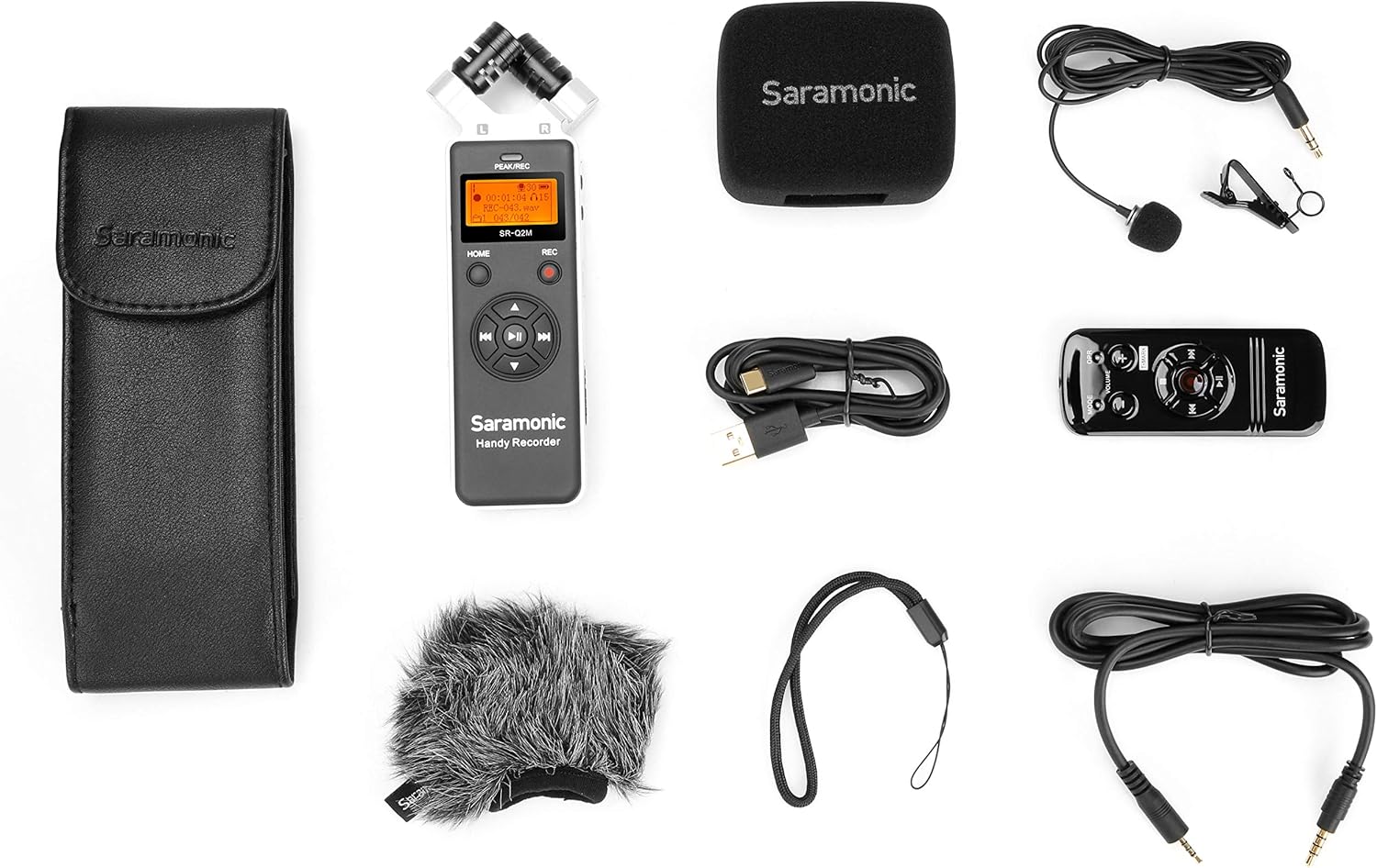
Image: All components included in the Saramonic SR-Q2M package, including the recorder, remote, lavalier mic, windscreens, case, and cables.
3. Producte acabatview
Familiarize yourself with the main components and controls of your SR-Q2M recorder.
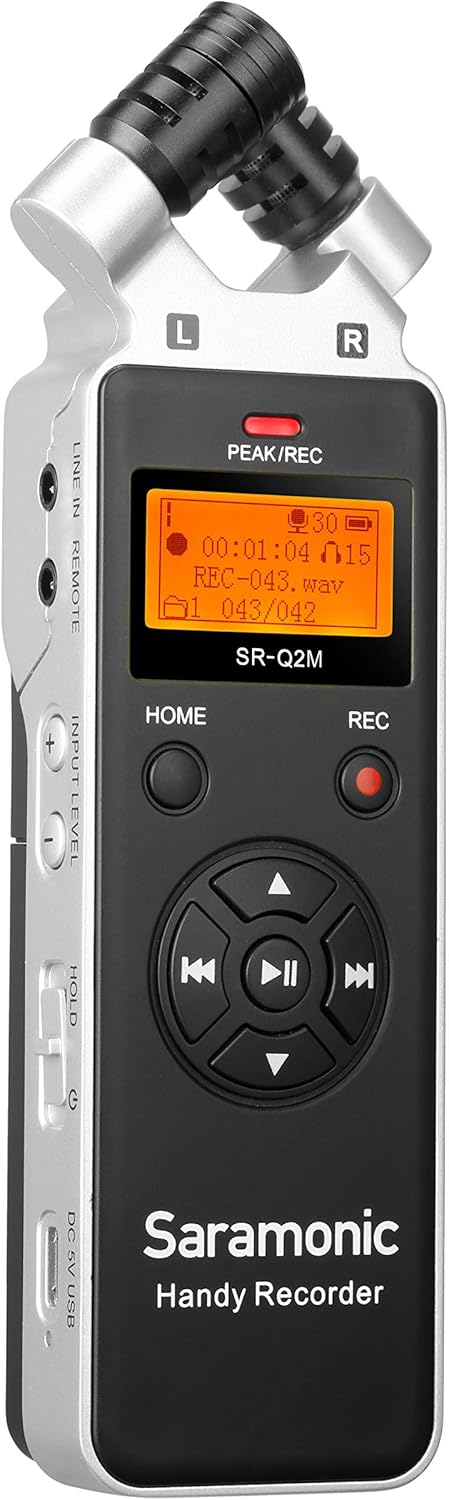
Imatge: Frontal view of the Saramonic SR-Q2M handheld recorder, showing the stereo microphones, display screen, and main control buttons.
3.1 Front Panel and Top Microphones
- Stereo Condenser Microphones: X/Y configured microphones for capturing wide, clear stereo sound.
- Pantalla de visualització: Shows recording status, battery level, time, and menu options.
- PEAK/REC Indicator: Lights up to indicate recording or input signal peaking.
- Botó HOME: Navigates to the main menu.
- Botó REC: Starts and stops recording.
- Navigation/Playback Controls: Directional buttons for menu navigation and playback (Play/Pause, Fast Forward, Rewind, Skip).

Imatge: Costat esquerre view of the Saramonic SR-Q2M, highlighting the LINE IN/REMOTE port, INPUT LEVEL controls, HOLD switch, and USB-C port.
3.2 Tauler lateral esquerre
- LINE IN / REMOTE Port: 3.5mm input for external line-level audio sources or the RC-X remote control.
- INPUT LEVEL Buttons (+/-): Adjusts the recording input gain.
- Interruptor HOLD: Locks all buttons to prevent accidental operation.
- DC 5V / USB-C Port: For external power supply or connecting to a computer for data transfer.

Imatge: Costat dret view of the Saramonic SR-Q2M, showing the LINE OUT port, VOLUME controls, and MicroSD card slot.
3.3 Tauler lateral dret
- Port de sortida de línia: 3.5mm output for connecting to cameras, mixers, or other audio devices.
- Presa per a auriculars: 3.5mm output for monitoring audio with headphones.
- VOLUME Buttons (+/-): Adjusts the playback volume for headphones/line out.
- Ranura per a targeta MicroSD: Insert your MicroSD card here for storage.

Imatge: Enrere view of the Saramonic SR-Q2M, showing the external MIC IN port and tripod mount thread.
3.4 Tauler posterior
- Port MIC IN: Entrada de 3.5 mm per connectar un micròfon extern.
- Muntatge de trípode: Standard 1/4-inch thread for mounting on tripods or stands.
4. Configuració
4.1 Instal·lació de la bateria
- Localitzeu la tapa del compartiment de les piles a la part posterior de la gravadora.
- Feu lliscar la coberta oberta.
- Introduïu dues piles AA, assegurant-vos de la polaritat correcta (+/-).
- Tanqueu bé la tapa del compartiment de la bateria.

Image: The Saramonic SR-Q2M with its battery compartment open, showing the slots for two AA batteries.
4.2 Instal·lació de la targeta MicroSD
- Locate the MicroSD card slot on the right side of the recorder.
- Insert the MicroSD card with the gold contacts facing down until it clicks into place.
- Per treure-la, empenyeu suaument la targeta cap a dins fins que surti.
4.3 Engegada/apagada
- Per encendre: Press and hold the HOME button for a few seconds until the display lights up.
- Per apagar: Press and hold the HOME button again until the display turns off.
4.4 Connexió d'accessoris
- Micròfon de solapa: Connect the included lavalier microphone to the 3.5mm MIC IN port on the back of the recorder.
- RC-X Remote Control: Connect the remote control cable to the LINE IN / REMOTE port on the left side.
- Auriculars: Plug your headphones into the 3.5mm Headphones Jack on the right side for monitoring.
- External Line-Level Device: Connect to the 3.5mm LINE IN / REMOTE port for line-level audio input.
- Camera/Mixer: Use the 3.5mm LINE OUT port to send audio to external recording devices.

Image: The Saramonic SR-Q2M handheld recorder connected to its RC-X remote control, demonstrating remote operation capability.
5. Instruccions de funcionament
5.1 Enregistrament bàsic
- Power on the SR-Q2M.
- Assegureu-vos que hi hagi una targeta MicroSD inserida.
- Adjust the input level using the INPUT LEVEL +/- buttons on the left side. Monitor the PEAK/REC indicator to avoid clipping (red light).
- Premeu el botó REC button once to start recording. The PEAK/REC indicator will glow red.
- Premeu el botó REC button again to stop recording. The file es desarà automàticament.
5.2 Reproducció
- From the main screen, use the navigation buttons to select a recorded file.
- Press the Play/Pause button (center of navigation controls) to start playback.
- Use the VOLUME +/- buttons on the right side to adjust playback volume.
- Use the Fast Forward/Rewind buttons to navigate within the track or skip between files.
5.3 Connexió a un ordinador
- Power on the SR-Q2M.
- Connect the recorder to your computer using the included USB-C cable.
- The recorder will appear as a removable storage device on your computer.
- You can now transfer recorded audio files al vostre ordinador.
5.4 Using the RC-X Remote Control
Connect the RC-X remote control to the LINE IN / REMOTE port. The remote allows you to control recording, playback, and volume without directly touching the recorder, reducing handling noise.
- Botó REC: Starts and stops recording.
- Botó Reproduir/Pausa: Controla la reproducció.
- Botons de VOLUM +/-: Ajusta el volum de reproducció.
- Botó MODE: Accedeix a les opcions del menú.
6. Manteniment
6.1 Neteja
- Use a soft, dry cloth to clean the exterior of the recorder.
- No utilitzeu netejadors líquids ni dissolvents, ja que poden danyar l'acabat o els components interns.
- Keep the microphone grilles free of dust and debris.
6.2 Emmagatzematge
- Store the recorder in a cool, dry place, away from direct sunlight and extreme temperatures.
- Si l'emmagatzemeu durant un període prolongat, traieu les piles per evitar fuites.
- Use the included protective travel case to prevent scratches and damage.
6.3 Cura de la bateria
- Feu servir sempre piles AA noves i d'alta qualitat.
- Canvieu les piles quan aparegui l'indicador de bateria baixa a la pantalla.
- Eliminar les bateries usades de manera responsable d'acord amb la normativa local.
7. Solució De Problemes
If you encounter issues with your SR-Q2M, refer to the following common problems and solutions:
| Problema | Possible causa/solució |
|---|---|
| La gravadora no s'encén. | Check battery installation and ensure batteries are fresh. Connect via USB-C for external power. |
| Cannot record audio. | Ensure a MicroSD card is inserted and has sufficient free space. Check input level settings. |
| Poor audio quality / Distortion. | Adjust INPUT LEVEL to prevent peaking (red PEAK/REC indicator). Ensure microphones are not obstructed. Consider disabling the limiter if audio artifacts are present. |
| No hi ha so durant la reproducció. | Check headphone connection and VOLUME settings. Ensure the correct file està seleccionat per a la reproducció. |
| El comandament a distància no funciona. | Ensure the remote is securely connected to the LINE IN / REMOTE port. |
| Recorder not recognized by computer. | Ensure the USB-C cable is properly connected. Try a different USB port or cable. Restart the computer and recorder. |
8. Especificacions
| Característica | Especificació |
|---|---|
| Dimensions del producte | 2.36 x 6.57 x 1.18 polzades |
| Pes de l'article | 5.3 unces (150 g) |
| Número de model de l'article | SR-Q2M |
| Interfície del maquinari | MicroSD, USB-C |
| Factor de forma del micròfon | Built-in Stereo (X/Y), Lavalier (external) |
| Format d'enregistrament | WAV (up to 96kHz high-resolution) |
| Conector d'auriculars | 3.5 mil·límetres |
| Capacitat d'emmagatzematge de memòria | 8 GB MicroSD card included (supports up to 128GB) |
| Battery Life (Digital Recording) | Approximately 19 hours (with 2 AA batteries) |
| Font d'alimentació | 2 x AA Batteries or DC 5V via USB-C |
| Mode de funcionament del micròfon | estèreo |
9. Garantia i Suport
The Saramonic SR-Q2M comes with a standard manufacturer's warranty. Please refer to the included Warranty Card for specific terms and conditions, including warranty duration and coverage details.
For technical support, troubleshooting assistance, or service inquiries, please visit the official Saramonic website or contact their customer support team. Keep your purchase receipt and warranty card handy for any claims.
Saramonic Official Weblloc: www.saramonic.com


