Introducció
Welcome to your new Echo (4th Generation) International Version. This device connects to Alexa, a cloud-based voice service, to provide premium sound, smart home hub capabilities, and a wide range of features. This manual will guide you through setting up and using your Echo device.

The Amazon Echo (4th Generation) International Version in Charcoal, featuring its spherical design and light ring.
Què s'inclou
- Echo (4th Gen) Device
- EU Power Adaptor (30W)
- Guia d'inici ràpid

The retail packaging for the Echo (4th Generation) device.
Configuració
Encès inicial
- Plug the EU power adaptor into the Echo device and then into a wall outlet.
- The light ring on your Echo will turn blue, then orange, indicating it is ready for setup.
Connecting to Wi-Fi and Alexa App
To fully utilize your Echo device, you need to connect it to your Wi-Fi network and set it up using the Alexa app.
- Download the Alexa app on your mobile device (compatible with Fire OS, Android, and iOS).
- Open the Alexa app and sign in with your Amazon account. If you don't have one, create a new account.
- Follow the on-screen instructions in the app to add a new device. Select "Amazon Echo" and then "Echo (4th Gen)".
- The app will guide you through connecting your Echo to your Wi-Fi network. Ensure your Wi-Fi supports 802.11a/b/g/n/ac (2.4 and 5 GHz) networks.
- Once connected, the light ring will turn off, and Alexa will greet you.

The Echo device ready for setup in a home environment.
Operating Your Echo
Comandaments de veu
Your Echo device is primarily controlled by voice. Simply say the wake word "Alexa" followed by your command. The light ring will turn blue when Alexa is listening.
- Reproducció de música: "Alexa, play music." or "Alexa, play [song name] by [artist]."
- Informació: "Alexa, what's the weather?" or "Alexa, what's in the news?"
- Temporitzadors i alarmes: "Alexa, configura un temporitzador durant 10 minuts" o "Alexa, configura una alarma per a les 7 del matí".
- Control de la llar intel·ligent: "Alexa, turn on the lights." (Requires compatible smart home devices and setup via the Alexa app).

Echo devices can be placed throughout your home for seamless voice control and audio.
Smart Home Hub Functionality
The Echo (4th Gen) includes a built-in smart home hub, allowing you to easily set up and control compatible Zigbee devices directly with your voice.
- Ensure your Zigbee devices are in pairing mode.
- Say "Alexa, discover my devices" or use the Alexa app to find and add new smart home devices.

The Echo device can be used to make announcements throughout your home, indicated by a green light ring.
Privacy Controls
Your Echo device is designed with multiple layers of privacy protection. You can manually disconnect the microphones by pressing the Microphone Off button located on the top of the device. The light ring will turn red when the microphones are off.

Pressing the Microphone Off button disables the microphones, indicated by a red light ring.
Manteniment
To ensure optimal performance and longevity of your Echo device, follow these simple maintenance guidelines:
- Keep the device clean by wiping it with a soft, dry, lint-free cloth.
- Eviteu utilitzar netejadors abrasius o dissolvents.
- Do not expose the device to liquids or excessive moisture.
- Ensure proper ventilation and avoid placing the device in enclosed spaces that could restrict airflow.
Resolució de problemes
Problemes comuns i solucions
| Problema | Solució |
|---|---|
| Echo not responding | Ensure the microphone is not off (red light ring). Try saying "Alexa" more clearly or from closer proximity. Unplug the device for 30 seconds and plug it back in. |
| No es pot connectar a la Wi-Fi | Check your Wi-Fi password. Ensure your router is working. Try moving the Echo closer to the router. Restart your router and the Echo device. |
| Mala qualitat del so | Ensure the device is placed on a stable surface away from walls or corners that might muffle sound. Adjust equalizer settings in the Alexa app. |
| Smart home devices not responding | Verify the smart home devices are powered on and within range. Try rediscovering devices in the Alexa app. Ensure they are compatible Zigbee devices. |
Especificacions
| Característica | Detall |
|---|---|
| Model | Echo (4th Gen) - 2020 release |
| Mida | 5.7" x 5.7" x 5.2" (144 x 144 x 133 mm) |
| Pes | 34.2 oz (970 g) |
| Connectivitat Wi-Fi | Dual-band Wi-Fi supports 802.11a/b/g/n/ac (2.4 and 5 GHz) networks. Does not support ad-hoc networks. |
| Connectivitat intel·ligent per a la llar | Zigbee |
| Connectivitat Bluetooth | A2DP support for audio streaming, AVRCP for voice control of connected mobile devices. Direct control of BLE Mesh. |
| Àudio | 3.0” (76.2 mm) neodymium woofer and two 0.8” (20 mm) tweeters. |
| Requisits del sistema | Alexa app compatible with Fire OS, Android, and iOS devices. |
| Idiomes | Alexa speaks US Spanish and English. |
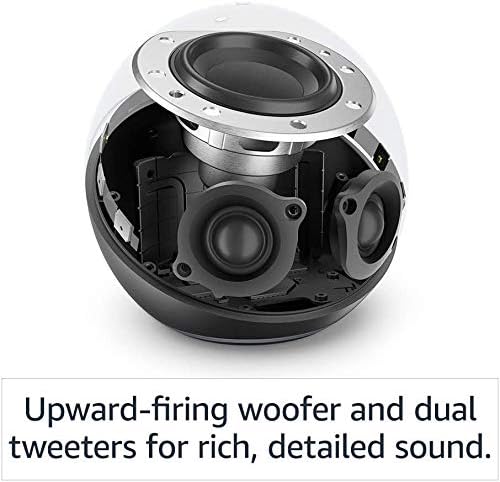
Internal components of the Echo (4th Generation), highlighting the woofer and tweeters for rich sound.
Garantia i Suport
Your Echo (4th Gen) comes with a Servei i garantia limitada de 1 anys. Use of Echo is subject to the terms provided by Amazon.
For further assistance, troubleshooting, or to learn more about Alexa features and accessibility, please visit the official Amazon device support weblloc:


