1. Introducció
Thank you for choosing the ATUMTEK ATMS034 Dual Monitor Arm. This product is designed to enhance your workspace ergonomics and free up valuable desk space by securely mounting two computer monitors. This manual provides detailed instructions for proper installation, operation, and maintenance to ensure safe and efficient use of your monitor arm.
The ATMS034 is compatible with most LCD monitors ranging from 13 to 27 inches, supporting VESA mounting patterns of 75x75mm and 100x100mm, with a weight capacity of up to 17.6 lbs (8 kg) per arm.
2. Informació de seguretat
- Llegiu atentament totes les instruccions abans de la instal·lació i l'ús.
- Assegureu-vos que la superfície de l'escriptori sigui prou resistent per suportar el pes combinat del braç del monitor i dels dos monitors.
- No supereu la capacitat màxima de pes de 17.6 lliures (8 kg) per braç.
- Ensure all screws are securely tightened during installation to prevent accidental detachment.
- Mantingueu els nens i les mascotes allunyats de la zona d'instal·lació.
- If you encounter any difficulties during installation, consult a qualified professional.
3. Contingut del paquet
Si us plau, comproveu que hi hagi tots els components abans de començar la instal·lació:
- Monitor Arm Assembly (Main Pole, Horizontal Arm with VESA plates)
- C-Clamp Base
- Components de la base del grommet
- VESA Screws (M4x12, M4x30, M5x12, M5x30)
- Volanderes i separadors
- Hex Keys (various sizes)
- Clips de cable
- Manual d'instruccions
4. Configuració i instal·lació
The ATUMTEK ATMS034 offers two mounting options: C-Clamp and Grommet. Choose the method best suited for your desk.
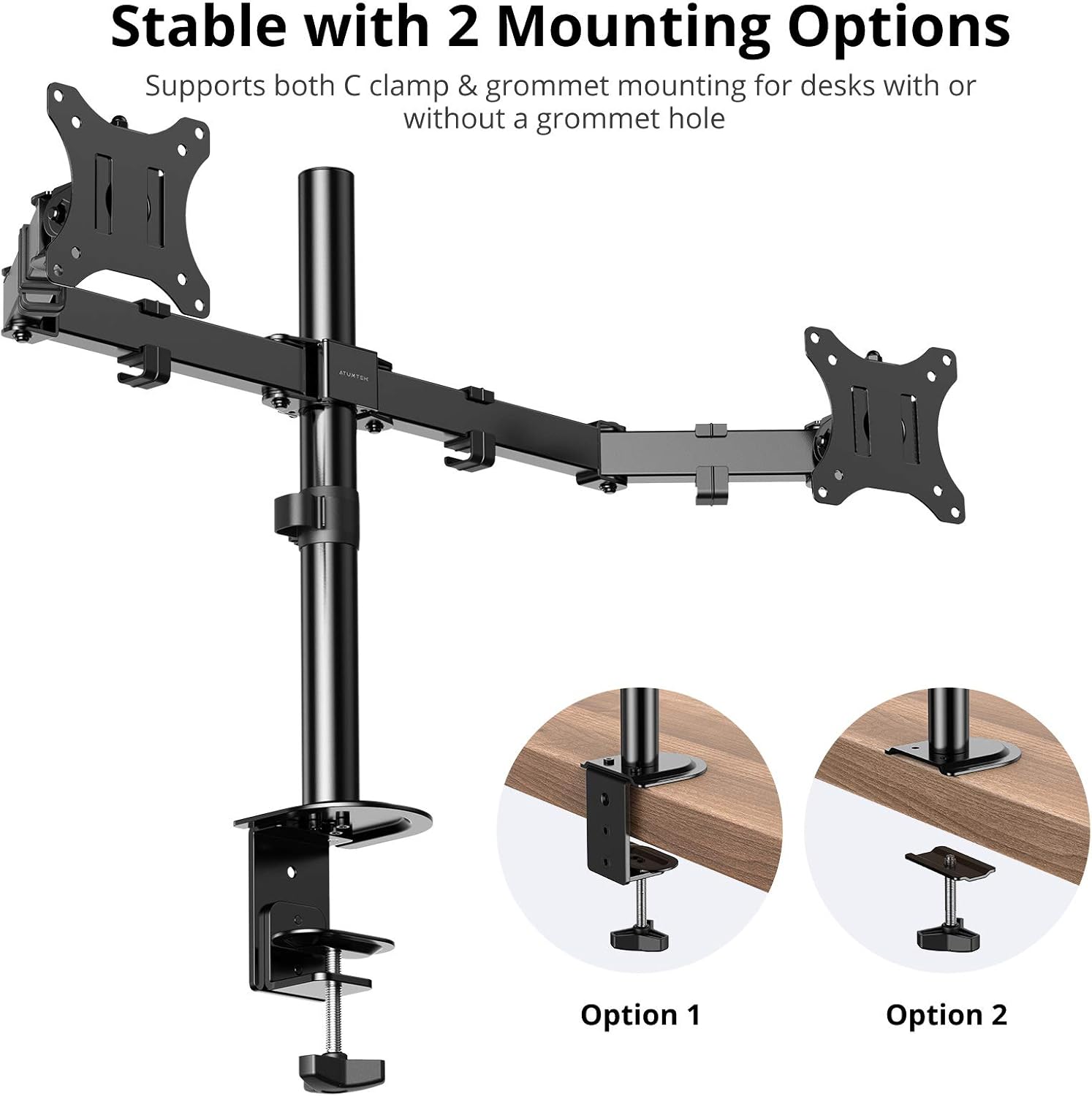
Image: The ATUMTEK ATMS034 Dual Monitor Arm illustrating both C-clamp and grommet mounting methods for desk attachment.
4.1. C-Clamp Instal·lació
- Enganxeu el C-clamp base fins a la part inferior del pal principal.
- Position the main pole assembly at the desired location on your desk.
- Apretar el C-clamp screw until the mount is securely fastened to the desk. Ensure the desk thickness does not exceed 2.4 inches (6 cm).
- Slide the horizontal arm onto the main pole and secure it at the desired height using the provided hex key.
4.2. Grommet Installation
- If your desk has a grommet hole, remove the grommet cover.
- Assemble the grommet base components according to the diagram in the included quick start guide.
- Insert the main pole through the grommet hole and secure the base from underneath the desk using the provided plate and screw.
- Slide the horizontal arm onto the main pole and secure it at the desired height using the provided hex key.
4.3. Connexió de monitors
- Carefully attach the VESA plates to the back of your monitors using the appropriate VESA screws (75x75mm or 100x100mm). Use washers and spacers if necessary to ensure a secure fit without overtightening.
- Slide the monitors (with VESA plates attached) onto the ends of the horizontal arms. Ensure they click into place or are secured with the locking mechanism.
- Adjust the tension of the arm joints using the hex keys to support the weight of your monitors. This will prevent sagging or unwanted movement.
5. Funcionament i ajustos
The ATUMTEK ATMS034 offers extensive adjustability for optimal viewcomoditat.

Image: The ATUMTEK ATMS034 Dual Monitor Arm demonstrating its full range of motion, including tilt, swivel, and 360-degree rotation.
5.1. Tilt, Swivel, and Rotation
- Inclinació: Monitors can be tilted from -35° to +90° to reduce glare and find the perfect vertical angle.
- Girar: Each monitor arm can swivel from -90° to +90°, allowing you to share your screen or adjust viewing angles horizontally.
- Rotació: Monitors can be rotated a full 360°, enabling quick switching between landscape and portrait orientations.

Image: Two monitors mounted on the ATUMTEK ATMS034, one in portrait mode (90° rotation) and the other in landscape mode (180° rotation), illustrating ergonomic viewflexibilitat.
5.2. Ajust d'alçada
The horizontal arm can be adjusted vertically along the main pole to achieve the desired monitor height. Loosen the securing screw on the main pole, slide the arm to the new position, and retighten the screw firmly.
6. Gestió de cables
The ATMS034 features integrated cable clips along the arms and main pole to keep your workspace tidy and organized.

Image: A monitor mounted on the ATUMTEK ATMS034, demonstrating how cables are neatly routed through the integrated cable clips on the arm, contributing to a clean desk setup.
Route your monitor power and video cables through these clips to prevent clutter and ensure a clean aesthetic. The clips are detachable for easy cable insertion and removal.
7. Especificacions
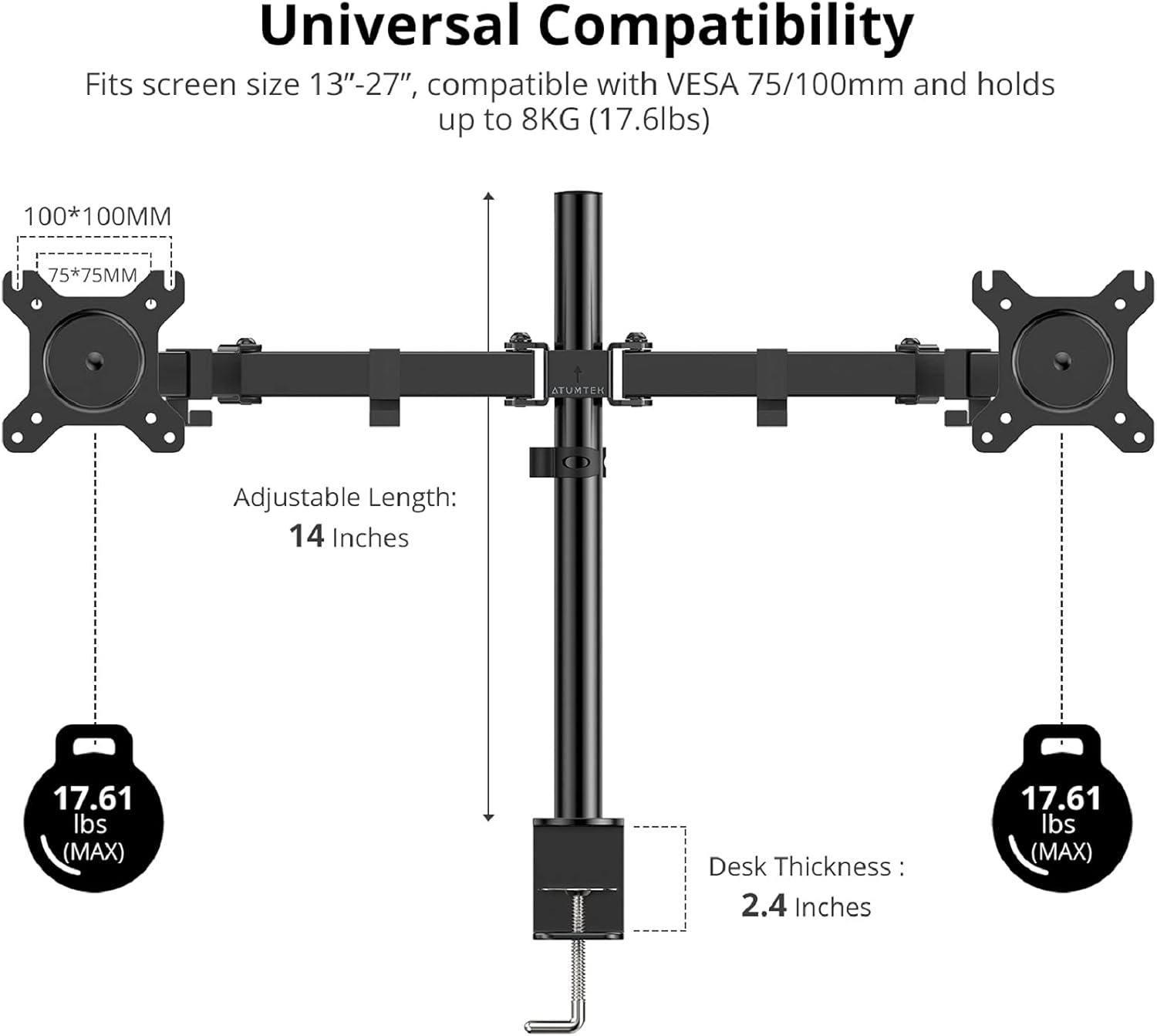
Image: A diagram illustrating the universal compatibility of the ATUMTEK ATMS034 Dual Monitor Arm, showing supported screen sizes (13-27 inches), VESA patterns (75x75mm, 100x100mm), weight capacity (17.6 lbs per arm), adjustable length (14 inches), and maximum desk thickness (2.4 inches).
| Característica | Especificació |
|---|---|
| Model | ATMS034 |
| Mida de monitor compatible | 13" - 27" (33-69 cm) |
| Capacitat de pes per braç | Fins a 17.6 lliures (8 kg) |
| Compatibilitat VESA | 75x75mm, 100x100mm |
| Interval d'inclinació | -35° a +90° |
| Gamma giratòria | -90° a +90° |
| Interval de rotació | 360° |
| Interval d'ajust d'altura | 14 inches (along main pole) |
| Gruix màxim de l'escriptori | 2.4 polzades (6 cm) |
| Opcions de muntatge | C-Clamp o Grommet |
| Material | Metall |
| Dimensions del producte | 54 x 23 x 8 cm (packaged) |
| Pes de l'article | 3.27 kg |
8. Solució De Problemes
- Monitors are sagging or not holding position: Ensure the tension screws on the arm joints are tightened sufficiently for the weight of your monitors. Use the provided hex keys to adjust.
- La muntura sembla inestable: Comproveu dues vegades que el C-clamp or grommet base is securely tightened to the desk. Ensure the desk surface is flat and sturdy.
- Difficulty attaching VESA plate: Verify that you are using the correct VESA screw size (M4 or M5) and length for your monitor. Use spacers if the monitor's back is uneven.
- Arm does not move smoothly: Check for any obstructions. If the arm feels too stiff or too loose, adjust the tension screws on the joints.
9. Cura i Manteniment
- Reviseu regularment tots els cargols i connexions per assegurar-vos que estiguin ben ajustats.
- Netegeu el braç del monitor amb un drap suau iamp drap. Eviteu productes de neteja o dissolvents abrasius.
- Do not apply excessive force when adjusting the arms; use the tension adjustments as needed.
10. Garantia i atenció al client
ATUMTEK stands behind the quality of its products. The ATMS034 Dual Monitor Arm comes with a 10 Years Product Quality Guarantee. If you encounter any issues or have questions regarding your product, please do not hesitate to contact our friendly customer service team. We are committed to providing excellent support and ensuring your satisfaction.
For assistance, please refer to the contact information provided on the ATUMTEK official weblloc web o la documentació de la compra.


