1. Introducció
Gràcies per la compraasing the Dolphin SP-17RBT 15 Inch Party Speaker. This portable PA system is designed to deliver powerful audio with its 15-inch woofer and horn tweeter, complemented by an engaging LED light display. Featuring WaveSync Technology for wireless stereo pairing, multiple input options (Bluetooth, AUX, USB), and included accessories like a microphone and tripod stand, the SP-17RBT is ideal for various audio applications. This manual provides essential information for safe operation, setup, and maintenance of your speaker.
2. Instruccions de seguretat
- Llegiu atentament totes les instruccions abans de fer funcionar l'altaveu.
- Mantingueu l'altaveu allunyat de l'aigua, la humitat i les temperatures extremes.
- Assegureu-vos que la ventilació sigui adequada; no obstruïu cap obertura de ventilació.
- Feu servir només l'adaptador de corrent subministrat pel fabricant.
- No intenteu obrir ni reparar l'altaveu vosaltres mateixos. Encarregueu tot el manteniment a personal qualificat.
- Netegeu l'altaveu només amb un drap sec i suau.
- Eviteu l'exposició prolongada a nivells de volum elevats per evitar danys auditius.
3. Contingut del paquet
Si us plau, comproveu que tots els elements que s'enumeren a continuació estiguin inclosos al vostre paquet:
- Dolphin SP-17RBT 15 Inch Party Speaker
- Suport del trípode
- Micròfon
- Control remot
- Adaptador de corrent de 9 V
4. Producte acabatview

Figura 4.1: Davant view of the Dolphin SP-17RBT speaker with its included tripod stand, showcasing the main woofer, horn tweeter, LED light strips, and control panel at the top. The speaker features a black finish with blue LED accents.
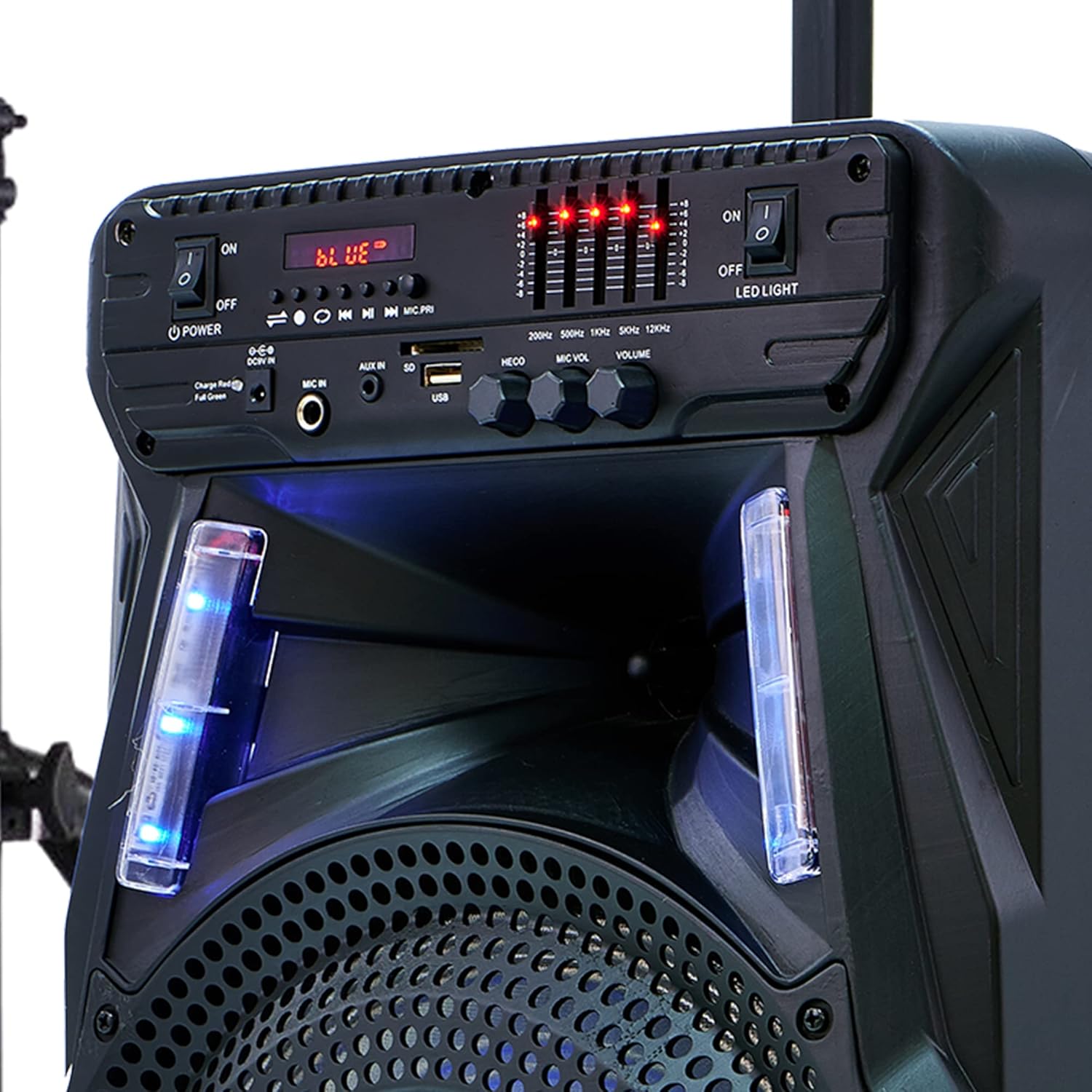
Figura 4.2: Close-up of the speaker's control panel, displaying buttons for power, LED light control, input selection (Bluetooth, AUX, USB), microphone inputs, volume controls, and an equalizer display. The display shows 'BLUE' indicating Bluetooth mode.

Figura 4.3: Detail of the speaker's base, highlighting the integrated wheels for portability and the sturdy feet for stable placement. The wheels facilitate easy transport of the unit.
Funcions del tauler de control:
- Interruptor d'alimentació: Activa o desactiva l'altaveu.
- LED LIGHT Switch: Toggles the LED light display ON or OFF.
- Botó MODE: Switches between input modes (Bluetooth, AUX, USB).
- Botó REPRODUCIR/PAUSA: Plays or pauses audio playback in Bluetooth/USB mode.
- PREVIOUS/NEXT Buttons: Skips to the previous or next track in Bluetooth/USB mode.
- MIC IN (6.35mm): Input jack for connecting the included microphone.
- ENTRADA AUXILIAR (3.5 mm): Input jack for connecting external audio devices via an AUX cable.
- Port USB: Per reproduir àudio files d'una unitat flash USB.
- Mando VOL MIC: Ajusta el volum del micròfon connectat.
- Botó ECO: Ajusta l'efecte d'eco del micròfon.
- Botó de VOLUM: Controls the master volume of the speaker.
- Equalizer Display: Visual representation of audio levels.
- Entrada DC 9V: Entrada d'alimentació per carregar l'altaveu.
5. Configuració
5.1 Desembalatge
Traieu amb cura tots els components de l'embalatge. Conserveu l'embalatge per a futurs transports o emmagatzematge.
5.2 Muntatge del suport d'altaveu
- Unfold the legs of the tripod stand until they are fully extended and stable.
- Ajusteu l'alçada del suport al nivell desitjat, assegurant-vos que el passador de bloqueig estigui ben enganxat.
- Carefully place the Dolphin SP-17RBT speaker onto the pole of the tripod stand. Ensure it is seated firmly and balanced.
Alternatively, the speaker can be placed directly on a flat, stable surface.
5.3 Engegada i càrrega
- Connect the supplied 9V power adapter to the DC 9V input port on the speaker and then to a power outlet.
- For first-time use, it is recommended to fully charge the speaker for approximately 3 hours. The charging indicator light will show the charging status.
- Flip the POWER switch to the 'ON' position to turn on the speaker.
A full charge provides over 5 hours of playback time.
6. Instruccions de funcionament
6.1 Encès/Apagat
To turn the speaker on, flip the POWER switch located on the control panel to the 'ON' position. To turn it off, flip the switch to the 'OFF' position.
6.2 Connexió Bluetooth
- Turn on the speaker. The default mode is typically Bluetooth, indicated by 'BLUE' on the display and a blinking Bluetooth icon. If not, press the MODE button until Bluetooth mode is selected.
- Activa el Bluetooth al teu dispositiu mòbil (telèfon intel·ligent, tauleta, etc.).
- Cerca available Bluetooth devices and select "Dolphin SP-17RBT" from the list.
- Once paired, the speaker will emit a confirmation sound, and the Bluetooth icon will stop blinking. You can now play audio from your device through the speaker.
6.3 Entrada AUX
- Connecteu un extrem d'un cable d'àudio de 3.5 mm (no inclòs) al port AUX IN de l'altaveu.
- Connecteu l'altre extrem del cable a la presa d'auriculars o a la sortida d'àudio del dispositiu extern.
- Press the MODE button on the speaker until 'AUX' is displayed.
- Reprodueix àudio des del teu dispositiu extern.
Reproducció USB 6.4
- Inseriu una unitat flash USB que contingui àudio MP3 files al port USB de l'altaveu.
- L'altaveu canviarà automàticament al mode USB i començarà a reproduir l'àudio files. If not, press the MODE button to select USB mode.
- Feu servir els botons REPRODUIR/PAUSA, ANTERIOR i SEGÜENT per controlar la reproducció.
6.5 Microphone Use
- Connect the included microphone to the MIC IN (6.35mm) port on the speaker.
- Ajusteu el botó MIC VOL per controlar el volum del micròfon.
- Turn the ECHO knob to add or reduce the echo effect for vocals.
6.6 WaveSync Technology (TWS Pairing)
WaveSync Technology allows you to wirelessly connect two Dolphin SP-17RBT speakers for a true stereo sound experience.
- Ensure both SP-17RBT speakers are powered on and in Bluetooth mode.
- On one of the speakers (this will be your primary speaker), press and hold the dedicated WaveSync button (if available, or a combination of buttons as per specific model instructions, typically the PLAY/PAUSE button for a few seconds).
- L'altaveu principal cercarà l'altaveu secundari. Un cop connectat, tots dos altaveus emetran un so de confirmació.
- Now, connect your mobile device to the primary speaker via Bluetooth as described in section 6.2. Audio will play simultaneously through both speakers in stereo.
6.7 LED Light Display
The speaker features an integrated LED light display that dances and changes color with the music. To turn the LED lights ON or OFF, use the dedicated LED LIGHT switch on the control panel.
6.8 Control remot
El comandament a distància inclòs proporciona un accés còmode a diverses funcions:
- Potència: Encén/apaga l'altaveu.
- Mode: Canvia les fonts d'entrada.
- Volum +/-: Ajusta el volum mestre.
- Reproduir/pausa: Controla la reproducció de suports.
- Anterior/Següent: Skips tracks.
- EQ: Cycles through equalizer presets (if available).
7. Manteniment
7.1 Neteja
Wipe the speaker's exterior with a soft, dry cloth. Do not use abrasive cleaners, waxes, or solvents, as they may damage the finish. Avoid spraying liquids directly onto the speaker.
7.2 Emmagatzematge
When not in use for extended periods, store the speaker in a cool, dry place, away from direct sunlight and extreme temperatures. If possible, use the original packaging for protection.
7.3 Cura de la bateria
To prolong the life of the built-in Lithium Ion battery, charge it regularly, even if the speaker is not in frequent use. Avoid completely draining the battery before recharging.
8. Solució De Problemes
- Sense energia:
Ensure the power adapter is securely connected to both the speaker and a working power outlet. Check if the POWER switch is in the 'ON' position. If operating on battery, ensure the battery is charged. - Sense so:
Check the master VOLUME knob on the speaker and the volume on your connected audio device. Ensure the correct input MODE (Bluetooth, AUX, USB) is selected. Verify all audio cables are securely connected. - Bluetooth no connectat:
Make sure the speaker is in Bluetooth mode and discoverable (Bluetooth icon blinking). Ensure Bluetooth is enabled on your device and it's within range (typically 10 meters). Try forgetting "Dolphin SP-17RBT" from your device's Bluetooth list and re-pairing. - So distorsionat:
Reduce the volume on both the speaker and the audio source. Check if the audio source itself is of good quality. Ensure no cables are damaged or loosely connected. - El micròfon no funciona:
Ensure the microphone is securely plugged into the MIC IN port. Adjust the MIC VOL knob. Check if the microphone itself is functional. - WaveSync Pairing Fails:
Ensure both speakers are SP-17RBT models and are in Bluetooth mode before attempting to pair them via WaveSync. Make sure they are close to each other.
9. Especificacions
- Model: SP-17RBT
- Potència de sortidatage: 2700 watts (pic)
- Mida del woofer: 15 polzades
- Tecnologia de connectivitat: AUX, Bluetooth, USB
- Font d'alimentació: Battery Powered (Built-in Lithium Ion)
- Durada de la bateria: Over 5 Hours (approx.)
- Temps de càrrega: 3 hores (aprox.)
- Pes de l'article: 18 lliures
- Color: Negre
- Tipus de muntatge: Muntanya de pols
- UPC: 850006218448
10. Garantia i Suport
For warranty information, technical support, or service inquiries, please refer to the official Dolphin weblloc web o contacteu directament amb el seu servei d'atenció al client. Conserveu el rebut de compra com a comprovant de compra per a qualsevol reclamació de garantia.


