Introducció
Welcome to your new AT&T EL52119 Cordless Answering System. This system is designed to provide reliable communication with advanced features for your home or office. It offers an unsurpassed range, ensuring clear calls throughout your property, and includes a digital answering system with up to 22 minutes of recording time to manage your calls efficiently. The large, backlit LCD screen enhances visibility, and the simulated full-duplex handset speakerphone allows for natural, two-way conversations. This manual will guide you through the setup, operation, and maintenance of your new cordless phone system.
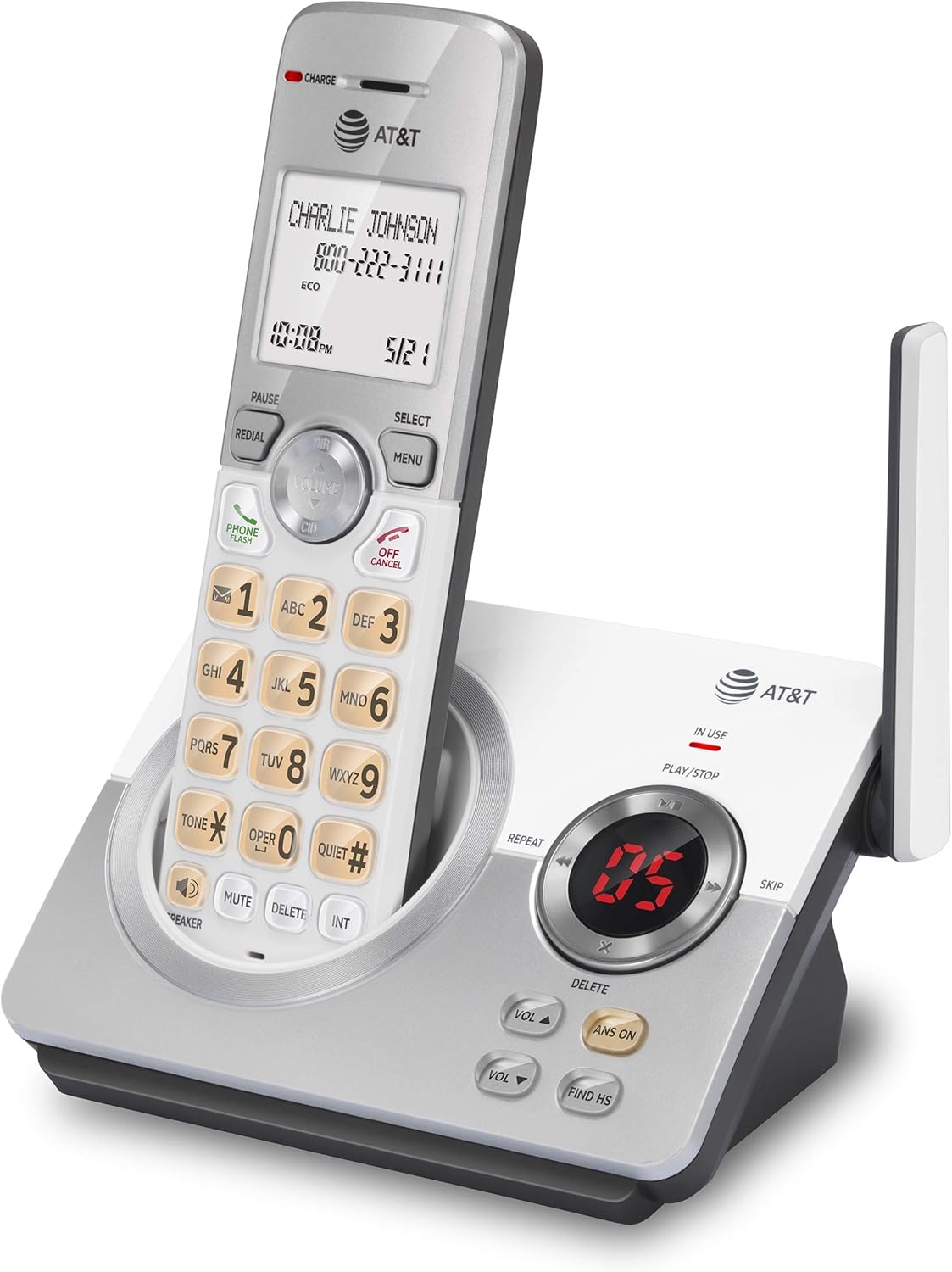
Figure 1: The AT&T EL52119 Cordless Answering System, showing the handset docked in its base unit.
Configuració
Contingut del paquet
Assegureu-vos que tots els elements estiguin presents al vostre paquet:
- Telèfon sense fil
- Base Unit with Digital Answering System
- Adaptador d'alimentació CA per a la unitat base
- Cordó de línia telefònica
- 2 AAA Rechargeable Batteries
- Manual d'usuari (aquest document)
Instal·lació
Instal·lació de la bateria: Open the battery compartment on the back of the handset. Insert the two AAA rechargeable batteries, observing the correct polarity (+ and -). Close the battery compartment cover securely.

Figure 2: The AT&T EL52119 handset and base, illustrating the components for setup.
Connecteu la unitat base:
- Plug the small end of the AC power adapter into the power jack on the back of the base unit.
- Connecteu l'extrem gran de l'adaptador de corrent altern a una presa de corrent estàndard.
- Plug one end of the telephone line cord into the TEL LINE jack on the back of the base unit.
- Connecteu l'altre extrem del cable de la línia telefònica a una presa de paret.
Carregar el telèfon: Place the handset in the base unit's charging cradle. The CHARGE indicator light on the handset should illuminate, indicating that the handset is charging. Allow the handset to charge for at least 16 hours before initial use to ensure optimal battery performance.
Initial Setup (Date and Time)
After the handset is charged, you will need to set the date and time. This is crucial for the Caller ID and answering system features to function correctly.
- Premeu MENÚ/SELECT al telèfon.
- Desplaça't fins a DEFINIR DATA/HORA i premeu MENÚ/SELECT.
- Enter the month, day, and year using the dial pad. Press MENÚ/SELECT after each entry.
- Enter the hour and minute. Press MENÚ/SELECT.
- Seleccioneu AM or PM i premeu MENÚ/SELECT.
- A confirmation tone will sound, indicating the date and time are set.
Funcionament del sistema telefònic

Figure 3: Key features of the AT&T EL52119, including digital answering system, speakerphone, call block, and extra large display.
Fer i rebre trucades
- Per fer una trucada: Premeu TELÈFON / FLASH or any dial pad key, then dial the number.
- Per respondre una trucada: Quan soni el telèfon, premeu TELÈFON / FLASH or any dial pad key.
- Per finalitzar una trucada: Premeu OFF/CANCEL·LAR or place the handset back in the base unit.
- Altaveu: Durant una trucada, premeu PONENT to activate the simulated full-duplex speakerphone. Press PONENT again to return to handset mode.
Sistema de resposta digital
Your EL52119 system includes a digital answering system with up to 22 minutes of recording time for incoming messages, announcements, and memos.
- Activació/desactivació: Premeu ANS ON on the base unit to turn the answering system on or off. The indicator light will show its status.
- Reproducció de missatges: Premeu PLAY/STOP on the base unit to listen to new messages. The message counter will display the number of messages.
- Ometent missatges: Durant la reproducció del missatge, premeu SALTAR per passar al següent missatge.
- Missatges repetits: Durant la reproducció del missatge, premeu REPETIR to repeat the current message. Press twice to go to the previous message.
- Eliminació de missatges: Durant la reproducció del missatge, premeu ELIMINAR on the base unit to delete the current message.
- Enregistrament d'un anunci sortint: Refer to the detailed instructions in the full user manual for recording a personalized outgoing message.
Identificador de trucada
The system stores up to 50 Caller ID entries. The large, backlit LCD screen displays the caller's name and number, along with the date and time of the call.
- Reviewing Caller ID Log: Premeu CID on the handset to scroll through the Caller ID log.
- Calling Back from Caller ID: Quan viewing a Caller ID entry, press TELÈFON / FLASH per marcar el número.
Bloqueig de trucades
The call block feature allows you to block unwanted calls. Consult the full user manual for detailed instructions on how to add numbers to the block list.
Manteniment
- Neteja: Clean the phone and base unit with a soft, slightly damp drap. No utilitzeu esprais de neteja ni productes químics agressius.
- Cura de la bateria: To maintain optimal battery life, fully charge the handset for 16 hours before first use. If the phone will not be used for an extended period, remove the batteries.
- Condicions ambientals: Avoid placing the phone in direct sunlight, near heating appliances, or in areas with excessive moisture or dust.
Resolució de problemes
| Problema | Solució |
|---|---|
| Sense to de marcatge. |
|
| El telèfon no es carrega. |
|
| Mala qualitat de so o estàtica. |
|
| El contestador automàtic no enregistra els missatges. |
|
Especificacions
- Model: EL52119
- Tecnologia: Tecnologia digital DECT 6.0
- Sistema de contestador: Digital, up to 22 minutes recording time
- Memòria d'identificació de trucades: Fins a 50 entrades
- Pantalla de l'auricular: Large, backlit LCD
- Altaveu: Simulated Full-Duplex Handset Speakerphone
- Bateries: 2 piles recarregables AAA (incloses)
- Dimensions (unitat base): Aproximadament 7.01 x 4.8 x 3.78 polzades (L x W x H)
- Pes (article): Aproximadament 1.12 lliures
- Color: Plata
- Material: Plàstic
Garantia i Suport
For detailed warranty information, please refer to the warranty card included with your product or visit the official AT&T weblloc.
If you require technical assistance or have questions about your AT&T EL52119 Cordless Answering System, please contact AT&T customer support. Support contact details are typically available on the AT&T weblloc o a l'embalatge del producte.
You can also visit the AT&T Store for more information: AT&T Store on Amazon.


